Hello! Welcome to your first lesson. We're kicking things off by building a solid foundation in the Java Collections Framework (JCF). Your goal is to excel in technical interviews and competitive programming, and mastering these fundamental data structures is the first crucial step. They are the essential tools you'll use to build more complex algorithms and solve a wide range of problems efficiently.
In this lesson, we'll explore the core collection types in Java: List, Set, and Map. You'll learn about their most common implementations, such as ArrayList, LinkedList, HashSet, TreeSet, HashMap, and TreeMap, and most importantly, understand the performance trade-offs between them so you can choose the right tool for the job.
The Java Collections Framework: An Overview
The Java Collections Framework (JCF) is a set of pre-built, highly optimized classes and interfaces that implement common data structures. Using the JCF saves you from having to implement these structures from scratch, allowing you to focus on solving the actual problem at hand. This is a key practice for both interviews and competitive programming, where speed and reliability are paramount.
The framework is built around a hierarchy of interfaces. Let's look at a diagram to visualize the structure.
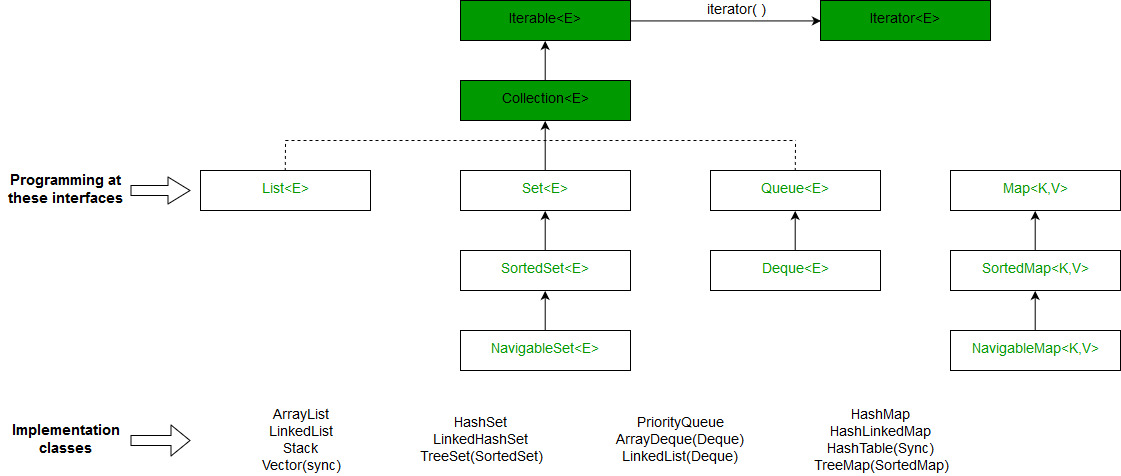
As you can see, the main interfaces are:
Collection: The root of the hierarchy, representing a group of objects.List: An ordered collection (a sequence) that allows duplicate elements.Set: A collection that contains no duplicate elements.
Map: An object that maps keys to values. It's separate from theCollectioninterface but is a core part of the framework.
Now, let's dive into each of these and their popular implementations.
The List Interface: Ordered Collections
A List is an ordered collection, meaning it maintains the insertion order of elements. It's the Java equivalent of Python's list. You can access elements by their integer index and duplicates are allowed. The two most common implementations are ArrayList and LinkedList.
ArrayList
An ArrayList is backed by a dynamic array. This means it's essentially a resizable array.
- Key Strength: Fast random access. Retrieving an element by its index using the
get(index)method is a constant time operation, O(1), because the memory location can be calculated directly. - Weakness: Slow insertion or deletion in the middle. Adding or removing an element from anywhere other than the end requires shifting all subsequent elements, resulting in a linear time complexity of O(n). Adding to the end is generally O(1), but can be O(n) if the internal array needs to be resized.
To see ArrayList in action, let's watch a segment from a comprehensive video on the JCF.
Complete Java Collections Framework in 1 Video - Java Collections Framework
Watch this section from the 'Complete Java Collections Framework' video by Anuj Kumar Sharma. It provides a practical demonstration of ArrayList, its internal workings, and its most common methods like add, get, remove, set, and how to iterate over it.
Watch from 04:45 to 18:52. Pay attention to how the internal array resizes and the time complexity of different operations like adding to the middle vs. the end.
LinkedList
A LinkedList is backed by a doubly linked list. Each element (or "node") stores the actual data plus a reference (or "pointer") to the previous and next nodes in the sequence.
- Key Strength: Fast insertion and deletion. Once you're at the desired position, adding or removing an element is an O(1) operation because it only involves updating a couple of references.
- Weakness: Slow random access. To get the element at index
i, you have to traverse the list from the beginning (or end), following the referencesitimes. This makes theget(index)operation O(n).
ArrayList vs. LinkedList: The Trade-Off
The choice between ArrayList and LinkedList is a classic interview question and depends entirely on your use case.
LinkedList vs ArrayList in Java Tutorial - Which Should You Use?
To solidify your understanding of the performance differences, this video 'LinkedList vs ArrayList in Java' by Coding with John offers excellent visualizations of their internal structures and how they handle common operations.
Watch from 03:04 to 11:25. Focus on how each data structure's implementation leads to different performance characteristics for get, add, and remove operations.
Here is a summary of the trade-offs:
| Operation | ArrayList |
LinkedList |
When to Use |
|---|---|---|---|
Access by index (get) |
O(1) | O(n) | ArrayList is much better if you need to frequently access elements by index. |
| Add/Remove at end | O(1) amortized | O(1) | Both are efficient. |
| Add/Remove at middle | O(n) | O(1)* | LinkedList is better for frequent insertions/deletions in the middle. |
*Note: The insertion/deletion operation for LinkedList is O(1) only after you've traversed to the position, which itself takes O(n) time. So, a full add/remove at an arbitrary index is still O(n), but it can be faster than ArrayList's O(n) which involves data shifting.
General Guideline: If you're unsure, start with ArrayList. It's often the better choice for general-purpose use, especially in read-heavy scenarios.
The Set Interface: Unique Elements
A Set is a collection that cannot contain duplicate elements. It models the mathematical set abstraction. If you try to add an element that already exists, the operation is simply ignored.
HashSet
A HashSet is the most commonly used implementation of Set. It is backed by a HashMap.
- Key Strength: Very fast performance.
add,remove, andcontainsoperations all run in average constant time, O(1). - Key Characteristic: It makes no guarantees about the iteration order. The elements may appear in a seemingly random order.
- Important Note: For custom objects,
HashSetrelies on thehashCode()andequals()methods to determine uniqueness. You must correctly override these methods in your custom classes to make them work as expected in aHashSet.
TreeSet
A TreeSet is another implementation of Set that stores elements in a sorted order. It is backed by a self-balancing binary search tree (a Red-Black Tree).
- Key Strength: Maintained sort order. Elements are always sorted, either by their "natural ordering" (e.g., alphabetical for strings, numerical for numbers) or by a custom
Comparatoryou provide. - Weakness: Slower performance than
HashSet.add,remove, andcontainsoperations take logarithmic time, O(log n).
Choosing the Right Collection in Java
For a concise comparison, please read the HashSet vs TreeSet section from the article 'Choosing the Right Collection in Java' on Medium.
Read the section titled 'HashSet vs TreeSet'. This will give you a clear summary of their structure, performance, and use cases.
Trade-off Summary: Use HashSet when you need fast lookups for unique items and don't care about order. Use TreeSet when you need to keep unique items in a sorted order.
Test your understanding!
You are building a system to track which unique users have visited a website today. Speed is critical. Which Set implementation should you use and why?
Show answer
You should use HashSet. The primary requirement is to store unique user IDs and check for their existence quickly (e.g., when a user visits, check if they are already in the set). HashSet provides O(1) average time complexity for these operations. The order in which users visited is not required, so the unordered nature of HashSet is not a drawback.
The Map Interface: Key-Value Pairs
A Map stores data in key-value pairs. Each key must be unique. It's the Java equivalent of a Python dictionary. Maps are incredibly useful for lookups, such as finding a user's information by their user ID.
HashMap
HashMap is the most popular Map implementation. Like HashSet, it uses a hash table.
- Key Strength: Excellent performance.
put(add/update),get(retrieve), andremoveoperations take average constant time, O(1). - Key Characteristic: No guaranteed order for the keys. It allows one
nullkey and multiplenullvalues.
TreeMap
A TreeMap stores key-value pairs in an order sorted by the keys. It's backed by a Red-Black Tree.
- Key Strength: Keys are always sorted. This is useful for retrieving entries in a specific order, like a dictionary or a phone book.
- Weakness: Slower than
HashMap.put,get, andremoveoperations take logarithmic time, O(log n).
For a detailed walkthrough of maps, including how to iterate over them and their core methods, let's return to our main video resource.
Complete Java Collections Framework in 1 Video - Java Collections Framework
This final video segment covers HashMap and TreeMap. It will show you how to work with key-value pairs and highlight their differences.
Watch from 54:03 to 01:02:13. Focus on the put, get, and iteration methods, and note how TreeMap automatically sorts the entries by key.
Trade-off Summary: Use HashMap for fast, general-purpose key-value storage where order is not important. Use TreeMap when you need to maintain your keys in a sorted order.
Test your understanding!
You need to count the frequency of each word in a large text file. Which Map implementation is most suitable for this task and why?
Show answer
HashMap is the best choice. The task involves iterating through the words and updating their counts. HashMap provides O(1) average time for get and put operations, which is ideal for this high-frequency lookup and update pattern. The order of the words doesn't matter for the final frequency count, so the faster performance of HashMap is preferable over the ordered TreeMap.
Conclusion
Congratulations on completing your first lesson! You've taken a big step in rebuilding your data structures foundation in Java.
Here are the key takeaways:
List(Ordered, duplicates allowed):ArrayList: Use for fast random access (read-heavy tasks).LinkedList: Use for frequent insertions and deletions in the middle of the list.
Set(Unique elements):HashSet: Use for fast lookups when order doesn't matter.TreeSet: Use when you need elements to be automatically sorted.
Map(Unique keys, key-value pairs):HashMap: Use for fast key-value lookups when order doesn't matter.TreeMap: Use when you need keys to be automatically sorted.
Understanding these trade-offs is fundamental for writing efficient code and is a common theme in technical interviews.
Preview of the next lesson: In our next session, we will dive deeper into sorting. You'll learn how to implement the Comparable interface and create custom Comparators to define your own sorting logic for objects. This will give you full control over how collections like TreeSet, TreeMap, and sorted lists behave.