Welcome back! In our last session, you mastered the use of template variables, which allow us to create dynamic and reusable prompts. We built a simple chain by piping a PromptTemplate into a chat model and saw that the model's response was an AIMessage object, from which we had to manually access the .content property.
Today, we'll address that final step. You'll learn how to use output parsers, the third key component of a basic LangChain sequence. These components are responsible for taking the raw output from an LLM and formatting it into a more useful and predictable structure. We will focus on the most fundamental of these, the StringOutputParser, to automatically transform the AIMessage into a clean, simple string.
The Problem with Raw LLM Output
When you interact with a LangChain chat model, it doesn't just return the text of its response. It returns a structured object, typically an AIMessage, which contains the content along with other metadata.
While this metadata can be useful, in many scenarios you only care about the text itself. Manually extracting the .content property from the response object works, but it adds an extra step to your code and makes chaining components together more difficult. What if the next component in your sequence expects a simple string, not a complex object?
This is the problem output parsers are designed to solve. They act as a formatting layer at the end of your chain.
The article "Langchain output parsers in Javascript" introduces this concept clearly. Let's start by reading the first part to understand the role of parsers.
Langchain output parsers in Javascript
Please read the introduction and the first part of the section titled "The StringOutputParser in Langchain.js".
Start by reading the introduction, which explains what output parsers are for. Then, continue to the section on StringOutputParser. Read the text and code describing the parser and examine the example of an AIMessage object that is produced without a parser.
The AIMessage object you just read about looks something like this in a console log:
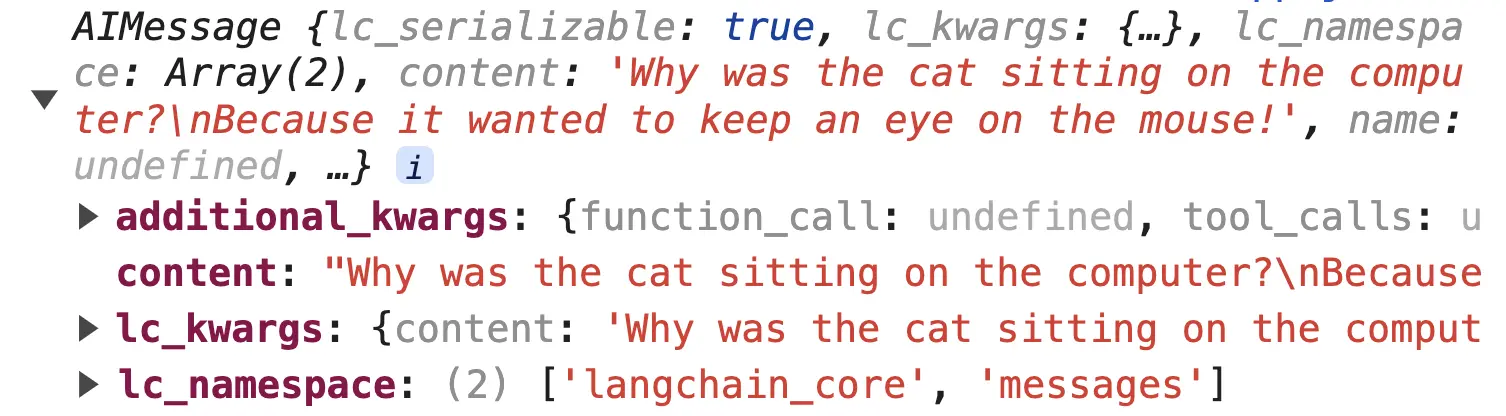
Our goal is to get just the string value from the content property automatically.
Introducing StringOutputParser
As its name suggests, StringOutputParser is a simple parser that extracts the string content from an LLM's message output. It's one of many parsers LangChain provides, each tailored for a different output format.

The video below provides an excellent visual demonstration of why output parsers are needed and how to integrate a StringOutputParser into a chain.
LangChain Tutorial (JS) #3: Output Parsers
Watch the beginning of this "LangChain Tutorial" video by Leon van Zyl, where he explains and demonstrates the StringOutputParser.
Pay close attention to the section from the introduction. The author explains why parsers are important, imports the StringOutputParser, and adds it to the chain using the .pipe() syntax. Notice how the final output changes from an object to a simple string.
As you saw in the video, the implementation is straightforward.
- You import
StringOutputParserfrom@langchain/core/output_parsers. - You create a new instance of it:
const parser = new StringOutputParser();. - You add it to the very end of your chain using
.pipe(parser).
The data flows through the chain like an assembly line:Prompt -> Model -> Parser
The output of the model (AIMessage) becomes the input for the parser, and the output of the parser (a string) becomes the final result of the entire chain.
Hands-On: Refining the Standalone Question Generator
Now it's time to apply this to the code from our previous lesson. We'll add a StringOutputParser to the "standalone question generator" chain.
Open your langchain-project and replace the content of src/index.ts with the code below. It's almost identical to last lesson's exercise, but with a few comments guiding you on where to add the parser.
// src/index.ts

import dotenv from 'dotenv';
import { ChatOpenAI } from "@langchain/openai";
import { PromptTemplate } from "@langchain/core/prompts";
// 1. Import StringOutputParser
import { StringOutputParser } from "@langchain/core/output_parsers";

dotenv.config();

const model = new ChatOpenAI({
    modelName: "gpt-4o-mini",
    temperature: 0,
});

const standaloneQuestionTemplate = `Given a question, convert it to a standalone question.
question: I'm looking into learning about web development and I saw this thing called Scrimba. I'm wondering what are the main technical requirements for running the Scrimba platform? I only have a pretty old laptop and I'm not sure if it's powerful enough.
standalone question: What are the technical requirements for running Scrimba?
question: {question}
standalone question:`;

const standaloneQuestionPrompt = PromptTemplate.fromTemplate(standaloneQuestionTemplate);

// --- YOUR CODE GOES BELOW ---

async function main() {
    // 2. Instantiate the parser
    const parser = new StringOutputParser();

    // 3. Add the parser to the end of the chain
    const chain = standaloneQuestionPrompt.pipe(model).pipe(parser);

    const longWindedQuestion = "I'm working on a project with TypeScript and I keep hearing about Zod for schema validation. I'm curious, what is Zod and why would I use it with TypeScript?";

    console.log("Original Question:", longWindedQuestion);

    const response = await chain.invoke({ question: longWindedQuestion });

    // 4. Log the response directly. It should now be a string!
    console.log("Standalone Question:", response);
    console.log("Type of response:", typeof response);
}

main();
Your task is to modify the code to incorporate the StringOutputParser.
- Import
StringOutputParserat the top of the file. - Instantiate the parser inside the
mainfunction. - Pipe the parser to the end of your existing chain definition.
- Update the final
console.logto print theresponsevariable directly. Since the parser returns a string, you no longer needresponse.content. I've also added atypeofcheck so you can confirm the output type.
Run npm start to see the result. The output should now be a clean string, and the type check should confirm it.
Conclusion
In this lesson, you've added the final piece to our basic LangChain structure. You now understand how to take the model's raw output and transform it into a predictable format using an output parser.
Key Takeaways:
- Chat models in LangChain produce
AIMessageobjects, which contain the response content plus metadata. - Output Parsers are components that format the model's response into a desired structure.
- The
StringOutputParseris the simplest parser, designed to extract just the string content from anAIMessage. - Parsers are added to the end of a sequence using the
.pipe()method, completing theprompt -> model -> parserflow.
We have now assembled the three fundamental building blocks of many LLM applications. In our next lesson, we will formalize this structure by learning how to properly combine a prompt template, model, and output parser into a single, reusable chain object. This will set the stage for building more complex and modular applications with the LangChain Expression Language (LCEL).