Hello again. In our last session, we took a significant step by creating our first prompt template using ChatPromptTemplate. We saw how to define a structure with placeholders like {input_language} to build a flexible translator. This moved us from static, hardcoded prompts to dynamic ones.
This lesson will solidify your understanding of how these dynamic inputs, or template variables, function within LangChain. We'll explore a more direct way to create simple templates and look under the hood to see how LangChain manages these variables. Mastering this concept is essential, as it forms the foundation for nearly every application that needs to interact with a user or process changing data.
The Anatomy of a Dynamic Prompt
At its core, a prompt template separates the fixed instructions for the model from the variable data that changes with each request. This is a powerful design pattern that keeps your code clean and your prompts reusable.
The diagram below perfectly illustrates this separation. A user provides some input (in this case, a "Topic"), which is then packaged as an input_variable and passed to the Prompt Template. The template then merges this variable with its predefined instructions to generate a complete prompt for the LLM.
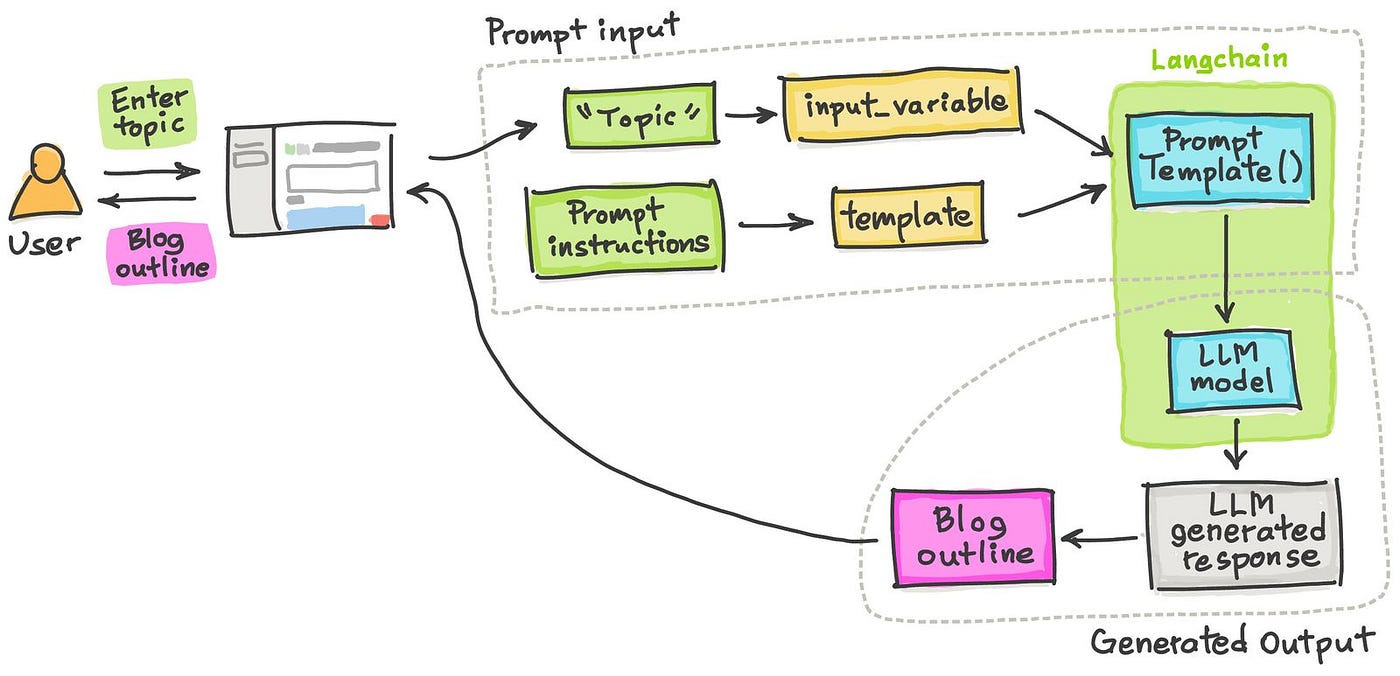
To formalize this idea, let's turn to a short reading that defines prompt templates and their role in structuring input for LLMs.
A Beginner's Guide to Getting Started with Prompt ...
This article provides an excellent, concise explanation of what prompt templates are and why they are so fundamental.
Please read the introductory sections, starting from the beginning down to the start of the "Types of Prompt Templates" section. Pay close attention to how the {topic} placeholder is used as a fill-in-the-blank mechanism.
From Chat Templates to String Templates
In the last lesson, we used ChatPromptTemplate.fromMessages(). This is ideal for chat models because it lets us construct a sequence of messages with different roles (system, user, ai). However, sometimes our needs are simpler. If you only need to create a single block of text as the prompt, LangChain offers a more direct approach: PromptTemplate.
PromptTemplate is typically used with the .fromTemplate() static method, which takes a single template string as its argument. This is perfect for tasks like summarization, question-answering, or any instruction that can be contained in one message.
The following video provides an excellent walkthrough of creating a PromptTemplate, highlighting how LangChain identifies the input variables.
Learn LangChain.js - Build LLM apps with JavaScript and OpenAI
This segment from a freeCodeCamp.org tutorial clearly demonstrates how to create a simple prompt template and what happens behind the scenes.
Watch the section from the beginning. The instructor creates a template for generating a tweet and then inspects the resulting prompt object. Notice the inputVariables property that LangChain automatically creates. This is the key mechanism we're focusing on.
As you saw in the video, when you create a prompt from a template string like "Generate a tweet for... {product_description}", LangChain parses this string, finds the {product_description} placeholder, and adds "product_description" to an internal inputVariables list. This is how the chain knows to expect an object with a product_description key when you later call .invoke(). If you fail to provide it, the chain will throw an error, which is a helpful way to ensure your inputs are always correct.
Hands-On: The Standalone Question Generator
Now it's your turn to put this into practice. We'll build a small utility that takes a potentially long-winded user question and refines it into a concise, "standalone" question that is easier for an LLM to process directly. This is a common task in more advanced chains, such as those that use chat history.
Open your langchain-project and replace the content of src/index.ts with the following boilerplate code. It sets up the necessary imports and initializes the model for you.
// src/index.ts

import dotenv from 'dotenv';
import { ChatOpenAI } from "@langchain/openai";
import { PromptTemplate } from "@langchain/core/prompts";

dotenv.config();

// Initialize the model
const model = new ChatOpenAI({
    modelName: "gpt-4o-mini",
    temperature: 0, // We want deterministic output
});

// --- YOUR CODE GOES BELOW ---

async function main() {
    // 1. Define the template string. It should instruct the model to
    //    convert a given 'question' into a standalone question.
    //    Use the placeholder {question}.
    const standaloneQuestionTemplate = ``; // Add your template string here

    // 2. Create the prompt template instance from the string.
    const standaloneQuestionPrompt = undefined; // Use PromptTemplate.fromTemplate()

    // 3. Create the chain by piping the prompt to the model.
    const chain = undefined; // Use .pipe()

    // 4. Invoke the chain with a long-winded question.
    const longWindedQuestion = "I'm looking into learning about web development and I saw this thing called Scrimba. I'm wondering what are the main technical requirements for running the Scrimba platform? I only have a pretty old laptop and I'm not sure if it's powerful enough.";

    console.log("Original Question:", longWindedQuestion);

    const response = await chain.invoke({ question: longWindedQuestion });

    console.log("Standalone Question:", response.content);
}

main();
Your task is to fill in the missing parts of the main function. Follow the comments to complete these steps:
- Write a template string that instructs the model to generate a standalone question from a user's
{question}. - Use
PromptTemplate.fromTemplate()to create the prompt object. - Pipe the prompt and model together to create the
chain. - The final
invokecall is already written for you. Run the code withnpm startand see if the model successfully distills the long question into a concise one.
Take your time to work through this. If you get stuck, you can refer back to the video segment.
Once you have a working solution, you can compare it with the solution presented in the next part of the video.
Learn LangChain.js - Build LLM apps with JavaScript and OpenAI
This video segment provides the solution to the challenge you just completed.
Watch the solution walkthrough from the beginning to see one way of implementing the standalone question generator.
Best Practices for Template Variables
As you build more complex applications, how you handle your template variables becomes increasingly important. Here are two key best practices to keep in mind:
- Use Clear and Descriptive Names: Name your variables semantically.
{user_question}is much clearer than{input}or{q}. This makes your prompts easier to read, debug, and maintain, especially when collaborating with others. - Ensure Clean Input Data: The data you pass into your variables should be what you expect. If you're passing user-generated content, you might need to clean it first (e.g., trim whitespace). Garbage in, garbage out applies just as much to LLMs as it does to traditional programs.
The following article offers a quick summary of these points.
A Beginner's Guide to Getting Started with Prompt ...
This section gives actionable advice on using template variables effectively.
Focus on point #2, Handle Variables Thoughtfully. It reinforces the importance of using descriptive names and ensuring your input data is clean.
Conclusion
In this lesson, you've deepened your understanding of how to make your prompts dynamic using template variables. You've now seen two ways to create templates and practiced building and invoking a chain that relies on a variable input.
Key Takeaways:
- Template variables like
{question}are placeholders that LangChain uses to inject dynamic data into your prompts. - For simple, single-string prompts,
PromptTemplate.fromTemplate()is a concise and effective tool. - LangChain inspects your template to find all variables, which it stores in an
inputVariablesproperty. It will expect these variables to be provided when the chain is invoked. - Using clear variable names and providing clean data are crucial for building robust and maintainable applications.
We've now covered the first two parts of a basic LLM chain: the prompt template (the "recipe") and the model (the "engine"). However, the output we're getting is still an AIMessage object. In our next lesson, we will introduce the third and final component: Output Parsers. These powerful tools allow you to take the raw output from the model and automatically format it into a more useful structure, such as a simple string, a JSON object, or even a list of items.