Hello! Welcome to the first lesson of your personalized course on Python and Machine Learning.
Given your goal of becoming proficient in machine learning, we're starting by strengthening your Python skills. The features we'll cover in these initial modules are the building blocks for writing clean, efficient, and professional-level code, which is essential for handling the large datasets you'll encounter in machine learning.
This first lesson focuses on two powerful Python features: list comprehensions and generator expressions. Mastering these will allow you to process data and create sequences in a way that is not only more concise but also significantly more efficient.
From For-Loops to Comprehensions
You're likely familiar with building a list using a for loop and the .append() method. For example, to create a list of the first 10 square numbers, you would write:
squares = []
for i in range(10):
    squares.append(i * i)
print(squares)
# Output: [0, 1, 4, 9, 16, 25, 36, 49, 64, 81]
This works perfectly fine, but Python offers a more "Pythonic" and compact way to achieve the same result: a list comprehension.
Part 1: List Comprehensions
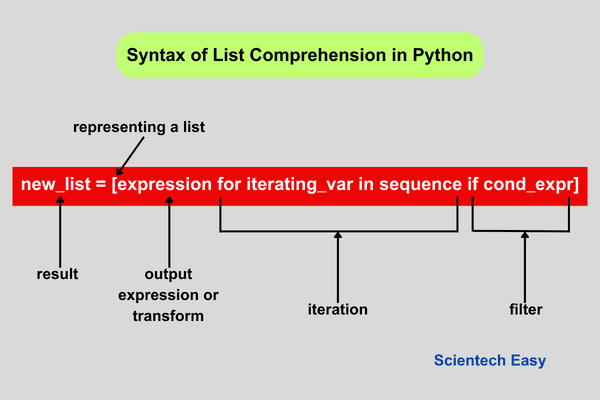
A list comprehension provides a concise way to create lists. The same code above can be rewritten in a single, readable line:
squares = [i * i for i in range(10)]
print(squares)
# Output: [0, 1, 4, 9, 16, 25, 36, 49, 64, 81]
The basic structure can be broken down into a few key parts, as shown in the image below.
Let's dive into the practical application and syntax with a video.
10 Python Comprehensions You SHOULD Be Using
This first video from the channel Tech With Tim will introduce the basic syntax of list comprehensions and show you how they directly translate from a standard for loop.
Please watch from the beginning until 02:05. Pay attention to how the expression on the left-hand side of the for loop determines what gets added to the new list.
Adding Conditions for Filtering
One of the most powerful features of list comprehensions is the ability to filter elements from the original iterable. You can add an if statement at the end of the comprehension to include only the elements that satisfy a certain condition.
For instance, if we wanted to get the squares of only the even numbers from 0 to 9:
# The traditional for-loop way
squares_of_evens = []
for i in range(10):
    if i % 2 == 0:
        squares_of_evens.append(i * i)

# The list comprehension way
squares_of_evens = [i * i for i in range(10) if i % 2 == 0]
print(squares_of_evens)
# Output: [0, 4, 16, 36, 64]
The if condition is evaluated for each item, and the expression is only computed for items where the condition is True.
This next segment of the video demonstrates this filtering capability, including how to chain multiple if conditions.
10 Python Comprehensions You SHOULD Be Using
Let's continue with the same video to see how to add conditional logic to your comprehensions.
Watch from 02:05 to 04:25 to see how a simple if condition works, and then from 05:20 to 07:40 to see how you can use multiple if statements for more complex filtering.
Test your understanding!
Given a list of words, words = ["apple", "banana", "cherry", "date", "elderberry"], use a list comprehension to create a new list containing only the words that have more than 5 letters.
Show answer
words = ["apple", "banana", "cherry", "date", "elderberry"]
long_words = [word for word in words if len(word) > 5]
print(long_words)
# Output: ['banana', 'cherry', 'elderberry']
Conditional Transformations with if-else
What if you want to apply a different transformation based on a condition, rather than just filtering? For example, categorizing numbers as "even" or "odd". For this, the if-else syntax is different and is placed before the for loop.
Syntax: [value_if_true if condition else value_if_false for item in iterable]
number_types = ["even" if i % 2 == 0 else "odd" for i in range(10)]
print(number_types)
# Output: ['even', 'odd', 'even', 'odd', 'even', 'odd', 'even', 'odd', 'even', 'odd']
Notice the structural difference:
- Filtering (
ifonly): Theifcomes after theforloop. - Transformation (
if-else): Theif-elseexpression comes before theforloop.
This next video clip clearly explains this important distinction.
10 Python Comprehensions You SHOULD Be Using
Watch this segment to understand how to use an if-else statement inside a list comprehension for conditional transformations.
Watch from 09:21 to 11:24. Notice how the position of the conditional logic changes compared to the filtering if we saw earlier.
Nested List Comprehensions
List comprehensions can also be nested to work with nested data structures, like a list of lists (a matrix). This is commonly used to "flatten" a matrix into a single list.
matrix = [[1, 2, 3], [4, 5, 6], [7, 8, 9]]

# The for-loop way
flattened = []
for row in matrix:
    for num in row:
        flattened.append(num)

# The list comprehension way
flattened = [num for row in matrix for num in row]
print(flattened)
# Output: [1, 2, 3, 4, 5, 6, 7, 8, 9]
The for clauses are read from left to right, just as you would write them as nested for loops.
Part 2: Generator Expressions
Now, let's turn our attention to generator expressions. Syntactically, they are almost identical to list comprehensions, but you use parentheses () instead of square brackets [].
# List comprehension
my_list = [i for i in range(10)]

# Generator expression
my_generator = (i for i in range(10))

print(my_list)
# Output: [0, 1, 2, 3, 4, 5, 6, 7, 8, 9]

print(my_generator)
# Output: <generator object <genexpr> at 0x...>
As you can see, the generator expression doesn't immediately produce a list of values. Instead, it creates a generator object.
This object doesn't store all the values in memory at once. It generates them one by one, on-the-fly, as you iterate over it. This is called lazy evaluation.
Why does this matter? Memory and Performance
The "lazy" nature of generators makes them incredibly memory-efficient, especially when working with very large datasets—a common scenario in machine learning.
Imagine creating a sequence of a million numbers.
- A list comprehension would create a list with one million numbers, consuming a significant amount of memory.
- A generator expression creates a small generator object that only keeps track of its current state, using a tiny fraction of the memory.
This has a direct impact on performance. Let's watch a video that provides a practical demonstration of these differences using Python's sys.getsizeof() and timeit modules.
Python tutorial - Generators vs List Comprehensions Explained (Learn Python Generator Expressions)
This video by Brendan Metcalfe provides an excellent, clear comparison of the memory usage and execution speed of list comprehensions versus generator expressions.
Watch from the beginning to 05:06. Pay close attention to the results from sys.getsizeof() and timeit as the number of items in the range increases. This clearly illustrates the efficiency of generators.
The Catch: Generators are Exhaustible
A crucial characteristic of generators is that they can only be iterated over once. After all items have been yielded, the generator is "exhausted" and cannot be reused.
squares_gen = (x**2 for x in range(3))

# First iteration: works as expected
print(list(squares_gen)) # Output: [0, 1, 4]

# Second iteration: the generator is empty
print(list(squares_gen)) # Output: []
If you need to iterate over the data multiple times, you should either create a new generator or store the results in a list.
This next reading further clarifies the difference and provides guidance on when to use each.
Python Generators: Boosting Performance and Simplifying ...
This article from DataCamp, 'Python Generators', provides a great textual summary of how generators work and why they are useful.
Please read the sections titled 'Python Generator Syntax and Patterns' (focus on the comparison to list comprehensions), 'Why We Use Python Generators' (focus on memory efficiency), and 'Issues That Come Up' (focus on the exhaustibility). This will reinforce the concepts from the video.
Test your understanding!
You need to find the sum of the cubes of all numbers from 1 to 20,000,000. For maximum memory efficiency, would you use a list comprehension or a generator expression? Write the one-line Python code to calculate this sum.
Show answer
A generator expression is the correct choice because it avoids creating a massive list of 20 million numbers in memory. The sum() function can process the numbers one by one as the generator yields them.
total_sum = sum(x**3 for x in range(1, 20_000_001))
print(total_sum)
Note: When a generator expression is the only argument in a function call, the parentheses for the generator itself can be omitted.
Summary: When to Use Which?
Here is a quick visual summary to help you decide when to use a list comprehension versus a generator expression.

In short:
-
Use a List Comprehension when:
- The resulting list is small enough to fit comfortably in memory.
- You need to access the elements multiple times or by index (e.g.,
my_list[5]). - You need to use list-specific methods like
.append()or.sort().
-
Use a Generator Expression when:
- You are working with a very large or potentially infinite sequence of data.
- Memory efficiency is a primary concern.
- You only need to iterate over the data once (e.g., passing it to a function like
sum(),max(), or aforloop).
Conclusion
In this lesson, you've learned how to use list comprehensions and generator expressions to write more efficient and readable Python code.
Key Takeaways:
- List Comprehensions
[...]create entire lists in memory, offering a concise syntax for transforming and filtering iterables. They are great for small-to-medium datasets. - Generator Expressions
(...)create generator objects that produce values one at a time (lazy evaluation). They are highly memory-efficient and ideal for large datasets or stream processing. - The choice between them is a classic trade-off: list comprehensions offer the full functionality of a list, while generator expressions offer superior memory performance for single-pass operations.
As you move into data manipulation and machine learning, you will find yourself using both of these tools constantly.
Preview of the Next Lesson:
In our next lesson, we will explore another feature for writing flexible Python code: using *args and **kwargs to create functions that can accept a variable number of arguments. This is a powerful technique used extensively in many Python libraries, including those for machine learning.