Recommended resources
The freely available resources this lesson will direct you to.
Welcome back. In our previous lesson, we established the theoretical foundation for AI agents by exploring the ReAct pattern: the Thought -> Action -> Observation loop that allows a language model to reason, interact with the world, and self-correct. We discussed why this pattern is so powerful for solving complex problems.
Today, we transition from theory to practice. We will focus on the "Action" component of ReAct and answer the critical question: How does an LLM actually execute an action? The answer lies in a mechanism called tool calling, also known as function calling. By the end of this lesson, you will build your first simple, single-purpose AI agent that uses a tool to extend its capabilities beyond its internal knowledge. This is the fundamental building block for all the advanced agentic systems we'll be designing.
The Tool-Calling Handshake
In the ReAct pattern, when the agent's "Thought" step determines it needs to perform an action, it can't just execute code on its own. Instead, it must signal to the application what it wants to do. This initiates a structured, multi-step conversation between your application and the LLM API.
This process can be visualized as a four-step sequence, which is a practical implementation of the Thought -> Action -> Observation loop we discussed.
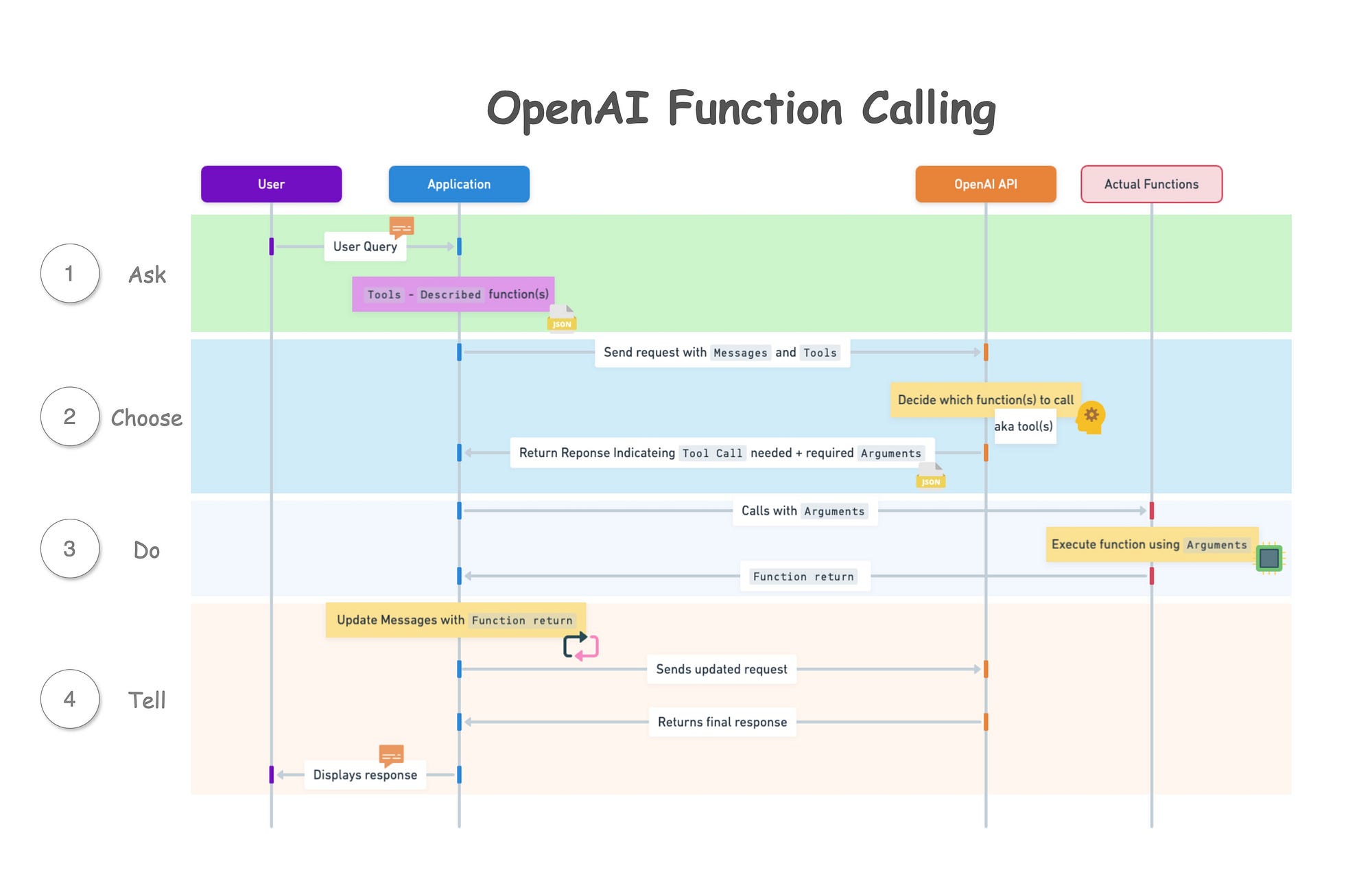
Let's break down this flow:
- Ask (User to LLM): Your application sends a request to the LLM. This request includes the user's prompt and, crucially, a list of tools the model has access to. Each tool is described in a structured format, telling the model its name, purpose, and the arguments it expects.
- Choose (LLM to Application): The model analyzes the prompt and the available tools. If it decides a tool is needed to fulfill the request, it doesn't respond with a final answer. Instead, it responds with a special message—a
tool_call. This message essentially says, "I need to run theget_weatherfunction with the argumentlocation: 'Paris'." - Do (Application Executes Tool): Your application receives this
tool_callrequest. It then executes your actualget_weatherfunction on your server, passing the arguments the model provided. - Tell (Application to LLM): After your function runs, your application takes the return value (e.g.,
{ "temperature": "15C" }) and sends it back to the LLM in a second API call. This new message is labeled as atoolrole, explicitly telling the model, "Here is the result of the function you asked me to run."
The model now has the user's original question and the real-world data from the tool. With this complete context, it can finally generate a natural language response for the user, like "The current weather in Paris is 15°C."
From Scratch: Building an Appointment-Scheduling Agent
The best way to understand this loop is to build it. Since you're proficient in JavaScript, we'll walk through building a simple agent from scratch in a Node.js environment, without relying on any agent-specific frameworks. This will give you a solid grasp of the underlying mechanics.
This video from Anand Sukumaran provides an excellent, ground-up implementation of an appointment-scheduling agent. We will go through it segment by segment to construct our understanding.
Build AI Agent in JavaScript From Scratch - NO Frameworks
We will use this video, "Build AI Agent in JavaScript From Scratch - NO Frameworks," to guide our implementation. It perfectly demonstrates the core logic of an agent that uses tools.
Watch the segments as we break them down below. You can find the code in the video's description if you want to follow along locally.
Step 1: The Basic Chat Loop
First, let's establish a basic interactive loop that can send messages to the OpenAI API and receive responses. This is the foundation of any chat application.
Build AI Agent in JavaScript From Scratch - NO Frameworks
Watch the initial setup part of the video.
This segment, from installing dependencies to the first chat, covers setting up the OpenAI client, using the readline library for command-line interaction, and creating a while loop to maintain a conversation. This is the basic scaffolding for our agent.
At this point, the LLM is still just a chatbot. As the video demonstrates, if you ask it to schedule an appointment (
Step 2: Defining Tools and the System Prompt
This is the most critical step in designing an agent. We need to do two things:
- Define the actual functions in our JavaScript code that can perform actions (e.g.,
checkAppointmentAvailability,scheduleAppointment). - Write a system prompt that tells the LLM about these functions, what they do, what arguments they take, and crucially, how the LLM should format its response when it wants to call one.
Modern APIs like OpenAI's ChatCompletions have a dedicated tools parameter for this, which uses a JSON Schema to define the functions. However, the video uses a powerful "from scratch" method where this information is embedded directly in the system prompt. This technique is highly instructive as it forces the model to generate a structured JSON response that our application can parse to decide whether to call a tool or reply to the user.
Build AI Agent in JavaScript From Scratch - NO Frameworks
Now, let's watch how the agent is given its purpose and its tools.
First, watch the segment on designing the system prompt. Pay close attention to how it instructs the model to respond in a specific JSON format, with a to field (user or system) and a function_call object. This is the core of the agent's "operating system." Next, watch how the corresponding JavaScript functions are defined, along with a functionMap object. This map is a classic software engineering pattern that will allow us to dynamically call the correct function based on the string name provided by the LLM.
Step 3: Implementing the Agent's Core Logic
We now have an LLM that knows how to ask for a function to be called, and we have the functions ready to be executed. The final piece is the code that connects them—the logic that processes the LLM's response.
This code will:
- Parse the JSON response from the LLM.
- Check if the
tofield isuser. If so, print the message to the console. - Check if the
tofield issystem. If so:
a. Extract the function name and arguments from thefunction_callobject.
b. Use thefunctionMapto find and execute the correct JavaScript function.
c. Capture the function's return value.
d. Make a new call to the LLM, sending the function's result back for the next step of reasoning.
Build AI Agent in JavaScript From Scratch - NO Frameworks
This part implements the logic that brings the agent to life.
Watch the segment on processing the LLM's response. This code is the implementation of the "Do" and "Tell" steps from our sequence diagram. It's the central hub of the agent, routing information between the LLM's brain and the application's tools.
Step 4: The Agent in Action
With all the pieces in place, the agent can now perform multi-step tasks that involve both reasoning and action. It can check for availability, ask the user for more information, and then schedule the appointment, all by autonomously deciding which tools to call and in what order.
Build AI Agent in JavaScript From Scratch - NO Frameworks
Let's see the final result.
Watch the final demonstration from scheduling and rescheduling. Notice how when asked to reschedule, the agent autonomously devises a plan: check availability (new time) -> delete appointment (old time) -> schedule appointment (new time). This isn't hardcoded; it's an emergent behavior resulting from the LLM's reasoning combined with the tools you provided.
Encapsulating the Logic with LangGraph.js
Building an agent from scratch is invaluable for understanding the mechanics. In a production environment, you'd likely use a library to handle the boilerplate of managing state and routing calls. LangGraph is a library designed for this purpose.
The "from scratch" logic we just built—calling the model, checking for a tool call, executing the tool, and calling the model again—forms a graph. LangGraph provides a way to define this graph explicitly.
Build an AI Agent with JavaScript and LangGraph
This article shows how to build a simple agent using LangGraph.js. It reinforces the concepts we just learned by showing how they are abstracted in a framework.
Read the section "A Concrete Example – What Time Is It?" and study the code in Listing 1. Notice how the core components are still there: A tool is defined (getCurrentDateTime). The model is bound to the tool. A workflow (the graph) is created with nodes for model and getCurrentDateTime. A conditionalEdge (shouldContinue function) implements the exact same logic as our "from scratch" version: it checks if the model's last message was a tool call and routes the process accordingly. Finally, review the FAQ section at the end. It provides a concise summary of the core concepts.
Conclusion
In this lesson, you've bridged the gap between the theory of ReAct and its practical implementation through tool calling. You've seen how to empower an LLM to act by providing it with functions and a clear protocol for how to request their execution.
Key Takeaways:
- Tool calling is the mechanism for action. It's a multi-step "handshake" where the model requests an action, your application performs it, and the result is fed back to the model.
- Tools require a schema. You must describe your functions to the LLM using a structured format (like JSON Schema) so it knows what they are, what they do, and what arguments they need.
- The core loop involves two API calls: The first to get the model's decision (a tool call or a message), and the second (if a tool was called) to provide the tool's output and get the final answer.
- Agentic behavior is emergent. By simply providing an LLM with reasoning capabilities and a set of tools, it can devise complex, multi-step plans to accomplish a goal.
You now have the skills to build a single-purpose agent. In our next lesson, we will expand on this foundation to design a multi-agent workflow, where different specialized agents can collaborate and delegate tasks to solve even more complex problems.