Recommended resources
The freely available resources this lesson will direct you to.
Hello, and welcome. This course starts with the customer’s ingestion problem: how data leaves a customer’s system and becomes dependable enough to use in a fintech product. Later lessons will address the people involved, product strategy, onboarding, and reliability. First, you need a map of the journey itself.
In this lesson, you will follow a trial balance from a customer export to a report-ready dataset. You will then apply the same mapping approach to an ACH file. The central product question is not merely “Did the upload succeed?” It is “What can a customer safely do with the data now, and what evidence supports that claim?”
Define the destination before tracing the route
“First usable state” depends on the product’s purpose. For a trial balance feeding a financial-reporting preview, it could mean that every in-scope account balance has a period, an entity, a correctly interpreted value, and a reporting category. The customer can inspect a draft report and trace each figure back to its source row. It does not mean the financial statements have been approved or audited.
A useful ingestion map therefore starts at both ends: identify the customer source, and state the earliest downstream action the product should permit. Then trace the data between them. For this lesson, use five checkpoints:
- Source: What system produced the dataset? What file or export did it produce, at what grain, and with what period or scope?
- Arrival: How did the product receive it, and how can it tell which source export it received?
- Interpretation: Which parts are data, which are headers or totals, and what do the source fields mean?
- Preparation: How are source values converted and matched to the product’s categories?
- Release for use: Which checks must pass before the product exposes the result for the intended task?
This is a data journey, not necessarily five separate software services. A customer might upload a spreadsheet through a browser, or files might arrive through an automated transfer. Both can support the same destination, but their operational questions differ.
Follow a trial balance from export to mapped accounts
Consider a customer whose accounting system exports one spreadsheet per closing period. Each spreadsheet contains a trial balance: account codes, account descriptions, debit and credit balances, plus a report date near the top. The fintech product will use it to populate a draft financial report.
Watch how a working example separates getting rows into a table from making those rows meaningful to a report. The demonstration uses Excel and Power Query; treat those as an illustration of the data journey, not as a required architecture for a B2B product.
Financial Reporting from Trial Balances - Super fast
Watch “Financial Reporting from Trial Balances - Super fast” from Excel Off The Grid to see a recurring trial-balance export cleaned, combined, and matched to reporting categories.
Begin with the source setup: notice the separate period files, source data, account cross-reference, and report. In the transformation, focus on removing report furniture, preserving the period, combining debit and credit under an explicit sign convention, and assigning data types. Then watch the category mapping: matching on account code makes the combined balances usable for reporting. Finally, skip to the next period to see what the same setup is expected to handle repeatedly.
The video’s source folder stands in for the arrival checkpoint. In a customer-facing product, arrival also needs an identifiable import: which customer entity it belongs to, which period it covers, when it arrived, and whether it is a new export or a repeat of one already received. Without that context, even correctly parsed numbers can land in the wrong report.
Next comes interpretation. A spreadsheet designed for a person may have a title, a date, blank lines, subtotals, and a final total. Those are not all account records. If a subtotal is ingested as another account, the downstream report can double-count balances while the upload still appears successful. The product must determine the row that begins account data, the fields that identify each account, and the source of the period date.
Account codes also illustrate why parsing is more than “read the cell.” A code such as 0010 is an identifier, not a quantity. Converting it to the number 10 may break its match against the customer’s account mapping. Debit and credit columns require an equally explicit decision: the video creates a signed value by subtracting credit from debit. That convention is useful for its report design, but a product must document its own convention rather than assume all sources or reports display signs identically.
A concrete source-to-product map
Suppose an illustrative export is headed “as at 30 June 2025” and contains these account rows. Amounts are illustrative, in a single currency.
| Source account code | Source description | Debit | Credit | Product signed balance | Reporting category |
|---|---|---|---|---|---|
0010 |
Cash | 1,000.00 | 0.00 | Cash and equivalents | |
0200 |
Payables | 0.00 | 300.00 | Liabilities | |
0300 |
Capital | 0.00 | 700.00 | Equity |
For this example, the signed value is defined as:
The negative values for payables and capital are not errors. They follow the chosen storage convention; the reporting view may present them differently. Because this is an illustrative complete trial balance under that convention, its debits and credits both total 1,000.00. A product should not impose that same equality check on an export that intentionally contains only a subset of accounts.
The map for one row can be stated precisely without specifying a full technical data contract:
| Journey point | What happens to the 0010 row |
What the product needs to retain |
|---|---|---|
| Customer source | Accounting system exports the period’s trial balance | Source entity and reporting period |
| Arrival | Spreadsheet is received as one identifiable import | Import identifier, arrival time, source file reference |
| Interpretation | 0010 is read as an account code; title and total rows are excluded |
Original row reference and original field values |
| Preparation | Debit and credit produce ; 0010 matches “Cash and equivalents” |
Signed value, sign convention, mapping result |
| First usable state | The row can contribute to the draft report | Visible import status and a path back to the source row |
Notice the two kinds of mapping. Field mapping establishes that a source column means “account code” or “credit balance.” Business mapping establishes that the customer’s account 0010 belongs in the product’s “Cash and equivalents” category. Successful field mapping does not imply successful business mapping.
Make “usable” a checked product state
A PM should be able to point to the moment the product changes from data received to data available for reporting. That transition needs observable conditions. For this trial-balance use case, a reasonable initial gate would check that:
- The import is associated with the intended customer entity and reporting period.
- Account rows were distinguished from headings, blanks, subtotals, and totals.
- Required account codes and balances parsed without unintended type changes.
- Every account included in the draft report has a known reporting category.
- Row counts and relevant source totals reconcile after documented exclusions and transformations.
- A report figure can be traced to its contributing account rows and source import.
The gate is use-case-specific. For example, if an account has no reporting-category match, the platform might retain the parsed row and show an “unmapped account” issue. It should not silently put the balance into an arbitrary category and call the report ready. Equally, a customer may want to inspect partially mapped data before fixing it; inspectable and available to the draft report need not be the same status.
Here is a compact journey map a product team could share during discovery:
Customer accounting export, one file per period: The customer provides a spreadsheet for a known entity and close date. The product records its arrival, isolates account rows, preserves account codes as identifiers, interprets balances under a stated sign convention, and joins codes to customer-approved reporting categories. Once required rows parse, mapping coverage is complete, and applicable totals reconcile, the import becomes available to a draft report. Otherwise it remains inspectable with specific unresolved issues.
That paragraph exposes questions worth asking a customer. Where is the authoritative period date: the report header, filename, or both? Can account codes change meaning? Does the export include all accounts or a filtered selection? If the same period is exported again after adjustments, how should the product distinguish it from an accidental re-upload? Those are gaps in the map to investigate, not reasons to assume the customer has a standard spreadsheet.
Apply the same map to an ACH file
A trial balance has account rows and reporting categories. An ACH file has a different shape: information sits at file, batch, and transaction levels. The same source-to-usable method still works, provided you do not flatten away the relationships among those levels.
Read the ACH overview for the file structure rather than trying to memorize every field position.
ACH File Overview | ACH Guide for Developers
Read “ACH File Overview” from the ACH Guide for Developers to understand why an ACH transaction cannot be interpreted from its entry row alone.
In “Record Sequence,” start at the description of record structure. Focus on the fixed-width format and the ordered file, batch, and entry records. Then, in “Record Overview,” read from batch through padding. Notice what the batch header contributes to an entry, what entry and optional addenda records contain, and what the batch and file control records summarize. Stop before “Data Specifications.”
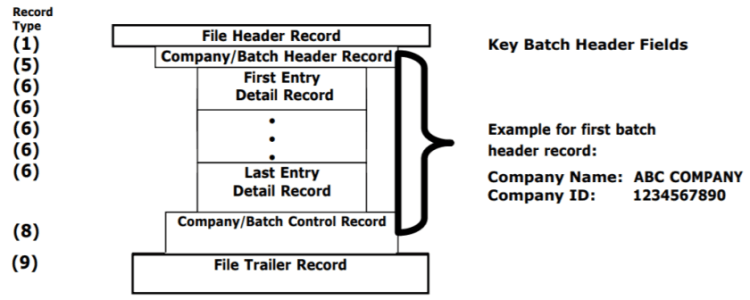
Suppose the customer’s treasury system exports an ACH file, and the product’s first intended use is an operations view of received payment instructions. Its journey might be:
- Source and arrival: Identify the exporting system, the delivered file, and the customer to whom it belongs. Preserve an import reference so staff can distinguish one delivery from another.
- Interpretation: Parse the fixed-width records in order. The file header identifies file-level context; each batch header supplies context shared by its entries; each entry supplies transaction details; optional addenda belong with the relevant entry. Control records summarize the batch and file rather than representing additional payments.
- Preparation: Represent an entry in the product together with the batch context needed to interpret it. Retain a trace back to its file and entry, while limiting exposure of sensitive receiver information in ordinary views.
- Release for use: Check the file structure and reconcile applicable entry counts and amounts with its control records. Only then expose accepted entries in the operations view, or clearly show which import could not be accepted and why.
The crucial boundary is that an ACH instruction present in an ingested file is not proof that a payment settled. For this use case, “first usable” means reliable visibility into the instructions the product received, not confirmation of funds movement. A different downstream product goal would require a different availability claim and additional evidence.
The trial-balance and ACH examples therefore share a product pattern while demanding different checks. The trial balance needs correct account classification and period attribution before it can support a draft report. The ACH file needs its record hierarchy and controls respected before it can support an operations view. In both cases, “file uploaded” describes arrival—not usable data.
Key takeaways
To map ingestion, specify the customer source, dataset grain, arrival method, interpretation rules, transformations, and first permitted product use. Preserve enough source context to explain each resulting record. Most importantly, define a visible quality gate between “received” and “usable,” with an honest state for data that needs attention.
Next, you will examine the people involved in that journey. Once the data path is visible, it becomes much easier to ask who provides the source, who configures mappings, who reviews problems, and who relies on the result.