Recommended resources
The freely available resources this lesson will direct you to.
Hello! Welcome back to our course on advanced Claude Code.
In our last lesson, we focused on ensuring code quality by defining style guides and linting rules. We explored how to use CLAUDE.md for "soft" guidance and settings.json hooks for "hard," deterministic enforcement. This created a robust system for generating clean, consistent code.
Today, we'll build on that foundation of automation. The learning outcome for this lesson is to specify test, build, and deployment commands in CLAUDE.md for workflow automation. We're moving from automating code style to automating the development lifecycle. This is a critical step in creating a professional, reliable workflow where Claude can not only write code but also help you validate, package, and deploy it.
We will cover three key mechanisms to achieve this:
- Informing Claude: How to list your project's commands in
CLAUDE.mdso Claude knows what tools are available. - Granting Permission: How to use
settings.jsonto securely control which of these commands Claude is allowed to run. - Enforcing Actions: How to use hooks to trigger these commands automatically at key moments, like running tests before a commit.
1. Informing Claude: The Commands Section in CLAUDE.md
Just as you would onboard a new developer by showing them the project's Makefile or package.json scripts, your first step is to tell Claude what commands are available. The CLAUDE.md file is the perfect place for this. By creating a dedicated Commands section, you provide essential context that Claude can reference.
When you ask Claude to "run the tests" or "build the container," it will look for these instructions to know exactly which command to execute.
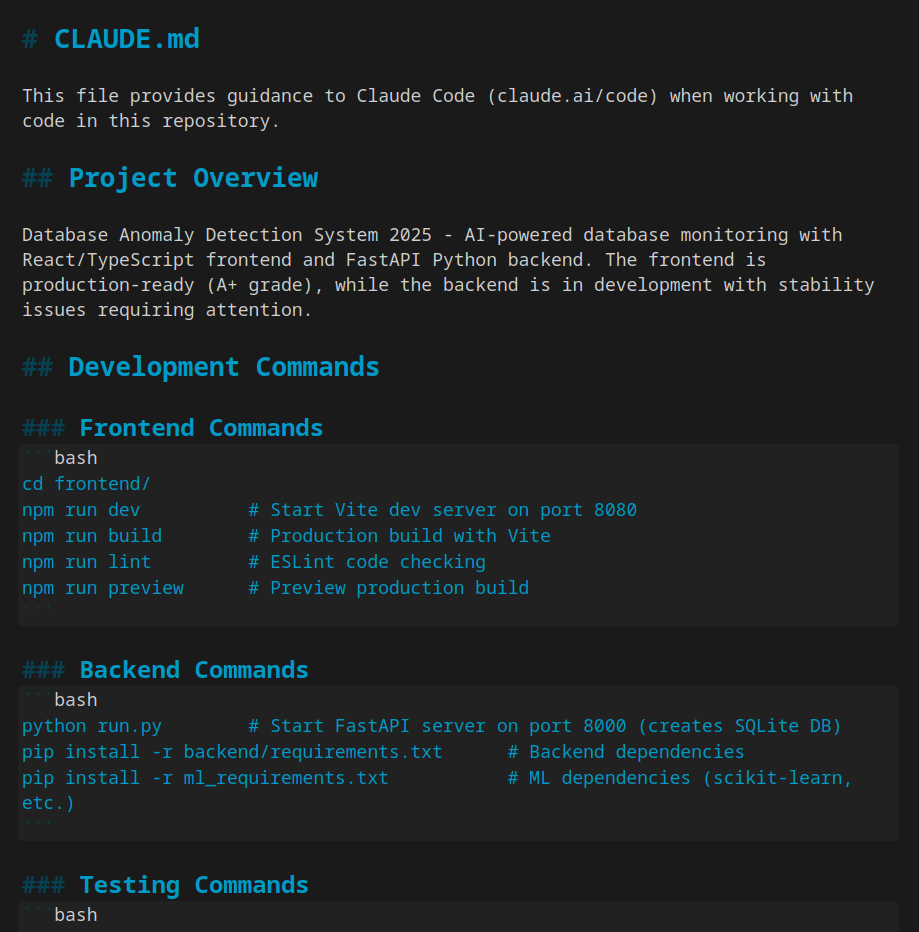
Let's look at a comprehensive example of how to structure this section in your CLAUDE.md.
Claude Code CLI: The Definitive Technical Reference
The Claude Code CLI technical reference contains an excellent example of a well-structured CLAUDE.md file. We'll focus on the 'Commands' section.
Find the subsection titled 'Effective CLAUDE.md Structure'. Examine the ## Commands section. Notice how it provides a simple, human-readable list of commands and their purposes, covering testing, linting, building, and database migrations.
For your typical FastAPI and PostgreSQL projects, a Commands section might look like this:
## Commands
- `pytest` - Run all unit and integration tests.
- `docker build -t my-api-image .` - Build the production Docker container.
- `alembic upgrade head` - Apply database migrations.
- `sh ./scripts/deploy_staging.sh` - Deploy the application to the staging environment.
This "soft" instruction gives Claude the knowledge it needs. But knowledge alone isn't enough; it also needs permission.
2. Granting Permission: Securing Commands with settings.json
For security, Claude Code doesn't run arbitrary shell commands by default. You must explicitly grant permission. This is especially critical for potentially destructive commands related to building and deploying. You can configure fine-grained permissions in your project's .claude/settings.json file.
This allows you to create a tiered system of trust:
allow: For safe, frequently used commands like running tests.ask: For sensitive commands like deployments, where you want final approval.deny: For dangerous commands you never want Claude to run, likerm -rf.
Let's dive into the syntax for these permission rules.
Claude Code CLI: The Definitive Technical Reference
The same technical reference provides a detailed guide to the permission system. This is crucial for securely managing workflow commands.
Locate the 'Permission Rules Syntax' subsection within the 'Permission System and Security' section. Focus on the 'Bash command patterns' example. Pay attention to the use of wildcards (*) to allow groups of commands, like Bash(npm run test:*).
Applying this to our FastAPI project, your .claude/settings.json might include:
{
  "permissions": {
    "allow": [
      "Bash(pytest:*)",
      "Bash(alembic:*)",
      "Bash(docker build:*)"
    ],
    "ask": [
      "Bash(sh ./scripts/deploy_staging.sh)"
    ],
    "deny": [
      "Bash(sudo:*)",
      "Bash(rm -rf:*)"
    ]
  }
}
With this configuration, Claude can freely run tests and build containers, but it will always prompt you before attempting a deployment. This strikes a great balance between automation and control.
3. Enforcing Actions: Deterministic Workflows with Hooks
Listing commands and setting permissions enables you to manually delegate tasks to Claude. The next level of automation is to make these tasks happen automatically as part of a workflow. This is where hooks become essential again.
A powerful pattern in modern development is to run tests before allowing a git commit, preventing broken code from entering your repository. You can enforce this with a PreToolUse hook that intercepts Claude's attempts to use the Bash(git commit:*) tool.
The following guide contains an excellent community-contributed recipe for exactly this scenario.
The Complete Claude Code CLI Guide - GitHub
This comprehensive guide on GitHub includes a collection of practical 'recipes' and advanced patterns. We'll use the one for running tests before commits.
Find recipe '#4. Run Tests Before Commits [COMMUNITY]'. Study both the settings.json configuration and the accompanying shell script. This is a perfect template for creating a quality gate in your workflow.
This pattern is incredibly powerful. It transforms Claude from a tool that can run tests into a partner that must ensure tests are passing before proceeding. This deterministic check is fundamental to building reliable CI/CD-like workflows directly within your development environment.
4. Practical Exercise: Automating Your FastAPI Workflow
Let's bring these concepts together with an exercise tailored to your background.
Scenario: You are working on a FastAPI project. Your workflow commands are:
- Test:
pytest -v - Build:
docker build -t my-app . - Deploy:
sh ./scripts/deploy.sh(a hypothetical deployment script)
Your Task (approx. 20 minutes):
-
Update
CLAUDE.md: Create a## Workflow Commandssection in aCLAUDE.mdfile and list the three commands above with brief descriptions. -
Configure
settings.json: Create a.claude/settings.jsonfile with apermissionsblock that:- Allows the
pytestcommand. - Allows the
docker buildcommand. - Requires Claude to ask for permission before running the
deploy.shscript. - Denies any use of
sudo.
- Allows the
-
(Advanced) Implement a Pre-Commit Test Hook:
- In your
settings.json, add aPreToolUsehook that triggers on anyBashcommand. - The hook should execute a shell script. This script will check if the command is a
git commit. - If it is a commit command, the script should run
pytest. If the tests fail, the script should exit with a non-zero status code to block the commit. If they pass, it should exit with0to allow it. (You can adapt the script from the "Run Tests Before Commits" recipe).
- In your
This exercise will give you a complete, three-layered automation framework for a typical project.
Conclusion
You've now learned how to automate not just code style, but the entire test-build-deploy cycle within Claude Code. This is a significant step towards using Claude as a true AI engineering partner.
Key Takeaways:
CLAUDE.mdis for informing: Use it to document your project'stest,build, anddeploycommands, giving Claude the necessary operational knowledge.settings.jsonis for controlling: Use thepermissionsblock to create a secure environment, allowing safe commands while requiring approval for sensitive ones.- Hooks are for enforcing: Use
PreToolUsehooks to create deterministic quality gates, such as ensuring tests pass before a commit is made.
By combining these three layers, you create a powerful, reliable, and automated development workflow.
Next Up:
In the next lesson, we will focus on a more granular aspect of project setup: implementing a specific architectural rule (e.g., FastAPI file structure and Pydantic model format) in CLAUDE.md. This will allow you to enforce not just code style, but also the structural integrity of your application.