Recommended resources
The freely available resources this lesson will direct you to.
Introduction
In our previous lesson, we established the fundamental concept of LLM function calling—the mechanism that transforms a language model from a passive text generator into an active participant in a larger application. You learned that function calling allows your Spring Boot application to grant an LLM access to "tools," which are essentially your Java methods, enabling it to query databases, call external APIs, and interact with the outside world.
This lesson takes that conceptual understanding and makes it concrete. Our goal is to diagram a simple agentic workflow that uses function calling to access an external data source. For a developer on the path to a senior role, translating a process into a clear architectural diagram is a critical skill. It's how we communicate complex interactions, identify potential bottlenecks, and ensure everyone on the team shares the same mental model of the system. We will dissect the flow of information between your application, the LLM, and external data sources, step by step.
The Anatomy of a Tool-Calling Workflow
Before we can diagram a workflow, we must first understand the components involved and their roles. Think of it as mapping out the actors and their interactions in a play. In a typical agentic system built with Spring Boot, these are the key players:
- The Client: The user or system initiating the request (e.g., a React frontend making an HTTP request).
- The Application (Spring Boot): The central orchestrator. This is your code, and it's always in control. It contains:
- A Controller (
@RestController) that receives the initial request. - The Spring AI
ChatClient, which handles communication with the LLM. - A set of Tools (your
@Beanannotated methods), which the LLM can request to use. These tools might interact with repositories or other services.
- A Controller (
- The AI Model (LLM): The reasoning engine. Its job is to understand the user's intent, break down the problem, and decide which tool (if any) is needed.
- External Systems: The "real world" data and services your application needs to access, such as:
- An internal database (e.g., holding user portfolio data).
- An external API (e.g., providing real-time stock prices).
The magic happens in the "conversation" between these components. The Spring AI framework plays a crucial role in managing this dialogue, and its documentation provides a clear, high-level overview of the process.
Let's start by examining the generic flow as defined by Spring AI.
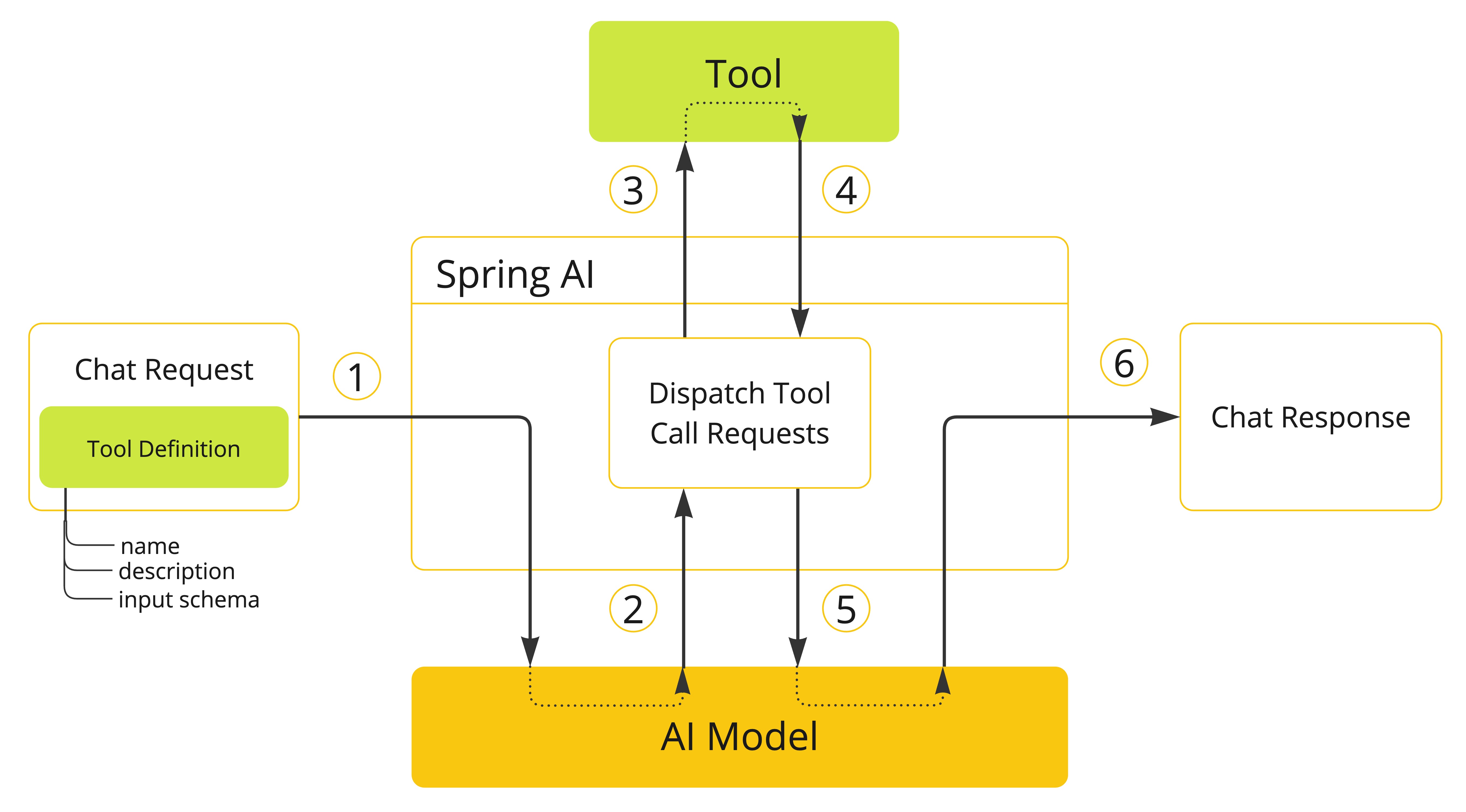
The official Spring AI documentation provides a detailed explanation of this sequence. It clarifies how your application, the AI Model, and the tools you define interact within the framework.
Tool Calling :: Spring AI Reference
This official documentation explains the core sequence of tool calling within the Spring AI framework.
Please read the Overview section. As you read, mentally map each of the six steps in the diagram to the description provided in the text.
The key takeaway from this diagram is that Spring AI acts as a mediator. It handles the packaging of tool definitions, dispatches tool call requests from the model to your code, and funnels the results back to the model. This is what the IBM Technology video you can watch below refers to as "embedded tool calling," where a library abstracts away the complexity of the execution loop.
What is Tool Calling? Connecting LLMs to Your Data
This video from IBM Technology contrasts "traditional" tool calling with "embedded" tool calling, which is the approach frameworks like Spring AI use.
Watch the segment explaining embedded tool calling. Notice how the "library" in the video plays the same role as "Spring AI" in the diagram we just reviewed.
Diagramming a Concrete Example: The Stock Wallet
Now, let's apply this general pattern to a more complex, real-world scenario. In the last lesson, we discussed an application that answers the question: "On which day during the last {days} days did my wallet have the highest value?"
Answering this requires a multi-step process involving multiple tools and data sources. The LLM needs to:
- Find out which stocks the user owns (from an internal database).
- For each of those stocks, get the historical price data (from an external API).
- Calculate the wallet value for each day.
- Identify the day with the highest value and formulate a response.
The following diagram from Piotr's TechBlog, which we've referenced before, visualizes this exact workflow. This is a perfect example of the kind of diagram you would create to explain an agentic workflow.

Let's trace the flow of information step-by-step, following the numbers in the diagram:
-
Prompt: A user sends a request to your Spring Boot application's controller, e.g.,
GET /wallet/highest-day/30. The prompt, "On which day during last 30 days my wallet had the highest value...", is sent to the Chat Model along with the definitions of available tools (WalletToolsandStockTools). -
Call
getNumberOfShares: The LLM reasons that it first needs to know what's in the wallet. It sends a response to your application requesting a call to thegetNumberOfSharesfunction.- 2.1 Call DB: Your
WalletToolsbean executes this method, which queries the internal database.
- 2.1 Call DB: Your
-
Response with Items: The database returns the list of shares (e.g., AAPL, AMZN, META, MSFT, NVDA). Your application sends this list back to the Chat Model as the result of the function call.
-
Call
calculateHighestWalletValueper Item: Now the LLM knows the stocks. It reasons that it needs historical prices for each stock. It enters a loop, sending a new function call request for each item in the list. For example, it first asks to callcalculateHighestWalletValue(company="AAPL", days=30).- 4.1 Call API: Your
StockToolsbean executes this method, which makes an HTTP request to an external stock data API.
- 4.1 Call API: Your
-
Response per Item: The external API returns the historical price data for that stock. Your application sends this data back to the Chat Model. Steps 4 and 5 are repeated for every stock in the wallet.
-
Final Chat Response: After multiple back-and-forths, the LLM has all the necessary data: the list of owned shares and the historical prices for each. It can now perform the final synthesis: calculate the total wallet value for each of the past 30 days, identify the maximum value, and generate a natural language response like, "Your wallet had the highest value of $X on YYYY-MM-DD." This final text is sent back to your controller and then to the user.
This entire sequence is what constitutes the agentic workflow. To see this flow explained visually, the video "How does OpenAI Function Calling work?" provides a concise walkthrough of a similar process.
How does OpenAI Function Calling work?
This video provides a clear, animated explanation of the multi-step interaction between an application, the OpenAI API, and external functions.
Watch the section that animates the process flow. This visual directly corresponds to the numbered steps we just analyzed in the stock wallet diagram.
Your Turn: Diagram Your Own Workflow
Now it's time to apply what you've learned. Your task is to diagram a simple agentic workflow for a new problem. This is an exercise in system design.
Scenario: A user wants to find the best-rated local coffee shop that is open right now.
The user prompt is: "Find me the best coffee shop near me that's open now."
To solve this, the system will need access to tools that can:
- Get the user's current geographical location.
- Search for coffee shops near a specific location.
- Check the current hours and rating for a specific business.
Your Task:
On a piece of paper or using a digital tool, create a diagram similar to the "LLM Agentic Workflow for Stock Wallet" we just analyzed.
- Identify Components: List the key components involved (e.g., User, Your App, LLM, Google Maps API, etc.).
- Define the Tools: Name and briefly describe the functions your application would need to provide as tools. Think about what inputs they would need and what they would return. For example:
getCurrentLocation()-> returns{"latitude": X, "longitude": Y}findNearbyPlaces(query, latitude, longitude)-> returns a list ofPlaceobjectsgetPlaceDetails(placeId)-> returns{"rating": 4.8, "hours": "...", "isOpenNow": true}
- Sketch the Flow: Draw the components and connect them with numbered arrows to show the sequence of calls and data responses. Annotate each step briefly. Your workflow will likely involve:
- An initial call to get the user's location.
- A second call to find nearby coffee shops.
- A loop to get details for each of the top few results.
- A final synthesis by the LLM to recommend the "best" one.
Take about 15 minutes to sketch this out. This exercise isn't about creating a perfect, production-ready diagram, but about thinking through the logical sequence of an agentic workflow.
Conclusion
In this lesson, you translated the abstract concept of function calling into a concrete architectural diagram. This is a vital step in designing any complex system, as it forces clarity and exposes the intricate dance of data between different services.
Here are the main takeaways:
- Agentic workflows are multi-step conversations: A single user prompt can trigger a series of back-and-forth calls between your application and the LLM to gather the necessary information.
- Diagrams are essential for clarity: Visualizing the flow of requests and responses between the user, your application, the LLM, and external data sources is crucial for understanding and communicating the system's design.
- The application orchestrates, the LLM reasons: Your Spring Boot code is always the one executing actions (calling APIs, querying databases), while the LLM's role is to decide what actions to take and in what order. Frameworks like Spring AI manage this interaction for you.
You now have a solid mental model for how to design an application feature that uses an LLM as an intelligent agent. However, building such a feature comes with its own set of challenges. In our next lesson, we will address these directly by identifying key considerations for safely deploying AI-powered features, including cost, latency, and hallucination mitigation.