Recommended resources
The freely available resources this lesson will direct you to.
Welcome to the next lesson in our journey to becoming a top-tier AI Engineer. In our previous session, we deconstructed a system design interview question by applying a five-step framework to a personalized recommendation engine. You learned how to structure your thinking, starting from clarifying requirements and moving through high-level design, deep dives, and trade-off discussions.
Today, we will focus intensely on a crucial part of that process: creating the architectural diagram itself. The learning outcome for this lesson is to be able to diagram a highly available, scalable RAG architecture suitable for a whiteboard interview. A well-drawn diagram isn't just a picture; it's the narrative backbone of your technical discussion, demonstrating your ability to think in systems and communicate complex ideas clearly. We will build a production-grade RAG architecture from the ground up, focusing on the components and patterns that distinguish a prototype from a system ready for millions of users.
The Whiteboard Strategy: Separating Concerns
In a high-pressure interview, clarity is your greatest asset. A common mistake is to draw a single, overwhelming diagram with dozens of boxes and crisscrossing lines. A more effective strategy is to separate your architecture into two distinct, logical flows. This mirrors how you would structure the engineering work itself.
- The Offline Data Pipeline: How documents and knowledge are ingested, processed, and indexed. This flow is about preparing the data.
- The Online Inference Pipeline: How a user's query is processed in real-time to generate a response. This flow is about serving answers with low latency.
By presenting the system this way, you can walk the interviewer through each part logically, explaining the design choices and scalability considerations at each step. Let's start with the foundation: the data pipeline.
Part 1: The Offline Data Pipeline
This pipeline's job is to take raw data from various sources and make it searchable for the RAG system. Scalability and resilience are key here, as you might need to process terabytes of data or handle continuous updates.
Design and Develop a RAG Solution - Azure
This guide from Microsoft's Azure Architecture Center provides a clean, high-level view of a RAG data pipeline. We will use this as the conceptual starting point for our diagram.
Focus on the diagram and the description under the heading RAG data pipeline flow. This outlines the core steps: Chunking, Enriching, Embedding, and Persisting.
The workflow described is a great starting point. To make it scalable and robust for production, we'll implement it using a decoupled, asynchronous architecture. Here's how we'd diagram and explain it:
A scalable offline data pipeline using a message queue to decouple data sources from asynchronous processing workers responsible for chunking, embedding, and indexing data into a vector database.
- Data Sources: The pipeline starts with diverse data sources: documents in Amazon S3, records in an RDBMS, articles from a CMS, etc.
- Ingestion Service: A service monitors these sources for new or updated documents and places a message into a Message Queue (e.g., Apache Kafka, AWS SQS). This is a critical design choice. Using a queue decouples the ingestion from the processing, allowing the system to handle huge backlogs of documents without failing. If processing workers are slow or fail, the tasks remain in the queue to be picked up later.
- Processing Workers: These are independent services that consume messages from the queue. You can scale the number of workers up or down based on the queue length. Each worker performs the core processing steps:
- Chunking: It breaks the document into smaller pieces. As you know from previous modules, using a structure-aware method (e.g., respecting paragraphs or tables) is far superior to naive fixed-size chunking.
- Embedding: For each chunk, the worker calls a dedicated Embedding Service to generate a vector embedding.
- Indexing: The worker then writes the chunk's text, its vector embedding, and any associated metadata (like source document ID, creation date, etc.) to the Vector Database.
This asynchronous, microservices-based approach is fundamental to building a scalable system, a concept that should resonate with your software engineering background.
Part 2: The Online Inference Pipeline
This is the real-time part of the system where a user gets their answer. The primary non-functional requirements are low latency and high availability.
Let's watch a segment of a video that provides a comprehensive overview of a production architecture. Pay attention to how many components are involved beyond a simple retrieve-and-generate loop.
Building Production RAG Systems: Architecture, Scaling & Cost Optimization
This video from Mukul Raina, "Building Production RAG Systems," gives an excellent overview of a complete system architecture.
Watch the section from the complete system architecture where he introduces the diagram. Notice the inclusion of caching, hybrid retrieval, re-ranking, and streaming, all of which are hallmarks of a production system.
Now, let's build up our whiteboard diagram for this online flow, incorporating these advanced components.
A scalable online inference pipeline showing a user query going through an API Gateway, an Orchestrator, multi-level caching, hybrid retrieval (vector and keyword), a re-ranker, and finally an LLM for generation.
- API Gateway & Load Balancer: The user's query enters through an API Gateway, which sits behind a load balancer. The load balancer distributes traffic across multiple instances of our application, ensuring high availability.
- Orchestration Service: This is the brain of the operation. It's a stateless service that coordinates the entire RAG workflow. Being stateless is crucial, as it allows us to run many instances behind the load balancer for scalability.
- Multi-Level Caching: Before doing any expensive work, the orchestrator checks a multi-level cache (often implemented in a fast in-memory store like Redis).
- Response Cache: Checks if the exact same query has been answered recently. A cache hit here is the fastest path, saving all subsequent steps.
- Embedding Cache: Checks if we've recently generated an embedding for the exact query text.
- Query Processing: If there's no cache hit, the orchestrator prepares the query. This may involve calling the Embedding Service to get a vector representation.
- Hybrid Search (Retrieval): Simple vector search is often not enough. A production system uses hybrid search to improve recall. The orchestrator queries two systems in parallel:
- Vector Database: For semantic similarity.
- Keyword Index (e.g., Elasticsearch/OpenSearch with BM25): For exact keyword matches, which is crucial for things like product codes, acronyms, or specific names.
The results are then merged (often using a technique like Reciprocal Rank Fusion).
- Re-ranking: The merged list of ~100 candidates is still noisy. To improve precision, this list is passed to a Re-ranker Service. This is typically a smaller, specialized cross-encoder model that is computationally more expensive than the initial retrieval but far more accurate at judging relevance. It re-orders the candidates and returns the top 5-10 most relevant chunks.
- LLM Generation: The orchestrator takes the top-ranked, highly relevant chunks, constructs a prompt with the user's query, and sends it to the LLM Generation Service.
- Streaming Response: The final response from the LLM is streamed back to the user to improve perceived latency. The user starts seeing the answer being generated word by word, rather than waiting for the full response.
Tying It All Together: A Production-Ready Diagram
Now, let's combine these concepts into a single, comprehensive diagram that you could draw on a whiteboard. This diagram should be your visual aid to discuss scalability and availability.
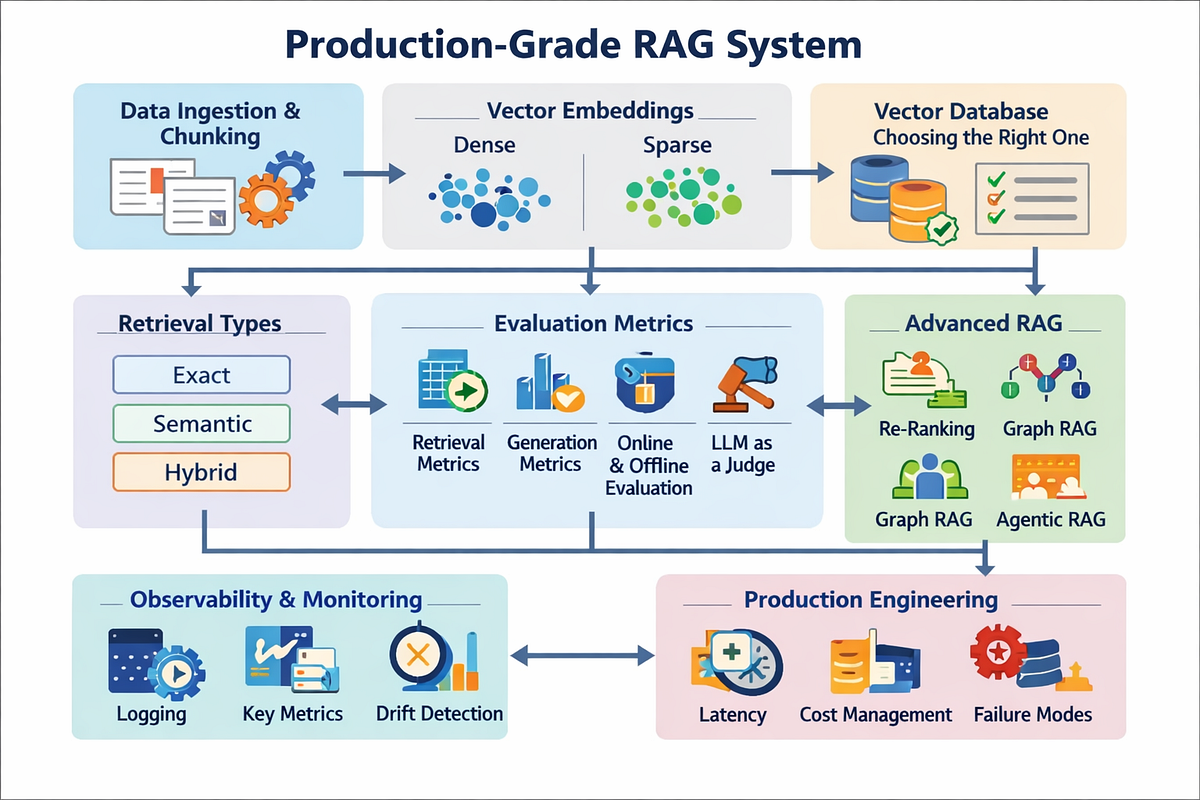
The diagram above is a great mental model. On a whiteboard, you would draw the boxes and arrows from our two pipeline diagrams and then use them to talk through the crucial "-ilities".
Scalable RAG Architecture | Production Design
This article provides the technical details behind the "how" of scaling each component. It's the perfect script to accompany your whiteboard diagram.
Read the following sections to understand the core principles: Start with Decoupling Components to grasp the core microservices philosophy. Skim the sections on Scaling the Retrieval Path and Scaling the Generation Path to understand how to scale the most intensive parts. Read about System-Wide Strategies, focusing on the roles of Load Balancing and Caching. Finally, review Containerization and Orchestration to see how technologies like Docker and Kubernetes tie everything together.
Discussing High Availability and Scalability:
While drawing your diagram, you'll narrate how it achieves these goals:
-
High Availability:
- "I've placed a load balancer in front of every stateless service—the orchestrator, the embedding service, the re-ranker. This allows me to run multiple instances, so if one goes down, traffic is routed to healthy ones."
- "For stateful components like the Vector DB, I'm using a primary-replica configuration. Reads go to the replicas, and writes go to the primary. If a primary fails, a replica can be promoted, preventing downtime."
- "I'd implement circuit breakers around the external LLM API calls. If the provider is slow or down, the circuit opens, and we can fail gracefully, perhaps by serving a cached response or a polite error message, instead of letting our system hang."
-
Scalability:
- "The entire architecture is decoupled into microservices. This is the key. The LLM generation is GPU-intensive, while vector search is memory-intensive. By separating them, I can scale each component's hardware independently. We can have a few large GPU instances for the LLM service and many memory-optimized instances for the vector DB."
- "The asynchronous ingestion pipeline with a message queue means we can scale from processing 1,000 documents a day to 10 million without re-architecting. We just add more processing workers."
- "The Vector Database is horizontally scalable through sharding. As our document corpus grows into the billions of vectors, we can partition the index across multiple nodes to keep search latency low. We can use a sophisticated sharding strategy, like sharding by date or document type, to make queries even more efficient."
Conclusion
In this lesson, we've moved from the abstract framework of system design to the concrete practice of diagramming a production-grade RAG architecture. You now have a blueprint for how to present a complex system in a clear, structured, and impressive way during a high-stakes interview.
Key Takeaways:
- Separate and Conquer: Divide your architecture into an offline (ingestion) and online (inference) pipeline for clarity.
- Production Components are Key: A scalable RAG system isn't just
retrieve-generate. It includes hybrid search, re-ranking, and multi-level caching. - Design for Scale: Emphasize decoupled microservices, asynchronous processing, and horizontal scaling (load balancing, sharding) to prove you're thinking about real-world load.
- Design for Resilience: Discuss high availability patterns like primary-replica databases, redundant services, and circuit breakers.
- The Diagram is Your Script: Use the diagram as a visual anchor to tell a story about your design choices and the trade-offs you've considered.
In our next lesson, we will put this architecture to the test. You will be asked to perform a mock system design for a multi-agent customer support platform, applying the scalable RAG patterns we've just discussed to a complex, real-world problem.