Recommended resources
The freely available resources this lesson will direct you to.
- Securing AI Agents: How to Prevent Hidden Prompt Injection Attackswww.youtube.com
- Guardrails with LangChain: A Complete Crash Course for Building Safe AI Agentswww.youtube.com
- Building an Enterprise Gen AI Gateway Using Langfuse, LangChain ...medium.com
- AI Guardrails — Production LLM Safety Guide (2026)myengineeringpath.dev
Hello! In our previous lesson, you did an excellent job of translating the raw data from your test harness into a professional, data-driven "before-and-after" report. That document provides the quantitative proof of your defense-in-depth strategy's effectiveness.
Now, we'll create the visual counterpart to that report. A compelling diagram is essential for communicating complex systems, a practice you're certainly familiar with from your work in SRE and platform engineering.
This lesson's goal is to prepare a concise architecture diagram illustrating the complete data flow, including all attack, defense, and monitoring components. This diagram will synthesize everything you've built into a single, easy-to-understand visual that will become a cornerstone of your final presentation.
1. The Goal: A Story in a Diagram
A great architecture diagram tells a story. It doesn't just show components; it shows interactions, pathways, and points of interest. For your demo, the diagram should clearly illustrate:
- The "Normal" Path: How a legitimate user interacts with the RAG chatbot.
- The "Attack" Path: Where and how direct and indirect prompt injections enter the system.
- The "Defense" Path: Where each of your security layers intercepts and neutralizes threats.
- The "Observability" Path: How every interaction is monitored for analysis.
Given your background, you're likely proficient with diagramming tools like Lucidchart, Draw.io, or even Mermaid. The focus here will be on what to draw and how to represent the specific components of an LLM security pipeline.
Let's start by looking at a few examples that illustrate different aspects of our system.
Building an Enterprise Gen AI Gateway Using Langfuse, LangChain ...
The article 'Building an Enterprise Gen AI Gateway' contains a superb high-level architecture diagram. While it uses AWS services, the overall structure—showing client interaction, a central application layer, security components, and monitoring—is a perfect template for what we want to create.
Focus on the 'Architecture Overview' diagram. Notice how it clearly separates different logical areas: traffic routing (Route 53, ALB), security (WAF), compute (ECS Fargate), and the API interfaces. We will adapt this professional layout for our local stack, replacing their components with ours (e.g., FastAPI server, Ollama, Langfuse).
This gives us a great starting point for the overall layout. Now, let's break down how to build our specific diagram, piece by piece.
2. Deconstructing the Architecture
We'll build our diagram in layers, just as we built the application itself.
Layer 1: The Core RAG Application
First, let's map out the basic, undefended RAG chatbot. This is the "happy path" for a normal user query.

Your core flow should look like this:
- User: Initiates the interaction.
- FastAPI Server: Receives the user's query via an HTTP request.
- LangChain Chain: Orchestrates the process.
- The query is embedded.
- A similarity search is performed on the Vector Store (FAISS).
- Retrieved documents (context) and the original query are formatted into a prompt using a Prompt Template.
- Ollama (LLM): Receives the final prompt and generates a response.
- The response flows back through the chain to the user.
Layer 2: The Attack Surfaces
Next, we need to show how attackers exploit this system. Use distinct visual cues (e.g., red dotted lines) to represent these malicious data flows.
- Direct Prompt Injection: Draw a path from an "Attacker" (who is also a User) sending a malicious payload directly to the FastAPI Server. This payload travels with the user query along the normal path.
- Indirect Prompt Injection: This is more subtle. Show an "Attacker" performing a one-time "poisoning" of the Vector Store. You can draw a separate arrow labeled "Data Poisoning" pointing to the Vector Store. Then, during a normal user query, the malicious data is retrieved from the store and enters the prompt, becoming an "indirect injection."
The IBM Technology video you've seen before explains this "landmine" concept well, which is what we want to capture visually.
Securing AI Agents: How to Prevent Hidden Prompt Injection Attacks
To reinforce the concept of indirect injection, let's revisit the 'Securing AI Agents' video from IBM Technology. It clearly explains how an attacker leaves a 'landmine' for the agent to find.
Watch the section from 03:53 to 05:01. Pay attention to how the malicious instruction is hidden on a webpage (our equivalent is the poisoned document in the vector store) and is only activated when the agent retrieves it. This is the dynamic we want to illustrate in our diagram.
Layer 3: The Defense-in-Depth Stack
This is the most important part of your diagram. Here, you'll show where each of your defense layers intercepts the data flow. A great way to visualize this is as a series of gates or checkpoints.
AI Guardrails — Production LLM Safety Guide (2026)
The 'AI Guardrails — Production LLM Safety Guide' provides excellent conceptual diagrams for laying out defense layers. We'll use its 'Middleware' pattern as a model.
First, review the 'Visual Explanation' table under 'Core Concepts'. It clearly shows the flow from User Input -> Input Guard -> LLM -> Output Guard -> Safe Response. Next, look at the 'Production Guardrail Architecture Patterns' section, specifically 'Pattern 2: Middleware Guardrails'. This directly maps to how we've embedded our defenses within the FastAPI application. We will place our specific tools into this pattern.
Based on this "Middleware" pattern, add the following components to your diagram, showing how they interrupt the attack path:
- Input Sanitizer (Regex & Semantic): Place this immediately after the FastAPI Server receives a request. Show it inspecting the raw user input before it gets to the LangChain chain. Any direct injection attempts can be blocked here.
- Guardrails AI (Runtime Guard): This component should wrap the call to the Ollama LLM. It inspects both the final prompt about to be sent to the LLM (input guard) and the raw response coming back from the LLM (output guard). This is your main defense against more complex jailbreaks and goal hijacking.
- Output Filter: This is the final checkpoint. Place it just before the response is sent back to the user from the FastAPI endpoint. It scans the finalized, post-Guardrails AI response to catch any remaining leaks or malicious content.
Layer 4: Observability and Testing
Finally, we need to show the components that support the system but aren't part of the core request-response flow.
- Langfuse (Monitoring): Langfuse should be a separate box. Draw arrows from your FastAPI application (specifically the LangChain components) to Langfuse. Label these arrows "Traces, logs, metrics." This illustrates that Langfuse is passively observing the entire process for monitoring and incident analysis.
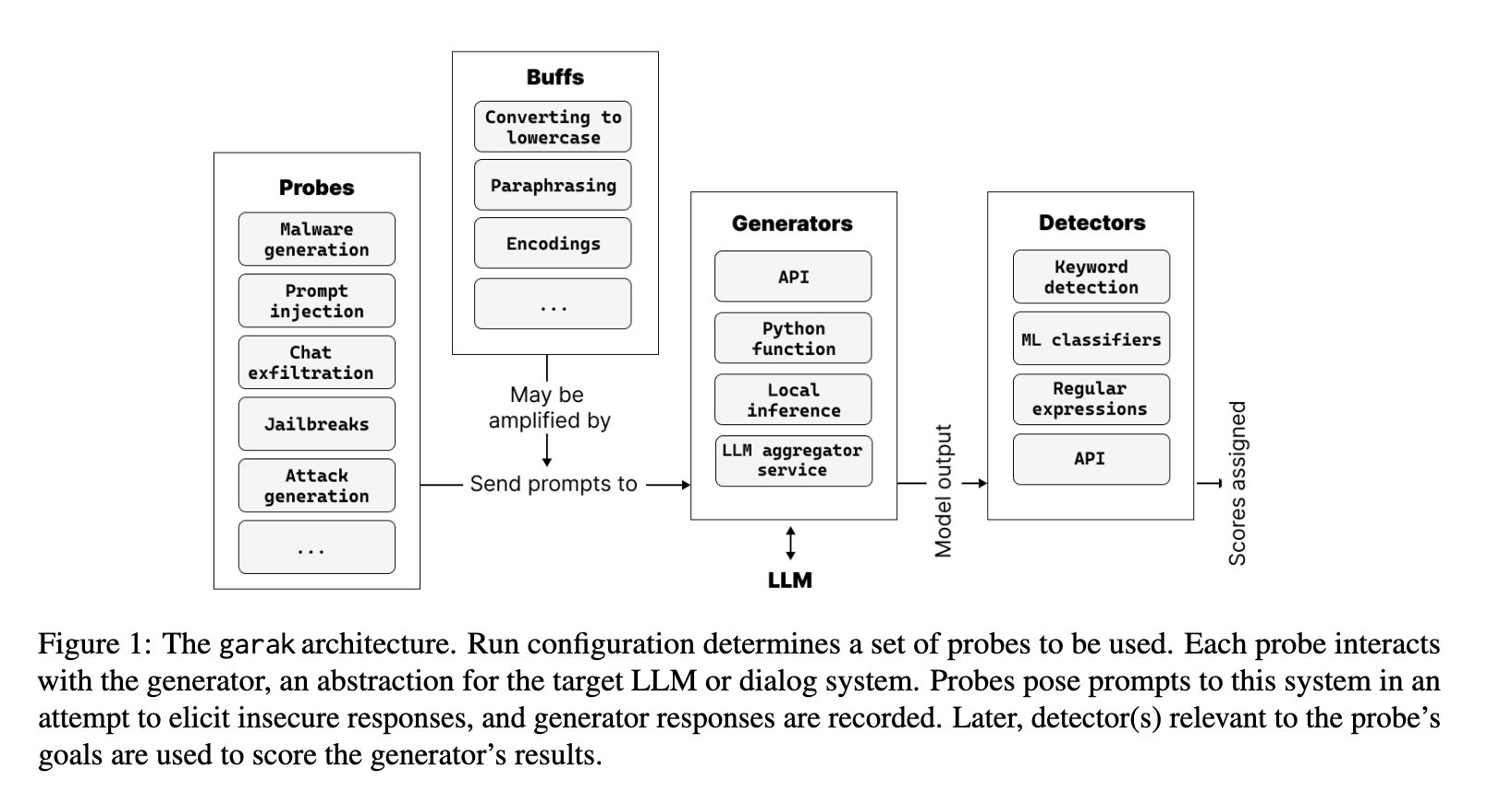
- Garak (Scanner) & Attack Payloads: Show these as external entities, similar to the "Attacker." Draw an arrow from Garak to the FastAPI Server labeled "Automated Probes." This clarifies that Garak is a testing tool used to audit the application's security, not a part of the production flow.
3. Assembling the Final Diagram
Now, combine all these layers into a single, coherent diagram. Use the following guidelines to ensure it's clear and professional for your demo:
- Layout: Use a top-to-bottom or left-to-right flow for the main request path. Group related components (e.g., place all defense layers clearly within the application boundary).
- Color Coding: Use colors effectively.
- Blue/Green: For the normal data flow.
- Red: For attack paths (direct and indirect).
- Orange/Yellow: For defense layer actions or blocks.
- Purple/Gray: For monitoring and external tooling.
- Labels and Annotations: Label every component and connection clearly. Add small text boxes to explain key interactions, for example:
- Next to the Input Sanitizer:
Blocks known injection patterns (e.g., 'ignore instructions') - Next to the Output Filter:
Redacts leaked PII or system prompt keywords - On the indirect injection path:
Malicious data retrieved from vector store during normal lookup
- Next to the Input Sanitizer:
- Legend: Include a legend to explain your color coding and line styles (e.g., solid line = data flow, dotted line = attack path).
Your final diagram will be a powerful tool to walk your audience through the problem, the solution, and the value you've provided.
Conclusion
You have now outlined a complete architecture that visually represents your entire AI security project. This diagram is more than just a technical drawing; it's a narrative device that synthesizes the complex interactions between attacks, defenses, and core application logic.
Key Takeaways:
- Layered Storytelling: You've learned to structure an architecture diagram to tell a story, layering the core application, attack surfaces, defense mechanisms, and observability components.
- Visualizing Abstract Concepts: You can now visually represent abstract threats like indirect prompt injection and the specific interception points of a defense-in-depth strategy.
- Professional Communication: This diagram serves as a professional artifact that demonstrates a deep understanding of the system's architecture, which is highly valuable in a consulting or senior engineering context.
Next Up:
With your quantitative report and your architectural diagram complete, you have all the core materials for your demo. In our next and final module, Delivering a Professional Security Briefing, we will focus on bringing it all together. You'll learn to storyboard a compelling narrative, anticipate audience questions, and present your findings with clarity and impact. This diagram will be your primary visual aid.