Recommended resources
The freely available resources this lesson will direct you to.
Hello. This course is a focused foundation for reading and fixing the snapshot-backup service rather than a broad survey of Iceberg. We will begin with the distinction that prevents many early misunderstandings: an Iceberg table is not a folder of Parquet files, and Hive Metastore is not where the table’s data lives.
By the end of this lesson, you should be able to look at an HMS table record and an S3 prefix and say which parts identify the current logical table state, which parts are merely stored objects, and why that difference matters for a backup service.
A table is a named, versioned state—not a directory
Suppose an application refers to:
analytics.trades
That is a logical table identifier: a name in a catalog namespace. It is not an S3 path, not a metadata JSON file, and not a set of Parquet files.
In an Iceberg deployment using Hive Metastore (HMS), the catalog’s job is to resolve that identifier to the current table metadata location. In practice, Iceberg’s Hive integration stores this location in HMS table parameters, conventionally under a key such as metadata_location.
The important resolution is:
- A client asks HMS for
analytics.trades. - HMS returns the catalog-side table record, including the current metadata-file location.
- The client reads that metadata JSON from S3 or other object storage.
- That metadata JSON defines the logical table configuration and identifies the current snapshot.
So the logical table state is not “whatever files happen to be under s3://.../trades/.” It is the state described by the metadata version that the catalog currently selects.
A useful distinction:
| Concept | Example | What it means |
|---|---|---|
| Table identifier | analytics.trades |
The name clients use |
| Catalog entry | HMS table and its parameters | The lookup record that resolves the name |
| Metadata location | s3://warehouse/.../metadata/00008-...metadata.json |
The catalog’s pointer to one metadata version |
| Logical table state | Schema, partition specs, properties, snapshots, current snapshot | The meaning of the table at that metadata version |
| Physical objects | JSON, Avro manifests, Parquet files, delete files in S3 | Stored files that realize or may once have realized table states |
“Logical” does not mean imaginary or detached from storage. The logical state is encoded in a physical metadata JSON file. The distinction is that the meaning of the table comes from interpreting that metadata file according to the Iceberg specification, rather than from listing files in an object-store prefix.
Read the Apache Iceberg specification as the authoritative foundation for Iceberg’s object model. It establishes the key idea that Iceberg tracks individual files through metadata rather than treating a directory as a table.
In Overview, read the overview explanation. Focus on two claims: table state lives in metadata files, and data files become part of a table only through an explicit commit. Then read all entries in Specification → Terms, from the core definitions. Do not try to memorize every term yet; identify which terms describe a logical concept, such as a snapshot or schema, and which describe a stored file. Finally, in Table Metadata, read the opening explanation. Scan the field table only for location, current-snapshot-id, snapshots, and metadata-log; these fields will become concrete in the next lessons.
The physical object graph
An Iceberg table is realized by a hierarchy of physical objects. The hierarchy is easier to understand if you read it from top to bottom:
- The catalog holds the current metadata pointer for the named table.
- A table metadata JSON file contains table-level information: schemas, partition specifications, properties, snapshot history, and the current snapshot reference.
- A snapshot record identifies one consistent table view and contains the location of its manifest list.
- A manifest list names the manifest files belonging to that snapshot.
- Manifest files describe individual data files and delete files, including paths, partition values, and file-level metrics.
- Data files contain rows, commonly in Parquet, ORC, or Avro format. Delete files, where used, record row-level deletions without necessarily rewriting a data file.
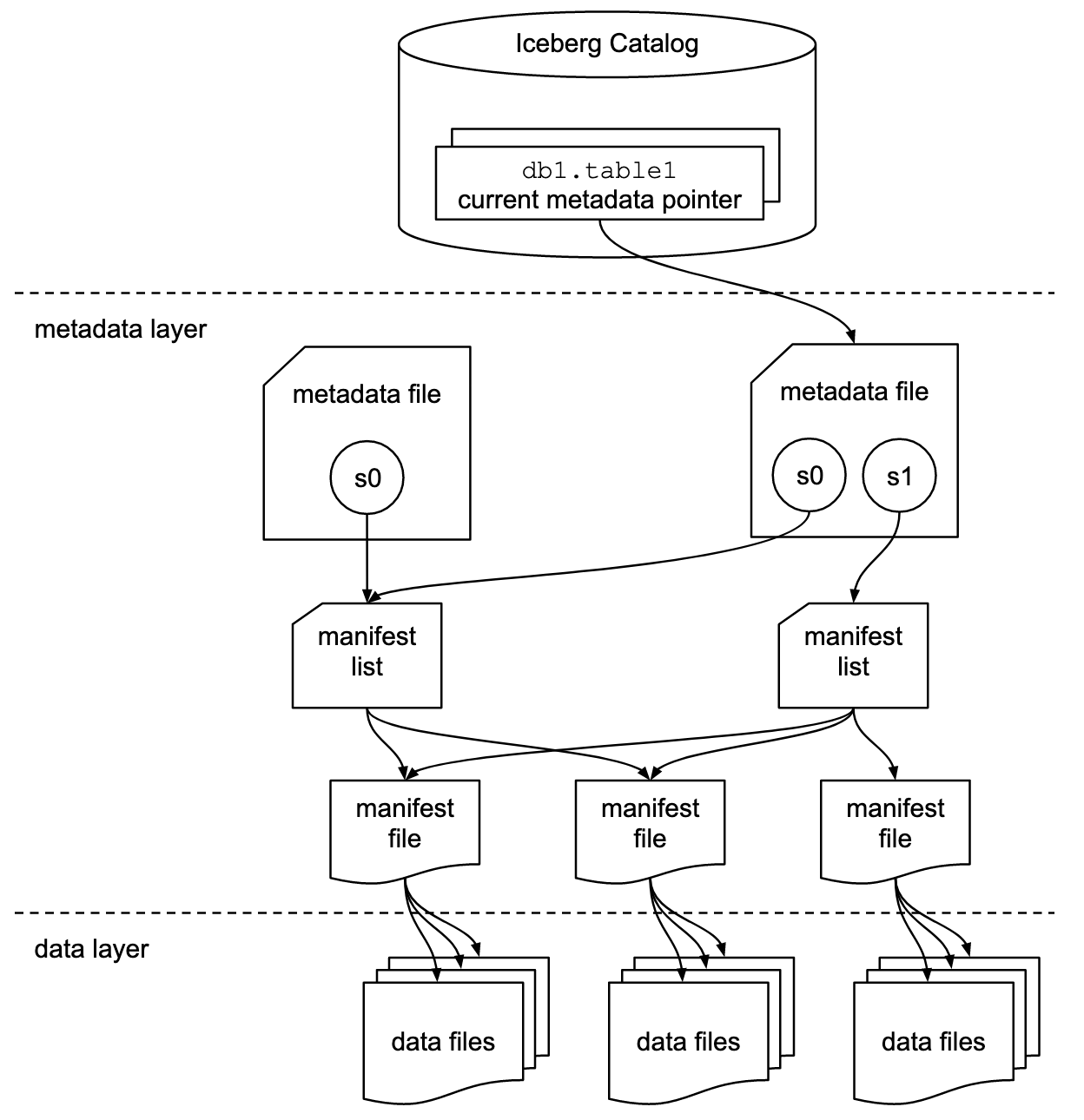
The diagram shows an essential fact for backup work: many physical objects can coexist.
For example, S3 may contain:
- the currently selected metadata JSON;
- older metadata JSON versions;
- manifest lists and manifests reused by more than one snapshot;
- data files visible in the current snapshot;
- data files visible only in older retained snapshots;
- recently written objects that have not yet been successfully committed;
- objects that are no longer referenced but have not yet been cleaned up.
Therefore, an S3 prefix is an inventory of objects, not a trustworthy definition of “the table.”
A snapshot is the key logical boundary: it represents a complete, consistent view of a table at a particular point in time. It does not usually mean that Iceberg copied all table data into a separate physical backup directory. A snapshot reuses existing files by referencing them through manifests.
This is why a service that backs up “a snapshot” cannot safely decide scope by scanning a data/ prefix. It must start from a specific metadata version and follow the references from the chosen snapshot.
HMS and S3 have different responsibilities
For the system you described, the split is likely close to this:
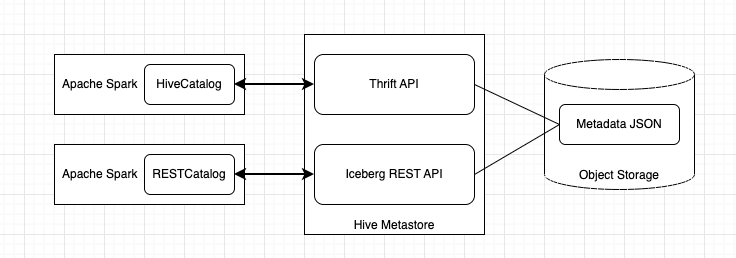
Hive Metastore: catalog and pointer layer
HMS supplies catalog-level information:
- namespace and table name;
- table properties and parameters;
- the current Iceberg metadata location;
- possibly a nominal table storage location.
HMS does not ordinarily contain the full Iceberg metadata JSON, manifest files, or Parquet data. It tells a client which metadata version is current.
When your service uses an HMS Thrift reader, it is probably making a catalog lookup equivalent in purpose to “load the HMS table definition.” The crucial field to trace is the one that gives the Iceberg metadata JSON location.
S3: object storage layer
S3 stores the physical objects:
- metadata JSON files;
- manifest lists and manifest files, usually Avro;
- data files;
- delete files, when applicable;
- sometimes statistics files and other auxiliary objects.
An S3 bucket is simply a storage container. It should not be confused with Iceberg’s bucket transform, which is a partitioning concept that will be covered later.
S3 prefixes such as metadata/ and data/ are common conventions, but Iceberg readers rely on file locations recorded in metadata, not on directory-name inference. In particular:
- A Parquet file below a table prefix is not automatically part of the Iceberg table.
- A metadata JSON object in S3 is not automatically the current metadata version.
- An old metadata file can still be readable even after HMS points to a newer one.
- A table’s base
locationis not a substitute for its currentmetadata_location.
That last point is particularly relevant in code review. A method that receives a table location and lists S3 objects is doing something fundamentally different from a method that reads the selected metadata JSON and follows its references.
One concrete example
Imagine that HMS currently resolves analytics.trades to:
s3://lake/warehouse/analytics/trades/metadata/00008-a1b2.metadata.json
That metadata file might say:
current-snapshot-id: 912345
snapshots: [912100, 912250, 912345]
Snapshot 912345 records the location of its manifest list. That manifest list identifies several manifest files. The manifests identify the exact data and delete files that make up snapshot 912345.
At the same time, the S3 table prefix may also contain:
metadata/00007-z9y8.metadata.json
metadata/00008-a1b2.metadata.json
metadata/snap-912250.avro
metadata/snap-912345.avro
data/old-file.parquet
data/current-file.parquet
data/newly-written-but-not-committed.parquet
Only the HMS pointer tells you that 00008-a1b2.metadata.json is the current metadata version. Only the metadata and snapshot graph tell you which data files belong to the selected state.
The existence of newly-written-but-not-committed.parquet does not make it table data. Iceberg writers can create physical files before the commit that makes them visible in table metadata. If the commit fails, those objects may remain as unreferenced files until cleanup.
This separation gives Iceberg its transactional behavior: clients see a new table state only after the catalog switches its current metadata pointer.
Understanding Apache Iceberg architecture | Starburst Academy
Watch “Understanding Apache Iceberg architecture” from Starburst for a compact visual walkthrough of the physical objects created for a table and the catalog update that makes a new state visible.
Watch the component overview to reinforce the roles of data files, manifests, manifest lists, metadata files, and snapshots. Then watch creation and append. Pay special attention to the final catalog pointer update: the new data and metadata objects exist before the catalog begins pointing at the new metadata JSON.
How to read your repository through this model
When you return to the backup-service code, do not begin by trying to understand every class. First classify each operation according to the layer it touches.
| If you find code that… | It is probably operating on… | Question to ask |
|---|---|---|
| Calls HMS through Thrift | Catalog state | Which table identifier is loaded, and which parameter supplies the metadata location? |
| Fetches a JSON blob from S3 | Table metadata | Is the location read once and then retained, or looked up again later? |
Deserializes Snapshot or table-metadata-like objects |
Logical Iceberg state | Which snapshot is selected, and from which metadata version? |
| Fetches Avro metadata objects | Manifest lists or manifests | Is the object reached by a reference from the selected snapshot? |
| Copies Parquet, ORC, or Avro data objects | Physical table contents | Is each copied object part of the selected snapshot’s referenced file set? |
| Lists an S3 prefix | Storage inventory | Is listing only an optimization or diagnostic step, or is it incorrectly defining backup scope? |
A practical first-pass note for the repository can be just five lines:
1. HMS table lookup method:
2. Field or parameter containing metadata location:
3. S3 read of metadata JSON:
4. Snapshot-selection method:
5. Object-copy methods and their source paths:
Fill this in with actual class and method names as you read. At this point, do not assume that a class called FileMetadata is necessarily an official Iceberg type; inspect its package and serialization format. A service may use Iceberg core classes, generated representations, or its own DTOs with familiar names.
The next lesson will make this flow precise: starting from an HMS catalog entry, you will trace the metadata_location pointer to one immutable metadata JSON version. That is the first point at which a backup can establish a stable scope.
Key takeaways
- An Iceberg table name such as
analytics.tradesis resolved by a catalog, often HMS. - HMS primarily supplies a current metadata pointer; it does not hold the table’s Parquet files or manifest graph.
- S3 stores the physical objects, including current, historical, and possibly uncommitted or no-longer-referenced objects.
- A metadata JSON version defines table-level logical state, including schemas, configuration, snapshot history, and the current snapshot.
- A snapshot is a consistent logical view that reaches its required files through a manifest list and manifest files.
- For a backup, “objects under this S3 prefix” is not an adequate definition of the table. The correct scope must be derived from a selected metadata version and snapshot.