Recommended resources
The freely available resources this lesson will direct you to.
- From Chaotic to Organized: Simple Folder Structure For New Content Creatorswww.youtube.com
- Riverside Walkthrough: From Studio to Publish - Everything You Need to Knowwww.youtube.com
- Podcast Editing Workflow Tips That Can Help Save Hours Every Weekmedium.com
- How to Export Edited Separate Tracks in Riverside for Multitrackcotovan.com
Hello! Your run sheet now covers the recording itself: who operates Riverside, what must pass before the conversation begins, and how to label interruptions and new takes. This final lesson starts where that run sheet ends. You will turn the recorded material into a package an editor can open, understand, and work with—without having to guess which files are complete or which take to use.
Allow about 40 minutes. The central rule is simple: a recording is not ready to hand off merely because the session has ended. Its expected tracks must finish uploading, the downloaded files must work, and the editor must know what each file contains.
Confirm what Riverside actually captured
Return to the recorded session in Riverside and inspect its recording or media area. Riverside’s walkthrough shows where individual feeds and a transcript can be downloaded after a session.
Riverside Walkthrough: From Studio to Publish - Everything You Need to Know
Watch Riverside Walkthrough: From Studio to Publish – Everything You Need to Know, from Riverside, to locate the post-recording media rather than an edited episode export.
Watch the media view. Notice that recorded feeds can be saved individually. For your setup, compare the tracks Riverside displays with what your run sheet says should have been recorded.
The pictured Recordings tab is an example of how individual track rows, download controls, and a transcript may appear. Its participants are not a model for your track count: three people sharing one room microphone do not become three isolated microphone recordings.
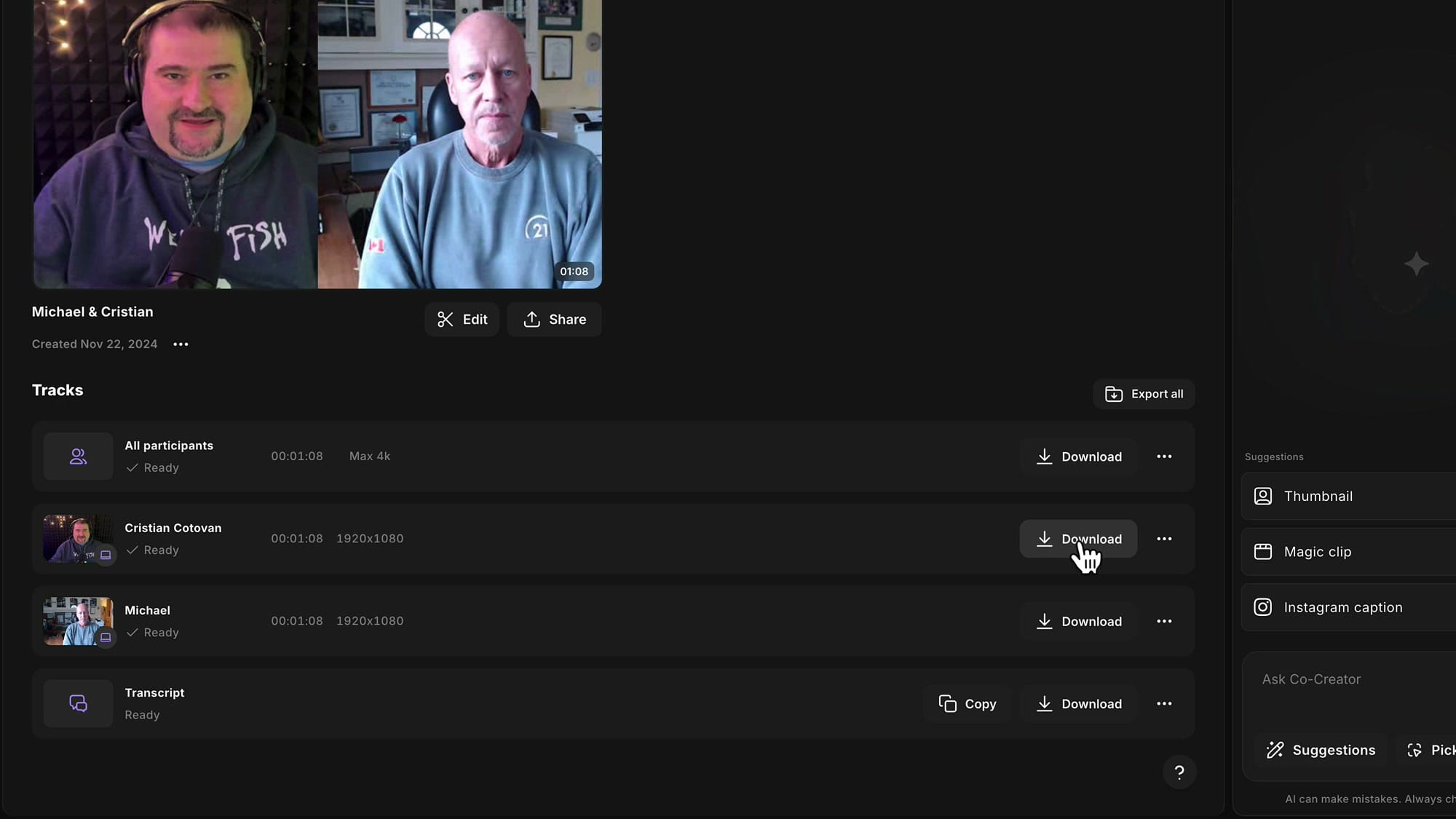
Build an expected-track list from your actual setup and run sheet. For this course’s arrangement, that usually means the track carrying the shared room microphone, the phone’s group-camera recording, and—if a remote guest participated—the guest’s recorded feed or feeds. A recording that combines sound and picture may contain both in one file; list what Riverside actually provides rather than inventing separate files. Include every take created after a restart. If you made an independent room-audio backup, list it separately and label it backup, not a Riverside track.
Check upload status for each expected source and take, not just the session as a whole. Keep the recording devices connected and the relevant Riverside session available while uploads are pending. If a remote guest recorded locally, their upload may need to finish on their device as well. Interface labels can vary, so look for a completed or ready state and an available download—not just a progress indicator.
Download the original, unedited tracks for the editor. A combined “all participants” recording can be helpful as a listening reference, but it does not replace the available individual source tracks. Likewise, a rendered edit or clip is not a substitute for raw material: trimming or audio enhancement may have removed choices the editor needs.
If an expected track remains incomplete or absent, do not mark it delivered. Keep the source device available, check its connection and Riverside’s upload or recovery guidance, and record the issue. If you cannot recover it, tell the editor exactly what is missing and whether a tested backup exists. Never silently substitute a mixed reference file for a missing isolated track.
Give every file a predictable place and name
The editor’s next problem is identification. A folder full of downloads named only by dates or default take numbers forces them to work out which camera, microphone, and restart belong together. Consistent naming solves that problem without altering the media.
Read the naming and episode-folder advice in Podcast Editing Workflow Tips That Can Help Save Hours Every Week. Focus on its “Naming files to prevent future chaos” subsection; you need its repeatable principle, not its particular show names or editing-template workflow.
Podcast Editing Workflow Tips That Can Help Save Hours Every Week
Read the file-naming advice in this article for a practical example of keeping an episode’s raw files distinct from its edits and final output.
In “Naming files to prevent future chaos,” start where the author explains that inconsistent episode filing wastes time. Read the naming example, ending with the suggestion to apply the same system across episodes. Focus on what stays consistent, then adapt the labels to identify your takes and recording sources.
A useful filename answers three questions: Which episode? Which take? Which source? For example, if these are the formats you actually downloaded:
EP07/
  raw/
    EP07_T01_room-mic_raw.wav
    EP07_T01_group-camera_raw.mp4
    EP07_T01_remote-guest_raw.mp4
  notes/
    EP07_handoff-notes.txt
Here, T01 is the take identifier spoken at the start of recording. If the session stopped and restarted, files from T02 get the same pattern with T02 in their names. “Room mic” identifies the one track containing all three in-room voices. The guest file in this illustration happens to be video; your guest’s available raw files might differ.
Keep each file’s original format and extension. Rename downloaded copies clearly, but do not convert a raw recording merely to make filenames uniform. If Riverside supplies one file containing both a source’s audio and video, keep that file intact and describe its contents in the notes. Keep original downloads or another untouched copy until the editor has confirmed receipt; names alone are not a backup.
This folder is an editor handoff, not a finished-episode folder. Put raw tracks and notes in it. Add a backup recording or transcript only if they exist and are useful, clearly marked as such. Do not mix in edited exports without labelling them separately.
Verify the copies, then write the notes
A “ready” indicator establishes that Riverside reports the upload complete. It does not prove that the copy you send can be opened. After downloading, compare your expected-track list with the files in raw/: every required source should be represented for every relevant take. Then open each file from that folder. Check that it plays near the beginning and near the end, contains the expected voice or picture, and is not obviously truncated. For a take with a synchronization clap, make sure the relevant files include that moment. You are checking delivery integrity here, not repeating the full rehearsal evaluation.
Your handoff notes should answer questions the media cannot answer reliably on its own: which take is preferred, where a disruption happened, what the backup captured, and which limitation remains unresolved. Use the take identifiers and approximate points you recorded on the run sheet. Approximate times are useful if labelled approximate; do not imply frame-accurate timing you have not checked.
A concise notes file could follow this structure:
Episode: EP07
Setup: Three in-room speakers on one shared room microphone;
       one phone group camera; remote guest present.
Preferred take: T02

Files: List each delivered filename and its source. Note whether
       a video file also contains audio.
T01: Interrupted at approximately [time/reason]. Preserve for
     possible usable material; conversation restarts in T02.
T02: Main take. Synchronization clap near the beginning.
Backup: [filename and what it captures], or “none.”
Known limitations: [specific issue and approximate location],
                   or “none noted after review.”
Missing/incomplete tracks: [source and take], or “none.”
Replace every bracketed field and ensure the file list matches the folder exactly. A transcript, if supplied, can help the editor find dialogue, but it does not replace notes about interruptions or missing media. Avoid describing an untested remote track, unheard backup, or unfinished upload as verified.
Finally, deliver the package through a transfer method the editor can access. If you archive the folder for transfer, use an ordinary file archive—not a new compressed audio or video export—and check the files again from the delivered location when practical. Confirm that the editor has access and can see the expected files before removing any local copies or clearing recording devices.
Conclusion
An editor-ready handoff has three properties: complete expected raw tracks, consistent source-and-take filenames, and concise, accurate session notes. Check upload completion and downloaded playback separately; neither check replaces the other. Most importantly, make any missing track or recording limitation visible rather than leaving the editor to discover it during the edit.
This completes the course. Your recording-day run sheet and handoff notes now form one continuous record of the session: what you intended to capture, what you actually captured, and what you delivered.