Recommended resources
The freely available resources this lesson will direct you to.
Hello! You are now at the rehearsal stage of the podcast workflow. The earlier modules covered the recording setup, room, group microphone, camera, and remote guest. This module turns those preparations into a usable recording and, later, an editor handoff.
In this lesson, you will make one timed rehearsal recording that gives the editor evidence of how the setup behaves: three in-room introductions, ordinary conversation, a brief moment of overlapping speech, deliberate pauses, and a visible, audible synchronization clap. The aim today is to capture that material. The next lesson will guide you through evaluating it.
Why rehearse the conversation, not just the equipment?
A quick “Can you hear me?” confirms that a microphone works. It does not show whether the shared microphone captures all three speakers during a real discussion. People turn toward each other, speak at different volumes, and occasionally talk at once. A rehearsal should include those ordinary changes while keeping the recording short enough to review.
With one shared microphone, the three people in the room are captured together, not as three independently adjustable voice tracks. If a remote guest joins from their own device, their recording is separate. That makes the in-room conversation especially important to test: the editor cannot later isolate each room voice as though each person had used a separate microphone.
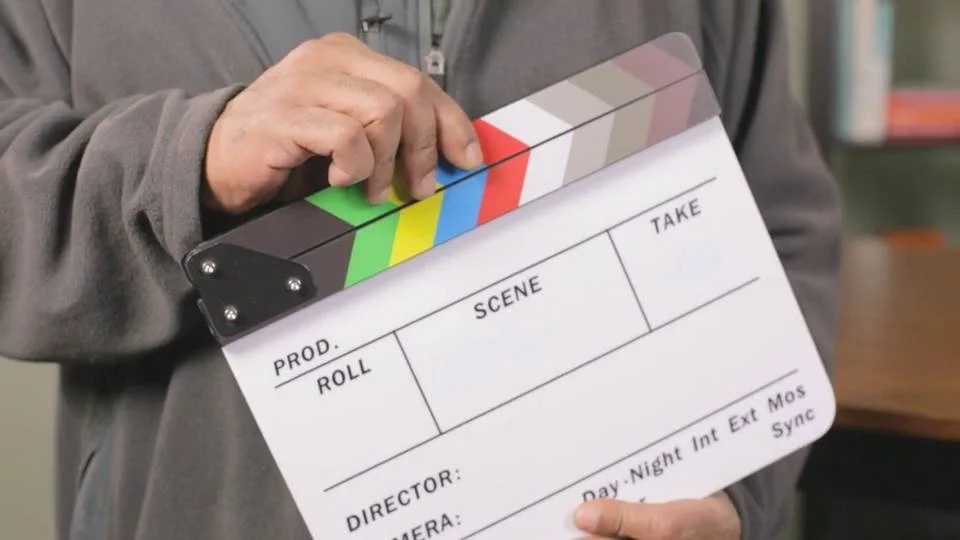
The other purpose of the rehearsal is to create an unmistakable reference point. A clap seen by the camera and heard by the microphone gives the editor a visual moment and a sound transient to compare. It is useful even when Riverside already associates the recordings, because it provides a manual synchronization check.
How to Sync Audio and Video - MediaMusicNow Blog
Read MediaMusicNow’s “How to Sync Audio and Video” for its two practical ideas: create a visible and audible sync point, and identify which recordings belong together.
Read from the introductory paragraph beginning “Getting high quality audio often means recording your audio on a separate device to your camera” through the final bullet of the “Identification” subsection, which ends “Clap in front of the camera and audio recorder.” Follow the clap method, paying particular attention to the “Synching” and “Identification” subsections. You do not need to buy a clapperboard: the hand-clap alternative is the relevant method here.
Prepare one eight-minute take
Use the room microphone and phone-camera arrangement you have already configured. Before starting, ask the three in-room speakers to sit in their intended recording positions. Have the remote guest join if one is planned for the podcast; if they are unavailable, you can still rehearse the room setup, but note that the remote exchange remains untested.
Choose one person to operate the recording controls and watch the clock. Give the take a simple identifier such as R01. That identifier should appear in the Riverside recording title if available, in a spoken announcement at the beginning, and in any notes you keep. This makes it easier to associate the camera and audio material later.
Before pressing Record, confirm that the intended group microphone and phone camera are active. Avoid introducing a second live room microphone merely because another device is present: it could create a duplicate, delayed recording of the same voices. Confirm also that the remote guest can be heard through the playback arrangement you prepared without their voice feeding back into the room microphone.
The brief Riverside tutorial below shows the recording control, countdown, and upload indicators. Its presenter uses a different equipment arrangement; watch for the recording procedure, not as instructions to replace your shared-microphone setup.
Riverside.fm Tutorial for Beginners
Watch “Riverside.fm Tutorial for Beginners” by TheFigCo to see what happens when a host starts and stops a recording.
Watch studio controls for the studio view and microphone indication. Then watch recording and upload for the pre-recording check, countdown, short recording, and upload progress after stopping. Interface labels may differ from yours; focus on confirming that capture has started and that uploads finish before anyone closes a recording device.
Allow roughly five minutes to gather everyone, check the shot and devices, and explain the sequence. Tell participants to speak at their normal podcast volume, not to perform an unnaturally loud “test voice.” Ask them not to move the shared microphone during the take.
Follow a simple rehearsal run of show
Start the clock after Riverside’s recording countdown has finished and you can confirm the recording is active. The times are guides, not cues to interrupt someone mid-sentence.
| Recording time | What to capture |
|---|---|
| 0:00–0:45 | Say the take identifier aloud—for example, “Rehearsal R01, group microphone and phone camera.” Once everyone is settled, make one clear hand clap within the phone camera’s frame, where the group microphone can hear it. Leave a beat before anyone speaks. |
| 0:45–2:00 | Have each of the three in-room speakers introduce themselves in turn, using a sentence or two at their normal speaking level. If present, invite the remote guest to introduce themselves too. |
| 2:00–4:30 | Discuss a straightforward podcast topic as you normally would. Let speakers look at one another and take natural turns rather than speaking directly into the microphone throughout. Include an exchange with the remote guest if present. |
| 4:30–5:15 | Allow a brief, intentional overlap: two in-room speakers respond at once for a few seconds, then return to normal turn-taking. If the remote guest is present, include a short moment when their reply meets an in-room reply. Do not spend the entire interval talking over one another. |
| 5:15–6:45 | Resume ordinary conversation. This gives the later review a comparison with the overlapping portion. |
| 6:45–7:15 | Include a few natural pauses between thoughts. Then announce, “Quiet room, fifteen seconds,” and have everyone remain still and silent for about 15 seconds. |
| 7:15–8:00 | Resume briefly, then say “End of rehearsal R01.” Leave a short beat and stop the recording. |
The announced quiet interval is different from an accidental gap. Because its purpose is spoken aloud, the editor will know that the silence—and any room noise audible within it—was intentional. Likewise, the short overlap tests a realistic challenge for a shared microphone without making the entire take difficult to understand.
For the clap, put your hands where the phone camera can see them and make sure the group microphone can hear them. Clap once, firmly but not immediately beside the microphone. Avoid clapping during Riverside’s countdown: both the image and sound must be in the recorded take. If the clap was missed, say so, settle everyone, and make another clearly identified clap rather than leaving its location ambiguous.
Finish the take without losing the material
When the operator stops recording, do not treat the stopped timer as proof that every file is ready. Check the upload status for the room recording and, if present, the remote guest’s recording. Keep the relevant browser or app open until each device reports that its upload is complete. A remote guest should remain available to confirm completion on their own device.
Make a short factual note while the take is fresh: the identifier R01, whether the remote guest participated, and any interruption such as a notification, a repeated clap, or someone briefly leaving the camera frame. Do not try to grade the sound or picture yet. The purpose of the note is to make the recorded events understandable when you review them.
An eight-minute take, a few minutes of setup, and time for uploads make this a manageable rehearsal rather than a full mock episode. If an interruption makes the take unusable, keep its identifier and start a new one—R02—so recordings and notes cannot be confused.
Conclusion
A useful rehearsal records more than isolated test words. Your take should contain identifiable introductions, normal discussion, short overlapping speech, pauses, quiet room sound, and one visible and audible clap—all under a clear take identifier. Keep every recording device open until uploads finish.
In the next lesson, you will use this take to evaluate voice balance, distortion, noise, echo, framing, lighting, and audio-video synchronization before deciding what to adjust for recording day.