Recommended resources
The freely available resources this lesson will direct you to.
Welcome back. Last lesson separated the reservation feature into a domain rule, a ConfirmReservation use case, an HTTP controller, and an Eloquent-backed repository. The code dependencies pointed toward the domain. This time, we’ll follow a request at runtime: from a React interaction, through those Laravel components, into the database, and back to the screen.
That distinction is useful when building or debugging a full-stack feature. A sensible folder structure does not, by itself, tell you where a user’s action went or whether it was saved. Allow about 40 minutes for the selected video passages, a short reading, and the worked trace.
Begin with the user-visible action
Watch selected passages from React JS CRUD App with Laravel APIs by Hardik Savani (ItSolutionStuff). The example creates posts rather than confirming reservations, but it exposes the same browser–API–database boundary. Watch for the specific handoffs, not the setup steps or the CRUD pattern as a whole.
React JS CRUD App with Laravel APIs
In “React JS CRUD App with Laravel APIs,” Hardik Savani builds a small feature across Laravel, storage, and React. Use these excerpts to identify what each side sends and receives.
In the Laravel API segment, watch the storage setup for the migration and model, then route to row for route registration, controller action, database insert, and returned JSON. In the React segments, watch the readback to see stored records reach the screen, then form submission to see input state become an HTTP request. The tutorial deliberately skips validation in its create action; our Laravel boundary below will not.
For our continuing example, the interaction is a Confirm reservation button on a reservation detail screen. Assume the screen already knows the workshop and reservation IDs. We’ll use a JSON API rather than Inertia: React and Laravel communicate through HTTP, while Laravel’s internal layers retain the boundaries from last lesson.
The request contract for this slice is deliberately small:
POST /api/reservations/confirm
Accept: application/json
Content-Type: application/json

{"workshop_id":"w-42","reservation_id":"r-9"}
A successful response is 200 OK with {"status":"confirmed"}. The IDs identify which reservation to act on; they do not give the client authority to declare it confirmed. Only the server can make that decision.
Here is a compact React/TypeScript interaction. It keeps the displayed result tied to the server response rather than changing the label as soon as the button is clicked.
import { useState } from "react";

type Phase = "ready" | "submitting" | "confirmed" | "error";

export function ConfirmButton({
  workshopId,
  reservationId,
}: {
  workshopId: string;
  reservationId: string;
}) {
  const [phase, setPhase] = useState<Phase>("ready");
  const [message, setMessage] = useState("");

  async function confirm() {
    setPhase("submitting");
    setMessage("");

    try {
      const response = await fetch("/api/reservations/confirm", {
        method: "POST",
        headers: {
          Accept: "application/json",
          "Content-Type": "application/json",
        },
        body: JSON.stringify({
          workshop_id: workshopId,
          reservation_id: reservationId,
        }),
      });

      if (!response.ok) {
        setMessage(
          response.status === 409
            ? "This reservation cannot be confirmed: no places remain."
            : response.status === 422
              ? "The reservation request is invalid."
              : "Confirmation failed. Please try again."
        );
        setPhase("error");
        return;
      }

      const body: unknown = await response.json();
      if (
        typeof body !== "object" ||
        body === null ||
        !("status" in body) ||
        body.status !== "confirmed"
      ) {
        throw new Error("Unexpected confirmation response");
      }

      setPhase("confirmed");
    } catch {
      setMessage("Could not verify confirmation. Please check and try again.");
      setPhase("error");
    }
  }

  return (
    <div>
      <button
        type="button"
        onClick={() => void confirm()}
        disabled={phase === "submitting" || phase === "confirmed"}
      >
        {phase === "submitting"
          ? "Confirming..."
          : phase === "confirmed"
            ? "Confirmed"
            : "Confirm reservation"}
      </button>
      {phase === "error" && <p role="alert">{message}</p>}
    </div>
  );
}
This assumes an existing, correctly configured authentication and CSRF arrangement; neither is supplied by fetch alone. Notice two other boundaries: TypeScript types do not validate a server response at runtime, and fetch does not throw merely because the server returned 409 or 422. The component checks the HTTP status before treating the response as success.
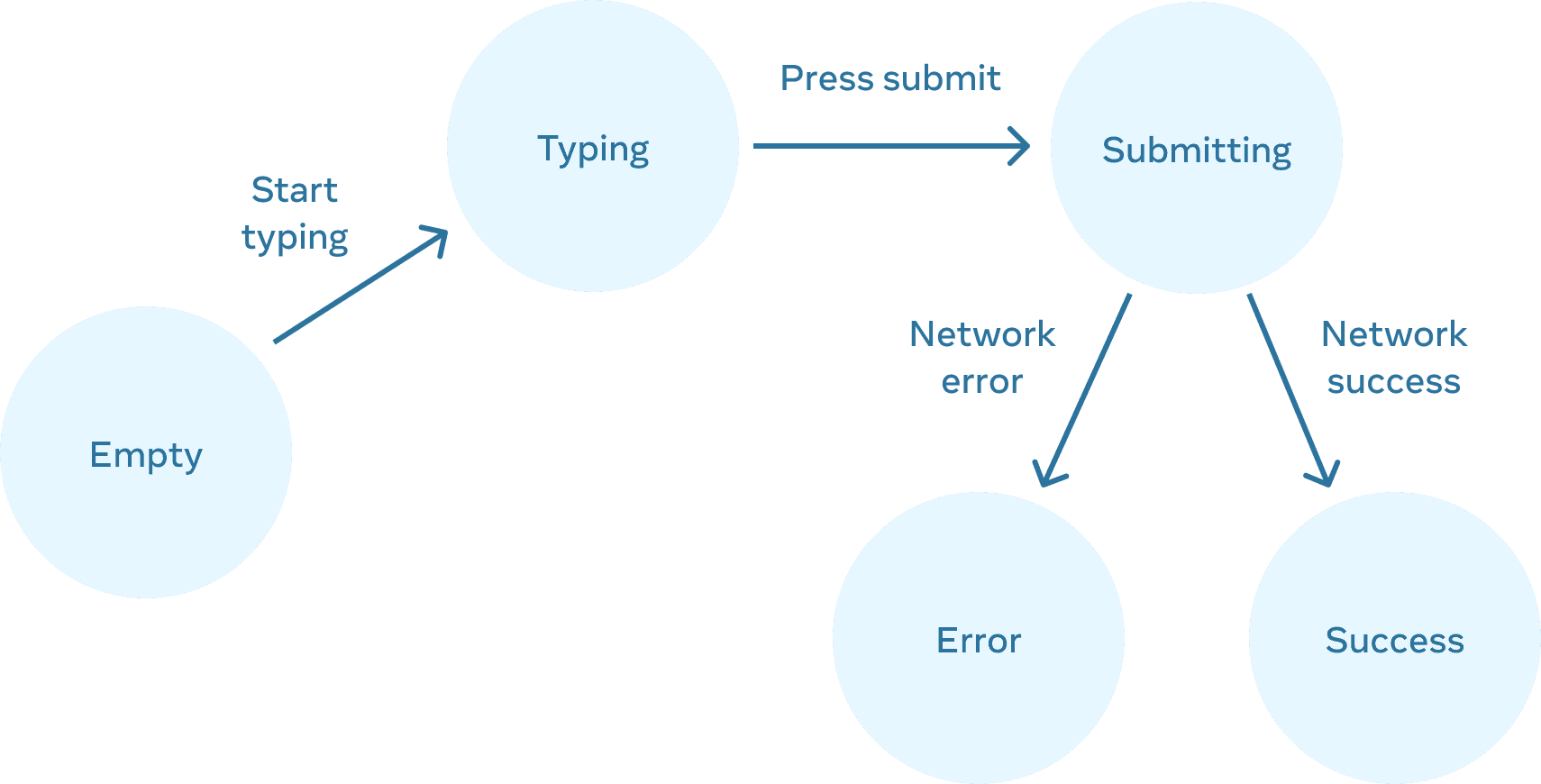
The provided Input field states diagram depicts a more general form that moves from empty and typing to submitting, then error or success. Our button has no typing stage, but its submitting, error, and success states serve the same purpose: they show what the interface knows while a request is in flight.
Follow the request through Laravel
The browser’s POST must match a Laravel route. With API routing configured, a route in routes/api.php is exposed under /api; an authenticated application would also apply its appropriate authentication middleware.
use App\Http\Controllers\Reservations\ConfirmReservationController;
use Illuminate\Support\Facades\Route;

Route::post(
    '/reservations/confirm',
    ConfirmReservationController::class
);
The controller from last lesson accepts the request, checks its shape, passes plain identifiers to the use case, and translates success into HTTP:
public function __invoke(
    Request $request,
    ConfirmReservation $confirm,
): JsonResponse {
    $data = $request->validate([
        'workshop_id' => ['required', 'string'],
        'reservation_id' => ['required', 'string'],
    ]);

    $confirm($data['workshop_id'], $data['reservation_id']);

    return response()->json(['status' => 'confirmed']);
}
Read the Validation Quickstart in Laravel’s Validation documentation, especially its controller example and “XHR Requests and Validation.” This clarifies why a malformed JSON request does not proceed into ConfirmReservation.
Validation | Laravel 13.x - The clean stack for Artisans and agents
Read Laravel’s validation quickstart to connect the request boundary with the response React receives when input is invalid.
Under “Validation Quickstart,” find “Writing the Validation Logic” immediately after “Creating the Controller.” Read the controller flow, focusing on where execution stops after failed validation. Then find “XHR Requests and Validation,” after “Repopulating Forms,” and read the JSON case. Compare its 422 response with the React component’s non-success branch.
Once validation passes, the familiar application service runs:
$workshopBookings = $this->bookings->get($workshopId);
$workshopBookings->confirm($reservationId);
$this->bookings->save($workshopBookings);
Each call answers a different question. get() obtains the facts needed for a decision. confirm() applies the domain rule: is this reservation eligible, and is a place available? save() asks the infrastructure adapter to persist the changed state. The controller does not make the admission decision, and the domain does not know whether its caller was React or another client.
The repository implementation is where the abstract operation meets actual storage. In this example, imagine workshops holds an approved booking limit and reservations holds each reservation’s workshop ID and status. On get(), the Eloquent adapter must load the limit and the relevant reservation states, then reconstruct WorkshopBookings with enough information to make its decision. On save(), it persists the confirmed status for the selected reservation. Representative database operations might look like this:
SELECT approved_booking_limit
FROM workshops
WHERE id = ?;

SELECT id, status
FROM reservations
WHERE workshop_id = ?;

UPDATE reservations
SET status = 'confirmed'
WHERE workshop_id = ?
  AND id = ?
  AND status = 'pending';
These queries illustrate the trace, not a complete repository implementation. In particular, updating a pending row is not enough to protect the workshop-wide limit against two confirmations racing each other. The load, decision, and write need a suitable transaction and concurrency strategy, which we will examine in the data-correctness module. An HTTP success response is warranted only after the intended persistence operation succeeds.
Trace the result back, including failures
A vertical slice is not complete when the database write finishes. Laravel must return an outcome that React can interpret, and the interface must avoid claiming more than that outcome supports.
| Point in the slice | Successful confirmation | Where a failure becomes visible |
|---|---|---|
| React interaction | Sends the IDs and shows “Confirming...” | Network failure reaches the component’s catch branch. |
| Laravel route and controller | Selects the action and validates input | Invalid input returns 422 before the use case runs. |
| Application and domain | Loads bookings and permits confirmation | A booking-limit rejection must be translated by the HTTP edge; the example contract uses 409. |
| Repository and database | Writes the changed reservation status | A failed write must not produce the controller’s success response. |
| HTTP response and React | Returns 200 with confirmed; the button changes to “Confirmed” |
A non-success status shows an error rather than a confirmed label. |
The 409 mapping is a design choice for this example, not something Laravel automatically infers from a domain exception. It requires an exception handler or other presentation-layer mapping. Likewise, authorization must be checked on the server: possession of a reservation ID is not permission to confirm it.
This trace also provides a practical debugging method. If the button reports an error, inspect the browser Network tab first: did a POST reach /api/reservations/confirm, with the expected body, and what status came back? If the route did not match, inspect Laravel’s registered routes. If the controller returned 422, inspect validated input. If the domain rejected confirmation, inspect the loaded business facts. If the response says success but a subsequent database read shows no change, inspect repository mapping and the write—not the React label. A fresh read through a read endpoint, or a direct check of the stored row, distinguishes persisted state from a screen updated solely on the basis of one response.
Finally, do not confuse runtime travel with source-code dependency direction. At runtime, the request reaches an Eloquent adapter and a database. In source code, ConfirmReservation still names only its repository interface and the domain. Tracing the whole feature should make every boundary visible without collapsing those boundaries into one controller.
Bringing the slice together
You can now trace confirmation in both directions: React sends an interaction as HTTP; Laravel routes and validates it; the application coordinates a domain decision; infrastructure reads and writes the necessary state; and the response determines what React displays. The important checks are not just “did the button work?” but which component decided, what was persisted, and what evidence the UI received.
Next, you’ll use traces like this to write an architecture decision record: a concise way to document why a boundary or implementation was chosen, which alternatives were considered, and what consequences remain.