Recommended resources
The freely available resources this lesson will direct you to.
Hello! In the previous lesson, you chose how to create an object using Builder or Factory. This final lesson in the Java design module turns to what happens when work doesn’t complete normally. In a backend service, the difficult part is often not throwing an exception; it is preserving enough information to diagnose the failure while still releasing the resources the operation acquired.
You’ll inspect a flawed Java method, repair its error handling, and trace what happens when both the work and cleanup fail. Plan on about 40 minutes, with most of the time spent reading and tracing code.
First, know what your catch block can intercept
The exception hierarchy matters when reviewing a catch block:
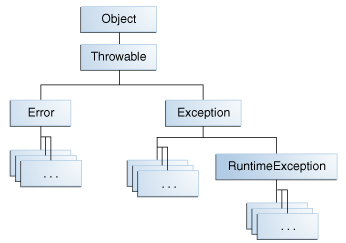
An IOException is a checked exception: a caller must catch it or declare it. A NullPointerException is a runtime exception: Java does not impose that requirement. Both are exceptions, but catch (Exception e) intercepts both. catch (Throwable t) goes further and also intercepts Error, a branch that includes failures such as OutOfMemoryError.
Watch Java Exception Handling - 5 Best Practices That You Should Know! from Visual Computer Science. Its file-stream example establishes the resource problem; the later sections address catch breadth and where a failure should be handled.
Java Exception Handling - 5 Best Practices That You Should Know!
Watch the file-stream example and the guidance on choosing a catch boundary. We’ll qualify one rule from the video: declaring a checked exception in a method signature can be appropriate when the caller can make a better decision about it.
Watch resource cleanup for the leak caused by closing only on the successful path and the try-with-resources alternative. Continue through catch selection for narrow catches, Throwable, and ignored failures. In layer boundaries, focus on the distinction between detecting a failure near its source and handling it where an application decision is possible.
“Catch the most specific exception” is a useful review heuristic, not a demand to put a catch around every call. Catch when you can recover, translate the failure at a meaningful boundary, or choose the response. Otherwise, let it propagate. A broad catch may be justified at an application boundary that must report an unexpected failure; deep inside a file reader or repository, it can accidentally turn a programming defect into a plausible-looking result.
Repair a method that hides failure
Suppose a service counts lines in an input file. This implementation looks defensive because it has both catch and finally, but trace the two paths where readLine() or close() fails:
import java.io.BufferedReader;
import java.io.IOException;
import java.nio.file.Files;
import java.nio.file.Path;

static long countRecords(Path file) {
    BufferedReader reader = null;

    try {
        reader = Files.newBufferedReader(file);
        long count = 0;
        while (reader.readLine() != null) {
            count++;
        }
        return count;
    } catch (Exception e) {
        return 0;
    } finally {
        if (reader != null) {
            try {
                reader.close();
            } catch (IOException ignored) {
                // Nothing to do
            }
        }
    }
}
If the file contains zero records, 0 is a valid answer. If opening or reading the file fails, this method also returns 0. The caller cannot distinguish empty input from failed input. Worse, catching Exception can conceal an unrelated runtime bug. The ignored close failure removes another diagnostic clue. A downstream service might now make a business decision using a count that was never successfully computed.
The simplest repair is to stop pretending that failure is a count. Since this method’s job is file I/O, declaring IOException makes its contract clear. Try-with-resources gives the reader a defined lifetime:
static long countRecords(Path file) throws IOException {
    try (BufferedReader reader = Files.newBufferedReader(file)) {
        long count = 0;
        while (reader.readLine() != null) {
            count++;
        }
        return count;
    }
}
Here the reader is closed when execution leaves the block, including when readLine() throws or the method returns. No catch is needed at this level: a caller with enough context can decide whether to retry, reject an operation, or report the failure. An empty file still returns 0; a failed read does not.
This repair also clarifies a resource-management rule: close what your code owns. The method opens this reader and finishes using it, so it should close it. In a Spring service, by contrast, a framework-managed transaction or shared DataSource has a different owner; do not close the shared infrastructure object merely because the method uses it. If you acquire a JDBC Connection directly and own that acquisition, its lifetime does need explicit management.
Read the relevant parts of Dev.java’s Catching and Handling Exceptions to see why try-with-resources is preferable to manually closing in finally.
Catching and Handling Exceptions - Dev.java
Dev.java explains both the cleanup guarantee and a less obvious benefit: preserving the exception from the work when cleanup also fails.
In “Exceptions Thrown from a Finally Block,” begin where the text introduces a situation in which the try block and then finally throw. Read the failure case through its explanation of which exception reaches the caller. Then, in “The Try-with-resources Statement,” under “Closing Resources and Handling Exceptions,” read the resource rules, from AutoCloseable through the note about when a catch block runs. Include “Opening Several Resources” within that range; notice the reverse closing order. Finally, in “Suppressed Exceptions,” read the exception ordering, then continue to the sentence explaining getSuppressed().
Try-with-resources applies to objects implementing AutoCloseable, including many file and JDBC resources. With multiple resources, Java attempts to close them in reverse declaration order. It guarantees a close attempt, not that a failing close() somehow succeeded.
Preserve the failure that matters
Cleanup can fail while Java is already handling another failure. This small program makes the distinction visible:
import java.io.IOException;

final class FaultyReader implements AutoCloseable {
    void read() throws IOException {
        throw new IOException("read failed");
    }

    @Override
    public void close() throws IOException {
        throw new IOException("close failed");
    }
}

static void inspectFailures() {
    try (FaultyReader reader = new FaultyReader()) {
        reader.read();
    } catch (IOException e) {
        System.out.println(e.getMessage());
        for (Throwable suppressed : e.getSuppressed()) {
            System.out.println("Suppressed: " + suppressed.getMessage());
        }
    }
}
Trace it in order. read() throws "read failed". As the block exits, Java calls close(), which throws "close failed". The exception caught as e is still the read failure; the close failure is attached to it as a suppressed exception. The output is:
read failed
Suppressed: close failed
A manually written finally that throws from close() can instead replace the original read failure. A return or throw written in finally poses a similar risk of hiding what happened earlier. Try-with-resources handles the common cleanup case without making you implement that exception bookkeeping yourself.
A suppressed exception is different from a cause. Suppression records an additional failure during cleanup. A cause records why a new exception you chose to throw exists. For example, an application layer may want to describe an I/O failure in its own terms:
import java.io.IOException;
import java.io.UncheckedIOException;
import java.nio.file.Path;

static long countForImport(Path file) {
    try {
        return countRecords(file);
    } catch (IOException e) {
        throw new UncheckedIOException("Could not count import records", e);
    }
}
The e passed to the constructor preserves the original IOException as the cause. Omitting it would discard useful diagnostic context. This translation is worthwhile only if the new exception expresses a meaningful boundary or contract; wrapping every exception at every layer merely creates noise.
Oracle’s Chained Exceptions explains the cause relationship. It is an older Java tutorial, but the cause mechanism shown here still applies.
Chained Exceptions (The Java™ Tutorials > Essential Java Classes > Exceptions)
Read Oracle’s explanation to distinguish an exception’s cause from the suppressed cleanup failures you just traced.
In “Chained Exceptions,” start with the opening explanation of one exception causing another. Read exception chaining through the IOException wrapping example. Focus on the constructor that receives the original exception and on what getCause() retrieves; stop before “Accessing Stack Trace Information.”
One final code-review signal is a catch block that both logs a failure and rethrows it without adding a decision. That can produce duplicate error reports when an outer boundary logs it again. Prefer to handle and report at the responsible boundary, or add useful context and propagate with the cause intact. Never replace a failed operation with a success-shaped value simply to avoid an exception.
Key takeaways
When reviewing Java failure paths, ask: Can the caller tell success from failure? Is the original cause still available? Will every resource this code owns receive a close attempt? Catch where you can make a meaningful decision, use try-with-resources for owned AutoCloseable resources, and distinguish a translated exception’s cause from a cleanup failure’s suppressed exception.
This completes the Java design module. Next, the course moves into JVM internals, beginning with how Java source becomes executing code.