Recommended resources
The freely available resources this lesson will direct you to.
Hello! Your sandbox now has a measured game loop: it can run zero or several fixed simulation ticks between rendered frames. Last lesson left a question open: if a key is pressed during an outer-loop iteration with no simulation tick, when should gameplay see it?
This lesson builds an input layer that answers that question. You’ll translate Win32 keyboard and mouse messages at the window boundary, maintain engine-owned state, and let simulation code query that state without including a Windows header. Allow about 45–55 minutes, including the short resources, implementation, and tests.
Messages are observations; input state is an engine contract
A window procedure receives messages such as “a key went down” and “the cursor moved.” Gameplay usually needs different questions answered: “Is the movement key held during this tick?” or “Was the jump key pressed since the last tick?”
The keyboard-input diagram shows why the window procedure is the right translation boundary. Keyboard activity passes through Windows message queues before your application handles it; it does not arrive as a gameplay action.
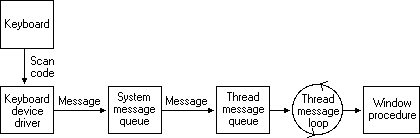
Watch the opening of The Cherno’s “Input Polling | Game Engine series” for the distinction between receiving notifications and asking for current state. The video uses a different windowing backend; take the design distinction, not its backend-specific implementation.
Input Polling | Game Engine series
Watch “Input Polling | Game Engine series” by The Cherno to distinguish event notifications from queries such as “is this button held?”
Watch events and polling. Focus on the camera-control example: an event says the mouse moved, while state tells you whether a modifier or mouse button is held during that movement.
SDL’s “Best Keyboard Practices” makes a complementary point. Although you are implementing Win32 rather than SDL, its explanation of events, held state, and key repeat applies to this design.
SDL3/BestKeyboardPractices - SDL Wiki
Read “Best Keyboard Practices” from the SDL Wiki for the distinction between physical key locations, held state, and repeated key events.
In “The 101-Button Joystick,” read the keyboard example. Then, under “Events vs States,” read events and repeat, including “A Note on Key Repeat.” Notice why repeat messages cannot drive continuous movement smoothly.
For this first implementation, give gameplay three queries for each supported key or mouse button:
- Down: it is currently held.
- Pressed: it changed from up to down since the previous simulation tick.
- Released: it changed from down to up since the previous simulation tick.
“Pressed” is an edge, not a synonym for “down.” Holding a movement key can affect every tick; pressing jump should ordinarily be observed once. Mouse position is a current client-area coordinate, while mouse movement and wheel travel are amounts accumulated between ticks.
Put engine-owned names at the boundary
Keep Win32 constants such as VK_SPACE, WM_KEYDOWN, and MK_LBUTTON out of the public input API. Start with a small set of engine keys; extend the mapping when a feature actually needs another key.
Add engine/include/engine/InputTypes.hpp:
#pragma once

namespace engine {

enum class Key {
    W, A, S, D, Space, Escape,
    Count
};

enum class MouseButton {
    Left, Right, Middle,
    Count
};

} // namespace engine
Count is a sentinel for array sizing, not a key that gameplay can press. These names currently represent the corresponding Win32 virtual keys. In particular, W means the key Windows identifies as W, not necessarily a fixed physical position on every keyboard layout. Physical-location movement bindings are a valid later refinement; do not silently equate virtual-key codes with scan codes.
Extend your existing WindowEvent declaration in Window.hpp. Preserve its existing close, resize, and focus fields; the additions below show the input fields and event types needed by this lesson:
#include <engine/InputTypes.hpp>

// Inside the existing WindowEvent definition:
enum class Type {
    CloseRequested,
    Resized,
    FocusChanged,
    KeyDown,
    KeyUp,
    MouseDown,
    MouseUp,
    MouseMoved,
    MouseWheel
};

Key key = Key::Count;
MouseButton button = MouseButton::Count;
int mouse_x = 0;
int mouse_y = 0;
float wheel_y = 0.0f;
bool focused = true;
If your existing Type declaration or focus field differs, extend it rather than replacing working resize and close behavior. The intended boundary is simple: WindowEvent carries engine types; only the Win32 implementation knows where those values came from.
In your Win32 window implementation, add a small mapping function. Keep it in the .cpp file:
bool translate_key(WPARAM virtual_key, engine::Key& result) {
    switch (virtual_key) {
    case 'W':       result = engine::Key::W;      return true;
    case 'A':       result = engine::Key::A;      return true;
    case 'S':       result = engine::Key::S;      return true;
    case 'D':       result = engine::Key::D;      return true;
    case VK_SPACE:  result = engine::Key::Space;  return true;
    case VK_ESCAPE: result = engine::Key::Escape; return true;
    default:        return false;
    }
}
The deliberate whitelist avoids treating an arbitrary Windows code as an array index. Unsupported keys can still receive normal Windows processing; they simply do not enter this prototype input layer.
In the existing window procedure, use the same event-queue operation you already use for resize and focus events. The following cases show what to enqueue; emit(e) stands for that existing queue operation, not a new gameplay callback:
// Add <windowsx.h> in this Win32-only .cpp for GET_X_LPARAM
// and GET_Y_LPARAM.

case WM_KEYDOWN:
case WM_KEYUP: {
    engine::Key key{};
    if (translate_key(wParam, key)) {
        engine::WindowEvent e{};
        e.type = message == WM_KEYDOWN
            ? engine::WindowEvent::Type::KeyDown
            : engine::WindowEvent::Type::KeyUp;
        e.key = key;
        emit(e);
        return 0;
    }
    break;
}

case WM_LBUTTONDOWN:
case WM_RBUTTONDOWN:
case WM_MBUTTONDOWN:
case WM_LBUTTONUP:
case WM_RBUTTONUP:
case WM_MBUTTONUP: {
    const bool down =
        message == WM_LBUTTONDOWN ||
        message == WM_RBUTTONDOWN ||
        message == WM_MBUTTONDOWN;

    engine::WindowEvent e{};
    e.type = down
        ? engine::WindowEvent::Type::MouseDown
        : engine::WindowEvent::Type::MouseUp;

    e.button =
        (message == WM_LBUTTONDOWN || message == WM_LBUTTONUP)
            ? engine::MouseButton::Left
        : (message == WM_RBUTTONDOWN || message == WM_RBUTTONUP)
            ? engine::MouseButton::Right
            : engine::MouseButton::Middle;

    if (down) {
        SetCapture(hwnd);
    }

    emit(e);

    if (!down &&
        (wParam & (MK_LBUTTON | MK_RBUTTON | MK_MBUTTON)) == 0 &&
        GetCapture() == hwnd) {
        ReleaseCapture();
    }
    return 0;
}

case WM_MOUSEMOVE: {
    engine::WindowEvent e{};
    e.type = engine::WindowEvent::Type::MouseMoved;
    e.mouse_x = GET_X_LPARAM(lParam);
    e.mouse_y = GET_Y_LPARAM(lParam);
    emit(e);
    return 0;
}

case WM_MOUSEWHEEL: {
    engine::WindowEvent e{};
    e.type = engine::WindowEvent::Type::MouseWheel;
    e.wheel_y =
        static_cast<float>(GET_WHEEL_DELTA_WPARAM(wParam)) /
        static_cast<float>(WHEEL_DELTA);
    emit(e);
    return 0;
}
These mouse coordinates are relative to the window’s client area. Wheel travel can be fractional; do not assume every message is exactly one notch. Mouse capture helps a drag receive its button release even if the pointer moves outside the client area. The snippet handles left, right, and middle buttons only.
Retain your existing focus handling, but ensure it enqueues FocusChanged with focused = false on WM_KILLFOCUS and focused = true on WM_SETFOCUS. Do not add duplicate focus events if those cases already exist. Leave unhandled messages to the window procedure’s existing DefWindowProc path. This prototype does not implement text entry or Alt/system-key bindings; neither should be improvised from these button-state queries.
Store transitions until a simulation tick consumes them
A per-rendered-frame pressed flag is tempting, but it loses information. Suppose a key goes down, the message pump handles it, and the scheduler runs zero ticks. If you clear pressed at the start of the next outer iteration, simulation never sees that press.
Instead, store pending edges when events arrive. At the start of each fixed tick, transfer them into a tick snapshot and clear the pending edges. Held state persists. If an outer iteration runs two ticks, the press belongs to the first tick only; both ticks can see that the key remains down.
Add engine/include/engine/Input.hpp. This class depends on engine events, not Windows:
#pragma once

#include <engine/Window.hpp>

#include <array>
#include <cstddef>

namespace engine {

class Input {
    template <std::size_t N>
    struct Buttons {
        std::array<bool, N> down{};
        std::array<bool, N> pending_pressed{};
        std::array<bool, N> pending_released{};
        std::array<bool, N> pressed{};
        std::array<bool, N> released{};

        void set(std::size_t i, bool is_down) {
            if (i >= N || down[i] == is_down) {
                return; // Also ignores OS-generated key repeats.
            }

            down[i] = is_down;
            if (is_down) {
                pending_pressed[i] = true;
            } else {
                pending_released[i] = true;
            }
        }

        void begin_tick() {
            pressed = pending_pressed;
            released = pending_released;
            pending_pressed.fill(false);
            pending_released.fill(false);
        }

        void clear() {
            down.fill(false);
            pending_pressed.fill(false);
            pending_released.fill(false);
            pressed.fill(false);
            released.fill(false);
        }

        bool is_down(std::size_t i) const {
            return i < N && down[i];
        }
        bool was_pressed(std::size_t i) const {
            return i < N && pressed[i];
        }
        bool was_released(std::size_t i) const {
            return i < N && released[i];
        }
    };

public:
    void on_event(const WindowEvent& e) {
        switch (e.type) {
        case WindowEvent::Type::KeyDown:
            keys_.set(index(e.key), true);
            break;
        case WindowEvent::Type::KeyUp:
            keys_.set(index(e.key), false);
            break;
        case WindowEvent::Type::MouseDown:
            buttons_.set(index(e.button), true);
            break;
        case WindowEvent::Type::MouseUp:
            buttons_.set(index(e.button), false);
            break;
        case WindowEvent::Type::MouseMoved:
            if (has_mouse_position_) {
                pending_dx_ += e.mouse_x - mouse_x_;
                pending_dy_ += e.mouse_y - mouse_y_;
            }
            mouse_x_ = e.mouse_x;
            mouse_y_ = e.mouse_y;
            has_mouse_position_ = true;
            break;
        case WindowEvent::Type::MouseWheel:
            pending_wheel_y_ += e.wheel_y;
            break;
        case WindowEvent::Type::FocusChanged:
            if (!e.focused) {
                keys_.clear();
                buttons_.clear();
                pending_dx_ = pending_dy_ = 0;
                tick_dx_ = tick_dy_ = 0;
                pending_wheel_y_ = tick_wheel_y_ = 0.0f;
                has_mouse_position_ = false;
            }
            break;
        default:
            break;
        }
    }

    void begin_tick() {
        keys_.begin_tick();
        buttons_.begin_tick();

        tick_dx_ = pending_dx_;
        tick_dy_ = pending_dy_;
        tick_wheel_y_ = pending_wheel_y_;
        pending_dx_ = pending_dy_ = 0;
        pending_wheel_y_ = 0.0f;
    }

    bool key_down(Key key) const {
        return keys_.is_down(index(key));
    }
    bool key_pressed(Key key) const {
        return keys_.was_pressed(index(key));
    }
    bool key_released(Key key) const {
        return keys_.was_released(index(key));
    }

    bool mouse_down(MouseButton button) const {
        return buttons_.is_down(index(button));
    }
    bool mouse_pressed(MouseButton button) const {
        return buttons_.was_pressed(index(button));
    }
    bool mouse_released(MouseButton button) const {
        return buttons_.was_released(index(button));
    }

    bool has_mouse_position() const { return has_mouse_position_; }
    int mouse_x() const { return mouse_x_; }
    int mouse_y() const { return mouse_y_; }
    int mouse_dx() const { return tick_dx_; }
    int mouse_dy() const { return tick_dy_; }
    float wheel_y() const { return tick_wheel_y_; }

private:
    template <class Enum>
    static std::size_t index(Enum value) {
        return static_cast<std::size_t>(value);
    }

    Buttons<static_cast<std::size_t>(Key::Count)> keys_;
    Buttons<static_cast<std::size_t>(MouseButton::Count)> buttons_;

    int mouse_x_ = 0;
    int mouse_y_ = 0;
    bool has_mouse_position_ = false;

    int pending_dx_ = 0;
    int pending_dy_ = 0;
    int tick_dx_ = 0;
    int tick_dy_ = 0;
    float pending_wheel_y_ = 0.0f;
    float tick_wheel_y_ = 0.0f;
};

} // namespace engine
A few choices here matter more than the amount of code:
downchanges when messages are handled.pressed,released, mouse displacement, and wheel travel are snapshots for the current simulation tick.- A down and an up between ticks leave the button not held, but the next tick can see both edges.
- Losing focus clears held state without inventing release actions. Otherwise, a key released while another application has focus could remain “stuck” in your engine.
- The first mouse-position message establishes a position without inventing a large movement from
(0, 0).
If your Window.hpp currently includes input implementation details, trim that dependency: it needs only InputTypes.hpp. Input.hpp can include Window.hpp to consume the engine event type.
Connect input to the loop you already have
Create engine::Input input; beside the sandbox’s window and scheduler. In the existing event-draining loop, feed every event to input before the switch that handles close, resize, and focus:
engine::WindowEvent event{};
while (window.poll_event(event)) {
    input.on_event(event);

    switch (event.type) {
    case engine::WindowEvent::Type::CloseRequested:
        window.close();
        running = false;
        break;
    case engine::WindowEvent::Type::Resized:
    case engine::WindowEvent::Type::FocusChanged:
        break;
    default:
        break; // Input events were handled by input.on_event().
    }
}
Then begin an input tick inside the scheduler’s fixed-update callback:
const auto result = scheduler.advance(
    frame_seconds,
    [&](double fixed_seconds) {
        input.begin_tick();

        previous_x = current_x;

        const int direction =
            static_cast<int>(input.key_down(engine::Key::D)) -
            static_cast<int>(input.key_down(engine::Key::A));

        current_x += 2.0 * direction * fixed_seconds;

        if (input.key_pressed(engine::Key::Space)) {
            engine::log(
                engine::LogChannel::Platform,
                engine::Severity::Info,
                "Space pressed during simulation tick");
        }
    });
This replaces the previous lesson’s always-moving test position with an input-controlled one. Hold A or D to change direction; tap Space to see one log entry for a press. The position remains a diagnostic stand-in, not a gameplay character.
Do not call begin_tick() once per outer loop. An outer loop can contain no ticks or several, and the input snapshot must follow the simulation boundary. This design samples the latest held state for each tick in an outer iteration and delivers accumulated edges and mouse travel to its first tick. It does not reconstruct the exact wall-clock time of every message; that would require a more detailed, tick-stamped input policy later.
Check the boundary without opening a window
Because Input consumes WindowEvent, its most important behavior is testable in the automated-test executable. Add cases using its existing assertion style. For example:
#include <engine/Input.hpp>
#include <cassert>

engine::Input input;
engine::WindowEvent e{};

e.type = engine::WindowEvent::Type::KeyDown;
e.key = engine::Key::Space;
input.on_event(e);
input.on_event(e); // Repeat must not create another edge.

// No tick occurred yet: the press must still be pending.
input.begin_tick();
assert(input.key_down(engine::Key::Space));
assert(input.key_pressed(engine::Key::Space));

input.begin_tick();
assert(input.key_down(engine::Key::Space));
assert(!input.key_pressed(engine::Key::Space));

e.type = engine::WindowEvent::Type::KeyUp;
input.on_event(e);
input.begin_tick();
assert(!input.key_down(engine::Key::Space));
assert(input.key_released(engine::Key::Space));

e.type = engine::WindowEvent::Type::KeyDown;
input.on_event(e);
e.type = engine::WindowEvent::Type::FocusChanged;
e.focused = false;
input.on_event(e);
input.begin_tick();
assert(!input.key_down(engine::Key::Space));
assert(!input.key_pressed(engine::Key::Space));
Also check a down-and-up before one tick, and two mouse positions before one tick: the former should expose both edges; the latter should report their coordinate difference once and zero movement on the following tick.
Build the tests, then run the sandbox. Verify A/D movement, a single Space-press log while holding Space, mouse-button state if you temporarily log it, and focus loss while a key is held. Once those checks pass, remove noisy diagnostic logging. None of the gameplay-side queries should require <windows.h> or refer to a WM_* constant.
Takeaways
Your window translates a limited set of Win32 messages into engine events. Input turns those events into held button state, tick-scoped press and release edges, mouse position, movement, and wheel travel. Pending edges survive outer-loop iterations with no simulation tick, while focus loss prevents held inputs from becoming stuck. Gameplay asks engine questions; it does not parse operating-system messages.
This completes the reliable Windows core’s initial loop-and-input boundary. Next, the course turns to vectors and coordinate spaces—the mathematics you’ll need before moving that input-controlled position through a 3D world.