Recommended resources
The freely available resources this lesson will direct you to.
Hello! This course begins with the part of an engine that makes later work manageable: a reliable Windows build and a clear boundary between reusable engine code and the programs that use it. Rendering, editing tools, tests, and eventually seeded worlds will all need that boundary.
In this lesson, you’ll create four CMake targets: an engine library, an editor, a sandbox, and an automated-test executable. The editor and sandbox will only be small console programs for now. The goal is to prove that each can use the engine without the engine depending on either application. Plan on roughly 40–45 minutes, including the build.
Think in targets, not just folders
A folder helps you find code; a CMake target tells the build system what to compile and what it depends on. Engine will be a library target with no main(). Editor, Sandbox, and EngineTests will each be executable targets with their own main() and their own purpose.
The following image shows a smaller version of this idea:
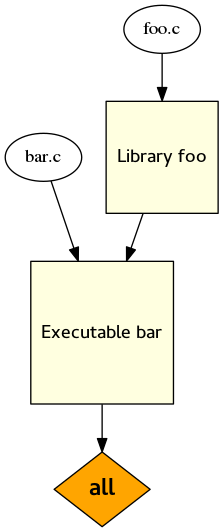
For our project, the important rule is one-way dependency: each executable may link to Engine, but Engine must not link to an executable or include one of its headers. Keep editor-specific code out of the engine library, even when putting it there would seem convenient. Otherwise, building a game without the editor could unexpectedly require editor code.
Watch this short introduction before writing CMake:
Better CMake Part 3 -- The Basics of Targets
Watch “Better CMake Part 3 — The Basics of Targets” by Jefferson Amstutz for a target-centered view of CMake.
Watch target fundamentals for the distinction between a build target and a runnable executable. Then watch visibility scopes for how PRIVATE, INTERFACE, and PUBLIC control what a target passes to its consumers. For this lesson, focus on the distinction between a target's own requirements and requirements inherited by targets that use it.
PRIVATE on an executable’s engine link means “this application uses Engine; it does not offer Engine as part of an interface to another target.” The engine’s public headers, by contrast, must be available to the applications compiling against it. Neither choice reverses the dependency: visibility controls which requirements are passed on, not which direction the application depends on the library.
Lay out the project
The official CMake tutorial provides the commands we need without requiring a large build-system framework:
Step 1: Getting Started with CMake
Read “Step 1: Getting Started with CMake” from the CMake documentation for the concrete syntax behind the project below.
In “Exercise 1 - Building an Executable,” read the target introduction, continuing through the paragraph that says the target building an implementation file is the one that needs to see it. In “Exercise 2 - Building a Library,” read the library explanation, especially why implementation files are PRIVATE while a header file set can be PUBLIC. In “Exercise 3 - Linking Together Libraries and Executables,” read the linking explanation for target_link_libraries and its three scopes. Finally, in “Exercise 4 - Subdirectories,” read the subdirectory introduction; notice what happens to relative paths when commands move into a subdirectory’s CMakeLists.txt. You can skip the tutorial’s TODOs and solutions for now.
Create this layout. Each CMakeLists.txt describes the target in its own directory; the root file brings the directories together.
world-core/
├── CMakeLists.txt
├── engine/
│   ├── CMakeLists.txt
│   ├── include/engine/Engine.hpp
│   └── src/Engine.cpp
├── editor/
│   ├── CMakeLists.txt
│   └── src/main.cpp
├── sandbox/
│   ├── CMakeLists.txt
│   └── src/main.cpp
└── tests/
    ├── CMakeLists.txt
    └── src/main.cpp
The engine/include/engine path is deliberate. Applications will write #include <engine/Engine.hpp> rather than refer to a relative path into the engine’s source tree. engine/src remains an implementation detail.
Start with the root CMakeLists.txt:
cmake_minimum_required(VERSION 3.23)
project(WorldCore LANGUAGES CXX)

enable_testing()

add_subdirectory(engine)
add_subdirectory(editor)
add_subdirectory(sandbox)
add_subdirectory(tests)
CMake 3.23 supports the header file set used below. enable_testing() allows CTest to discover the test we will register. Listing engine first also makes the intended organization easy to read: define the reusable library, then define its consumers.
Define one library and three consumers
Put this in engine/CMakeLists.txt:
add_library(Engine STATIC)

target_sources(Engine
    PRIVATE
        src/Engine.cpp
    PUBLIC
        FILE_SET HEADERS
        BASE_DIRS include
        FILES include/engine/Engine.hpp
)

target_compile_features(Engine PUBLIC cxx_std_17)
A static library keeps this first Windows build simple: there is no engine DLL to place beside each executable. The PRIVATE source belongs to the engine’s compilation. The PUBLIC header file set describes an API that its consumers can include; BASE_DIRS include supplies the appropriate header-search directory. The public C++17 requirement tells consumers which language level this engine API expects.
We only need a tiny function to verify the boundary. Put this in engine/include/engine/Engine.hpp:
#pragma once

namespace engine {
int core_revision();
}
And this in engine/src/Engine.cpp:
#include <engine/Engine.hpp>

namespace engine {
int core_revision() {
    return 1;
}
}
core_revision() is just a link smoke test, not an engine feature. It gives every consumer a real symbol to call, so a successful build checks more than whether CMake recognizes the target names.
Now define the sandbox in sandbox/CMakeLists.txt:
add_executable(Sandbox src/main.cpp)
target_link_libraries(Sandbox PRIVATE Engine)
Its sandbox/src/main.cpp is:
#include <engine/Engine.hpp>
#include <iostream>

int main() {
    std::cout << "Sandbox: engine revision "
              << engine::core_revision() << '\n';
    return 0;
}
Give the editor its own executable. In editor/CMakeLists.txt:
add_executable(Editor src/main.cpp)
target_link_libraries(Editor PRIVATE Engine)
In editor/src/main.cpp:
#include <engine/Engine.hpp>
#include <iostream>

int main() {
    std::cout << "Editor: engine revision "
              << engine::core_revision() << '\n';
    return 0;
}
Today this editor has no interface. Later, its tools can grow around engine services without making the engine require the editor. Likewise, the sandbox can become the place to run a world-generation or rendering experiment without putting its main() in the reusable library.
Finally, create tests/CMakeLists.txt:
add_executable(EngineTests src/main.cpp)
target_link_libraries(EngineTests PRIVATE Engine)

add_test(NAME EngineSmokeTest COMMAND EngineTests)
And tests/src/main.cpp:
#include <engine/Engine.hpp>
#include <iostream>

int main() {
    if (engine::core_revision() != 1) {
        std::cerr << "Unexpected engine revision\n";
        return 1;
    }
    return 0;
}
CTest treats a zero exit status as success and a nonzero status as failure. This explicit check works in Release builds too, unlike a check that relies solely on the C++ assert macro, which may be disabled. As the engine gains behavior, this same executable can hold focused automated checks rather than launching a whole application to verify every change.
Build and inspect the boundary
From the project root, configure outside the source directories. If Visual Studio 2022 with C++ support is installed, one Windows command-line option is:
cmake -S . -B build -G "Visual Studio 17 2022" -A x64
cmake --build build --config Debug
ctest --test-dir build -C Debug --output-on-failure
If you use a different installed generator or compiler, adjust the configure command; keep build as a separate build directory. With the Visual Studio generator, the executables will typically be under their corresponding directories in build, with a Debug subdirectory.
There are two distinct successes to look for. First, Sandbox, Editor, and EngineTests all compile and link against the same Engine target. Second, CTest runs EngineSmokeTest successfully. If an application cannot find engine/Engine.hpp, inspect the engine’s public header file set and its BASE_DIRS; do not “fix” the error by adding a global include directory or copying the header into the application.
The build boundary is also a useful design check. EngineTests should require engine code, not an editor window. Sandbox should not require editor code. If an engine .cpp file starts including something under editor/ or sandbox/, that is an architectural problem even if a temporary include-path change could make it compile.
Takeaways
You now have four separately named build targets with distinct jobs: one reusable library and three independent executables that consume it. Target-local sources, public headers, and PRIVATE application links make their dependencies explicit; CTest gives the engine an automated entry point from the beginning.
In the next lesson, you’ll apply ownership and RAII rules inside this engine boundary. That matters before window, rendering, and world resources acquire lifetimes that are harder to manage than today’s smoke-test function.