Recommended resources
The freely available resources this lesson will direct you to.
Hello! Welcome to the first lesson of our "Introduction to PyTorch" module.
In the previous module, you did an incredible job building a complete neural network from scratch using NumPy. You saw firsthand how multi-dimensional arrays are the backbone of deep learning, used to store data, weights, and gradients. Now, we're going to transition to PyTorch, a powerful library that will automate much of the heavy lifting.
This lesson introduces the single most important object in PyTorch: the tensor. Think of it as a NumPy array, but with superpowers like built-in GPU acceleration and automatic gradient tracking, which we will explore soon. Mastering tensors is the first and most crucial step in becoming proficient with PyTorch.
Our goal for this lesson is to create and manipulate tensors in PyTorch, including reshaping and basic operations.
1. From NumPy Arrays to PyTorch Tensors
You are already familiar with NumPy's ndarray. A PyTorch torch.Tensor is conceptually identical—it's an n-dimensional array. Everything you learned about dimensions, shapes, and indexing with NumPy applies here.
Let's start by visualizing what tensors of different dimensions look like.
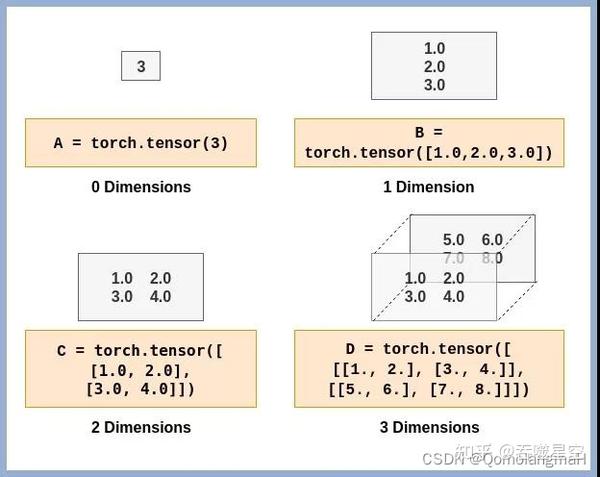
The following video provides an excellent introduction, framing the tensor as the fundamental building block of PyTorch.
Watch this short clip from the video 'PyTorch in 1 Hour' by Zachary Huang to understand why the tensor is so central to everything we'll do.
Starting just before the two-minute mark, watch the tensor introduction. The key idea is to think of a tensor as a NumPy array with added capabilities.
2. The Three Pillars of a Tensor: Shape, Type, and Device
Every tensor has three critical attributes you must always be aware of, especially when debugging.
shape: A tuple describing the tensor's dimensions. Mismatched shapes are the most common source of errors in deep learning code.dtype: The data type of the elements (e.g.,float32,int64).device: The hardware where the tensor's data is stored (cpuorcudafor NVIDIA GPUs).
The next video segment explains these attributes and highlights why float32 is the default for model parameters, a concept that connects directly to our work with gradients in the previous module.
Let's explore the core attributes of a tensor. Pay close attention to the discussion on why floating-point numbers are essential for training.
About five minutes into the video, watch tensor attributes. Focus on understanding the role of shape, device, and dtype, and the reasoning behind using float32 for parameters that need to be learned.
3. Creating Tensors
PyTorch offers several flexible ways to create tensors. We can group them into three main patterns.
This clip demonstrates the three most common patterns for creating tensors. Mastering these will cover the majority of your needs when building models.
Starting about two and a half minutes in, watch tensor creation patterns. The video covers: Direct creation: From a Python list. From a desired shape: Using functions like torch.zeros, torch.ones, and torch.rand. Mimicking another tensor: Using _like functions to match properties.
For a more comprehensive reference on all the ways you can initialize a tensor, the official documentation is an excellent resource to review.
Introduction to PyTorch Tensors
The official PyTorch documentation provides clear examples for creating tensors, including from data, with specific shapes, and setting data types. It's a good idea to quickly read through this to solidify your understanding.
Skim through the sections 'Creating Tensors', 'Tensor Shapes', and 'Tensor Data Types'. This reinforces what you saw in the video and introduces a few more useful methods.
Here's a quick summary of the most common creation functions:
| Function | Description | Example |
|---|---|---|
torch.tensor(data) |
Creates a tensor from a Python list or NumPy array. | torch.tensor([[1, 2], [3, 4]]) |
torch.zeros(dims) |
Creates a tensor filled with zeros. | torch.zeros(2, 3) |
torch.ones(dims) |
Creates a tensor filled with ones. | torch.ones(2, 3) |
torch.rand(dims) |
Creates a tensor with random numbers from a uniform distribution on [0, 1). |
torch.rand(2, 3) |
torch.randn(dims) |
Creates a tensor with random numbers from a standard normal distribution. | torch.randn(2, 3) |
torch.arange(start, end, step) |
Creates a 1-D tensor with a range of values. | torch.arange(0, 10, 2) |
torch.zeros_like(tensor) |
Creates a zero-filled tensor with the same shape as an existing tensor. | torch.zeros_like(my_tensor) |
4. Tensor Operations and Manipulations
Once you have a tensor, you'll need to perform calculations and change its shape.
Mathematical Operations
Most deep learning computations involve just a few core mathematical operations.
- Element-wise operations: Standard operators like
+,-,*,/work on each element individually. - Matrix Multiplication: This is the heart of a neural network's linear layer. In PyTorch, you use the
@operator ortorch.matmul().
It's crucial to distinguish between element-wise multiplication (*) and matrix multiplication (@). This video clip explains the difference and introduces reduction operations like sum() and mean().
Watch tensor operations. Focus on: The difference between * and @. How reduction operations (.mean(), .sum()) work. The importance of the dim argument for controlling which dimension to collapse. This is a vital concept.
Understanding the dim argument is critical. For a 2D tensor representing a batch of data (rows) and features (columns):
dim=0collapses the rows (e.g., computes the mean of each feature across the batch).dim=1collapses the columns (e.g., computes the mean of all features for each item in the batch).
Reshaping Tensors
You will constantly need to change the shape of your tensors. For example, to pass the output of a 2D convolutional layer into a 1D linear layer, you must first "flatten" it.
-
reshape()orview(): These methods change the tensor's shape.reshape()is generally safer and recommended. For example,tensor.reshape(4, 2)would turn a tensor with 8 elements into a 4x2 matrix. Using-1in one dimension tells PyTorch to infer the size automatically, e.g.,tensor.reshape(-1, 1). -
squeeze()andunsqueeze(): These are used to remove or add dimensions of size 1, which is extremely useful for managing batch dimensions.

The official PyTorch tutorial has a great section on this.
Introduction to PyTorch Tensors
Let's review the common methods for manipulating a tensor's shape. The following sections from the PyTorch documentation provide code examples for unsqueeze, squeeze, and reshape.
Read the section 'Manipulating Tensor Shapes'. Pay attention to how unsqueeze is used to add a batch dimension, a very common task.
5. The NumPy Bridge
PyTorch integrates seamlessly with NumPy. You can convert a NumPy array to a PyTorch tensor and back again with zero copying of the data (if the data is on the CPU). This means they share the same underlying memory location, making the conversion virtually instantaneous.
- To PyTorch Tensor:
torch.from_numpy(numpy_array) - To NumPy Array:
pytorch_tensor.numpy()
Introduction to PyTorch Tensors
This feature is incredibly useful when working with other scientific computing libraries. Let's see how it works.
Read the 'NumPy Bridge' section, studying the conversion methods. The key takeaway is that the NumPy array and PyTorch tensor will share the same memory, so modifying one will change the other.
Conclusion
In this lesson, you've taken your first crucial step into the world of PyTorch. You now have the foundational skills to work with torch.Tensor, the primary data structure you'll use from here on out.
Key Takeaways:
- A PyTorch tensor is a multi-dimensional array, similar to a NumPy
ndarraybut with extra capabilities for deep learning. - Every tensor has a
shape, a data type (dtype), and adevice(likecpuorcuda). - You can create tensors in various ways: from existing data (
torch.tensor), with a specific shape (torch.zeros,torch.rand), or by mimicking another tensor (torch.ones_like). - Essential tensor operations include element-wise math, matrix multiplication (
@), and reductions (.sum(),.mean()) using thedimargument. - You can flexibly change a tensor's shape with
reshape(),squeeze(), andunsqueeze(), which is vital for preparing data for different model layers.
In our next lesson, we will uncover one of the tensor's most powerful "superpowers": automatic differentiation with Autograd. You will see how PyTorch can automatically compute all the gradients you painstakingly derived by hand in the previous module, freeing you to focus on model architecture.