Recommended resources
The freely available resources this lesson will direct you to.
- You Can Learn AI Agent System Design In 19 Min | RAG, Vector Database, Evals, Function Callingwww.youtube.com
- 10 Use Cases for AI Agents: IoT, RAG, & Disaster Response Explainedwww.youtube.com
- Emerging Architectures for LLM Applications | Andreessen Horowitza16z.com
- Build SaaS with AI: Complete 2026 Guide for Founders and Indie ...www.swfte.com
Welcome! Throughout this first module, we've journeyed from understanding what LLMs are to identifying the product patterns they enable. In our last lesson, we established a crucial mental model for any product builder: knowing when not to use an LLM is as important as knowing when to use one.
Now, we'll address the next logical step. You've vetted an idea, confirmed that a core part of it genuinely requires the probabilistic power of an LLM, and resisted the temptation to build a "thin wrapper." So, what's next? It's time to move from the what to the how.
In this final lesson of our foundational module, you will learn to translate your product idea into a high-level solution architecture. This is the practice of sketching a blueprint for your application, identifying the major components and how they fit together. For an indie hacker, a clear architectural plan is your north star, helping you choose the right tools, estimate effort, and avoid painting yourself into a corner with "spaghetti code."
The Anatomy of an LLM Application
Before you can architect your own application, you need to know the fundamental building blocks. Nearly every LLM-powered product, from a simple content generator to a complex agent, can be broken down into a similar set of components.
Let's look at a common architectural pattern.
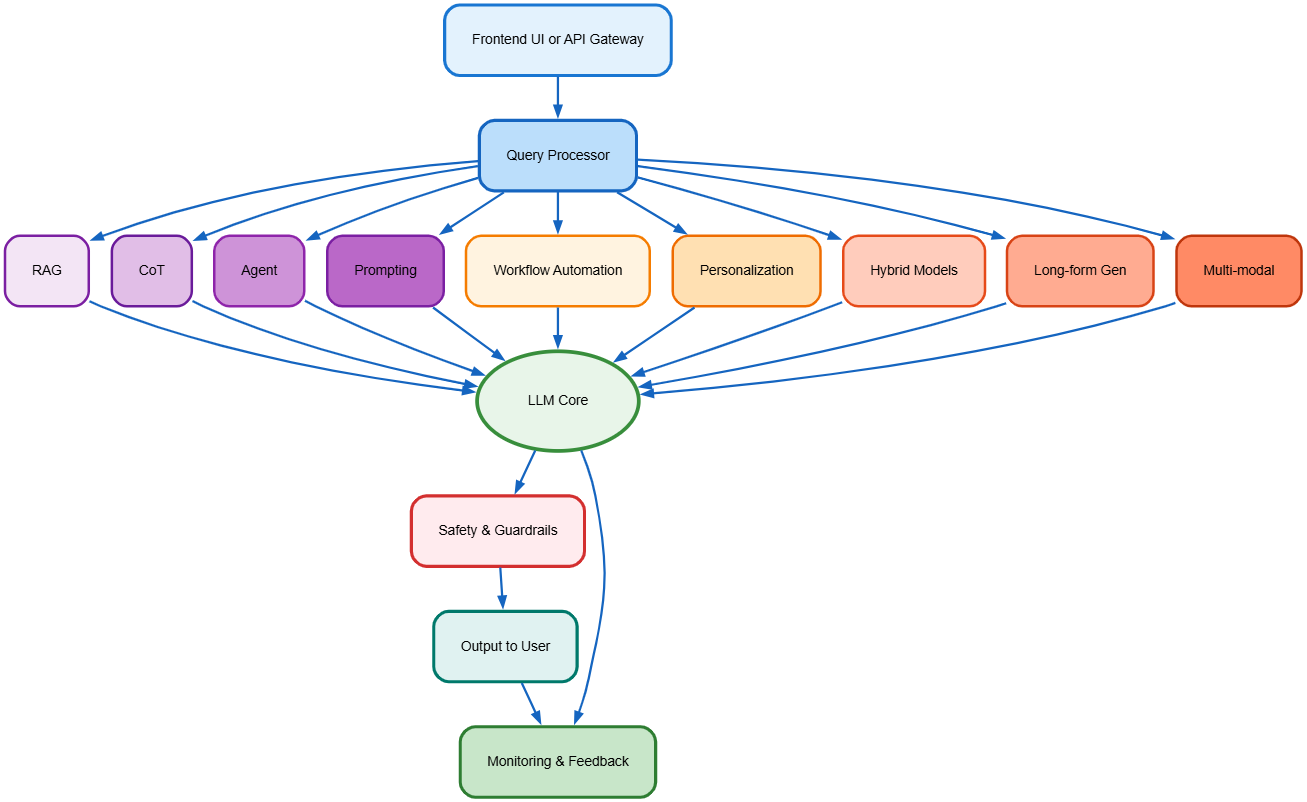
This diagram illustrates the journey of a user's request.
- Frontend UI or API Gateway: This is the entry point. It's where your user types their message or where another computer program sends a request.
- Query Processor: This is the application's central nervous system. It takes the raw input and decides what to do with it. Does the user want to chat? Do they need information from a document? Are they trying to execute a command?
- LLM Product Patterns: Based on the processor's decision, the request is routed to a specific workflow. Notice the boxes: RAG, Agent, CoT (Chain of Thought), Prompting. These are the patterns we discussed in a previous lesson. An architecture routes a request to the appropriate pattern.
- LLM Core: This is where the actual call to a large language model like GPT-4 or Claude happens. This component's job is to execute the prompt crafted by the preceding pattern.
- Safety & Output: The response from the LLM is processed, checked for safety, formatted, and finally sent back to the user.
A key principle of good software design, even for a solo hacker, is the separation of concerns. You don't want your payment processing logic tangled up with your prompt templates.

This diagram provides a great way to think about this separation:
- Serving Interfaces: How does the world talk to your app? (e.g., a web interface using FastAPI, a command-line tool).
- Infrastructure: What are the generic, replaceable building blocks you're using? (e.g., the specific LLM provider, a database like PostgreSQL, file storage on S3).
- App & Domain: This is your product's unique logic—its secret sauce. It includes your specific workflows (like an "Article Writer Workflow"), business entities ("Article", "Report"), and core logic that is independent of the infrastructure.
Your goal as an architect is to define the components in the "App & Domain" layer and then decide which "Infrastructure" and "Serving" components are the best fit.
A Concrete Example: Deconstructing a Customer Support Agent
Theory is helpful, but seeing a real-world example is better. Let's deconstruct the architecture for a common AI product idea: an automated customer support agent for an e-commerce store.
This video provides an excellent, detailed walkthrough of designing such a system. As you watch, pay close attention to how the different components are introduced and connected.
You Can Learn AI Agent System Design In 19 Min | RAG, Vector Database, Evals, Function Calling
This video from Sean's AI Stories, titled "You Can Learn AI Agent System Design In 19 Min," walks through the practical steps of architecting an AI agent for e-commerce customer support. It's a perfect case study for our learning outcome.
Please watch the following segments to see how a professional would map this product idea to a technical solution: Goals and Scope: Notice how the first step is to define clear business goals (automation %, satisfaction) and a tight technical scope (returns, exchanges, order status). Data and Backend: The narrator distinguishes between storing structured data (like transaction history) in a traditional relational database and unstructured data (like return policies) in a vector database. This is a key architectural decision for any RAG-style application. The Orchestrator: This section introduces the core logic. A Gateway handles authentication. A Router Agent acts as the central brain, understanding the user's intent (e.g., "they want to return something") and deciding where to send the request next. It also includes a crucial "human-in-the-loop" escape hatch. Planner and Tools: Once the router decides the intent is "return," it calls a specialized Planner Agent. This agent's job is to execute the return process. It does this by using function calling to access external tools like the Stripe API (for refunds) or the Shopify API (to check order details). RAG for Policies: Before executing the return, the planner agent must check the company's return policy. It does this using Retrieval-Augmented Generation (RAG). It queries the vector database to find the relevant policy section and includes that information in its decision-making process.
Let's summarize the high-level architecture we just saw in that video:
- Serving Interface: Website Chat, Email.
- Orchestrator/App Logic: A Router Agent determines user intent and passes control to a specialized Planner Agent (e.g.,
ReturnPlanner,ExchangePlanner). - Infrastructure (Tools): External APIs for critical functions (Stripe for payments, Shopify for orders, 3PL for shipping).
- Infrastructure (Data): A Relational Database (like PostgreSQL) for structured data (user info, chat history) and a Vector Database (like pgvector) for unstructured data (company policies, FAQs) to enable RAG.
- Safety: A mechanism to flag complex or angry conversations for a human-in-the-loop.
This is a complete, high-level architecture. You can see all the pieces and how they connect to solve the business problem.
A Framework for Your Product Idea
That case study is great, but how can you apply this thinking to your own, unique idea? A simple yet powerful mental model for designing any agentic system is introduced in this next video.
10 Use Cases for AI Agents: IoT, RAG, & Disaster Response Explained
This video from IBM Technology, "10 Use Cases for AI Agents," presents a clear, reusable framework for thinking about agent architecture.
Please watch the introduction from the beginning which defines the core components of an agent. Then, watch the agriculture example from the agriculture use case, which clearly lays out the framework in action. Finally, note how the conclusion at the end reinforces that this pattern is universal.
The core framework presented is: Goal → Planner → Memory → Executor → Action.
Let's map our e-commerce agent to this framework:
- Goal: Maximize customer satisfaction by automating 70% of support requests.
- Planner: The router agent determines the user wants to return an item and plans the steps: check policy, verify order, issue refund.
- Memory: The vector database containing the return policy and the relational database with the user's order history.
- Executor: The return planner agent uses the LLM to synthesize the information from memory and decide to call the Stripe refund tool.
- Action: The system makes an API call to Stripe to process the refund and updates the database.
When you have a new product idea, start by breaking it down using this framework. It forces you to clarify the objective, the information needed, and the actions the system must be able to perform.
From Idea to Blueprint: A Practical Template
Now it's time to bring this all together into a tangible asset for your project. As an indie hacker, you need a quick way to get from a vague idea to a concrete plan. The best way to do this is to create a small design document.
This guide for SaaS founders provides some excellent real-world examples and a fantastic template for this exact process.
Build SaaS with AI: Complete 2026 Guide for Founders and Indie ...
This guide from Swfte.com is a treasure trove of practical advice for indie hackers. We'll focus on the sections for architecture planning and real-world case studies.
First, read the section on AI-Assisted Architecture Planning. Pay close attention to the Prompt Template it provides. This is a perfect starting point for your own architectural document. Next, jump to the section on Real Case Studies. Read through the four examples (ContentPilot, Solo SaaS, Code Review, Agency Pivot). For each one, notice how it lists the Stack—this is the real-world implementation of an architecture. You'll see combinations like Supabase + OpenAI API, or Next.js + Claude API. These are the kinds of concrete choices that flow from a high-level plan.
The prompt template from the article is an excellent, structured way to think through your architecture. It forces you to define the user actions, constraints, and required components:
I'm building a SaaS for [use case]. Users will:
- [Action 1]
- [Action 2]
- [Action 3]
Expected scale: [users/month]
Budget: [amount]
Technical experience: [level]

Recommend an architecture with:
1. Database schema (What data do I need to store?)
2. API structure (How will the frontend and backend talk?)
3. Authentication approach (How will users log in?)
4. Hosting solution (Where will the code run?)
5. Third-party integrations needed (What are my "tools"?)
You can use this template as a checklist for your own ideas. You can even use it as a prompt for an LLM like Claude or GPT-4 to get a first-pass recommendation, which you can then critique and refine.
Conclusion
Congratulations on completing the first module! You've gone from a high-level curiosity about AI to possessing a robust strategic and architectural framework for building real products. You now have the tools to take a raw idea, decide if it's a good candidate for an LLM, and if so, sketch out a concrete blueprint for how to build it.
Key Takeaways:
- A typical LLM application consists of a frontend, a query processor/orchestrator, specific patterns (RAG, Agents), the LLM core, and a safety layer.
- Good architecture separates concerns, allowing you to change your infrastructure (e.g., switch LLM providers) without rewriting your core application logic.
- The
Goal → Planner → Memory → Executor → Actionframework is a powerful mental model for designing any agentic system. - Use a structured template to create an architectural plan, defining your use case, user actions, and required components (databases, APIs, hosting).
- Reference real-world case studies to see how other indie hackers have composed their technology stacks.
You have built a solid foundation. So far, our journey has been about strategy and planning. In the next module, we roll up our sleeves. It's time to move from blueprints to bricks and mortar. We will start by setting up your local Python development environment and making your very first, real API call to an LLM.