Recommended resources
The freely available resources this lesson will direct you to.
Welcome to the first lesson in our module on Advanced Routing and Cost Modeling. In the previous module, we focused on securing the LLM system, establishing a hardened infrastructure with robust access controls, encrypted communication, and secure credential management. Now that we have a secure foundation, we can build more intelligent application logic on top of it.
This lesson introduces a critical component for any production-grade LLM system: the LLM Router, also known as an AI Gateway. Instead of hard-wiring your application to a single LLM, a router acts as an intelligent traffic controller, directing incoming requests to different models based on specific rules. This is fundamental for optimizing cost, latency, and performance by ensuring you always use the right tool for the job.
Our goal today is to configure a router to direct requests to different LLMs based on task-specific information sent in the request itself, such as custom headers or fields in the JSON payload. This is a foundational skill for building sophisticated, efficient, and scalable AI services.
1. The Role of an LLM Router
At its core, an LLM router is a proxy server that sits between your applications and your LLM providers. Its primary job is to intercept a request, inspect it, and decide which of several available LLMs should handle it.
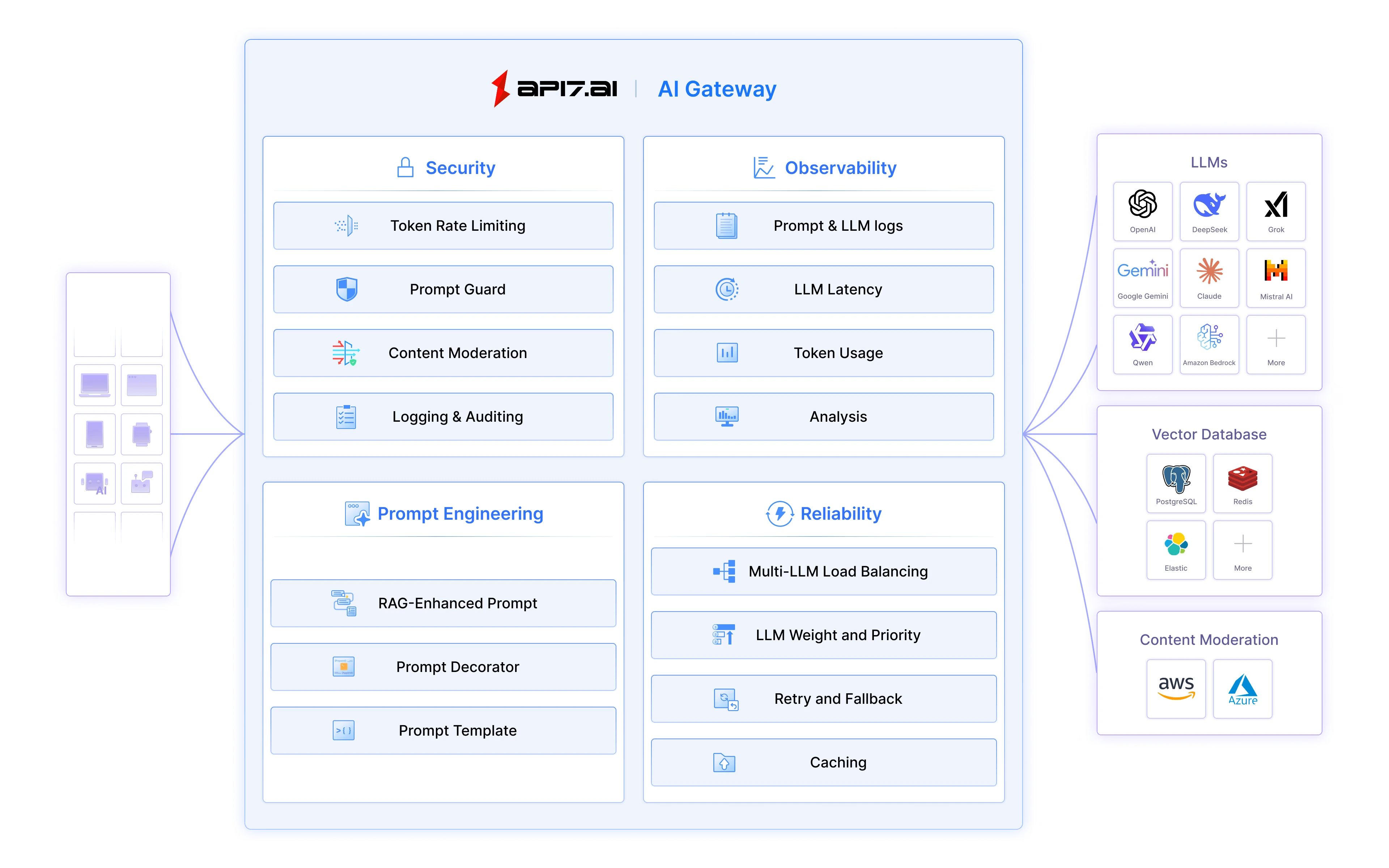
Why is this so important? As applications become more complex, you'll find that not all tasks require the most powerful (and expensive) model.
- A simple summarization task might be handled perfectly by a small, fast model.
- A complex code generation request might demand a state-of-the-art model.
Using a powerful model like GPT-4o for every request can be inefficient and costly. An LLM router solves this problem. The following video introduces this core concept.
Sam Witteveen's video "What is an LLM Router?" provides a great introduction to the problem of LLM overspending and the concept of routing as a solution.
Please watch the first minute of the video, up to the introduction of RouteLLM, to understand the motivation behind using a router. The problem: The speaker explains the common issue of using expensive, powerful models for tasks that don't require them, leading to wasted money and slower performance.
2. Implementing a Router with LiteLLM
To get hands-on experience, we'll use LiteLLM, a popular open-source tool that provides a unified interface for over 100 LLMs and includes a powerful proxy server with routing capabilities. This is a perfect fit for your background in building and managing infrastructure.
The LiteLLM proxy can be deployed as a containerized service, giving you a central gateway to manage all your LLM traffic.
LiteLLM Crash Course | For Complete Beginners
The "LiteLLM Crash Course" from the Data Science Basics channel gives a fantastic practical walkthrough. We'll use it to set up our router.
Follow these segments to get your LiteLLM proxy up and running: Introduction: Get a high-level overview of what LiteLLM is and its two main components: the Python SDK and the Proxy Server. We will be focusing on the proxy. Proxy Deployment: This section shows how to deploy the LiteLLM proxy using Docker and docker-compose. Follow along to get the proxy running on your local machine. Your experience with containers will make this straightforward. Adding Models: Once the proxy is running, watch this part to learn how to add different models (e.g., from OpenAI and Groq) via the admin dashboard. This populates your router with the "destinations" to which you can route traffic.
After completing these steps, you will have a running LiteLLM proxy with at least two different models configured, ready for you to define routing rules.
3. Configuring Task-Specific Routing
Now we get to the core of today's learning outcome. We will implement routing logic that directs requests based on information passed in the request itself. LiteLLM offers a very clear and effective way to do this using tags.
The idea is simple:
- In your configuration, you "tag" each model deployment with a specific purpose (e.g.,
free-tier,paid-tier,code-gen). - When making a request, you include the desired tag in the request payload or as a header.
- LiteLLM automatically routes the request to a model that has the matching tag.
Let's explore the documentation to see exactly how this works.
This official LiteLLM documentation page details the tag-based routing feature.
Please read the following sections: "Define tags on config.yaml": This shows the config.yaml structure. Notice how each model under model_list can have a tags array. Also, note the enable_tag_filtering: True setting in router_settings. "Make Request with tags": This section provides curl examples showing how to include a tags array in the JSON payload of your request to target a specific model deployment. "Calling via Request Header": This shows the alternative method of passing tags using the x-litellm-tags HTTP header. This is especially useful when you can't modify the request body.
This tag-based system directly enables you to configure routing based on payload fields (tags) or headers (x-litellm-tags), fulfilling our lesson's objective.
For instance, you could configure two deployments of gpt-4o: one tagged summarization and another tagged code-generation. Your application could then direct traffic by simply adding the appropriate tag to the request, allowing you to track usage or even use different underlying model versions for each task.
4. Alternative Routing Mechanisms
While LiteLLM's tagging is a powerful and direct method, it's helpful to see how other systems approach this. Many API gateways and routers use a more declarative, graph-based approach. For example, Cloudflare's AI Gateway allows you to define a routing graph using JSON.
JSON Configuration - AI Gateway - Cloudflare
This documentation from Cloudflare shows how routing logic can be defined as a series of connected elements.
Quickly scan the sections for the "Conditional Element (If/Else)" and the "Model" element. Notice how the conditional element can check a request field (like metadata.plan) and branch to different model elements based on the value. This achieves the same outcome as LiteLLM's tags but uses a different configuration paradigm.
This pattern of inspecting request metadata (headers, user ID, payload fields) to make a routing decision is a common industry practice you'll encounter in various LLM gateway and service mesh products.
Your Turn: Design a Routing Configuration
Let's put this into practice. Based on what you've learned from the LiteLLM documentation, design a config.yaml snippet for the model_list that implements the following logic:
- Task 1: Code Generation. Route requests tagged
code-gento an OpenAIgpt-4omodel. - Task 2: Simple Q&A. Route requests tagged
simple-qato a fast, free model like Groq'sllama3-8b-8192. - Default: Route any untagged requests to OpenAI's
gpt-4o-mini.
After outlining the YAML, write two curl commands:
- One that asks "How do I write a for loop in Python?" and routes it to the
code-genmodel. - One that asks "What is the capital of France?" and routes it to the
simple-qamodel.
Take about 10 minutes to work through this. You can check your solution against the example in the expandable section below.
Solution
config.yaml snippet:
model_list:
  - model_name: my-llm-service
    litellm_params:
      model: openai/gpt-4o
      api_key: os.environ/OPENAI_API_KEY
      tags: ["code-gen"]
  - model_name: my-llm-service
    litellm_params:
      model: groq/llama3-8b-8192
      api_key: os.environ/GROQ_API_KEY
      tags: ["simple-qa"]
  - model_name: my-llm-service
    litellm_params:
      model: openai/gpt-4o-mini
      api_key: os.environ/OPENAI_API_KEY
      tags: ["default"] # Handles untagged requests

router_settings:
  enable_tag_filtering: True
curl for Code Generation:
curl http://localhost:4000/v1/chat/completions \
-H "Content-Type: application/json" \
-H "Authorization: Bearer <your_master_key>" \
-d '{
    "model": "my-llm-service",
    "messages": [{
        "role": "user",
        "content": "How do I write a for loop in Python?"
    }],
    "tags": ["code-gen"]
}'
curl for Simple Q&A:
curl http://localhost:4000/v1/chat/completions \
-H "Content-Type: application/json" \
-H "Authorization: Bearer <your_master_key>" \
-d '{
    "model": "my-llm-service",
    "messages": [{
        "role": "user",
        "content": "What is the capital of France?"
    }],
    "tags": ["simple-qa"]
}'
Conclusion
In this lesson, we established the critical role of an LLM router for building efficient and cost-effective AI systems. You learned how to set up the LiteLLM proxy and configure it to perform task-specific routing based on tags passed in the request payload or headers.
Key Takeaways:
- An LLM Router (or AI Gateway) is a proxy that directs requests to different models based on defined rules, enabling cost optimization and performance tuning.
- LiteLLM provides a practical, open-source tool to implement a router, unifying access to over 100 LLMs.
- Tag-based routing is a powerful mechanism for directing traffic based on task-specific fields in the request payload (
tags) or headers (x-litellm-tags). - This routing pattern is a standard industry practice, though implementation details may vary across different platforms like Cloudflare's AI Gateway.
In our next lesson, we will build upon this foundation. You'll learn how to extend the router to handle more complex scenarios by differentiating between and routing requests for different data types, such as text and images, which is essential for building multi-modal applications.