Recommended resources
The freely available resources this lesson will direct you to.
Hello. The preceding module topics established how a controller, HMI, and physical process can depend on one another—and why a seemingly small control change needs a safe way back. This lesson turns that principle into a validation gate. Rather than assuming that a documented Labshock feature works in your installation, you will record what you can actually install, reach, restart, and restore. That record will determine whether the next lesson uses a live PLC-to-HMI connection or a self-contained simulated fallback.
Plan for 45–60 minutes, with additional time if this is your first Docker image download. A free-session timeout may require a second sitting. You are not expected to make an unverified setup fit a stopwatch.
1. Separate documentation, demonstration, and observation
The Labshock README describes a Docker-based environment, a licence-free trial with a stated five-minute initialization delay and 40-minute session limit, and components including PLC, SCADA, and an engineering workstation. Those are useful expectations, not evidence that every component is running or usable in your edition.
labshock/README.md at main · zakharb/labshock · GitHub
Read the project's README to establish the requirements, stated trial limits, and component names you will verify.
In “Requirements,” note Docker and the stated CPU, memory, and storage figures. In “Trial License Info,” read the trial terms. Then, under “Services,” read the Portal description and the “SCADA,” “PLC,” and “EWS” subsections. Treat their feature lists as claims to check locally, not as your completed validation record.
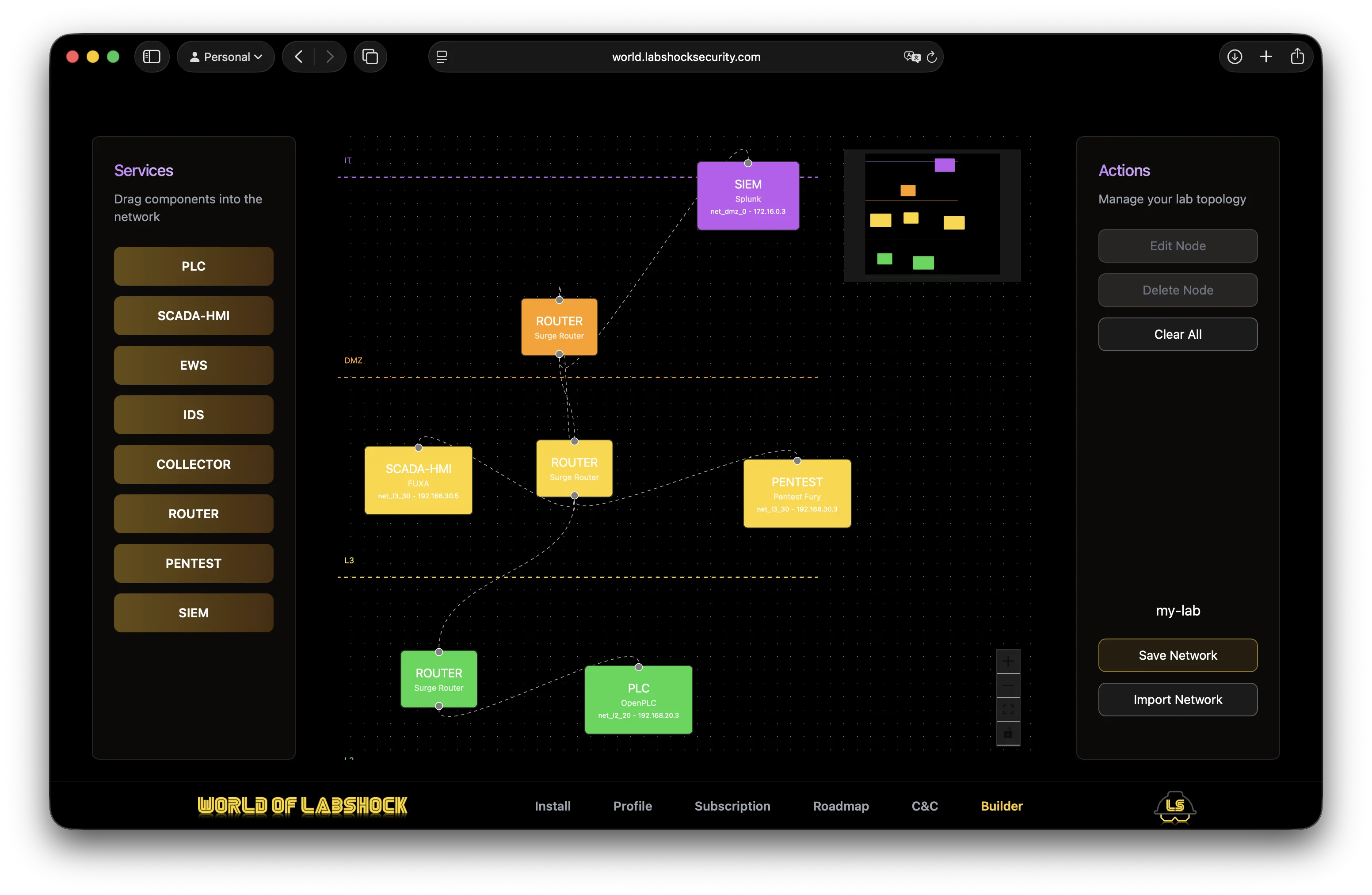
The Builder image illustrates why that distinction matters. It depicts components placed in labelled IT, DMZ, and L3 areas. A picture of separated zones does not establish that your VM interfaces, published Docker ports, or traffic paths are isolated.
Use three evidence labels throughout this lesson:
- Documented: stated by the project for a particular published version.
- Observed: measured in your installation, with a time and an evidence reference.
- Unverified: not checked, unavailable, or inconclusive. “Unverified” is not “passed.”
A video can make the startup sequence easier to recognise, but it is a recording of somebody else’s installation—not a test of yours.
OT/ICS Hands-On Labs with LABSHOCK!
Watch the installation and first-login demonstration in Daniel Lowrie’s “OT/ICS Hands-On Labs with LABSHOCK!” to see what a successful startup can look like.
Watch compose startup for the transition from repository files to running containers, then portal access for the HTTPS-versus-HTTP distinction. Follow current project instructions over commands shown in a recording. Do not dismiss a certificate warning unless you have confirmed that the address is your isolated lab instance.
2. Establish an isolated, reproducible starting point
Lab LV-07 — Labshock capability-validation gate
Relevant subject area: ICS lab architecture and safe operational validation
Objective: Produce an evidence-backed deployment record and a defensible Lesson 8 path decision.
Tools: A dedicated Linux VM with Docker and Compose available, a browser inside that VM, access to the official project documentation, and a place to save notes and screenshots.
Topology: Your dedicated lab VM runs Labshock containers. Use its own browser to reach the portal. No production OT network, routed test target, or inbound connection from another machine is needed.
Before installation, confirm that the VM is dedicated to this lab and that its virtual networking does not bridge it into a production or otherwise unapproved network. A NAT setting alone is not a complete exposure assessment: check VM port-forwarding rules and host networking settings too. Take a VM snapshot if available, and note whether it is pre-install or post-install; the difference matters when testing recovery.
The official Quickstart is the installation reference. Its supplied parsed text renders some install/start command blocks only as &&. Do not run that text or reconstruct missing commands by guesswork. Open the rendered guide, inspect the current repository files and instructions, and stop for clarification if the commands remain incomplete. Its cleanup text is also unsuitable as a routine reset procedure because it describes broad Docker removal.
Quickstart Guide · zakharb/labshock Wiki · GitHub
Use the project’s Quickstart to check supported hosts and locate the installation, lifecycle, and login instructions before changing the VM.
At the opening of the guide, read the host guidance. Locate “Install Labshock” and “Run/Stop Labshock,” but verify that their command blocks display completely in the live rendered page; the supplied extraction is incomplete. Under “Run/Stop Labshock,” the stated stop instruction is readable. Under “Login Labshock,” check the local login address. Finally, notice that “Cleanup Labshock” describes removing more than this lab; do not use it for the reset check below.
If installation instructions are complete, follow them in the dedicated VM. Record the guide revision or access date, repository revision, any files or instructions you actually used, and each failed step as well as each successful one. The following commands are read-only checks in the Linux lab VM; they do not install Labshock:
docker version
docker compose version
git --version
If you installed from a repository checkout, run these from that checkout, after locating and inspecting its actual Compose file:
git rev-parse HEAD
docker compose config --services
The second command identifies configured service names; it does not prove they started. Do not share an unredacted full Compose configuration or logs if they may contain credentials or tokens.
3. Inspect the running lab and its exposure
Wait for the installation’s stated initialization period, then collect evidence at two layers. Container state answers whether processes are running; application state answers whether the service you need responds and permits the intended action.
For a Compose-based installation, run the following in the Linux lab VM, from the verified Compose directory:
docker compose ps
docker ps --format 'table {{.Names}}\t{{.Status}}\t{{.Ports}}'
ss -lnt
Record the command time, relevant output, and any errors. Compare the published addresses and ports with the VM’s host and hypervisor configuration. A binding displayed as 0.0.0.0 or :: deserves closer attention than a loopback-only binding; conversely, https://localhost working in the guest does not prove that another machine can reach it. Docker port publishing, VM forwarding, and host firewall behaviour must be considered together. Do not scan a wider network to settle the question. If exposure cannot be established confidently, keep the VM disconnected from unapproved networks and mark isolation unverified.
Next, open the project-documented HTTPS portal in the VM browser. Check the address before handling any certificate warning. Record whether login succeeds, what trial or licence state the interface reports, and whether restrictions or expiry messages appear. Never put a password, licence key, or session token in the shared record.
For each service you inspect, distinguish three states:
| Service | Configured or listed? | Container running? | Interface usable in this session? |
|---|---|---|---|
| Portal | Record evidence | Record evidence | Login and navigation result |
| PLC | Record evidence | Record evidence | Controller interface and permitted access |
| SCADA/HMI | Record evidence | Record evidence | Display and tag availability |
| Engineering workstation | Record evidence | Record evidence | Interface access, if needed |
| Other observed service | Record its actual name | Record evidence | Record what you tested |
Do not mark a PLC or HMI usable merely because its tile appears in the Portal. Equally, an unavailable optional IDS or SIEM does not by itself fail a PLC-to-HMI lesson. Record the edition and observed limitations without inferring that payment would fix an untested problem.
4. Test restart, persistence, and a safe reset
An OT lab needs a known recovery route before state changes become meaningful. Restart, persistence, and reset answer different questions:
- Restart: Can you stop and start the same installation and regain access?
- Persistence: Does a harmless saved setting remain after that restart?
- Reset: Can you deliberately return a disposable change to the recorded baseline?
First, save screenshots or notes of your baseline and ensure you have enough session time left. If the verified installation uses Compose, stop it from its Compose directory in the Linux lab VM:
docker compose stop
Restart using the start procedure you verified in the live project instructions. Where that procedure uses Compose and its files support it, the standard detached start is:
docker compose up -d
Recheck docker compose ps, Portal access, and the services relevant to Lesson 8. Record elapsed startup and initialization time, whether the stated session limit occurred in practice, and whether another restart is workable. If your verified installer uses a different lifecycle procedure, use that procedure consistently rather than mixing launchers.
For persistence, use only a disposable, non-operational artefact if the installed UI permits one—for example, a clearly named draft topology containing no live control connection. Record its initial state, save it, restart, and check whether it remains. For reset, use the UI’s documented delete/clear action only after confirming that it affects that disposable artefact, or restore a suitable post-install VM snapshot. Check that the artefact is gone and the baseline services still work. If no safe disposable change or documented reset is available, record reset unverified; do not substitute docker compose down -v, broad Docker cleanup, or deletion of another project’s data.
This is also a narrow Lesson 8 feasibility probe, not the next lesson’s control exercise. Confirm separately whether a PLC interface and an HMI are accessible, whether you can identify one HMI tag’s actual PLC source rather than merely similarly named displays, and whether an explicitly simulated, low-consequence state change can be restored to its initial value. Record before-and-after readings and the restoration check. Do not write a coil, change controller logic, or operate a process control just to force a pass when the tag mapping, simulation boundary, or reversal is uncertain. In that case, mark end-to-end visibility or restoration unverified.
A useful troubleshooting order is to check the Compose directory and service state first, then initialization/licence messages, then the correct HTTPS origin, and finally individual application availability. A running container, a reachable login page, and a working cross-service tag are progressively stronger—but different—observations.
5. Complete the validation record and choose a path
Keep the record compact enough to reuse in Lesson 8. “Evidence” can be a dated note, redacted screenshot, or saved command output; label any example or mock value simulated, never “observed.”
| Gate item | Observed result and time | Evidence reference | Status: pass / fail / unverified |
|---|---|---|---|
| VM isolation and inbound exposure | VM mode, forwarding and published-port findings | ||
| Installation and version | Procedure, repository revision, Docker/Compose versions | ||
| Licence and session | UI state; measured initialization/session behaviour | ||
| Active services | Container and application checks for Portal, PLC, HMI | ||
| PLC-to-HMI tag visibility | Tag, verified source, displayed value and time | ||
| Safe change and restoration | Initial state, bounded test, restored state—or why not tested | ||
| Restart and recovery | Stop/start procedure and service rechecks | ||
| Persistence and reset | Disposable artefact or snapshot result | ||
| Outstanding limitations | Symptoms, attempted checks, information still needed |
Make one decision beneath the table:
- Live path: Isolation is verified; restart and recovery work; PLC and HMI are usable; the HMI displays a verified PLC-sourced tag; a permitted simulated state change can be returned to its initial state; reset or baseline recovery is demonstrated; and session limits leave a workable plan for Lesson 8. Cite the evidence for each condition.
- Fallback path: Any live-path condition is failed or unverified, but you can safely continue with the next lesson’s self-contained, explicitly simulated controller logic, HMI tag map, and telemetry trace. Specify which live tests failed and why supplied artefacts are preferable. Do not assume that an optional second platform or a paid licence is required.
- Blocked: You cannot safely carry out the intended live work and cannot yet preserve or use the simulated fallback materials. State precisely what prevents progress and the smallest safe action needed to unblock it.
If time permits, score the quality of your own record out of 10: installation and version evidence (2); licence and service evidence (2); network-exposure reasoning (2); restart, persistence, and reset results—including honest “unverified” entries (2); and an evidence-supported path decision (2). This scores documentation and judgment, not whether every feature passed.
Conclusion
The key result is not a successful login; it is a reproducible account of what this particular installation can safely support. Documented features, running containers, reachable applications, verified tag connections, and recoverable control changes are distinct levels of evidence. Keep failed and unverified checks in the record: they are what make the gate useful.
In Lesson 8, you will build and document a basic PLC-to-HMI control scenario. Your gate decision determines whether that work uses the verified live environment or clearly labelled simulated artefacts—with no need to pretend an unavailable integration was tested.