Recommended resources
The freely available resources this lesson will direct you to.
Welcome back. Your Personal Introduction gave you a low-pressure speaking warm-up, and your microphone setup is ready. Now we need a more useful reference point: one timed recording from every task that contributes to the PTE Academic Speaking score.
Your latest Speaking score was 47, while your other skill scores were higher. This baseline will help us find out what happens during the speaking tasks—particularly when you must form sentences quickly. It is not a mock-test score or a prediction of your next result. Allow about 40–45 minutes, including setup, six first-take recordings, and a brief review.
Define the set before you start
Pearson’s Speaking & Writing format page is the timing reference for this session. Read the “Task,” “Time to answer,” and “How to answer this question” parts of the six named subsections. You can leave the detailed scoring explanations for a later lesson.
PTE Academic & UKVI test format: Speaking & Writing | Pearson PTE
Read Pearson’s task instructions so that each baseline recording uses the right preparation and speaking window.
Under “Understand each question type,” open “Read Aloud” and read its task instructions, ending at the one-recording rule. Do the same in “Repeat Sentence,” from the task description through its recording rule, and in “Describe Image,” from the image instructions through that rule. Continue with “Retell lecture,” from the lecture instructions; “Summarize Group Discussion,” from the discussion instructions; and “Respond to a situation,” from the situation instructions. In each subsection, notice when preparation begins, when the microphone opens, and how long you may speak.
There is one easily confused distinction. Answer Short Question requires a spoken answer, but Pearson says it affects Listening, not the Speaking score. We will keep it separate from the six-recording Speaking baseline. You can make an optional Listening-check recording at the end.
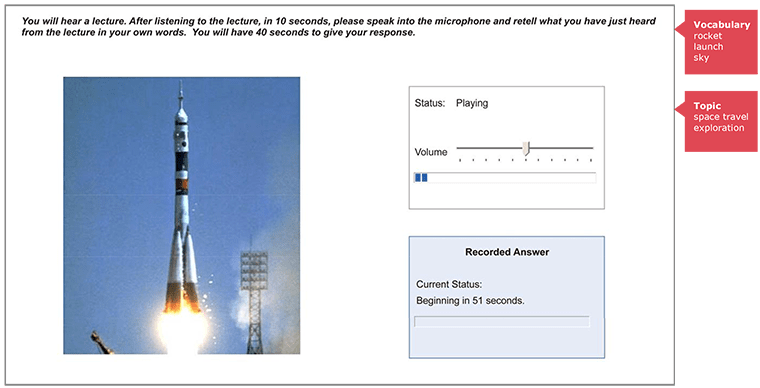
The image below shows a Retell Lecture screen, not a lecture to practise with. The rocket may suggest a topic, but it cannot tell you what the speaker actually says. It also shows why you must distinguish the audio-playing period from the countdown to your recorded answer.
Set conditions that make the recordings comparable
Use the microphone position and normal speaking volume you established earlier. Open a recorder that lets you save and replay individual files, and keep a separate timer visible. If possible, use a blank page for lecture and discussion notes. Do not make a polished second take. A stumble is valuable baseline information, not a reason to delete the file.
Save six files in task order: 01_Read_Aloud, 02_Repeat_Sentence, 03_Describe_Image, 04_Retell_Lecture, 05_Group_Discussion, and 06_Respond_to_a_Situation. Start each recording when the response window begins. For listening prompts, hear the prompt once; do not listen again to improve your answer. If you accidentally hear a video presenter’s model answer, note that beside the file so you do not mistake that attempt for an unseen-prompt baseline.
For now, use only a simple rule when speaking: give the task’s content, in your own words where required, and continue after a small wording error. Do not insert a memorized paragraph merely to fill time. Pearson assesses content as well as pronunciation and oral fluency; an unrelated fluent sentence cannot replace missing information.
Make the six first-take recordings
Work down this list without replaying your files between tasks. The videos below supply prompts, not strategies to copy. In particular, stop them before the presenter gives an answer: some of the presenter’s later advice about inventing details or adding filler conflicts with Pearson’s content requirements.
1. Read Aloud. Give yourself 35 seconds to prepare, which is within Pearson’s 30–40-second preparation range. Then open your recorder and read the passage once. Pearson’s answer time varies with the item; for this practice passage, set a 45-second recording limit, not an assumed official limit for every Read Aloud item. If you have already glanced at the passage, simply avoid rehearsing it before the timer starts.
Urban trees can make crowded streets more comfortable during hot weather. Their leaves provide shade, while water released from the leaves helps cool the surrounding air. However, trees need enough soil and regular care to survive in cities. Choosing suitable species is therefore an important part of urban planning.
Read the words that are there. This task tests accurate reading, not paraphrasing.
2. Repeat Sentence. Use the brief audio prompt in the following video. Start at the marked range, listen once, and pause at its end before the presenter repeats it. Open your recorder immediately and say what you heard within 15 seconds. Do not add a closing phrase if you cannot recall the whole sentence.
PTE Speaking 90 Score Strategy (Live Mock Test) | Templates + Real Exam Method
Use only the spoken Repeat Sentence prompt in “PTE Speaking 90 Score Strategy (Live Mock Test)” by Language Academy PTE. The presenter’s response is not part of your prompt.
Play the sentence prompt once. Pause at 00:05:08, before the presenter’s answer begins, and make your own 15-second recording.
3. Describe Image. Return to Pearson’s format page. In “Describe Image,” scroll to the “Test tips” subsection “Focus on the main information in the image” and find the example map showing gorilla distribution in Africa. Do not read the explanatory notes beside it as a script. Study the map for 25 seconds, then record one 40-second description. If the map does not display on your device, describe only the rocket photograph in the Retell Lecture screenshot above, ignoring the interface and vocabulary labels; mark that file “photo fallback,” since it is not the same prompt.
4. Retell Lecture. The next video contains a short talk about housing in Australia. Listen from the marked start and stop before the presenter discusses his response. You may jot down keywords while listening. When the audio ends, allow 10 seconds to prepare, then record a 40-second retelling of what the lecture said—not what a related picture might suggest.
PTE Speaking 90 Score Strategy (Live Mock Test) | Templates + Real Exam Method
Use the lecture audio in the same Language Academy PTE mock-test video as a one-hearing Retell Lecture prompt. This is practice audio, not an official Pearson item.
Listen once to the housing lecture. Stop at 00:11:24, before the presenter comments on it. Time 10 seconds of preparation and then record your own 40-second response.
5. Summarize Group Discussion. Listen once to the three-person discussion about university attendance. Notes are allowed. After it ends, take 10 seconds to prepare and record a response within two minutes. Identify the shared issue and distinguish the speakers’ views as well as you can. Do not assign a point to a speaker if you are unsure who said it.
PTE Speaking 90 Score Strategy (Live Mock Test) | Templates + Real Exam Method
Use the discussion audio in the same mock-test video, stopping before the presenter’s summary. This gives you a solo-practice prompt without requiring another person to read three roles.
Listen once to the attendance discussion. Stop at 00:17:04, before the presenter starts summarizing it, then use a 10-second preparation timer and a two-minute recording window. This edited practice clip runs slightly longer than Pearson’s stated maximum of three minutes for a discussion, so note that difference when judging how much you recalled.
6. Respond to a Situation. Play the next range once. It describes a problem with university schedule information and asks what you would say at the registrar’s office. You can see the situation while you listen. Stop before the presenter’s advice, take 10 seconds to prepare after the prompt, and record 40 seconds speaking to the person at the office. Your job is to address the problem and request the needed help, rather than summarize the scenario for an examiner.
PTE Speaking 90 Score Strategy (Live Mock Test) | Templates + Real Exam Method
Use only the situation prompt in the same mock-test video. Do not watch the presenter’s suggested answer before making your recording.
Play the registrar prompt once and stop at 00:20:26. Allow 10 seconds to prepare, then record one 40-second response.
These six items cover every task type Pearson identifies here as contributing to the Speaking score. They are a diagnostic sample, not a full speaking-section simulation: a real test contains more than one item of several types.
Preserve the evidence without trying to fix it yet
Now replay each file once. Make a compact record rather than rewriting your answers or assigning yourself a PTE score. For each file, note:
| Record | What to capture |
|---|---|
| Timing | Did you begin promptly? Did your answer finish, stop early, or run into the limit? |
| Content | What important word, image feature, lecture idea, speaker view, or situational requirement was missing or changed? |
| Delivery | Note any place you stopped, restarted, repeated yourself, or became hard to hear. Add the approximate time in the recording if possible. |
Keep the original files and notes together. If a clip failed because playback, pausing, or recording did not work, mark it “technical failure” rather than treating silence as a speaking weakness. You may then record a replacement, clearly labelled as such.
If you want a small check of the Listening-only spoken task, have someone read aloud once, or use your device’s text-to-speech once, for: “What instrument is used to measure temperature?” Record a short answer within 10 seconds. Save it separately as 07_Answer_Short_Question_Listening; do not include it in your Speaking baseline.
Takeaway
You now have a first-take recording for Read Aloud, Repeat Sentence, Describe Image, Retell Lecture, Summarize Group Discussion, and Respond to a Situation, made under their respective preparation and response windows. The point is not to sound like a 90-score model today. It is to preserve an honest sample of how you speak when the clock, listening, and sentence construction compete for your attention.
In the next lesson, you will examine these recordings more closely for pauses, repetitions, false starts, incomplete ideas, and problems caused by reading notes. Keep the files unchanged so that later improvements can be compared with a real starting point.