Recommended resources
The freely available resources this lesson will direct you to.
Hello! Welcome back to our module on LLM Operations and Security.
In the last lesson, we discussed the trade-offs between API-based and self-hosted LLMs. A major challenge with self-hosting is the sheer size of these models, which can require expensive, high-VRAM GPUs. You might be wondering how tools like Ollama make it feasible to run models with billions of parameters on a personal computer.
This lesson directly answers that question by exploring a fundamental optimization technique. We'll address the learning outcome: Explain how quantization reduces model size and inference cost. We will unpack what quantization is, how it works at a conceptual level, and analyze its impact on model size, speed, and performance.
1. The Core Problem: Why Are LLMs So Big?
Large Language Models are, by definition, large. A model like Llama 3 8B has 8 billion parameters. In most machine learning frameworks, each parameter is stored as a 32-bit floating-point number (FP32), which takes up 4 bytes of memory.
A little math shows the scale of the problem:
Just loading this "small" 8B model would require 32 GB of VRAM, far more than is available on most consumer GPUs. This is the core problem that quantization solves.
Quantization is a compression technique that reduces the numerical precision of a model's parameters. Think of it like reducing the color depth of a high-resolution photograph. You lose some fine-grained detail, but the overall image remains recognizable, and the file size becomes much smaller.
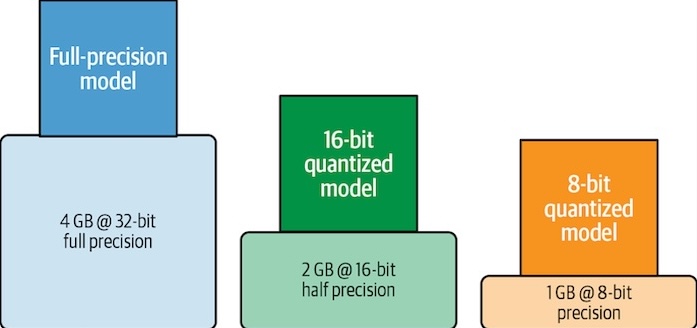

To see a practical demonstration of this problem and a high-level overview of the solution, let's start with a video.
Quantizing LLMs - How & Why (8-Bit, 4-Bit, GGUF & More)
The video 'Quantizing LLMs - How & Why' by Adam Lucek provides an excellent introduction. It starts by showing the file sizes for a real-world 70B parameter model, grounding the problem in a concrete example.
Watch the first 2 minutes and 20 seconds (00:00 - 02:20). Pay attention to why this technique is necessary for running large models on consumer hardware.
2. How Quantization Works
To understand quantization, we first need to appreciate how numbers are typically represented. As a software engineer, you're likely familiar with data types, but a quick refresher in the context of LLMs is helpful.
Models are trained using high-precision formats like FP32 (32-bit float), which can represent a very wide range of numbers with high precision. This is crucial during training to capture subtle gradients during backpropagation.
The key insight behind quantization is that for inference (i.e., generating text), this level of precision is often not necessary. The video you just started explains this well.
Quantizing LLMs - How & Why (8-Bit, 4-Bit, GGUF & More)
Let's continue with the same video to understand the underlying data representations. The presenter gives a clear, developer-focused explanation of binary representation and floating-point numbers (FP32, FP16, BF16).
Watch the segment from 02:20 to 11:52. This will give you the necessary background on how model weights are stored before we dive into how they are compressed.
As the video explained, we can use fewer bits to represent each number. The process involves mapping the range of values from a high-precision data type (like FP32) to a lower-precision one (like INT8, an 8-bit integer).
This mapping requires two key components:
- Scale Factor: A multiplier that scales the floating-point values to fit within the integer range.
- Zero-Point: An integer value that corresponds to the floating-point value of 0.0. This is needed if the mapping is not centered around zero.
To explore these mapping strategies visually without getting bogged down in complex mathematics, the following article is an excellent resource.
A Visual Guide to Quantization
The article 'A Visual Guide to Quantization' by Maarten Grootendorst uses excellent diagrams to explain the core quantization mechanisms.
Please read Part 2 of the article. Start from the heading 'Introduction to Quantization' and continue through 'Symmetric Quantization' and 'Asymmetric Quantization'. Focus on understanding the difference between these two mapping methods from the diagrams.
In summary, quantization involves:
- Analyzing the distribution of a model's weights (which are floating-point numbers).
- Determining a target integer range (e.g., -128 to 127 for INT8).
- Calculating a scale factor (and possibly a zero-point) to map the float range to the integer range.
- Converting each weight to its corresponding integer value.
During inference, these integers can be used directly for computation on hardware that supports integer math (which is faster), or they can be de-quantized back to floats on-the-fly.
3. The Impact: Reduced Size and Faster Inference
The benefits of quantization are twofold, directly addressing our learning outcome.
1. Reduced Model Size and Memory Usage
This is the most direct benefit. By using fewer bits per parameter, the overall model size shrinks dramatically.
| Precision | Bits per Parameter | Size Reduction (vs. FP32) | 7B Model Size |
|---|---|---|---|
| FP32 | 32 | 0% | ~28 GB |
| FP16 | 16 | 50% | ~14 GB |
| INT8 | 8 | 75% | ~7 GB |
| INT4 | 4 | 87.5% | ~3.5 GB |
This reduction means the model requires less disk space, less RAM to load, and critically, less GPU VRAM to run, making self-hosting accessible on consumer-grade hardware.
2. Increased Inference Speed
Inference speed improves for two main reasons:
- Memory Bandwidth: Smaller models require less data to be transferred from memory to the processing units of the GPU, reducing bottlenecks.
- Faster Computation: Integer arithmetic is significantly faster and more energy-efficient than floating-point arithmetic on most processors (both CPUs and GPUs).
Let's return to our main video to see a practical demonstration of these savings and an analysis of the performance trade-offs.
Quantizing LLMs - How & Why (8-Bit, 4-Bit, GGUF & More)
The next part of the 'Quantizing LLMs' video demonstrates loading base, 8-bit, and 4-bit models, showing the concrete impact on memory. It then compares the output quality and a performance metric called 'perplexity' to evaluate the trade-off.
Watch the segment from 11:52 to 21:51. Observe the reported memory savings and how the model's output quality and perplexity score change with more aggressive quantization.
As the video demonstrates, while there is a slight degradation in performance (higher perplexity), the model's output remains coherent and useful, especially at 8-bit and often even at 4-bit. This makes the trade-off highly favorable for many applications.
4. Practical Application: GGUF and Ollama
The concepts we've discussed are put into practice through specific model formats and tools. One of the most popular formats for quantized models designed to run on consumer hardware is GGUF (Georgi Gerganov Universal Format).
This format is used by the llama.cpp library and is the backbone of tools like Ollama, which you encountered in the previous lesson. GGUF is designed to be a single, portable file that contains everything needed to run the model, including its quantized weights and metadata. It's particularly well-suited for running models on CPUs or splitting the workload between CPU and GPU.
The final segment of the video provides a brief but clear introduction to GGUF.
Quantizing LLMs - How & Why (8-Bit, 4-Bit, GGUF & More)
To connect this theory to the tools you've seen, let's watch the last part of the 'Quantizing LLMs' video, which covers the GGUF format.
Watch from 21:51 to the end. This will show you how quantization is packaged into a practical format that enables tools like Ollama.
Conclusion
You now understand the fundamental principles of quantization and its critical role in making large language models practical for self-hosting.
Key Takeaways:
- What it is: Quantization is a compression technique that reduces the numerical precision of model weights, typically converting them from 32-bit floats to 8-bit or 4-bit integers.
- How it reduces size: Using fewer bits per parameter directly translates to a smaller memory footprint. An 8-bit quantized model is 75% smaller than its 32-bit original.
- How it reduces cost: Smaller models require less VRAM, enabling them to run on cheaper, more accessible hardware. Faster integer computations also lead to lower energy consumption.
- The Trade-off: There is a slight loss in model performance (accuracy), but for many applications, this degradation is minimal and a worthwhile trade-off for the massive efficiency gains.
- Practical Formats: GGUF is a popular file format that packages quantized models for efficient execution on consumer hardware, powering tools like Ollama.
In our next lesson, we will continue exploring inference optimization by looking at caching strategies, specifically KV caching. While quantization reduces the static size of the model, KV caching is a technique that dramatically speeds up the process of generating long sequences of text.