Recommended resources
The freely available resources this lesson will direct you to.
Hello! Welcome to your next lesson in the "LLM Operations and Security" module.
In our last lesson, we focused on performance optimization, specifically how KV caching accelerates the dynamic process of text generation. Today, we shift our focus from making LLMs fast to making them safe—another critical pillar of building production-ready AI systems.
This lesson is designed to help you achieve the learning outcome: Implement an input/output moderation filter to handle inappropriate content. We will explore why moderation is necessary, what kind of content we need to filter, and three practical approaches to implementing these safety checks in your applications.
1. Why Moderation Matters: The Role of Guardrails
When you deploy an LLM-powered application, you are responsible for its behavior. Without proper controls, LLMs can be prompted to generate harmful, toxic, or otherwise inappropriate content, or they might hallucinate responses that create legal or reputational risks for your organization.
To understand the real-world consequences, let's look at a couple of high-profile incidents where AI chatbots went "off the rails."
Guardrails Crash Course for Beginners 🛡️🔥
The video 'Guardrails Crash Course for Beginners' from the AI Anytime channel provides excellent motivation by showcasing real-world examples of AI chatbot failures.
Watch the first four minutes of the video (00:03 - 04:01). It discusses cases involving Air Canada and the delivery firm DPD, which highlight the financial and brand risks of unmoderated AI.
These examples underscore the need for guardrails: mechanisms that enforce safety boundaries and control an LLM's behavior. Content moderation is a fundamental type of guardrail.
In a typical LLM application, moderation can be applied at two key points, as shown in the diagram below.
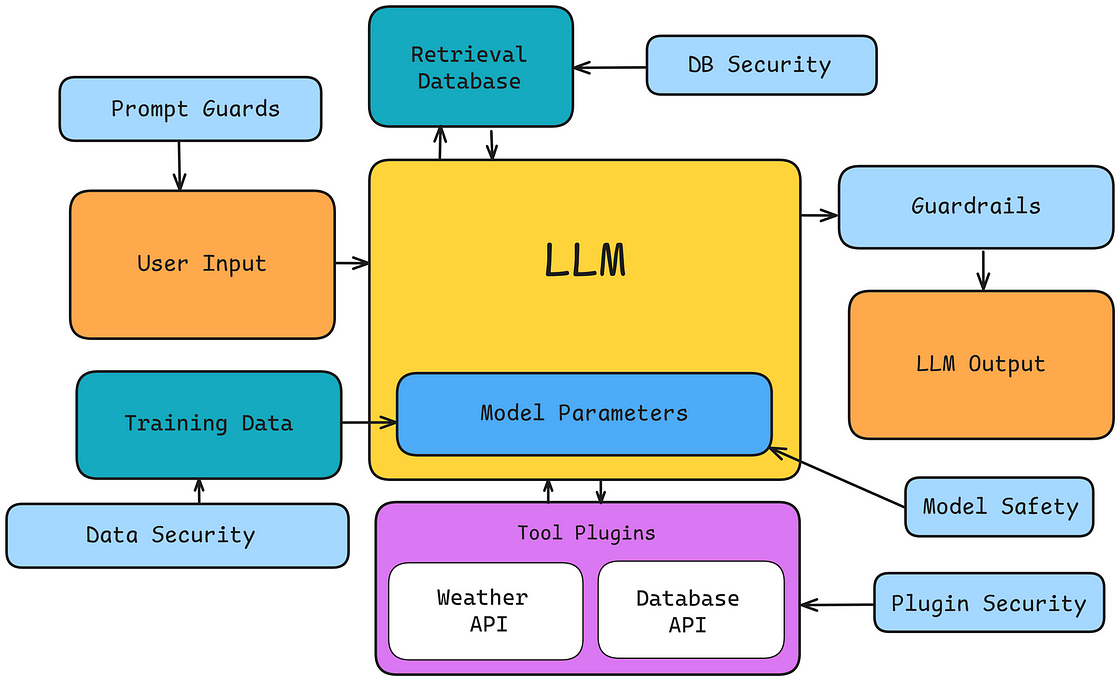
- Input Moderation: Filtering the user's prompt before it reaches the LLM. This prevents the model from processing or responding to malicious or inappropriate requests.
- Output Moderation: Filtering the LLM's generated response before it is shown to the user. This acts as a final safety net to catch any harmful content the model might produce.
2. Defining "Inappropriate Content"
The term "inappropriate content" is broad. To implement an effective filter, you need to define what specific categories of content you want to block.
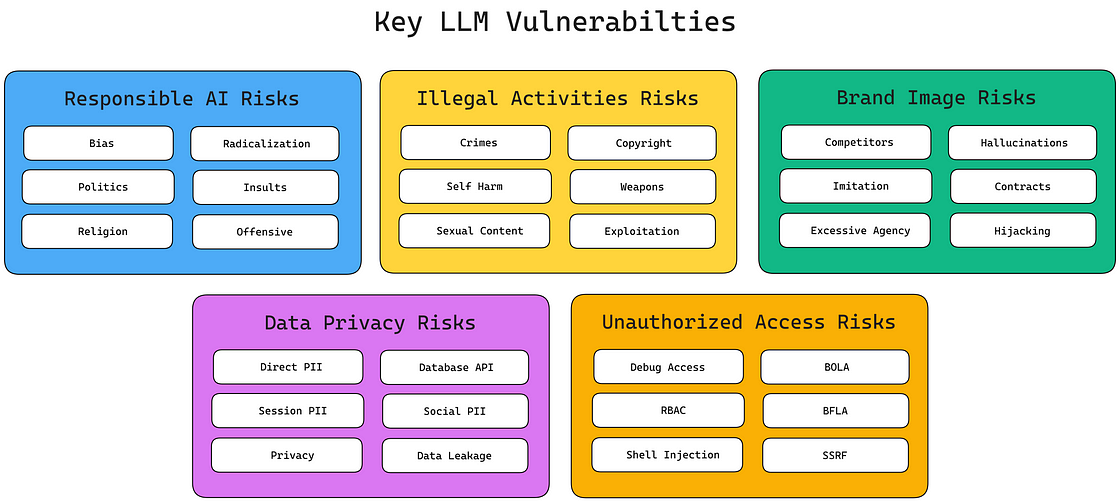
Common categories for moderation include:
- Hate speech: Content that expresses hatred or promotes violence against individuals or groups based on attributes like race, religion, or sexual orientation.
- Harassment: Abusive or threatening language targeting individuals.
- Self-harm: Content that encourages or provides instructions on how to self-harm or commit suicide.
- Sexual content: Explicit descriptions of sexual acts or content involving minors.
- Violence: Glorification of violence or providing instructions on how to perform violent acts.
Now, let's explore three different methods for implementing these checks.
3. Approach 1: Use a Dedicated Moderation API
One of the most direct ways to implement content moderation is by using a specialized API designed for this purpose. If you are using OpenAI models, the Moderation API is an excellent choice. It's a separate, fine-tuned classification model that is free to use and designed to check text against OpenAI's safety policies.
The workflow for input moderation is simple:
- Receive input from the user.
- Send the input text to the Moderation API.
- If the API response indicates the content is flagged (
flagged: true), block the request and inform the user. - If the content is not flagged, proceed to send it to the main LLM (e.g., GPT-4o).
The following resource from the OpenAI Cookbook provides a complete, practical code example of this workflow. Given your background, the asynchronous Python implementation should be quite clear.
Let's study the official OpenAI Cookbook on using the Moderation API. We will focus on the 'Input moderation' section, which provides a robust code example.
Please read Section 1, 'Input moderation'. Pay close attention to the execute_chat_with_input_moderation function. It demonstrates an efficient pattern where the moderation check and the LLM call are run in parallel, but the LLM response is cancelled if the moderation check fails.
This same principle can be applied to output moderation, where you would take the generated response from the LLM and pass it through the Moderation API before sending it back to the user.
4. Approach 2: Use a Specialized Moderation Model
In the open-source ecosystem, a common approach is to use a smaller, specialized LLM that has been fine-tuned specifically for safety classification tasks. These models act as dedicated gatekeepers.
A leading example is Meta's Llama Guard. It's a model trained to classify prompts and responses as "safe" or "unsafe" and to identify specific harm categories (e.g., S1: Violent Crimes, S13: Elections).
Let's see a quick demonstration of Llama Guard in action.
Guardrails Crash Course for Beginners 🛡️🔥
The 'Guardrails Crash Course' video also provides a concise demonstration of using Llama Guard for content safety classification. This will give you a practical sense of how these specialized models work.
Watch from 11:27 to 17:15. This segment introduces Llama Guard and shows a code example where it classifies prompts like 'how to make a bomb' as 'unsafe' and 'what is AI' as 'safe'. Notice how the model's output is a simple classification that your application can easily act upon.
Using a model like Llama Guard gives you more control and is a great option when you're building with open-source models and want to host your entire stack, including your safety mechanisms. Frameworks like Haystack provide components (e.g., LLMMessagesRouter) that make it easy to integrate these models into a pipeline, as shown in the "AI Guardrails" resource (LINK).
5. Approach 3: Use a Guardrail Library
A third approach is to use a high-level library that provides a framework and a suite of pre-built validators for various safety and quality checks. Guardrails AI is a popular open-source library that does exactly this. It allows you to define safety rules and validators that can be applied to both inputs and outputs.
These validators can wrap different underlying methods, including regex, custom code, or even calls to other LLMs. This provides a flexible and extensible way to manage content.
Let's look at a concrete example of using Guardrails AI to filter for profanity.
Guardrails for LLM Applications | Complete Tutorial for AI Developers WIth Guardrails AI
The tutorial 'Guardrails for LLM Applications' by Sunny Savita includes a detailed walkthrough of the Guardrails AI library. We'll watch a segment that demonstrates the 'profanity-free' validator.
Watch from 44:50 to 50:15. This part shows how to import the profanity-free validator, apply it to a sentence, and see how it raises an exception when profanity is detected. This is a clear, practical example of an output moderation filter.
As the video demonstrates, libraries like Guardrails AI offer a rich ecosystem of validators for many common concerns, including not just profanity and toxicity, but also detecting Personally Identifiable Information (PII), preventing prompt injections, and ensuring outputs conform to a specific structure (like valid JSON).
Conclusion
In this lesson, we explored the critical role of content moderation in building safe and reliable LLM applications. We saw that filtering inappropriate content is a key responsibility for any AI developer.
Key Takeaways:
- Moderation is essential for preventing harmful outputs and protecting your application and users from risks.
- Filters should be applied to both user inputs (to block malicious prompts) and LLM outputs (as a final safety check).
- There are several ways to implement moderation:
- Dedicated APIs like the OpenAI Moderation API offer a simple and effective solution.
- Specialized Models like Llama Guard provide a powerful, self-hostable option for the open-source ecosystem.
- Guardrail Libraries like Guardrails AI provide a high-level, extensible framework with many pre-built validators.
The best approach depends on your specific needs, the LLM ecosystem you're working in, and the level of customization you require.
In our next lesson, we will take a deeper dive into a specific type of malicious input: prompt injection. We will apply techniques to mitigate basic prompt injection attacks, building directly on the concepts of input filtering we've learned today.