Recommended resources
The freely available resources this lesson will direct you to.
Hello! Last time, you traced where a pointer points and distinguished an array from a pointer variable. A C string uses those same rules, with one extra convention: its characters end at a null character. In this lesson, you will trace what string operations read, change, and print—and recognize when an apparent string is not safe to use as one.
A string ends at '\0', not at the end of its array
C has character arrays, but no built-in string object that stores its length. A C string is a sequence of characters followed by a null character, '\0'. The terminator occupies a character slot; it is not included in the string’s length.
char word[8] = "cat";
The array has eight elements. Its first four contain 'c', 'a', 't', and '\0'; the remaining four are also zero because this initializer initializes the whole array. Its capacity is eight characters, but its current string length is three. The terminator means that a later operation can find the end without knowing the array’s capacity.
Watch the opening of Engineer Man’s Working with character arrays and "strings" in C, then its demonstrations of copying and moving the terminator.
Working with character arrays and "strings" in C
Engineer Man introduces the null byte and shows how character-array operations depend on its position.
Watch the terminator for why string functions need '\0'. Skip to length versus capacity, then watch changing characters. Notice that moving the terminator changes the string seen by a function without changing the array’s allocated size.
For example, consider:
char s[] = "banana";  /* seven elements, including '\0' */
s[3] = '\0';
The array still has seven elements, and the characters after index 3 have not disappeared. But string operations now see "ban": they stop at s[3]. Writing 'a' back to that position restores "banana", provided the original terminator at s[6] is still there.
Do not confuse '\0' with '0' or NULL. The first is a character whose value is zero and can terminate a string. The second is the visible digit zero. NULL denotes a null pointer, not a character stored at the end of a string.
An array need not contain a string at all:
char raw[3] = {'c', 'a', 't'};
raw contains three valid characters but no terminator. Passing it to strlen or printing it with %s does not mean “process three characters”: those operations seek '\0' and would read beyond this array, giving undefined behavior. For a three-character string, reserve at least four slots.
The same characters, two different declarations
Compare these declarations:
char a[] = "cat";
const char *p = "cat";
a is a four-element, modifiable array containing its own characters and terminator. In most expressions, a converts to a pointer to a[0], but a is not a pointer variable. You can change a[0]; you cannot assign a new address to a or write ++a.
p is a pointer variable. It points at the first character of a string literal, so you can advance or reassign p. You must not modify the literal through it. The const declaration makes that restriction visible to the compiler. A declaration such as char *p = "cat"; may be accepted by C, but attempting p[0] = 'C' still has undefined behavior—a crash is possible, not guaranteed.
Watch Portfolio Courses’ String In Char Array VS. Pointer To String Literal for these contrasts.
String In Char Array VS. Pointer To String Literal | C Programming Tutorial
Portfolio Courses contrasts an initialized character array with a pointer to a string literal, including modification, pointer movement, and sizeof.
Watch array and literal, moving the pointer, and size and const. One terminology correction matters for precise tracing: an array is not a “constant pointer”; it is an array that converts to a pointer in many expressions. Also, modifying a literal is undefined behavior even on a system where it does not visibly crash.
This distinction makes sizeof questions straightforward. If char a[] = "cat";, then sizeof a is 4 bytes, including the terminator. If const char *p = "cat";, then sizeof p is the implementation’s pointer size, not the length or capacity of the text. Neither expression searches for '\0'; strlen does that.
Pointers also let you choose where a string begins:
char text[] = "planet";
char *q = text + 2;
Here q[0] is 'a', *q is 'a', and q[1] is 'n'. A string operation receiving q sees "anet" because it starts at that address and continues to the original terminator. text itself remains "planet". Unlike a pointer into a literal, q points into a modifiable array, so changing *q would change text[2] too.
Reading, comparing, and copying strings
Include <string.h> when using the standard string functions below. Their effects become easier to trace if you picture where each one starts and where it stops.
strlen(s) counts characters before the first '\0'; it does not count the terminator. Thus, after char a[10] = "cat";, strlen(a) is 3 while sizeof a is 10. If p = a + 1, strlen(p) is 2: the function sees "at".
strcmp(s, t) compares character contents, not pointer addresses. It returns zero for equal strings, a negative value if the first differs earlier in lexicographic order, and a positive value if the second does. For tracing, rely on the sign, not a particular nonzero number.
char a[] = "cat";
char b[] = "cat";

a == b             /* addresses of different arrays: false */
strcmp(a, b) == 0  /* equal character sequences: true */
Pointer equality can be true when two pointers designate the same character; it is simply not a general test for equal text. Conversely, assigning one pointer to another copies an address, not the characters:
char a[] = "cat";
char *alias = a;
alias[0] = 'b';     /* a now contains "bat" */
To give another array its own characters, use a copying operation with enough destination space. strcpy(dest, src) copies characters including the terminator. strcat(dest, src) finds dest’s existing terminator and copies src starting there, again including its terminator.
char dest[10] = "cat";
strcat(dest, "fish");  /* dest becomes "catfish": 7 letters plus '\0' */
Neither function knows the destination’s capacity. The programmer must provide sufficient space; source and destination also must not overlap for these calls. Treat strcpy and strcat as descriptions of character movement, not as automatic bounds checks.
Ted Jensen’s A Tutorial on Pointers and Arrays in C makes the copying movement explicit using two advancing pointers.
A TUTORIAL ON POINTERS AND ARRAYS IN C by Ted ...
Read Ted Jensen’s Chapter 3 copy walk-through to connect last lesson’s *p++ rule to string copying.
In Chapter 3, “Pointers and Strings” (printed pp. 15–17), start at the paragraph introducing Program 3.1 and continue through the explanation of my_strcpy. Read the copy walk-through. Focus on what *pB++ = *pA++ writes, where both pointers stand when the loop ends, and why the destination still needs a terminator written after that loop.
The crucial detail is the loop condition. A loop that continues while the source character is nonzero copies ordinary characters but stops before copying '\0'. It must write the terminator separately. An alternative is to copy first, then test whether the copied character was zero:
char *out = dest;
const char *in = src;

/* Assumes dest has enough space and the regions do not overlap. */
while ((*out++ = *in++) != '\0') {
    /* The assignment copies one character, including '\0' on the last pass. */
}
Each postfix increment advances its pointer after using the old address. On the final pass, both pointers advance past the copied terminator; the terminator itself has already been stored in dest.
Rows of strings, then a complete trace
An array of character arrays can hold several independent strings:
char sports[5][15] = {
    "golf", "hockey", "football", "cricket", "shooting"
};
Each row has 15 character slots, so each can hold at most 14 characters plus '\0'. The initializer gives each row its string and zero-initializes its unused slots. Yet string functions stop at the first zero in a row: strlen(sports[0]) is 4, while sizeof sports[0] is 15.
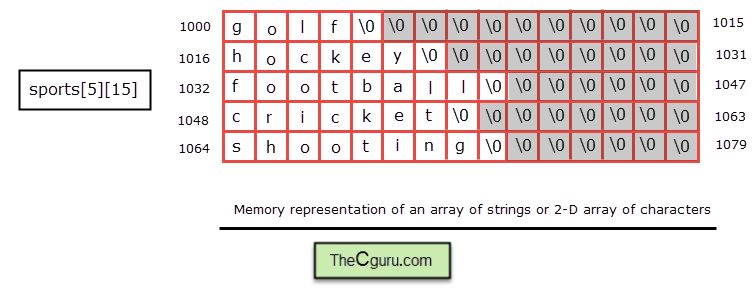
There is an address-label error worth catching rather than memorizing. If sports[0][0] were at byte address 1000, a 15-character row would occupy addresses 1000 through 1014, and sports[1][0] would be at 1015, not 1016 as labeled in the picture. In general, for this declaration, sports[r][c] is bytes after the first element. As in the previous lesson, sports + 1 advances by one whole row, not one character, and sports is not a char **.
Now trace a mixed example statement by statement. It is a constructed GATE-style example, not a previous-year question:
#include <string.h>

char a[10] = "cat";
char b[10] = "dog";
char *p = a + 1;
char *q = b;

*p++ = 'u';
*q++ = *p;
*q = '\0';
strcpy(b + 1, "xy");
strcat(a, "s");
int result = strcmp(a, b);
| After the statement | a as a string |
b as a string |
Pointer position or effect |
|---|---|---|---|
| Initializations | "cat" |
"dog" |
p at a[1]; q at b[0] |
*p++ = 'u' |
"cut" |
"dog" |
Write a[1], then p advances to a[2] |
*q++ = *p |
"cut" |
"tog" |
Read 't' from a[2]; write b[0]; q advances to b[1] |
*q = '\0' |
"cut" |
"t" |
b[1] becomes the first terminator; q stays there |
strcpy(b + 1, "xy") |
"cut" |
"txy" |
Copy 'x', 'y', and '\0' into b[1] onward |
strcat(a, "s") |
"cuts" |
"txy" |
Replace a’s terminator with 's'; store a new terminator after it |
The final result is negative, because "cuts" compares before "txy" at their first characters. p still points to a[2], and q still points to b[1]; neither library call changed those pointer variables. Notice also that shortening b to "t" did not erase its later array elements. The following strcpy overwrote them with a new suffix and terminator.
Key takeaways
When tracing a C string, record the array’s capacity, the first terminator’s position, and each pointer’s current address. sizeof measures an object’s size; strlen scans a string. Pointer assignment can create an alias, while character copying creates separate contents. String functions need a reachable terminator and, when writing, sufficient destination space.
The next lesson moves from contiguous character arrays to structures and unions, where tracing values will require attention to member layout as well as addresses.