Recommended resources
The freely available resources this lesson will direct you to.
Hello. Your targeted collection has created a controlled baseline: one catalog-scoped item, one item organization, one transaction organization, selected reference entities, and selected supply transactions. Now the task is to prove that the data actually arrived in the Planning Data Repository in a form Planning can use.
This is a critical implementation distinction: a collection request can show Succeeded while a particular item, supplier, purchase order, or on-hand balance is still absent because it was outside the selected scope or lacked a required related record. In this lab, you will validate the complete evidence chain for one item-organization scenario before involving any plan run.
For a senior functional-consultant interview, the concise framing is:
“After collections, I validate master and transactional data directly in the planning repository through Plan Inputs, and validate network entities through Maintain Supply Network Model. I reconcile by item, organization, source document, quantity, and date before diagnosing plan behavior.”
What “reviewing the repository” means
Oracle Planning collects data from multiple Fusion SCM applications and stores a planning-oriented representation in the Planning Data Repository. This repository is the input layer for Demand Management, Supply Planning, and Replenishment Planning; it is not the same as a plan’s recommendations or simulation results.
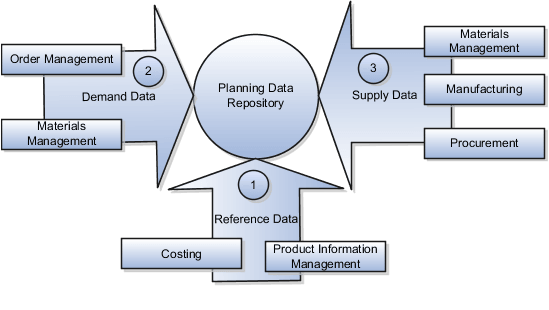
Your previous targeted collection selected a subset of these data classes. For the controlled buy-item scenario, your proof should be based on four questions:
- Does the item exist for the intended organization with usable planning attributes?
- Does the organization and its connected supplier/network context exist?
- Do operational records such as on-hand, sales orders, and purchase orders exist with the expected quantities and dates?
- Can you link each repository record back to the source record and the collection request you submitted?
The repository is populated through a staging and load process, rather than Planning querying the source transaction tables live.
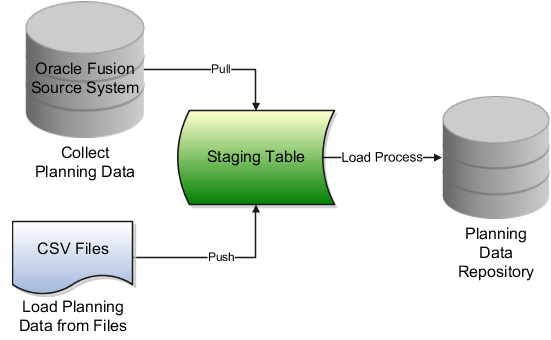
That architecture explains a common troubleshooting trap: changing an item attribute or purchase order in the source application does not instantly change repository data. First correct the source, then run the appropriate collection, then validate the refreshed repository record.
The two repository-review work areas
Oracle provides two complementary options. Choose based on the business object you are validating, not based on convenience.
| Repository evidence | Primary review location | Typical examples |
|---|---|---|
| Supply and demand data outside the network model | Plan Inputs | Items, item structures, on-hand, purchase orders, sales orders, work orders, sourcing data, calendars |
| Supply-network entities | Maintain Supply Network Model | Organizations, suppliers, customers, carriers, interlocation shipping networks |
| Supplier and carrier evidence | Either, depending on the needed detail | Supplier master and supplier-related context |
The practical rule is:
- Start in Plan Inputs for the item-organization and its operational transactions.
- Use Maintain Supply Network Model when you must prove that the organization, supplier, or network relationship itself was collected.
- Never use a plan output, such as a planned order or an exception, as proof that source data was successfully collected. That is downstream behavior, not repository evidence.
Read Oracle’s procedure before navigating. It establishes the appropriate page for each type of entity and the Full Pane workflow.
Review Data in the Planning Data Repository
Read Oracle’s official procedure to distinguish Plan Inputs from Maintain Supply Network Model and to follow the standard table-search workflow.
In the section “Review Data Using the Plan Inputs Page Layout,” read from the choice of review pages. Then follow the numbered steps beginning with Navigator navigation through reviewing results, paying particular attention to opening Plan Inputs in Full Pane and searching for the relevant seeded table. Finish with the “Review Data Using the Maintain Supply Network Model Page” steps, which begin at “In the Navigator, click Plan Inputs” and explain the separate task-based search for network entities.
Lab setup: define your expected evidence before searching
Use the exact scenario from the previous collection. Retain the notation below in your lab notes, replacing it with your real values:
- Item:
- Organization:
- Catalog:
- Supplier: , if the item has a buy sourcing rule or purchase order
- Purchase order: , if collected
- Sales order or other demand: , if collected
- Collection request ID:
Create an expected-results sheet from the source application before you search Planning. You are not trying to match every source column. You are validating the fields that establish planning usability.
| Object | Minimum expected evidence | Source comparison point |
|---|---|---|
| Organization | Organization code/name and active planning-relevant context | Inventory organization setup |
| Item-organization | Item number, organization, planning method or make/buy attribute, lead time, UOM | Product Information Management / item organization |
| Calendar | Calendar name and correct working-date pattern near a known date | Calendar setup |
| Sourcing | Source type, supplier or source organization, assignment context, effective dates | Sourcing rule and assignment set |
| On-hand | Item, organization, subinventory where relevant, quantity, date | Inventory balance |
| Purchase order | PO number, line, supplier, item, organization, open quantity, promised/need-by date, status | Procurement document |
| Sales order | Order number, line, item, organization, requested date, open quantity, status | Order Management document |
Establish a comparison convention
For each quantity, record the unit of measure. A mismatch can be legitimate when the source transaction is in a transaction UOM and Planning displays a primary or planning UOM, but it must be explainable through valid UOM conversion.
For each date, record what the field means:
- Requested date generally describes demand timing.
- Promised, expected, or need-by date generally describes supply timing, depending on transaction type.
- Collection completion time tells you when the repository was refreshed; it is not the transaction’s business date.
This discipline prevents weak conclusions such as “the PO is missing” when the actual issue is a filtered status, changed date, or quantity converted into another UOM.
Lab 1: validate the item-organization record in Plan Inputs
Step 1: open Plan Inputs in Full Pane
- Open the Navigator.
- Select Plan Inputs. Depending on your configured landing page, Planning may open in a panel with a Plans menu.
- From the Plans menu, right-click Plan Inputs and select Open.
- On the Plan Inputs page, click Open, then select Full Pane.
- In Open Table, Graph, or Tile Set, search for the seeded table for Items. Use the exact available label in your pod.
- Open the table and add filters before searching.
The Full Pane is not just a display preference. It gives enough column width to compare identifiers, organizations, planning attributes, and dates without making conclusions from truncated values.
This short video demonstrates the Full Pane and seeded-table workflow. Use it to confirm the navigation pattern; use Oracle documentation and your environment’s table labels as the authority for the exact objects available in 26B.
Oracle Fusion planning training | Collection process in oracle Fusion Cloud planning central
Watch “Oracle Fusion planning training | Collection process in oracle Fusion Cloud planning central” by MY TECHNO JOURNAL for a visual walkthrough of opening Plan Inputs, searching seeded tables, changing layouts, and reviewing collected records.
Watch Plan Inputs review. Focus on the switch to Full Pane, selecting a seeded table such as Items or Suppliers, applying search criteria, choosing an appropriate layout, and exporting evidence when needed. Do not attempt to build custom tables in this lab; use seeded objects to validate the collection baseline.
Step 2: filter narrowly
For the Items table, start with:
- Item equals
- Organization equals
If your available table splits item master data from item-organization data, inspect both. An item can exist globally yet fail to have the organization-specific attributes that make it usable in supply or replenishment planning.
Do not begin with a blank search in a student environment unless the data volume is very small. A broad result set makes it easy to inspect a similarly named item in the wrong organization and declare success incorrectly.
Step 3: verify planning-relevant master data
After opening the matching result, inspect the available attributes. The layout differs by release and role, so use View, Actions, or the table layout selector to expose columns as needed.
Validate at least:
| Validation | What “good” looks like | Why it matters later |
|---|---|---|
| Item number and description | Exact item identifier from source | Proves the intended item, not a look-alike, was collected |
| Organization | , not only a global item record | Planning decisions are organization-specific |
| UOM | Primary/planning UOM is valid and expected | Quantities and order modifiers depend on it |
| Planning attributes | Relevant planning method, make/buy, lead time, order modifiers if collected | Determines supply behavior in a future plan |
| Status and effectivity | Active and effective for the intended time | Inactive or future-effective data may not drive planning |
| Source indication, where exposed | Expected Oracle Fusion source system | Helps isolate cross-source ambiguity |
A data record can be present but unusable. Examples include a disabled item, an invalid lead time, an item not assigned to the planning organization, or a make/buy setting that conflicts with the intended sourcing design. Record that distinction explicitly in your evidence sheet.
Step 4: validate the calendar and sourcing context
Still in Plan Inputs, search the appropriate seeded table for the relevant business object:
- Search for the calendar object and locate the calendar expected for .
- Search for sourcing rules, assignment sets, or the comparable available sourcing table.
- Filter by , , rule name, supplier , or assignment set name as appropriate.
- Confirm the source type and effective dates.
For this lab, you are proving that the context exists in the repository. You are not yet proving that a particular plan has selected the assignment set or generated a recommendation; that plan-level validation belongs in the Supply Planning module.
A strong evidence note looks like this:
Item exists in organization , with the expected primary UOM and active planning attributes. Calendar is present. Sourcing rule identifies supplier , and the relevant assignment context is collected and effective on the test date.
Lab 2: validate organization and supplier in the supply network model
The supply network model is the correct place to prove that collection created the network entities themselves. This is particularly useful when a purchase order or sourcing rule appears incomplete.
Step 1: navigate to the task
- Remain in Plan Inputs.
- Open the Tasks panel.
- Select Maintain Supply Network Model.
- Search first for organization .
- Search separately for supplier , if the scenario includes a supplier.
Use the smallest possible search criteria: organization code for the organization; supplier number or supplier name for the supplier. Verify that you are searching the Planning repository’s network model, not navigating back to source supplier setup.
Step 2: compare network evidence to your scenario
For the organization, check its identity and that it corresponds to the inventory organization you selected in the item and transaction filters.
For the supplier, check:
- supplier identity;
- supplier site or related context where your collection and table expose it;
- consistency with the supplier on or the sourcing design;
- active/effective status if available.
The relationship test is more meaningful than isolated existence:
- If exists but is absent, investigate the PO entity selection, transaction organization, open status, item eligibility, and collection logs.
- If exists but supplier details are absent or incomplete, investigate whether supplier reference data was selected and whether the source supplier/site data is valid.
- If both exist but later supply planning does not source from , investigate assignment-set effectiveness and future plan options rather than recollecting blindly.
Lab 3: validate on-hand and transaction records
Master data says the scenario can be planned. Transactional data says Planning has the correct current position to plan from.
Return to Plan Inputs in Full Pane. Open each relevant seeded table separately, rather than expecting one screen to prove every relationship.
1. On-hand
Search for the on-hand inventory table using and . If your scenario tracks subinventories, include the expected subinventory in the comparison.
Validate:
- item and organization;
- on-hand quantity;
- UOM;
- subinventory or locator, if relevant;
- snapshot/transaction timing, if displayed.
The repository quantity should be compared to the source balance at a controlled point in time. If inventory activity continued while collection ran, record that timing condition rather than treating any difference as a defect.
2. Purchase order supply
Search the purchase-order-related seeded table. Use the most precise identifier available:
- PO number
- Item
- Destination or organization
- Supplier , if necessary
Validate the open planning-relevant portion of the line, not simply the original ordered amount. Compare:
- PO number and line;
- item and destination organization;
- supplier;
- remaining/open quantity;
- promised, need-by, or expected date;
- status;
- UOM.
A closed, canceled, fully received, or otherwise ineligible order can exist in Procurement but legitimately not appear as collectible open supply. First verify the source document’s operational status before concluding that Planning lost it.
3. Sales order demand
If you selected sales orders in your prior collection, search the relevant sales-order demand table using , , and .
Validate:
- sales order number and line;
- item and organization;
- open demand quantity;
- requested date;
- UOM;
- status.
If sales orders were deliberately excluded from the collection, document that as an expected absence. In a controlled test, “not collected by design” is different from “missing unexpectedly.”
4. Other selected transactions
Only validate transaction types you selected in the collection request:
| Prior selection | Repository evidence to check |
|---|---|
| Purchase requisitions | Requisition number, line, item, destination organization, quantity, date, status |
| Transfer orders | Source and destination organizations, item, quantity, date, status |
| Work orders | Work order number, item, organization, quantity, dates, status |
| Reservations | Demand/supply references, item, organization, reserved quantity |
| Resource availability | Resource identity, organization, capacity date range and available capacity |
Avoid expanding the validation to entities you did not select. Repository validation should test the defined collection scope, not become an unbounded data audit.
Reconcile the end-to-end scenario
Use this final matrix to bring the separate searches into one defensible conclusion.
| Layer | Expected record | Your result | Interpretation |
|---|---|---|---|
| Network master | Organization | Present / absent | Organization eligibility and network collection |
| Item master | Item in | Present / absent | Item and item-organization collection |
| Planning context | Calendar and sourcing context | Present / absent | Date and supply-source prerequisites |
| Inventory | On-hand for in | Quantity matched / explained variance / absent | Starting netting position |
| Firm supply | for , , | Matched / explained variance / absent | Incoming supply |
| Independent demand | for , | Matched / explained variance / absent | Demand signal |
| Execution proof | Collection request and selected children succeeded | Confirmed / issue | Evidence that the defined load completed |
Your outcome is not necessarily that every row is “present.” The outcome is a fully explained result. For example:
Collection request succeeded. Item , organization , calendar , supplier , on-hand quantity, and PO are present and reconcile to the source. Sales order is absent by design because Sales Orders was not selected in the targeted collection.
That statement proves controlled implementation work. It is much stronger than “I checked Plan Inputs and data looked fine.”
Root-cause sequence for repository mismatches
When a record is missing or differs from source, troubleshoot from the collection boundary inward. Do not immediately change plan options or recreate planning setup.
| Symptom | First checks | Likely correction |
|---|---|---|
| Item is not found | Source organization was enabled; item belongs to selected catalog; Items reference entity was selected; correct item-organization filter | Correct source eligibility, catalog membership, entity selection, or organization filter; rerun a targeted collection |
| Item exists but planning attributes are missing | Global versus organization-level item data; attribute effective dates; available table layout | Validate source item organization assignment and expose the correct repository columns |
| Organization or supplier is missing | Relevant reference entity selected; search in Maintain Supply Network Model; source master status | Select and recollect appropriate network reference data; correct source master setup |
| On-hand is absent | On Hand was selected; transaction organization is ; item is collected | Correct transaction filter or entity scope, then recollect |
| PO is absent | Purchase Orders selected; PO is open; destination organization and item are within scope; supplier/reference data exists | Correct the source record or collection scope; review child process log before recollection |
| Quantity differs | UOM conversion; partial receipt/shipment; reservations; transaction timing; source changes after collection | Compare at the same timestamp and UOM; recollect if a source change occurred |
| Date differs | Requested versus promised/need-by date; calendar interpretation; source update timing | Compare like-for-like date attributes and confirm the collected calendar |
| Records are from an unexpected source | Source-system filter and record source attributes | Confirm selected source system and prevent ambiguous multi-source collection scope |
The collection process itself should also be checked. Oracle’s collection guidance explicitly directs you to monitor scheduled process status and then review the result in Plan Inputs.
Collect Data Using the Net Change Collection Type
Read this short Oracle reference for the operational handoff from collection completion to repository validation. Although it describes Net change collection, the monitoring and review principle also applies to your completed targeted collection.
In the numbered procedure, read the collection-to-review sequence. Focus on the separation between submitting the collection, monitoring it in Scheduled Processes, and reviewing collected records in Plan Inputs. For this lab, retain your targeted collection request R1; do not run a net change collection yet.
Evidence to retain for interview-quality validation
Capture evidence efficiently. You do not need screenshots of every column, but you do need traceability.
Keep:
- the collection request ID and completion timestamp;
- the selected catalog and organization filters;
- the entity-selection summary;
- one filtered result for item in organization ;
- one network-model result for , plus when applicable;
- one on-hand result;
- one firm supply or demand result, such as or ;
- a short reconciliation note explaining any intentional absence or variance.
If policy permits, use the Plan Inputs export capability for a filtered table result. Name the file so another consultant can relate it to the collection run, for example:
R1_I1_O1_PO_validation_YYYYMMDD.xlsx
Do not export broad repository tables unnecessarily; filtered evidence is both safer and more useful.
Key takeaways
- The Planning Data Repository is the collected planning-input layer, not a plan’s output.
- Use Plan Inputs to validate supply and demand records, including item-organization data, on-hand, and open transactions.
- Use Maintain Supply Network Model to validate organizations, suppliers, customers, carriers, and interlocation shipping networks.
- Reconcile one scenario using consistent identifiers: item, organization, source document, quantity/UOM, date meaning, and collection request.
- A record that is present may still be unusable; verify organizational context, status, effectivity, and planning-relevant attributes.
- When data is absent, investigate collection scope, selected entities, source eligibility, transaction status, and child-process evidence before changing plan configuration.
Next, you will make a controlled source-data change, run a net change collection, and verify exactly which repository records were refreshed.