Recommended resources
The freely available resources this lesson will direct you to.
Welcome back. Last lesson, we chose a list for feed order and a set for bookmarked-ID lookup. Now the question is how to make operations on those collections easy to read without hiding what they do.
In about 40 minutes, you’ll write a focused Kotlin extension function, use a lambda with a higher-order function, and combine the two for an articles feature. The aim is code you could defend in a senior Android review: concise, but explicit about policy, ordering, and cost.
Extensions give an operation a useful home
Suppose both the feed and article-detail screens need the same display rule: trim an article title, and show a fallback when it is empty. A function can express that rule without making every screen repeat it:
data class Article(
    val id: String,
    val title: String,
    val subtitle: String?
)

fun Article.titleForDisplay(): String =
    title.trim().ifEmpty { "Untitled article" }

val article = Article("a1", "  Kotlin state  ", null)
println(article.titleForDisplay()) // Kotlin state
Article is the receiver type. Inside titleForDisplay(), properties such as title belong to the article on which the function is called. The function is still defined outside the class; it does not add a member to Article or gain access to its private implementation. Compared with titleForDisplay(article), the call reads naturally where the article is already in hand.
Read the Kotlin documentation’s “Extension functions” section, from its advice to check the standard library first through the truncate() example. Notice how the receiver is declared and how the call looks at the use site.
Extensions | Kotlin Documentation
Read “Extensions” in the Kotlin documentation to learn the declaration and call syntax, and to check whether an existing collection operation already does the job.
In “Extension functions,” begin with the opening examples. Stop after the explanation of truncate(). Focus on the receiver before the function name; you do not need the later interface and map examples for this lesson.
An extension earns its place when it names a repeated, cohesive rule. titleForDisplay() is a plausible UI-facing rule; an extension named processArticle() that searches, logs, persists, and formats would conceal too much. Equally, there is little reason to wrap article.title.trim() in a new API if that expression appears once and no shared policy is involved.
This matters when changing an established Android codebase. Android Developers shows how a static utility method can become a Kotlin extension while retaining an API callable from Java. Read that migration example for the shape of the change, rather than as a reason to convert every utility method.
Adopt Kotlin for large teams | Android Developers
Android Developers uses a Java utility class to illustrate an incremental move to Kotlin extensions. It is a useful model for improving call sites without requiring an all-at-once migration.
Under “Move utility methods to extension functions,” start where the text introduces static utility classes and read the migration example through its note about Java and Kotlin callers. Watch for the point where the receiver parameter becomes the type before the function name, and for why the file-level JVM name is retained for existing Java callers.
A higher-order function keeps the mechanism and supplies the rule
An extension answers where can I call this operation? A higher-order function answers a different question: can this function receive behavior as an argument? Kotlin’s filter does exactly that. It traverses a collection; the caller supplies a function that decides whether each element stays.
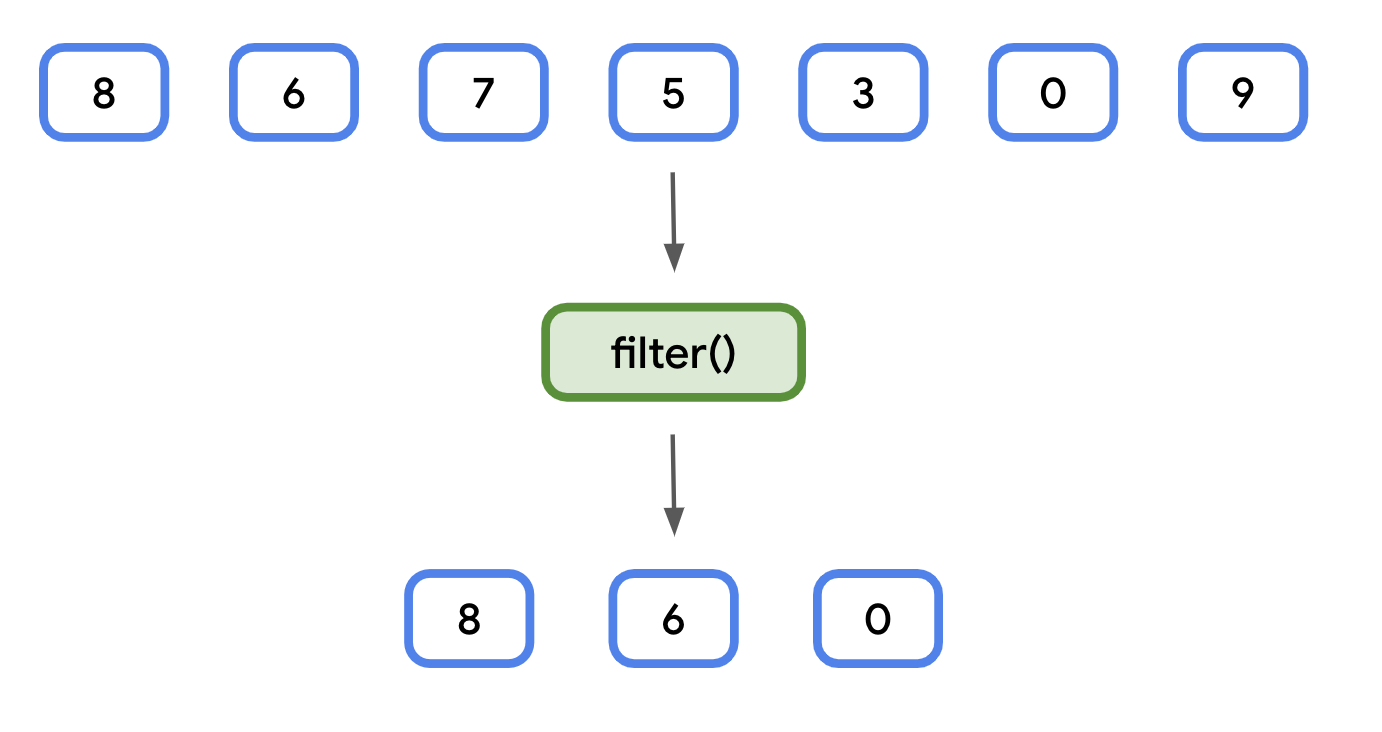
For the pictured sequence, the code is:
val numbers = listOf(8, 6, 7, 5, 3, 0, 9)

val evenNumbers = numbers.filter { number ->
    number % 2 == 0
}
// [8, 6, 0]
The expression in braces is a lambda. filter calls it for each number and keeps the number when it returns true. You could write { it % 2 == 0 } for this short, one-parameter lambda. Naming the parameter becomes more helpful when the body has several conditions or the meaning of it is unclear.
Watch Philipp Lackner’s collection example, then his demonstration of defining an extension that accepts a function. His custom filter is instructive for seeing the syntax from the inside; in production, use Kotlin’s existing filter rather than recreating it without a distinct purpose.
Kotlin Newbie to Pro - LAMBDA FUNCTIONS - Part 28
In “Kotlin Newbie to Pro - LAMBDA FUNCTIONS - Part 28,” Philipp Lackner first supplies a condition to filter, then implements a function that accepts such a condition. Watch for the division of responsibilities between traversal and caller-supplied behavior.
Watch the filter example, from introducing filter through changing its condition, to see what the Boolean result controls. Then watch the custom function, from its declaration through the final comparison with built-in filter. Focus on the parameter’s function type and where that function is invoked for each item.
A function type such as (Article) -> Boolean says: “give me a function that accepts an Article and answers yes or no.” That is more precise than passing a vague configuration object, but it also places a responsibility on the caller. A predicate used during filtering should normally be free of side effects: the caller should not have to wonder whether rendering a list will also write to a database or emit analytics.
Combine them around a real feature rule
Imagine a bookmarks view that shows only saved articles, while letting the screen supply a search condition. The bookmarked-only rule belongs to the feature; the search condition may differ between screens. This is a reasonable place for an extension that is also a higher-order function:
fun List<Article>.matchingBookmarks(
    bookmarkedIds: Set<String>,
    matches: (Article) -> Boolean
): List<Article> = filter { article ->
    article.id in bookmarkedIds && matches(article)
}
The receiver is List<Article>. The matches parameter is a function supplied by the caller. The extension combines that caller-supplied condition with one fixed feature rule: an article must be bookmarked.
val articles = listOf(
    Article("a1", "Kotlin state", null),
    Article("a2", "Coroutines", "Async work"),
    Article("a3", "Kotlin testing", null)
)
val bookmarkedIds = setOf("a1", "a3")
val query = "testing"

val visibleArticles = articles.matchingBookmarks(bookmarkedIds) { article ->
    article.titleForDisplay().contains(query, ignoreCase = true)
}
// Contains article a3
Notice what the function does not do. It does not sort or deduplicate the feed: filter preserves the order and any duplicates in the input list. It does not change articles or bookmarkedIds; it returns a new list. For each article, set membership is typically an expected lookup, and the whole list is visited once. The search predicate adds its own work—for example, checking title text—so avoid describing the entire operation as unconditionally .
The && also short-circuits: matches(article) is called only for a bookmarked article. That is a useful efficiency detail, but not a reason to make matches depend on being invoked a particular number of times. For an empty article list or an empty bookmarked-ID set, the result is simply empty.
Would this helper always improve the codebase? No. If the rule occurs once, the direct expression may be clearer:
val visibleArticles = articles.filter { article ->
    article.id in bookmarkedIds &&
        article.title.contains(query, ignoreCase = true)
}
Prefer the named extension when several call sites genuinely share the bookmarked-only policy, or when that policy needs one well-owned place to change. Keep it near the feature that owns the rule rather than in a catch-all CollectionUtils file. The call matchingBookmarks(...) should tell reviewers enough that they can anticipate its behavior before opening its implementation.
Know where extension syntax can mislead
An extension looks like a member call, but it is not an override. Kotlin chooses an extension using the receiver’s declared type, not its runtime subtype. If both Content.label() and ArticleContent.label() extensions exist, a value declared as Content calls the Content extension even when it contains an ArticleContent object. If a class has a compatible member function with the same name, the member takes precedence.
Read the Kotlin documentation’s “Extension or member functions?” subsection to see both rules in small examples.
Extensions | Kotlin Documentation
Return to the Kotlin documentation for the dispatch rules that prevent surprising extension APIs.
In “Extension or member functions?”, read the static-dispatch example, starting with the question about how Kotlin chooses a call and stopping after the Shape explanation. Then read the precedence examples through the explanation of the different-signature overload. Focus on why neither example behaves like overriding a member method.
These rules suggest a practical review standard: give extensions names unlikely to collide with members, and do not use them to simulate polymorphism. Prefer an ordinary member or interface operation when different implementations must supply different behavior. Also check the standard library before adding a near-duplicate extension; fewer local abstractions can make a codebase more fluent, not less.
Key takeaways
An extension function gives a focused operation a readable call site without changing the receiver class. A higher-order function accepts behavior—often a lambda—so a reusable operation such as filtering can apply a caller’s rule. Combine them when there is a real shared policy, as with matchingBookmarks, but keep ordering, allocation, side effects, and naming visible enough to reason about.
The strongest code-review explanation is not “this is idiomatic Kotlin.” It is why the abstraction exists, which behavior it fixes, which behavior callers control, and what a reader might otherwise misunderstand. Next lesson, we’ll look more closely at the generic types behind reusable APIs and how to keep them type-safe.