Recommended resources
The freely available resources this lesson will direct you to.
Hello! Welcome to the third lesson in our course on building a secure ThinkPad.
Introduction
In the last lesson, you formulated a personal threat model for your x230 project. You identified your key assets and defined potential adversaries, including the "Opportunist," the "Targeted Remote Attacker," and the highly capable "Evil Maid." This model gives us the "why" behind our security efforts.
Today, we will build on that foundation by introducing a cornerstone concept in computer security: the Trusted Computing Base (TCB). This lesson addresses the learning outcome: Define the Trusted Computing Base (TCB) and explain why minimizing its size is a fundamental security principle.
We will explore what the TCB is, what it means for a component to be "trusted," and most importantly, why our primary architectural goal is to make this base as small as humanly possible. This principle directly informs our strategy against the "Evil Maid" and justifies the significant effort we will later put into replacing the laptop's stock firmware.
This lesson should take approximately 60 minutes to complete.
1. What is the Trusted Computing Base (TCB)?
At its heart, the TCB is the set of all components within a system that are responsible for enforcing its security policy. If any component inside the TCB has a bug or a vulnerability, the security of the entire system can be compromised. Components outside the TCB, even if they fail, cannot break the system's core security guarantees.
"Trusted" vs. "Trustworthy"
A critical, and perhaps counter-intuitive, point is the meaning of the word "trusted" in this context. It does not mean the component is secure, reliable, or has earned our confidence. It simply means the component is so critical to security that we have no choice but to rely on it.
As one of the resources puts it:
In normal usage, a trusted entity is an entity you can trust... In a technical context, a trusted system component is one you have to trust.
This distinction is vital. Every component in the TCB is a potential single point of failure for the entire system's security.
Reading (10 mins):
To solidify this concept, please read the following sections from the Red Hat article "What is a Trusted Computing Base?". Focus on the definition of the TCB and the crucial distinction between "trusted" and "secure."What is a Trusted Computing Base? (What is a Trusted Computing Base?; Trusted != secure)
Now, let's look at the more formal definition from the US Department of Defense's "Orange Book," a foundational text in computer security.
Reading (5 mins):
Read the "Definition and characterization" section of the Wikipedia article on the TCB. Notice how it defines the TCB as the "totality of protection mechanisms... responsible for enforcing a computer security policy."Trusted computing base (Definition and Characterization of TCB)
In short, the TCB is the foundation upon which all security rests. If the foundation is flawed, the entire structure is insecure.
2. The TCB in Action: The Reference Monitor
Now that we have a definition, how does the TCB actually work? The abstract concept that describes the TCB's function is the Reference Monitor Concept (RMC).
The RMC is a simple but powerful idea:
- You have subjects (e.g., users, programs).
- You have objects (e.g., files, network ports, memory locations).
- The Reference Monitor is an abstract machine that mediates every single attempt by a subject to access an object, checking it against a set of security rules.
The actual implementation of a Reference Monitor in an operating system is called a Security Kernel. For a Security Kernel to be effective, it must have three properties:
- Completeness: It must mediate every access, without exception. It can't be bypassed.
- Isolation: It must be protected from tampering by other parts of the system.
- Verifiability: It must be small enough to be thoroughly analyzed and tested to ensure it is correct.
Video (10 mins):
This video provides an excellent overview of the TCB, the Reference Monitor Concept, and its implementation as a Security Kernel. It also introduces the hardware and software components that typically make up the TCB.
The diagram below, taken from the video's source, is a great summary of the concepts discussed.
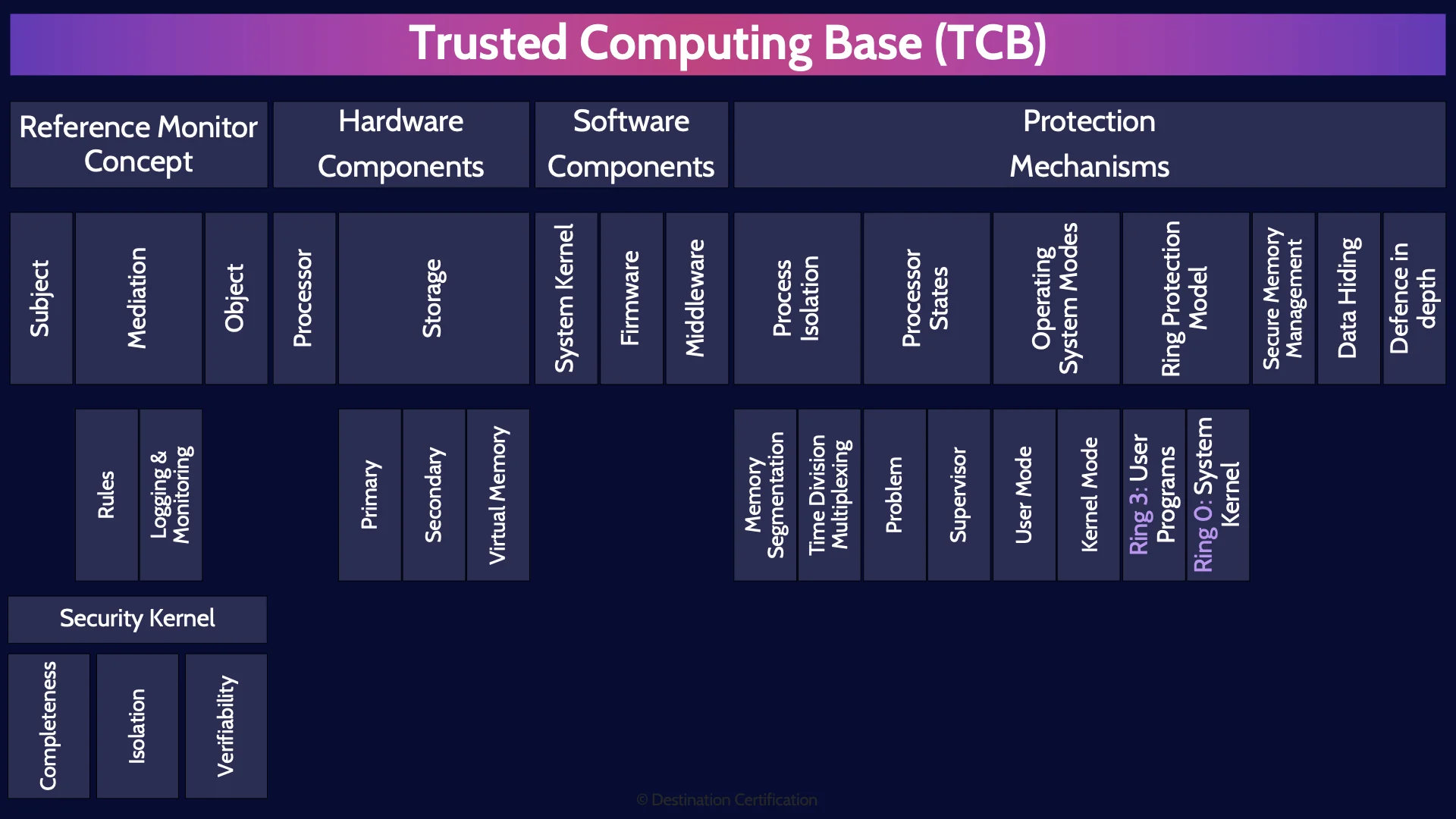
This mind map illustrates the key components and concepts related to the Trusted Computing Base (TCB). It shows how the Reference Monitor Concept, hardware components (like the CPU and memory), and software components (like the OS kernel and firmware) all form parts of the TCB, which is responsible for enforcing security through various protection mechanisms.
3. The Principle of TCB Minimization
This brings us to the central theme of this lesson and a guiding principle for our entire project: the TCB must be as small as possible.
Why? Given your background in systems thinking and epistemology, you can appreciate that this isn't just a technical preference; it's a fundamental response to the problem of complexity and the limits of knowledge.
1. Reducing the Attack Surface
This is the most direct reason. Every line of code, every hardware component, and every feature within the TCB is a potential place for a vulnerability to hide. By reducing the number of components in the TCB, we proportionally reduce the "surface area" that an adversary can attack. More features mean more bugs.
2. Enabling Verification and Auditability
Remember the third property of a Security Kernel: verifiability. A TCB with millions of lines of code across proprietary firmware, drivers, and an OS kernel is effectively impossible to fully verify. It's a "black box."
By shrinking the TCB, we approach a state where we can actually audit and reason about its correctness. This is the entire motivation behind open-source firmware projects like Coreboot. By replacing a proprietary, feature-rich, multi-megabyte BIOS with a minimal, open-source alternative, we are drastically shrinking the firmware portion of the TCB and making it auditable. This aligns with the Popperian ideal of subjecting our systems to harsh criticism—something that's impossible with a closed-source, opaque TCB.
3. Taming Complexity (The Hayekian Argument for a Small TCB)
A large, complex TCB is analogous to what Hayek called the "fatal conceit" in central planning. It's a system so intricate that no single designer or team can fully understand all its internal interactions and emergent behaviors. To declare such a system "secure" is an act of faith, not engineering. Vulnerabilities arise from unforeseen interactions between components, much like economic crises arise from the unpredictable consequences of central directives.
Minimizing the TCB is an act of epistemological humility. It is an admission that we cannot guarantee the security of a massively complex system. Our only rational strategy is to reduce the system to a set of simple, understandable, and verifiable components. We are replacing a complex, "made order" (the proprietary TCB) with a simpler, more robust one that we can actually understand and trust.
Reading (15 mins):
The following texts explicitly discuss the importance of TCB size and the methods for establishing trustworthiness. As you read, think about how these points relate to our goal of replacing the x230's stock firmware.
First, read about the practical consequences of TCB size and the challenge of making components trustworthy.
What is a Trusted Computing Base? (How to verify trust for a TCB; Complexity adds risk)Next, read the section from Wikipedia that discusses the economic and security implications of TCB size, explicitly mentioning the microkernel vs. monolithic kernel debate as an example of this principle in action.
Trusted computing base (TCB Size and Trustworthiness)
By the end of this course, your x230 will have a TCB that is radically smaller than that of an off-the-shelf laptop. We will achieve this by:
- Replacing the proprietary BIOS with a minimal Coreboot image.
- Neutralizing the Intel Management Engine, a powerful and opaque subsystem.
- Using Qubes OS, which uses virtualization to ensure that most applications run outside the core TCB of the host system (Dom0).
Each of these steps is a deliberate act of TCB minimization.
Conclusion
You now understand one of the most important principles in designing secure systems. The Trusted Computing Base is the very foundation of security, and our goal is to make that foundation as small, simple, and solid as possible.
Key Takeaways:
- The Trusted Computing Base (TCB) is the set of all hardware, firmware, and software components that are critical for enforcing the system's security policy.
- A component being "trusted" means we are forced to rely on it, not that it is inherently "trustworthy." Every part of the TCB is a potential point of failure.
- The Reference Monitor Concept is the abstract model for a TCB, mediating all access between subjects and objects.
- Minimizing the TCB is a fundamental security principle because it reduces the attack surface, makes verification and auditing feasible, and tames unmanageable complexity.
Preview of the Next Lesson:
We've established that firmware is a critical, low-level part of the TCB. In our next lesson, we will begin our deep dive into the specific firmware on your x230. We'll answer the question, "What is a BIOS/UEFI and what does it do?" This will set the stage for understanding the specific risks of proprietary firmware and why replacing it is our first major practical step.