Recommended resources
The freely available resources this lesson will direct you to.
Hello! Last lesson, you saw that a function call produces a value and that a function body can return its final expression. Now we’ll focus on the function signature: how to specify the inputs a function accepts and the type of value it gives back. You’ll use those signatures to turn a small calculation into reusable pieces of a program. Allow about 35–40 minutes, including the video and a run in your Cargo project.
From a calculation to a function
Suppose a program needs to combine two distances measured in metres. You could write the addition wherever it is needed, but a function gives the calculation a name and lets callers supply different distances:
fn total_metres(first: f64, second: f64) -> f64 {
    first + second
}
Read the signature from left to right. fn begins a function definition; total_metres is its name. Inside the parentheses are two parameters, first and second, each declared as f64. The -> f64 says that a call to this function will produce an f64. The body supplies that value with its final expression, first + second.
Function names conventionally use snake_case. Like main, a function is defined with braces; unlike main, this one accepts inputs and declares a useful return value. You can put the definition before or after main in src/main.rs.
Watch the relevant parts of Francesco Ciulla’s Functions in Rust demonstration. The middle section revisits statements and expressions, which you covered last lesson, so you can skip it.
Functions in Rust - Full Crash Rust Tutorial for Beginners
Francesco Ciulla’s “Functions in Rust - Full Crash Rust Tutorial for Beginners” demonstrates defining and calling functions, then adding typed inputs and a return type.
Watch defining functions for fn, naming, calls, and the placement of definitions. Continue with typed inputs for parameters, arguments, and compiler feedback when a parameter lacks a type. Skip the statements-and-expressions recap, then watch return values for the return-type declaration and a function whose result is used by its caller. Stop before the tuple-return discussion.
Parameters describe inputs; arguments supply them
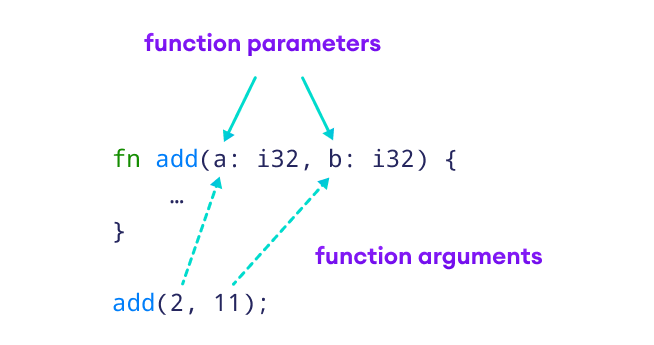
A parameter is a named variable in a function definition. An argument is the value supplied for that parameter at a particular call:
let combined = total_metres(750.0, 1_250.0);
Here, 750.0 is the argument for first, and 1_250.0 is the argument for second. They are matched by position, not by their resemblance to the parameter names. During this call, the body calculates 2_000.0, which becomes the value bound to combined.
The image makes the definition-versus-call distinction visible with an integer addition function.
Read the official Rust Programming Language book’s “Parameters” subsection for a second example using two different input types.
Functions - The Rust Programming Language
The official Rust book shows why each parameter needs its own type annotation and how multiple arguments are matched to parameters.
In the “Parameters” subsection, begin at the paragraph opening “We can define functions to have parameters.” Read the parameter examples, finishing the explanation of print_labeled_measurement just before “Statements and Expressions.” Focus on the value: i32, unit_label: char signature and its call with 5 and 'h'; you have already studied the following subsection.
A local binding can often get its type from an expression:
let combined = total_metres(750.0, 1_250.0); // combined is inferred as f64
A function parameter is different: its type must be written in the signature. Rust does not infer first and second from whichever call happens to appear in main. That makes the function’s input contract clear wherever it is called. A call must supply the required number of arguments, in the declared order, with compatible types. For example, total_metres(750.0, true) fails because true is a Boolean, not an f64.
The return type describes the result
A function that produces a useful value declares its return type after ->. The body must then provide a value of that type:
fn metres_to_kilometres(metres: f64) -> f64 {
    metres / 1_000.0
}
The last line has no semicolon, so its f64 value becomes the result of the call. This is the block-expression rule from last lesson, now viewed as a function’s output contract. You could instead write return metres / 1_000.0;, but a tail expression is conventional when the result is produced at the end of the function. An explicit return is useful when a function needs to finish early; conditional early returns will make more sense after the next lesson.
Not every function needs to produce useful data. A function that only prints can omit the return-type declaration:
fn print_kilometres(kilometres: f64) {
    println!("{kilometres} km");
}
Its result is the unit value (), which you encountered last lesson. Calling it performs the printing; it does not return the text it printed. This is why it is helpful to distinguish a function that calculates a value from one called for an effect. main normally omits -> for the same reason.
Put the signatures to work
Replace src/main.rs in your Cargo project with this complete program:
fn total_metres(first: f64, second: f64) -> f64 {
    first + second
}

fn metres_to_kilometres(metres: f64) -> f64 {
    metres / 1_000.0
}

fn print_kilometres(kilometres: f64) {
    println!("{kilometres} km");
}

fn main() {
    let combined = total_metres(750.0, 1_250.0);
    let kilometres = metres_to_kilometres(combined);
    print_kilometres(kilometres);
}
Run cargo check, then cargo run. The program should print 2 km. Follow the calls closely: total_metres returns an f64 that initializes combined; that value becomes the argument to metres_to_kilometres; its returned f64 initializes kilometres. The final call uses that value to print, but supplies no useful result to bind.
This separation will be useful as your programs grow. A caller can reuse a calculating function without obliging it to print, while a printing function can decide how to present the calculated value.
A signature also gives the compiler specific mistakes to report. If you temporarily change metres_to_kilometres to end with metres / 1_000.0;, cargo check will find that the body produces () where -> f64 promises an f64. Remove the semicolon to restore it. If you instead change the call to metres_to_kilometres(true), the compiler can point to the incompatible argument. In both cases, read the signature alongside the error: it states what the call or body must satisfy.
What to carry forward
A Rust function’s signature names its typed parameters and, when it returns useful data, declares a return type. Calls supply arguments by position; the body supplies its result with a tail expression or an explicit return. Functions without a useful result can omit ->, returning ().
Next, you’ll use if, loop, while, and for to make function behavior depend on conditions and repeat work.