Recommended resources
The freely available resources this lesson will direct you to.
Hello! We’ll begin with a small Node.js program and use it to answer a practical question: when a program fails, what kind of failure are you looking at? This first module builds the JavaScript foundations you’ll need for later work on APIs, debugging, and reviewing code—including code suggested by AI. Today, the aim is to run a file from the terminal and distinguish a syntax error, a runtime error, and a logical error by what you observe.
Run a JavaScript file with Node.js
Node.js runs JavaScript outside the browser. For now, you need only a terminal, an editor, and an installed version of Node.js. This short segment shows how a file becomes a running program; the version number shown in the video is historical, so you do not need to match it.
Node.js Ultimate Beginner’s Guide in 7 Easy Steps
Watch “Node.js Ultimate Beginner’s Guide in 7 Easy Steps” by Fireship for a visual introduction to Node and its command-line workflow.
Watch what Node is, then the terminal setup to see the version check. In running a file, focus on the difference between entering JavaScript interactively and saving it in a .js file that you pass to node.
Open a terminal and check that the command is available:
node --version
If it prints a version, you’re ready. If your terminal says the command cannot be found, Node.js needs to be installed or made available in that terminal before continuing.
Create a working folder and enter it:
mkdir node-error-lab
cd node-error-lab
In your editor, create app.js inside that folder, with this content:
console.log("Program started");
console.log("Tickets today:", 3);
console.log("Program finished");
Save the file. From the terminal in node-error-lab, run:
node app.js
You should see the three messages in order. The terminal command tells Node which file to execute; console.log() prints values so you can observe what happened. Each time you edit the file below, save it and run node app.js again. Running a file again does not automatically pick up unsaved changes.
Identify the kind of failure
An error message is useful evidence, but it is not the definition of a bug. The first distinction is when the problem becomes apparent: before the program can execute, while it executes, or only when you compare its result with what you intended.
What went wrong? Troubleshooting JavaScript - MDN Web Docs
Read MDN Web Docs’ “What went wrong? Troubleshooting JavaScript” for its introductory distinction between error types.
Under “Types of error,” read the three definitions. Focus on whether the code can start running and whether a wrong result necessarily produces an error message. Stop before “An erroneous example”; its browser game is not needed for this Node.js lesson.
| Kind of problem | What happens | Typical clue |
|---|---|---|
| Syntax error | JavaScript cannot understand the code’s grammar. | Node reports a SyntaxError; this file’s statements do not begin executing. |
| Runtime error | The code is valid JavaScript, but an operation fails during execution. | Node reports an error, often with a location; earlier output may already be visible. |
| Logical error | The program executes, but its result does not meet the requirement. | There may be no error message at all. You need an expected result to spot it. |
The following video supplies concrete examples. It also introduces ReferenceError and TypeError: although their names differ, both can be runtime errors when valid code encounters a missing name or tries an invalid operation.
Errors in JavaScript / Intro to JavaScript ES6 programming, lesson 6
Watch “Errors in JavaScript / Intro to JavaScript ES6 programming, lesson 6” by Codexpanse with Rakhim to see how the error types appear in practice.
Watch invalid syntax and reported errors, paying attention to when execution fails and what a stack trace helps locate. Then skip to wrong results for a calculation that runs without an error but produces the wrong answer.
First: code Node cannot parse
Replace app.js with this deliberately broken version:
console.log("Program started");
console.log("Tickets today:", 3;
console.log("Program finished");
Run node app.js. Node reports a SyntaxError near the second line: the console.log( call is missing a closing parenthesis. Notice that even Program started is not printed. For this simple file, Node must parse its code before executing its statements.
Put the missing ) back, save, and rerun to confirm that the file works. Error locations point you toward the problem, but they are not always the exact character you need to fix; an earlier unclosed quote or bracket can cause an error to be reported later.
Observe a failure during execution
Now replace app.js with valid JavaScript that will fail when it reaches a particular line:
console.log("Program started");

const tickets = null;
console.log("Ticket count:", tickets.length);

console.log("Program finished");
Run it. You should see Program started, followed by a TypeError about reading length from null. You should not see Program finished.
That sequence tells you more than the error name alone. Node successfully began executing the file. It printed the first message, reached an operation it could not perform, and stopped before the last message. In the error output, look for a reference to app.js and a line number: that is your starting point for inspecting the failing operation. The surrounding lines of error output are called a stack trace. Later in the course, you’ll use stack traces to follow failures through larger programs.
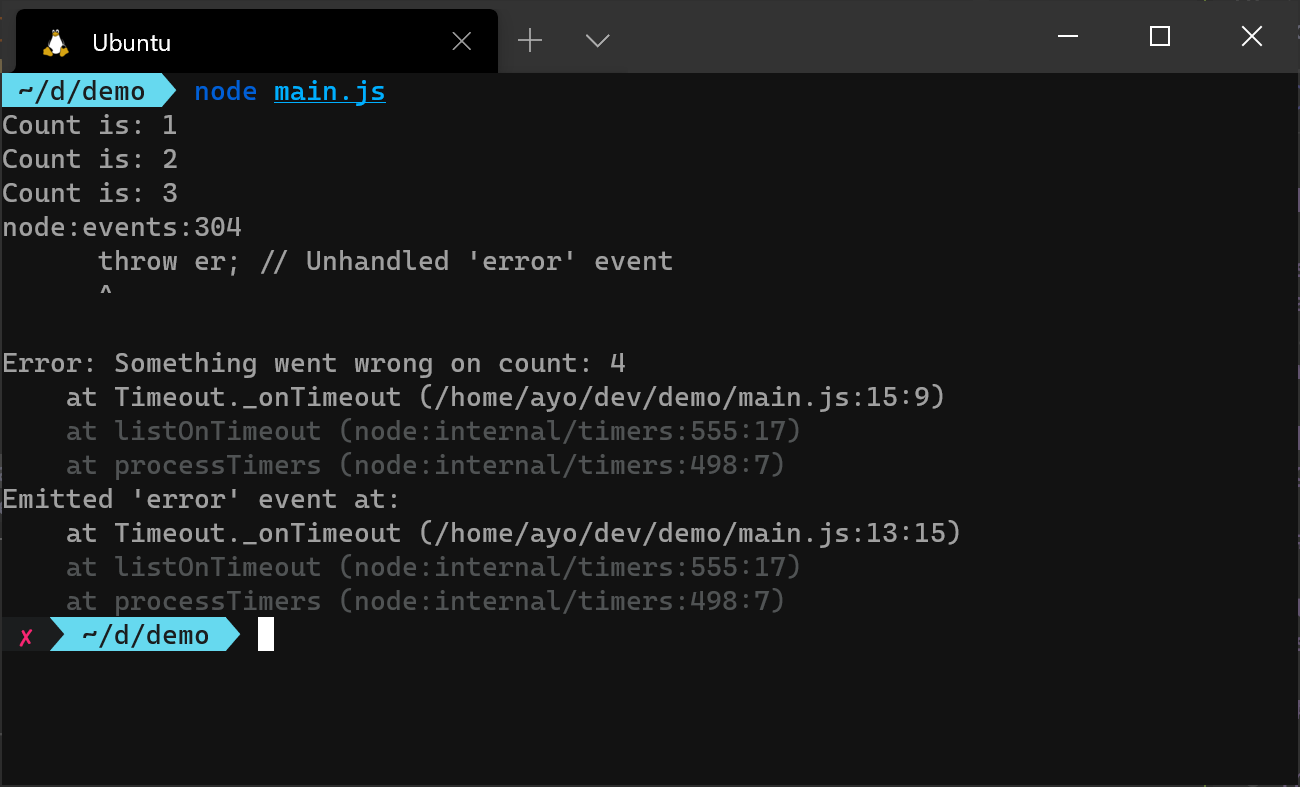
The image below shows the same broad pattern in a different Node.js program. It prints counts before failing on count 4. Its unhandled error event involves a Node feature we have not covered yet; for today, focus on the earlier successful output, the error message, and the reference to main.js:15:9 in the trace.
A misspelled variable name can also fail at runtime. For example, console.log(ticktes) is grammatically valid JavaScript, but if ticktes has never been defined, executing that line produces a ReferenceError. A typo is not automatically a syntax error; the question is whether it makes the code invalid JavaScript or causes a failure when valid code runs.
To repair the tickets.length example, give tickets a value whose length you can read:
console.log("Program started");

const tickets = ["new", "open"];
console.log("Ticket count:", tickets.length);

console.log("Program finished");
Rerun it and check for all three messages, including Ticket count: 2.
Catch a wrong answer when Node reports nothing
For the final version of app.js, suppose your requirement is: Given three tickets in total, one of them closed, report two open tickets. This program runs, but it violates that requirement:
const totalTickets = 3;
const closedTickets = 1;

const openTickets = totalTickets + closedTickets;
console.log("Open tickets:", openTickets);
Node prints Open tickets: 4 without complaining. From Node’s perspective, adding those numbers is perfectly valid. The logical error becomes visible only because you know the expected output is 2. Change the calculation to subtract closedTickets, save, and rerun.
This is an important habit in day-to-day development: successful execution is not proof of correct behavior. When output looks suspicious, state what you expected, compare it with what you got, and inspect the calculation or decision that produced the difference. Printing an intermediate value with console.log() can help you narrow down where expectation and reality diverge. In later lessons, you’ll replace much of this manual checking with automated tests and debugging tools.
For now, use this compact diagnostic approach:
- Did the file start? A
SyntaxErrormay prevent this simple script from printing anything. - Did it stop partway through? Read the runtime error and locate your file and line in its output.
- Did it finish with the wrong answer? Write down the expected result and trace the logic that produced the actual one.
These are clues, not infallible shortcuts: a runtime error can occur before the first print, and a program can finish despite a serious logical bug.
Takeaways
You can run a saved JavaScript program with node app.js from the appropriate folder. A syntax error prevents this file from executing; a runtime error occurs as valid code runs and may leave partial output; a logical error can produce a normal-looking run with an incorrect result. Knowing which situation you face helps you choose where to look next.
In the next lesson, we’ll examine JavaScript values, coercion, and strict equality—rules that often explain why a program runs successfully yet makes the wrong decision.