Recommended resources
The freely available resources this lesson will direct you to.
Last lesson separated an LLM request into system instructions, user input, context, and model output. This lesson looks one level deeper: before the model can use any of those text components, it must convert them into tokens.
A token is not necessarily a word, character, or sentence. It is a piece of text selected by a tokenizer associated with a particular model. By the end of this lesson, you will be able to use a tokenizer to inspect a short input, identify its tokens and token count, and explain the path from typed text to the numerical input an LLM processes.
Text is first encoded into tokens
Suppose a user enters:
What is RAG?
To us, this is three words plus punctuation. An LLM does not receive it in that form. Before inference begins, a tokenizer converts it into a sequence of text pieces, then maps each piece to a numeric identifier.
Conceptually, the process has three stages:
- Split: the tokenizer divides the input into pieces called tokens.
- Encode: each token is mapped to an integer called a token ID.
- Process: the LLM performs its computations using those numeric representations.
Later, when the model produces token IDs as output, the tokenizer performs the reverse operation—decoding—to turn them back into readable text.
The particular token boundaries and IDs depend on the tokenizer. Different models may use different vocabularies and tokenization rules, so the same text can have different token counts for different models.
A useful distinction:
| Term | Meaning |
|---|---|
| Character | A visible unit such as R, ?, or a space |
| Word | A linguistic unit such as “retrieval” |
| Token | A model-specific text chunk, which may be a word, part of a word, punctuation, whitespace combined with text, or a byte sequence |
| Token ID | The integer assigned to a token in a tokenizer’s vocabulary |
The ID itself does not carry an obvious human meaning. For example, if a tokenizer assigns a number to a token representing “ RAG”, that number is a lookup key—not a score, definition, or measure of importance.
Tokenization | Learn how to interact with OpenAI models
Read this Microsoft workshop page for a practical definition of tokens and an introduction to the OpenAI Tokenizer tool you will use to inspect real text.
In the section “What is Tokenization?”, read the definition and purpose. Focus on the phrase “commonly occurring sequences of characters”: a token is not automatically one word. Then move to “OpenAI Tokenizer Tool” and “Try The Example.” Read the tool walkthrough. Notice that character length and token count are different measures, and that punctuation and less common strings can consume tokens in unexpected ways.
Why tokens are usually subwords
A simple word-based tokenizer might split:
Retrieval helps.
into:
Retrieval | helps | .
That seems reasonable, but it has a problem: a model would need a separate vocabulary entry for every possible word form, spelling variation, proper name, technical term, and word in every supported language. A fixed vocabulary cannot practically contain all of them.
At the other extreme, a character-based tokenizer could represent every input, but it would create long sequences. The word “retrieval” would require nine character tokens rather than one or a few useful chunks.
Modern LLM tokenizers generally use a compromise called subword tokenization. They keep frequent sequences together while breaking rarer or unfamiliar sequences into smaller parts.
For illustration only, a tokenizer might represent words in a pattern like:
retrieval | -augmented | generation
or split a less common word into several pieces. Do not treat those boundaries as universal: the actual pieces must be inspected using the tokenizer for the model you intend to call.
Subword tokenization offers two important benefits:
- Efficiency: common text can be represented with relatively few tokens.
- Coverage: unusual words, typos, identifiers, URLs, names, and new terms can still be represented as smaller pieces rather than causing the system to fail.
This also explains why emojis, accented characters, code, long number strings, and specialized names can use more tokens than their visible length suggests.
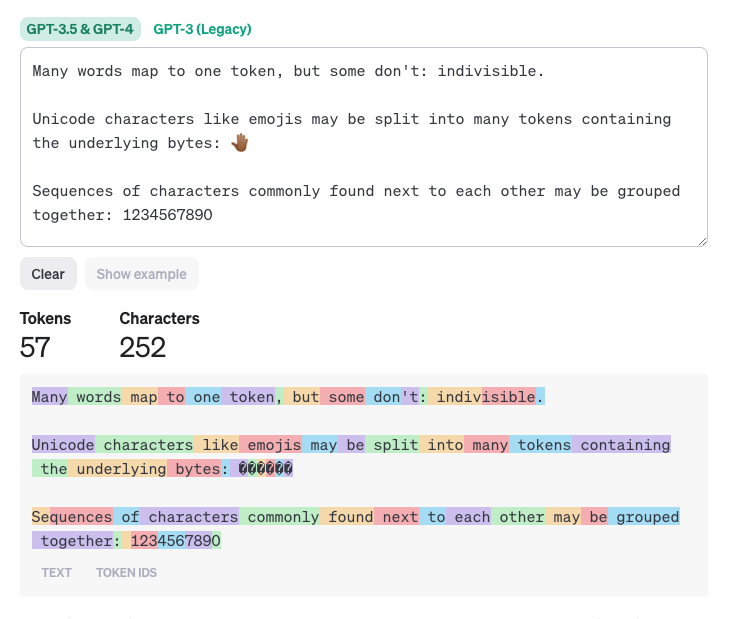
In the image, the word “underlying” and the sequence 1234567890 have the same number of characters, but they are broken into different numbers of tokens. The emoji is also represented by several tokens in that tokenizer. This is why “one token is about one word” is only a loose rule of thumb, not a dependable counting method.
Inspecting a short user input with a tokenizer
Use a tokenizer whenever you need a reliable answer to questions such as:
- How many input tokens will this prompt use?
- Which pieces does the model see?
- Why is an unfamiliar product name consuming many tokens?
- Will retrieved RAG passages fit within the model’s context budget?
For now, inspect this short user input:
What is RAG?
In the OpenAI Tokenizer tool described in the reading:
- Clear any existing text.
- Paste
What is RAG?. - Observe the color-coded segments.
- Record the total token count.
- Change one feature at a time: remove the question mark, change
RAGtoRetrieval-Augmented Generation, or add an emoji. - Compare the changed token count and segmentation.
The point is not to memorize the exact count. The point is to observe that the tokenizer uses its own learned vocabulary and rules, rather than simply counting visible words.
A compact observation note might look like this:
| Input variation | What to inspect | What it teaches |
|---|---|---|
What is RAG? |
Token pieces and total | A short natural-language question becomes a sequence of units |
What is RAG |
Difference after removing punctuation | Punctuation can be its own token or affect boundaries |
What is Retrieval-Augmented Generation? |
Count versus the abbreviation | Longer visible wording does not necessarily scale predictably by word count |
What is RAG? 🤖 |
Emoji segmentation | Unicode characters may be represented by several tokens |
When working with an API, the same idea applies, although the application normally tokenizes text for you. You do not manually send token IDs in an ordinary chat request. You send text and select a model; the provider uses the appropriate tokenizer behind the scenes. Knowing how to inspect tokens still matters for cost, context limits, debugging, and prompt design.
Most devs don't understand how LLM tokens work
Watch “Most devs don't understand how LLM tokens work” by Matt Pocock for a short visual walkthrough from model-specific vocabulary to encoding and decoding.
Watch vocabularies and IDs to connect token pieces with their numeric IDs and see why token counts vary across models. Then watch the full workflow, focusing on the distinction between human-readable input and the numeric sequence processed internally.
From token pieces to token IDs
Tokenization and encoding are closely related but distinct:
- Tokenization splits text into token pieces.
- Encoding maps each piece to the ID assigned in the model’s vocabulary.
Imagine a deliberately tiny fictional vocabulary:
| Token piece | Fictional token ID |
|---|---|
What |
412 |
is |
93 |
RAG |
7801 |
? |
17 |
A short question could then be encoded as:
These numbers are illustrative. A real tokenizer can produce different pieces and entirely different IDs.
Two details matter here:
Whitespace may be part of a token
In many tokenizers, a token may include a preceding space, such as is rather than is. That helps the tokenizer efficiently represent common patterns in natural text. It also means that starting a word at the beginning of a string can tokenize differently from the same word after a space.
The model must use its matching tokenizer
A trained model expects the vocabulary and tokenization rules used during its training. Sending token IDs generated by a mismatched tokenizer would scramble the intended input.
Think of it as using a shared codebook:
- The tokenizer converts a text piece into a code number.
- The model has learned what that code number represents.
- A different tokenizer may assign different code numbers or split the text differently.
For ordinary API use, select the model and let the provider apply its compatible tokenizer. When estimating tokens or investigating context limits, ensure that your inspection tool uses an encoding appropriate to that model.
Read these sections of the Hugging Face course to understand why modern tokenizers use subwords and why tokenization must be followed by conversion to model-specific IDs.
In “Subword tokenization,” read the subword explanation. Focus on the balance between preserving useful word pieces and avoiding an impossibly large vocabulary. Then go to “Encoding” and read the two-step encoding overview. Pay particular attention to why a tokenizer must match the model’s pretrained vocabulary.
Tokens in the full LLM request
The phrase What is RAG? is only the visible user message. As you learned previously, an application normally sends a complete request containing instructions, conversation context, and the user input.
For example:
System instruction:
Answer clearly and do not invent facts.

Retrieved context:
RAG retrieves relevant document passages and includes them in an LLM request.

User input:
What is RAG?
All of this content contributes to the input token count—not just the last question.
The LLM also generates output tokens. If the answer begins:
RAG stands for Retrieval-Augmented Generation.
the model generates it token by token. In the next lesson, you will examine that next-token prediction process. For this lesson, retain the full pipeline:
- The application assembles instructions, context, and user input.
- The compatible tokenizer encodes the combined text into token IDs.
- The LLM processes numerical representations of those IDs.
- The model produces output token IDs.
- The tokenizer decodes them into the answer the user reads.
For RAG, token awareness becomes especially practical. Retrieved documents must fit alongside the system instructions, conversation history, user question, and the answer the model still needs room to generate. A RAG system cannot simply insert an unlimited number of documents into a prompt.
Key takeaways
An LLM does not directly process words or characters. It processes numeric representations of tokens.
- A token is a model-specific chunk of text: it may be a whole word, subword, punctuation mark, whitespace-plus-word, or byte-based fragment.
- A tokenizer first splits text into tokens, then maps tokens to vocabulary-specific token IDs.
- Exact token boundaries and token counts depend on the tokenizer, so inspect text using a tokenizer compatible with the chosen model.
- Visible character count, word count, and token count are different quantities.
- The whole LLM request—system instructions, context, user input, and eventually generated output—consumes tokens.
Next, you will examine what happens after encoding: how an LLM uses the preceding tokens to predict one next token at a time and build a response.