Recommended resources
The freely available resources this lesson will direct you to.
Welcome to the next lesson in our module on LLM Security and Governance. In our last session, we focused on setting up fine-grained audit logging. You learned how to capture a detailed record of every interaction, essentially creating a trustworthy history of who did what, and when. This visibility is the foundation of a secure system.
Today, we build directly on that foundation by addressing the crucial next question: who is allowed to do what? This lesson is dedicated to designing a role-based access control (RBAC) policy. We'll define a structured approach to manage permissions for different models and administrative functions, ensuring that users and services only have access to the resources they absolutely need.
Your background in SRE and cloud infrastructure makes you very familiar with RBAC in contexts like AWS IAM and Kubernetes. We will leverage that understanding and apply these core principles to the unique resources and risks within an LLM ecosystem.
1. The Fundamentals of RBAC in an LLM Context
At its heart, RBAC is a methodology for restricting system access based on the roles of individual users within an enterprise. It consists of three main components:
- Principals: The 'who'. These are the users, groups, or service accounts that need access.
- Roles: A collection of permissions. Instead of assigning permissions directly to users, you assign roles (e.g., "Developer," "Auditor").
- Scopes & Permissions: The 'what'. This defines the specific resources a role can access (the scope) and the actions it can perform on them (the permissions).
The diagram below illustrates this fundamental relationship, which you've likely encountered in your cloud engineering work.
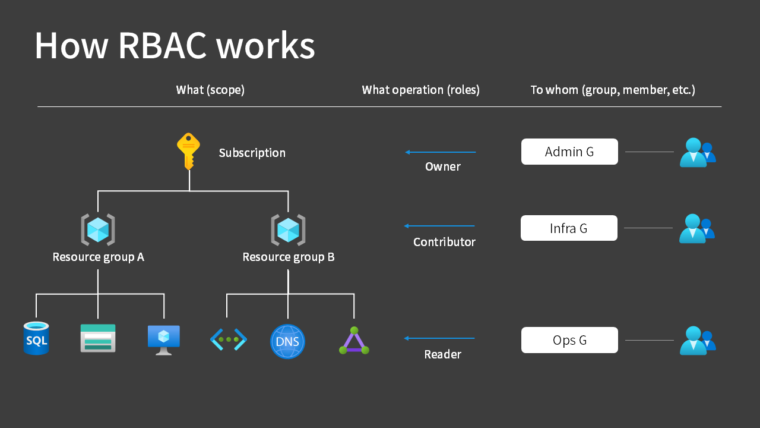
While the model is the same, the specifics of what we're protecting in an LLM system are unique. Let's define the key resources and permissions.
Role-Based Access Control for AI Development: Managing ...
This article provides an excellent, structured breakdown of how to apply RBAC specifically to AI systems. It gives us a clear vocabulary for defining our policies.
Please read the section titled "Designing RBAC for AI: Resources, Roles, and Permissions". Pay close attention to the "Core resource taxonomy" and the "Example roles and capabilities" tables. This will help you build a mental model of the assets we need to protect.
Based on the article and industry best practices, we can establish the following taxonomy for an LLM platform:
| Category | Example Resources | Example Permissions |
|---|---|---|
| Models | gpt-4o, llama-3-8b, internal-finance-v2 |
inference, read_details, deploy, fine_tune |
| Prompts | support_bot_system_prompt, summary_template_v3 |
read, write, version, approve |
| Data | fine_tuning_dataset, evaluation_data, user_conversations |
read, write, upload, delete |
| Evaluations | regression_test_suite, benchmark_results |
run, read_results, create_suite |
| Platform | User accounts, Teams, API Keys, Routing rules, Budgets | manage_users, manage_keys, configure_gateway, view_usage |
With this framework, we can design roles that enforce the principle of least privilege and separation of duties. For instance, a Prompt Engineer can create and edit prompts but cannot deploy a new model, while an LLM App User can only perform inference with a limited set of models.
2. The Dangers of Insufficient Access Control
Before we build a policy, it's vital to understand the risks of getting this wrong. In traditional software, the risks of over-privileged accounts are well-known. In AI, these risks are amplified because the system's behavior is probabilistic, and it can be manipulated in novel ways like prompt injection.
The following video discusses the security problems that arise when AI agents are given broad, uncontrolled access to external systems and data.
The Security Problem with MCP | Identity, RBAC & Audit
This video from ByteMonk, titled "The Security Problem with MCP", explains the risks of connecting AI to production systems without proper identity and access management.
Watch these segments to understand the problem and the solution: The Flip Side: This section explains how a lack of access control can allow an AI to be tricked into exfiltrating or deleting data, far beyond its intended function. Identity-First Security: Here, the video introduces the solution: tying every AI action to a verified identity and enforcing fine-grained permissions. This is the essence of what our RBAC policy aims to achieve. A Practical Example: Observe the scenario where two users with different roles (Analyst vs. Intern) ask the same question. The system uses RBAC to grant access to one and deny it to the other, logging both events.
As the video highlights, without strong RBAC, a single compromised user account or a clever prompt injection could give an attacker the keys to your kingdom. By enforcing RBAC, we ensure that even if an AI is tricked, the "blast radius" of the attack is limited to the permissions of the identity it's acting on behalf of.
3. Practical Implementation with an API Gateway
Now, let's get practical. One of the most effective ways to enforce RBAC in a multi-model, multi-provider environment is by using a centralized API gateway. This aligns perfectly with your SRE experience of managing traffic and policies for microservices. The gateway becomes the single point of entry for all LLM calls, allowing you to enforce authentication and authorization universally.
We'll explore this using LiteLLM, an open-source tool that can manage access to over 100 LLM providers. Its proxy server includes a dashboard for setting up exactly the kind of RBAC policy we need.
LiteLLM Crash Course | For Complete Beginners
This crash course from Data Science Basics provides a complete, hands-on demonstration of setting up and using the LiteLLM proxy server to enforce RBAC.
Follow along with the presenter as they demonstrate the key steps to designing and enforcing a policy. It's recommended to watch these sections in order: Deploying the Gateway: Docker Setup. See how to get the LiteLLM proxy and dashboard running locally. Adding Models: Model Hub. Watch how different models from different providers (OpenAI and Groq) are added to the gateway. This is the first step—defining the resources to be controlled. Creating Roles (Teams): Creating Teams. This is the core of our policy design. The presenter creates a 'finance' team and an 'HR' team, assigning specific models and budgets to each. This directly maps to creating roles with specific permissions. Creating Principals (Virtual Keys): Virtual Keys. Here, virtual API keys are generated and tied to a specific team (role). This is how you grant a user or application a specific set of permissions. Enforcing the Policy: Testing Access. This is the most critical part. The presenter uses Python and cURL to show that a key created for the 'finance' team (which only has access to a Groq model) correctly fails when trying to access a GPT model. This demonstrates RBAC enforcement in action. The presenter's debugging process around caching is also very insightful for real-world operations.
This hands-on demonstration shows how a gateway can translate a conceptual RBAC policy into concrete, enforceable rules. By creating teams and issuing team-specific keys, you can effectively control which users or applications can access which models, for what cost, and for how long.
4. RBAC in a Cloud Native Environment: Azure OpenAI
While a tool like LiteLLM is powerful and flexible, it's also important to understand how RBAC is handled natively within major cloud ecosystems like Azure, AWS, or GCP. Your experience with Azure makes this a relevant example.
In Azure, RBAC is a first-class citizen used to govern access to all resources, including Azure OpenAI. The principles are the same, but the implementation is deeply integrated into the platform's identity and access management (IAM) fabric.
Authorization in Azure OpenAI Service | Journey Of The Geek
This article from Journey Of The Geek provides a clear explanation of how Azure RBAC is applied to the Azure OpenAI service.
Please read the article, focusing on these concepts: Management vs. Data Planes: Understand the distinction between controlling the infrastructure (management plane) and controlling model interactions (data plane). Role Definitions: Examine the JSON structure of an Azure RBAC role. Note the actions (for the management plane) and dataActions (for the data plane) properties. This is how Azure separates administrative permissions from usage permissions. Built-in Roles: Pay attention to the analysis of the Cognitive Services OpenAI User and Cognitive Services OpenAI Contributor roles. Understand the permissions each one grants and why you might choose one over the other for a human user versus a service principal. Best Practices Summary: The concluding summary provides excellent, actionable recommendations for applying the principle of least privilege in Azure OpenAI.
When multiple roles are assigned to a user at different scopes (e.g., subscription-wide vs. resource group-specific), Azure RBAC aggregates the permissions. The user is granted the union of all permissions from all their role assignments. This means the most permissive role assignment for a given action will apply.

This cloud-native approach provides deep integration with the rest of the platform's security and identity services, which is often a requirement for large enterprises.
Conclusion
In this lesson, you have learned how to design and implement a role-based access control policy, a critical pillar of LLM governance. By applying a familiar security model to the unique assets of an AI system, you can effectively manage access, mitigate risk, and enforce organizational policies.
Key Takeaways:
- RBAC for LLMs involves defining permissions for specific resources like models, prompts, and datasets, and bundling them into roles.
- The goal is to enforce the principle of least privilege, ensuring users and applications can only perform actions they are explicitly authorized for, thus minimizing the blast radius of any potential compromise.
- API Gateways like LiteLLM provide a powerful, centralized, and provider-agnostic way to implement and enforce RBAC policies through features like teams and virtual keys.
- Cloud-native RBAC, such as in Azure, offers deep integration with platform identity services, separating permissions into management and data planes to provide granular control.
You now have a solid understanding of how to control both what happened (audit logging) and who is allowed to do it (RBAC). In our final lesson for this module, we will complete our security overview by looking at foundational infrastructure security. We will discuss how to apply standard security best practices like secrets management, mTLS, and network policies to harden the entire LLM serving stack.