Recommended resources
The freely available resources this lesson will direct you to.
Welcome back! In our previous lesson, we established the core strategy for solving the Word Search II problem: using a Trie to guide a backtracking search and efficiently prune invalid paths. You learned why this combination is so effective, transforming a brute-force search into an intelligent, prefix-guided exploration.
Today, we transition from concept to practice. This lesson focuses on implementing the backtracking function that brings our strategy to life. You will learn how to structure the recursive dfs (depth-first search) function, manage its state, and integrate it with the Trie to find all matching words on the grid. This is a fantastic exercise in combining a data structure with a classic algorithmic pattern, a skill highly valued in coding interviews.
The Algorithm at a Glance
Let's quickly recall the main components of our solution:
- Trie Data Structure: We need a
TrieNodeclass. We'll pre-populate a Trie with all the words from our dictionary. - Main Function (
findWords): This function orchestrates the process. It builds the Trie and then iterates through every cell of the 2D grid, launching a backtracking search from each one. - Backtracking Function (
dfs): This is the heart of our solution. It explores paths from a given cell, guided by the Trie, to find words.
Our focus today will be on crafting this dfs function.
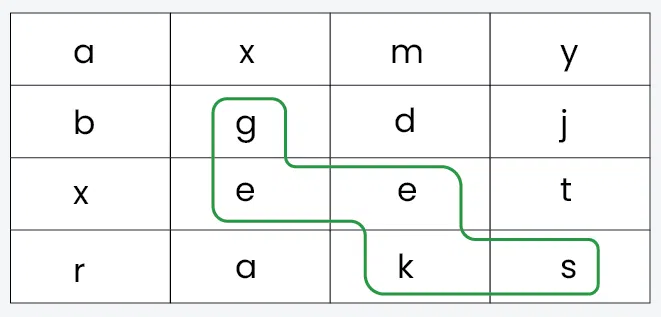
Implementing the Backtracking (DFS) Function
The standard backtracking template is "choose, explore, unchoose." In our context, this translates to:
- Choose: Select a valid neighboring cell.
- Explore: Recursively call the function for that new cell.
- Unchoose: Backtrack and undo the choice to explore other paths.
The dfs function needs to manage its state carefully. At any point in the recursion, we need to know:
- Our current position on the board
(row, col). - Our current position in the Trie (
node), which corresponds to the prefix we have formed so far.
The function signature will look something like this (as a nested function within findWords):dfs(node: TrieNode, row: int, col: int)
1. Pruning and Base Cases
The power of this algorithm comes from its ability to stop searches early. The dfs function must return immediately under several conditions:
- Out of Bounds: The
(row, col)coordinates are outside the grid. - Cell Visited: The cell at
(row, col)has already been used in the current path. A common and efficient way to handle this is to modify the board in-place, marking the cell with a special character (e.g., '#'). - Invalid Prefix (Trie Pruning): The character at
board[row][col]does not correspond to a child of the current Trienode. This is the crucial optimization: if the patho-a-xisn't a prefix of any word in our dictionary, there's no point in exploring it further.
2. The Recursive Step
If none of the pruning conditions are met, we proceed with the core logic:
-
"Choose":
- Save the current character:
original_char = board[row][col]. - Mark the cell as visited:
board[row][col] = '#'. - Advance the Trie pointer to the next node:
node = node.children[original_char].
- Save the current character:
-
Check for a Word:
- After advancing the Trie pointer, check if this new
nodemarks the end of a word (e.g.,node.isEndOfWordis true ornode.wordis not null). - If it is, we've found a word! Add it to our results.
- Crucial Optimization: To prevent adding the same word multiple times (if it can be formed via different paths), we should "deactivate" this word in the Trie. A simple way is to set
node.isEndOfWord = Falseornode.word = nullafter adding it to the results. This is more efficient than using asetto store results, as it also helps prune the Trie itself.
- After advancing the Trie pointer, check if this new
-
"Explore":
- Recursively call
dfsfor all four adjacent neighbors (up, right, down, left), passing the newnodeand neighbor coordinates.
- Recursively call
-
"Unchoose" (Backtrack):
- After the recursive calls return, we must restore the board to its original state so that other search paths can use this cell. This is the essence of backtracking:
board[row][col] = original_char.
- After the recursive calls return, we must restore the board to its original state so that other search paths can use this cell. This is the essence of backtracking:
A Complete Implementation
Now, let's see how these pieces fit together in a complete Python solution. The following resource provides a very clean and well-commented implementation.
212. Word Search II - In-Depth Explanation
This resource contains the full Python code for the Word Search II problem, including the TrieNode class and the findWords function with its nested dfs helper.
Focus on the Python implementation provided in the "Solution Implementation" section. Read through the code, paying close attention to: The structure of the TrieNode class and its insert method. The main findWords function, which sets up the Trie and the main loop. The nested dfs function, which contains all the backtracking and pruning logic we just discussed. Notice how it marks the board with '#' and restores it later.
The code you just reviewed is a perfect translation of our algorithm. It elegantly combines the Trie building, the main grid iteration, and the recursive dfs search. The in-place modification of the board (board[row][col] = '#') is a classic technique that saves the space of a separate visited set.
Advanced Optimization: Pruning the Trie Itself
The current implementation prunes search paths on the grid. We can make it even faster by pruning the Trie itself.
Imagine our dictionary contains "app" and "apple". Once we find "app", the 'p' node is still there. Later, if we find "apple", the 'e' node is still there. If these are the only words, these branches are now "dead"—they cannot lead to any new words. Continuing to traverse them is wasted effort.
We can solve this by adding a reference counter (refs) to each Trie node.
- When inserting a word, increment the
refscount for each node along the path. - When we find a word, we "deactivate" it as before (
node.idx = -1). We can then trace back up the path, decrementing therefscount. - If a node's
refscount drops to zero, it means no more active words exist down this branch, and we can remove the node from its parent's children.
This aggressive pruning can significantly speed up the search on large boards with many shared prefixes.
The following resource provides an implementation of this advanced technique.
212. Word Search II - Solution & Explanation
This section from NeetCode explains and implements the advanced pruning technique using a reference count in the Trie.
Read the section titled "Backtracking (Trie)". Focus on the Intuition and Algorithm parts. Then, examine the provided Python code, particularly how refs and idx are used in the TrieNode and dfs function to remove dead branches.
This optimization is a great example of the deeper thinking required for top-tier interview performance—it shows you're not just solving the problem, but considering how to make your solution as efficient as possible.
Common Pitfalls
When implementing this algorithm, several common mistakes can arise. Being aware of them will help you write robust code.
- Forgetting to Backtrack: The most common error is failing to restore the board after a recursive call (
board[row][col] = original_char). This corrupts the board state for all subsequent searches. - Handling Duplicates Incorrectly: If a word can be formed in multiple ways, simply adding it to a list will result in duplicates. Using a
setfor results works, but the superior method we discussed is to "deactivate" the word in the Trie (node.word_index = -1) the first time it's found. - Incorrect Trie Traversal: Always check if a child exists (
node.children[char] is not None) before you try to access it. Accessing a non-existent child will cause a crash.
The AlgoMonster article you read earlier has a great summary of these and other potential issues.
Conclusion
In this lesson, you've moved from the conceptual to the practical, implementing a complete, efficient solution for the Word Search II problem. You have learned how to structure a backtracking dfs function that works in tandem with a Trie to intelligently search a 2D grid.
Key Takeaways:
- The core of the solution is a
dfsfunction that embodies the "choose, explore, unchoose" backtracking pattern. - State management is critical: your
dfsneeds to track its grid position and its corresponding Trie node. - Pruning happens in two key places:
- At the start of the
dfscall (checking bounds, visited status, and prefix validity in the Trie). - By deactivating words in the Trie after they are found to prevent duplicates and enable further optimization.
- At the start of the
- Advanced solutions can even prune the Trie itself by removing "dead" branches, leading to significant performance gains.
In our next lesson, we will continue exploring the power of Tries by tackling a different kind of problem: implementing wildcard matching, where a special character like . can match any single letter.