Recommended resources
The freely available resources this lesson will direct you to.
Hello! Last time, you separated an app’s process from the component instances it hosts. That distinction explains a common Android bug: an object that outlives a screen can keep the old screen in memory simply by holding its Context.
In this lesson, you will choose a Context by asking what an operation needs: app-wide facilities, the current screen’s theme or window, or a particular component’s lifetime. You will apply that decision to repositories, dialogs, Fragments, Compose, and receiver registration. This is more useful than memorizing a list of APIs that supposedly “work” with each context type.
A Context carries an environment, not just access to APIs
Context is an abstract Android class through which code accesses facilities such as resources, app-specific files, system services, and component operations. An Activity, Service, and Application each provide a context, but they represent different environments and have different lifetimes.
The supplied diagram shows the inheritance relationships worth remembering. Follow the branch from Context through ContextWrapper: Application and Service sit on that branch, while Activity also passes through ContextThemeWrapper.
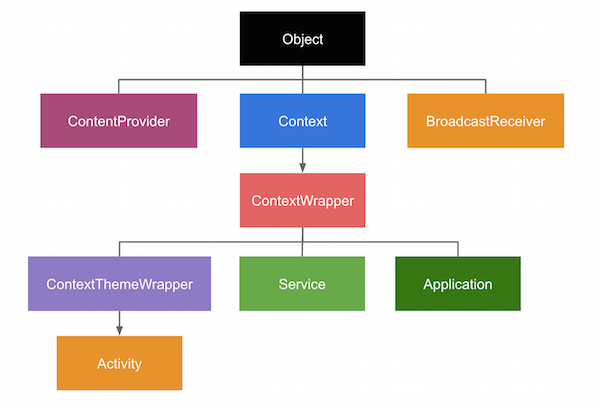
Inheritance is only part of the story. An Activity context is associated with a particular screen instance and its UI environment. An application context is associated with the application in the current process, not with whichever Activity happens to be visible. Neither is a magic reference to an app that survives process death.
Watch the selected portions of Context in Android - A Deep Dive by Konstantinos Reppas for the underlying structure and the lifetime distinction.
Context in Android - A Deep Dive
Context in Android - A Deep Dive introduces Context as an Android-provided abstraction and compares the context types carried by components. Watch it for the structural model; the practical rules below add some important qualifications.
Start with the definition, then watch the hierarchy. Focus on where Activity, Service, and Application diverge. Skip to the lifetime risk and component contexts. Stop before the discussion of base context: accessing a wrapper's base is not a general solution to choosing the right context.
A useful correction to overly rigid “capability charts” is that an application context can access resources, inflate layouts, and start an Activity under the applicable launch rules. The question is whether it supplies the right environment for the operation. An application context does not stand for the currently displayed Activity, its window, or necessarily its selected theme.
Make the choice using lifetime and UI requirements
First ask, will another object retain this context? A singleton, repository, database holder, or other app-scoped dependency can outlive several Activity instances. If it retains an Activity context, it may also retain that destroyed Activity’s views and other references after a configuration change. For app-wide work, pass applicationContext instead.
Second ask, does the operation depend on the current screen? A dialog needs an appropriate window owner; inflation that must resolve a screen’s theme needs that screen’s themed context. Use the current Activity—or a context derived from its UI, such as a View’s context—for the appropriate UI work. Do not store it in an app-scoped object.
Third ask, what should end the operation? A registration made for a visible screen should end when the screen no longer needs it. Substituting the application context to avoid a leak can accidentally make the registration last much longer than intended.
| Operation | Appropriate choice | Reason |
|---|---|---|
| Retained repository accessing app-specific files | Application context | It must not retain a particular Activity. |
| Dialog shown in response to a screen interaction | Current Activity | It needs a live screen and window, as well as suitable theming. |
| Inflate a View using that screen’s theme attributes | Activity or relevant View’s context | Theme resolution should match the UI displaying the View. |
| Register a receiver needed only while a screen is visible | Activity context, with matched unregistration | Its active scope should match the screen’s interest. |
| App-wide registration needed while the process runs | Application context, with an explicit owner and cleanup policy | It is intentionally independent of one Activity. |
This is a lifetime-and-environment decision, not a claim that each context has an entirely separate set of callable methods. Passing a Context does not change the thread on which code runs, grant extra permissions, or make work durable across process death.
A retained dependency and a screen have different owners
Suppose a repository provides the location of an app-private report. It needs the app’s files directory, but it does not need the screen that requested the report:
class ReportRepository(context: Context) {
    private val appContext = context.applicationContext

    fun reportFile(): File =
        File(appContext.filesDir, "report.json")
}
Converting the supplied context when the repository is constructed protects it even if a caller passes this from an Activity. The repository can be retained without retaining that Activity. Reading or writing the file must still happen off the main thread; choosing the application context does not make disk I/O nonblocking.
Now compare a screen-owned operation:
class ReportActivity : ComponentActivity() {
    fun showReportReadyDialog() {
        AlertDialog.Builder(this)
            .setMessage("The report is ready.")
            .setPositiveButton("OK", null)
            .show()
    }
}
Here this identifies the Activity whose UI should host the dialog. Call this in response to an interaction while the Activity is in a suitable state; do not hand the Activity to ReportRepository so that the repository can show it later. If a long-running operation finishes after the screen has gone away, the owner of the UI should decide whether to show anything on the current screen.
A themed wrapper is not a substitute for an Activity. ContextThemeWrapper can supply theme attributes for inflation, but wrapping an application context in a theme does not give it the Activity’s window or lifecycle. Conversely, using an application context for a Toast is generally possible: not every visible result requires an Activity-owned window. Identify the specific UI requirement rather than labeling all UI operations alike.
Launching an Activity is another case where “can call the method” differs from “behaves like a screen launch.” An Activity can call startActivity() in its normal task context. Starting one from an application or Service context generally requires FLAG_ACTIVITY_NEW_TASK; that flag affects task behavior, and background-activity-launch restrictions still apply. We will examine the Intent and task rules in later lessons. Do not select an application context merely to bypass the screen that should own navigation.
Component access does not make every component a Context
Inside a Service, this is its Service context. It is appropriate for operations scoped to that Service; a dependency intended to survive the Service instance should instead retain the application context. A Service context does not provide a foreground Activity’s window, even if an Activity exists elsewhere in the same process.
A Fragment is not a Context. While attached, it can obtain its host through requireContext(); use requireActivity() when an API specifically requires an Activity. For a View belonging to the Fragment’s UI, view.context is often the relevant themed context. These references must not be retained past the appropriate host or view lifecycle. In particular, obtaining a context while attached does not make it safe for a callback to use after detachment.
Similarly, a BroadcastReceiver is not a Context: onReceive() is given one for that callback. A ContentProvider accesses one through getContext() after attachment. Neither pattern implies that an arbitrary long-lived object should retain an Activity. When work launched from a short-lived callback must continue, choosing an application context may avoid retaining a screen, but it does not extend the callback or keep the process alive. Durable work needs an appropriate scheduling mechanism, covered later.
In Compose, LocalContext.current provides the context of the current composition environment. It may be a themed wrapper, so avoid assuming it is always directly castable to Activity. Use it for UI-local Android operations; obtain its applicationContext before handing a context to a retained app-level dependency. remember does not turn a screen context into an app-scoped one.
Match receiver registration to the period of interest
Receiver registration makes the lifetime question concrete. The Android Developers’ Broadcasts overview explains that a context-registered receiver receives broadcasts while registered and that the registration can retain its registering context.
Broadcasts overview | Background work | Android Developers
Read Android Developers’ Broadcasts overview to see how a seemingly simple choice of Context determines which component a receiver can keep alive.
In “Receive broadcasts,” find “Context-registered receivers.” Read registration and cleanup through “Unregister your broadcast receiver.” Focus on the Activity-versus-Application example, the exported/not-exported registration choice, and why unregistering matters even when Android will eventually destroy a component.
For a receiver whose updates matter only while a screen is visible, one possible pairing is registration in onStart() and unregistration in onStop():
class StatusActivity : ComponentActivity() {
    private val statusReceiver = object : BroadcastReceiver() {
        override fun onReceive(context: Context, intent: Intent) {
            // Handle a short, screen-relevant update.
        }
    }

    override fun onStart() {
        super.onStart()
        ContextCompat.registerReceiver(
            this,
            statusReceiver,
            IntentFilter("com.example.app.STATUS_CHANGED"),
            ContextCompat.RECEIVER_NOT_EXPORTED
        )
    }

    override fun onStop() {
        unregisterReceiver(statusReceiver)
        super.onStop()
    }
}
The action string here stands for an app-defined broadcast; the flag assumes the receiver should accept broadcasts from this app, not other apps. The important context choice is this: the registration belongs to this Activity, and the callbacks are needed only for that Activity’s visible period. An app-wide receiver would need a different owner and deliberate registration and cleanup. Using applicationContext and forgetting to unregister is not leak prevention; it changes the receiver’s scope.
A compact decision rule
When an API asks for Context, inspect the dependency it creates rather than supplying the nearest available this:
- Retained beyond a screen? Use an application context for app-wide facilities, and avoid retaining an Activity, View, or themed wrapper derived from it.
- Needs the current UI’s theme or window? Use the live Activity or appropriate UI context, and keep the operation within that UI owner’s lifetime.
- Registers a callback or starts ongoing work? Choose the owner first, then pair registration with cleanup or select a mechanism that genuinely supports the required lifetime.
The distinction from the previous lesson remains important: application context lasts for the current process’s application instance. It does not preserve a repository, registration, or unfinished operation if that process is removed.
Key takeaways
Choose Context by lifetime, UI environment, and operation scope. An Activity context supplies a particular screen’s environment but must not be retained by longer-lived dependencies. An application context suits app-wide, non-screen-specific dependencies, but it is not a stand-in for a live window and does not make work survive process death. For registrations, the right answer includes when you unregister, not just which context you pass.
Next, you will see how manifest declarations and intent filters make components discoverable to Android—building on the distinction between a component object, the context available to it, and the system that activates it.