Recommended resources
The freely available resources this lesson will direct you to.
- Simplify AI Schemas with Pydantic & OpenAI (No More Manual JSON!)www.youtube.com
- LLMs + Instructor: Generate Structured Output in Python Easilywww.youtube.com
- Instructor - Multi-Language Library for Structured LLM Outputs ...python.useinstructor.com
- Structured Outputs - Ollama's documentationdocs.ollama.com
Hi! Last lesson, your ecommerce application made a real model call through generate_text(), but the result was still arbitrary text. That works for displaying a sentence; it is fragile if another part of the application expects named fields.
Today you’ll build a second, structured model call. Given a short sales observation, it will return a typed OfferInsight containing a metric, its direction, an observation, and a follow-up question. Keep your existing generate_text() function: this new function serves a different output contract. Allow about 40 minutes, including a local run.
Define the output before writing the prompt
Imagine a dashboard receiving this note: “The repeat-purchase rate fell from 28% in January to 22% in February.” A free-form answer might bury the metric in prose or omit the comparison. A typed output gives the dashboard stable field names while leaving room for a useful analyst question.
Watch the Pydantic-model portion of Leon van Zyl’s Simplify AI Schemas with Pydantic & OpenAI. Focus on how Python field types become a JSON schema; we’ll use the same idea with your local Ollama model, not the OpenAI setup in the video.
Simplify AI Schemas with Pydantic & OpenAI (No More Manual JSON!)
Leon van Zyl demonstrates defining a Pydantic model and generating its JSON schema without maintaining a second, handwritten schema.
Watch the typed model for the field definitions, then the generated schema for its properties and required fields. Stop before the discussion of API-specific strict-schema settings.
Add the local Ollama client and declare Pydantic as a direct project dependency. Keep LiteLLM and the other dependencies already in your project:
uv add ollama pydantic
uv sync --locked
Create schemas.py:
from typing import Literal

from pydantic import BaseModel, ConfigDict, Field


class OfferInsight(BaseModel):
    model_config = ConfigDict(extra="forbid")

    metric: Literal[
        "conversion_rate",
        "average_order_value",
        "repeat_purchase_rate",
    ]
    direction: Literal["up", "down", "flat"]
    observation: str = Field(
        description="One sentence grounded in the supplied business figures"
    )
    follow_up_question: str = Field(
        description="One question for an analyst to investigate next"
    )
BaseModel is the Python type your application will receive. Its generated JSON schema is the instruction you can send to a model-capable endpoint. The Literal fields restrict category values; the two str fields allow text; and extra="forbid" disallows unexpected keys. All four fields are required because none has a default.
You can inspect the contract without making a model call:
uv run --locked python -c "from schemas import OfferInsight; print(OfferInsight.model_json_schema())"
Look for the four properties, the required-field list, and the permitted category values. This is a practical advantage of defining the Python model first: changing the contract in schemas.py changes the schema you send, rather than requiring you to update two separate definitions.
Send that schema to the local model
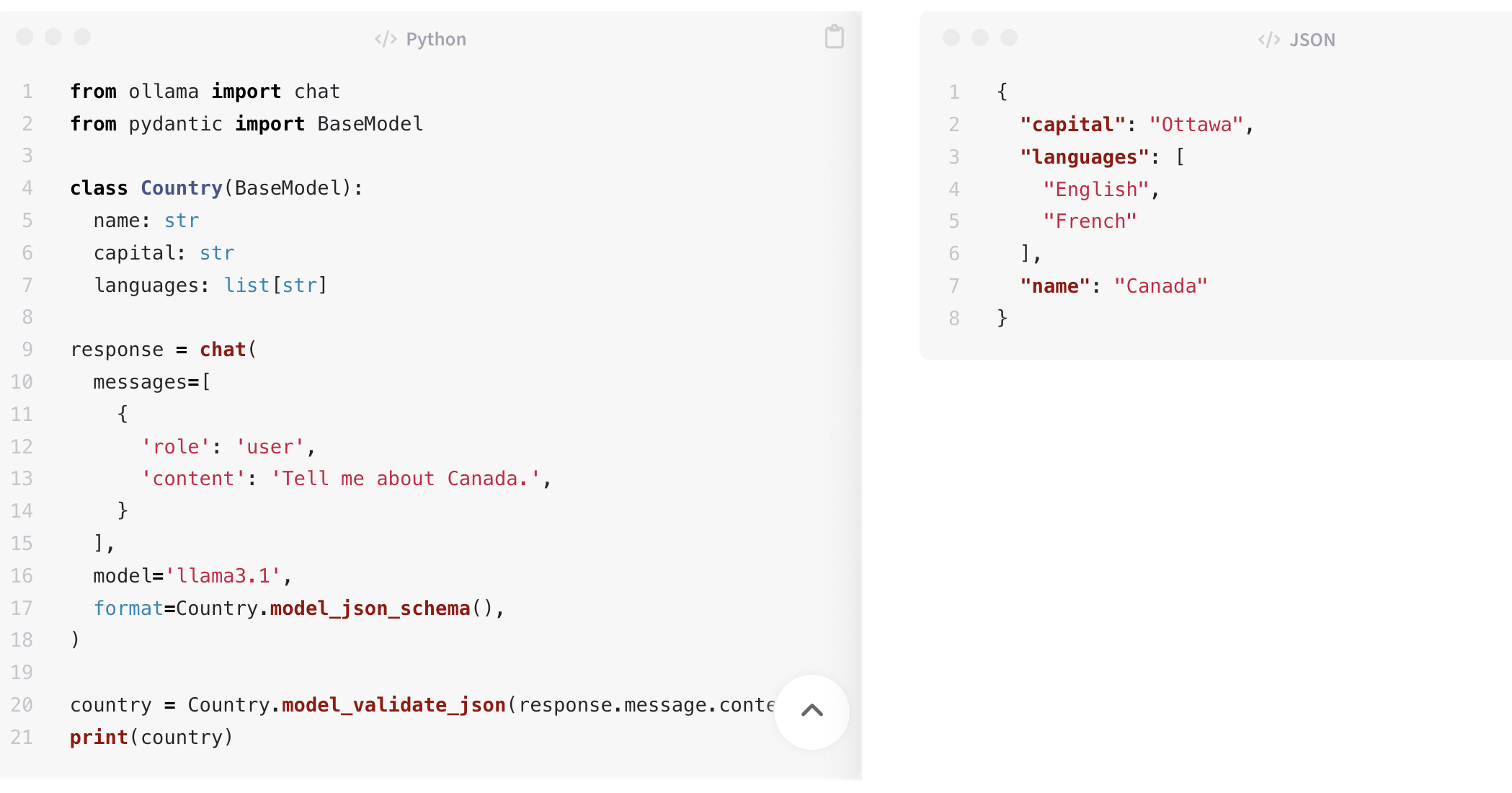
Ollama’s Structured Outputs documentation shows the two operations we need: pass a Pydantic-generated schema to format, then parse the returned JSON into that model. Its example uses a Country model and a different Ollama model name; keep the qwen2.5:1.5b model you installed last lesson.
Structured Outputs - Ollama's documentation
Read Ollama’s Python example to see how a schema shapes the generation request and how the result becomes a Pydantic object.
In “Generating structured JSON with a schema,” start at the sentence introducing Pydantic models. Read the Python example through its print(country) line. Focus on format=Country.model_json_schema() and Country.model_validate_json(response.message.content); you do not need the preceding cURL example.
The supplied image shows that same pattern side by side: a Pydantic model and Ollama request on the left, with JSON containing the requested fields on the right.
Add the following imports and function to your existing model_client.py. Do not replace its generate_text() function or its LiteLLM import:
from ollama import Client

from schemas import OfferInsight


def generate_offer_insight(
    business_note: str,
    settings: Settings,
) -> OfferInsight:
    """Generate a typed insight from a short business note."""
    if not business_note.strip():
        raise ValueError("Business note must not be blank")

    if settings.model_backend != "local":
        raise NotImplementedError(
            "Structured output is configured for local Ollama only"
        )

    model_name = settings.model_name.removeprefix("ollama_chat/")
    if model_name == settings.model_name or not model_name:
        raise ValueError(
            "Local MODEL_NAME must be ollama_chat/ followed by a model name"
        )

    prompt = (
        "Analyze this demo ecommerce note using only its supplied facts. "
        "Do not invent additional figures. Identify the metric and direction, "
        "write a brief observation, and suggest one follow-up question.\n\n"
        f"Note: {business_note}"
    )

    client = Client(
        host=settings.model_api_base,
        timeout=settings.model_timeout_seconds,
    )
    response = client.chat(
        model=model_name,
        messages=[{"role": "user", "content": prompt}],
        format=OfferInsight.model_json_schema(),
    )

    if response.message.content is None:
        raise ValueError("Model returned no JSON content")

    return OfferInsight.model_validate_json(response.message.content)
There is one naming detail worth noticing. Your configured MODEL_NAME is ollama_chat/qwen2.5:1.5b: the prefix tells LiteLLM how to route last lesson’s text call. Ollama’s own client needs the installed model name, qwen2.5:1.5b, so this function removes the prefix at its provider boundary. Business code still calls a function in model_client.py; it does not need to construct an Ollama request.
We use Ollama’s client here because the documented format argument directly accepts the generated schema. This structured-output implementation supports the free/local configuration for now. Your earlier generate_text() function retains its optional hosted route; the new function explicitly rejects hosted settings rather than pretending the providers’ structured-output parameters are interchangeable.
Run the typed request and interpret its limits
Replace app.py’s demo call with this one, or put it in a separate small script if you want to keep both demos:
from config import Settings
from model_client import generate_offer_insight


def main() -> None:
    note = (
        "For this demo store, repeat-purchase rate fell "
        "from 28% in January to 22% in February."
    )
    insight = generate_offer_insight(note, Settings())

    print(insight.model_dump_json(indent=2))
    print("Metric available to application code:", insight.metric)


if __name__ == "__main__":
    main()
With Ollama running and the model installed, run:
uv run --locked python app.py
The wording of the observation and question may vary. A suitable result has metric set to repeat_purchase_rate, direction set to down, and both text fields populated. Unlike last lesson’s return value, insight is an OfferInsight instance: application code can access insight.metric without searching a paragraph for a metric name.
There are two distinct safeguards in the function. Passing format=OfferInsight.model_json_schema() asks Ollama to generate according to your schema. Calling OfferInsight.model_validate_json(...) accepts the result as a typed object only if it can be parsed against that model; otherwise the call fails rather than returning a plausible-looking object. Neither step proves the business claim is true. For example, a well-formed observation string could still misstate the percentages, and a follow_up_question can be well-typed yet unhelpful.
If the request fails, first confirm ollama list contains qwen2.5:1.5b, the server is reachable at MODEL_API_BASE, and .env still uses MODEL_BACKEND=local. A small model can also struggle with a schema; a parsing error is information about this run, not a reason to silently treat the raw text as a trusted insight.
Takeaway
You now have one typed source of truth, OfferInsight, for both the schema sent to Ollama and the object returned to Python. The application asks for a schema-constrained result instead of merely requesting “JSON” in a prompt, while keeping provider details out of app.py.
Keep schemas.py, the new function, and your updated dependency files. Next lesson, you’ll focus on the acceptance boundary: how to handle malformed, incomplete, or business-invalid model responses before downstream code uses them.