Recommended resources
The freely available resources this lesson will direct you to.
Welcome back. In the previous lesson, you translated quantitative formulas into Python using named variables, arithmetic operators, and parentheses. You also saw that Python’s = means assignment, not a mathematical claim of equality.
Now we add an essential discipline for algebra and modelling: checking a proposed answer. Whether you solve an equation by hand, rearrange a formula, or calculate a result in code, substitution lets you test whether the candidate actually satisfies the original relationship. Plan for about 30 minutes.
What it means to verify a solution
Consider an equation such as
Suppose someone proposes that
To verify this proposed solution, do not repeat the process used to find . Instead, substitute for every occurrence of in the original equation and see whether the left-hand side and right-hand side are equal.
Evaluate the left-hand side:
The right-hand side is also . Therefore,
So is a verified solution.
In a market interpretation, could be the number of units sold, could be USD received per unit, and could be a fixed payment in USD. Both sides of the equation are then measured in USD, which is another quick reasonableness check.
A verification answers one precise question:
Does this candidate satisfy the original equation?
It does not explain how the candidate was found, and it does not establish that a failed candidate is “almost right.” It either satisfies the condition or it does not.
A reliable manual checking routine
For a one-variable equation, use this sequence:
- Write down the original equation.
- Replace every occurrence of the variable with the proposed value.
- Use parentheses around a substituted negative number or fraction.
- Calculate the left-hand side and right-hand side separately.
- Compare the final values and state a conclusion.
The original equation matters. A mistake in algebraic rearrangement can sometimes be hidden if you check only a later line of your working.
Substitution with signs, parentheses, and order
Negative values are where careful notation matters most. Consider
and the proposed solution
Substitute for , keeping parentheses around the negative value:
Then calculate:
Therefore, is correct.
Without parentheses, it is easy to lose track of the two minus signs. Treat substitution as a literal replacement: wherever you see , insert .
Now compare that with a failed candidate for the earlier quantity equation:
Test :
But the right-hand side remains , so
Thus, does not solve the equation.
When a check fails, review these possibilities before concluding that the original solution is wrong:
- You may have copied the equation incorrectly.
- You may have substituted the candidate into only part of the equation.
- A negative sign or parentheses may have been lost.
- There may be an arithmetic error.
- The proposed value may genuinely not be a solution.
The following short video reinforces the mechanics of substitution and the use of order of operations. Its examples concern evaluating expressions, which is exactly the computational core of checking an equation.
Intro to Evaluating Algebraic Expressions | How to Evaluate Algebraic Expressions | Math with Mr. J
Watch “Intro to Evaluating Algebraic Expressions” from Math with Mr. J to see substitution written out carefully before calculation.
Start with single-variable substitution, focusing on the fact that a number placed beside a variable means multiplication. Then watch multiple operations to see why multiplication or division must be completed before addition or subtraction after substitution.
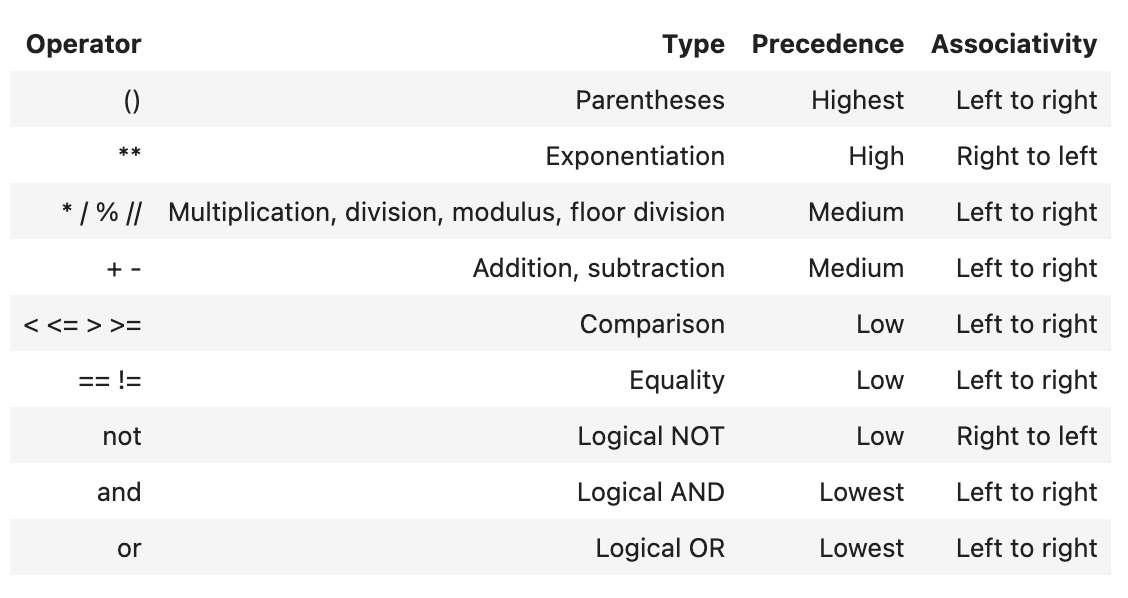
Python follows the same arithmetic priorities you use by hand. The operator-precedence reference below is useful when you need to inspect a longer expression. In particular, arithmetic is evaluated before an equality comparison, and parentheses make your intended grouping explicit.
Turning an algebraic check into Python
Python can perform the same verification, but it is important to distinguish two symbols:
| Symbol | Meaning in Python | Example |
|---|---|---|
= |
Assign a value to a variable name | quantity = 250 |
== |
Test whether two values are equal | left_side == right_side |
Mathematics uses to claim equality. Python uses = to store a value. To ask whether two already-calculated values are equal, use ==.
Here is the quantity example in Python:
unit_receipt_usd = 12.0
fixed_receipt_usd = 500.0
target_receipt_usd = 3500.0

candidate_quantity = 250

left_side = unit_receipt_usd * candidate_quantity + fixed_receipt_usd
right_side = target_receipt_usd

print(left_side)
print(right_side)
print(left_side == right_side)
The output is:
3500.0
3500.0
True
The Boolean value True means that the candidate satisfies the equation. Notice the parallel with the manual work:
The code deliberately stores each side separately. This makes a failed check informative: you can see which numerical values Python compared, rather than seeing only False.
Now test the incorrect candidate:
candidate_quantity = 240

left_side = unit_receipt_usd * candidate_quantity + fixed_receipt_usd

print(left_side)
print(right_side)
print(left_side == right_side)
This produces:
3380.0
3500.0
False
Recall a key point from the previous lesson: changing candidate_quantity alone does not update left_side. You must run the line that recalculates left_side after changing the candidate.
Do not write this when you mean to check equality:
left_side = right_side
That line overwrites the old value of left_side with the value of right_side. It does not test the equation. The checking line is:
left_side == right_side
A brief Python reference for equality tests
The relevant parts of Real Python’s Operators and Expressions in Python clarify the distinction between assignment and comparison.
Operators and Expressions in Python
Read the sections “The Assignment Operator and Statements” and “Comparison Operators and Expressions” from Real Python. They provide a precise reference for why = stores a value while == compares two values.
In “The Assignment Operator and Statements,” read from the opening explanation through the examples assigning values to number, day, digits, and letters. Then move to “Comparison Operators and Expressions.” Read its comparison-operator table carefully, especially the == and != rows, and continue through the explanation of comparison inputs. Focus on the fact that a comparison requires a left value and a right value and returns either True or False.
For the current type of algebra problem, integer-valued and clean decimal-valued calculations will usually compare exactly. In later data analysis, you may encounter decimal rounding effects: two values that are mathematically intended to match can differ by a tiny computer-storage error. In that case, inspecting the difference between the two sides is often more informative than relying only on ==. For now, clear intermediate variables and direct equality checks are the right foundation.
A compact checking template
For any equation with a proposed numerical solution, you can use this pattern.
By hand
Then state whether the two numerical values agree.
In Python
candidate =  # proposed value

left_side =  # original left-hand expression, using candidate
right_side = # original right-hand expression

print(left_side)
print(right_side)
print(left_side == right_side)
The aim is not merely to get True. It is to make the check auditable: another person, or your future self, should be able to see the original relation, the candidate, both evaluated sides, and the conclusion.
Key takeaways
To verify an algebraic solution, substitute the proposed value into the original equation and evaluate both sides.
- A candidate is a solution only if the two sides have the same value.
- Parentheses are especially important when substituting negative values.
- A failed check may reveal a copying, sign, substitution, or arithmetic error—or an incorrect candidate.
- In Python,
=assigns a value, while==tests equality. - Calculate and print
left_sideandright_sideseparately before checking them with==. - After changing a candidate value, recalculate any dependent expressions.
This completes the module on quantitative foundations and Python as a calculator. Next, you will begin working with functions: identifying which quantity is the input, which is the output, and how a formula describes their relationship.