Recommended resources
The freely available resources this lesson will direct you to.
- Effective Context Engineering for AI Agents (why agents still fail in practice)www.youtube.com
- LangGraph: Build Human-in-the-Loop Agents That Never Breakwww.youtube.com
- Evaluating Key Functional Properties of LLM Architectures in ...arxiv.org
- Production-Grade AI Agents: Architecture Patterns That ...medium.com
Hello! In our last lesson, we built a proactive quality assurance layer for our agent, using validation techniques to ensure its outputs are not just syntactically correct but also semantically sound and grounded in evidence.
This lesson addresses the next crucial step in building reliable agents. An agent can produce a validated output but still behave erratically during the process—getting stuck, misusing its tools, or forgetting key information. These are not failures of output, but failures of process. Your clients will care as much about the reliability of the workflow as they do about the final result.
Therefore, our learning outcome for today is to diagnose and fix common single-agent failure patterns: looping, tool misuse, and context loss.
We will move from being a "builder" to a "diagnostician," learning to identify the root causes of these behavioral failures and applying architectural patterns to prevent them. This skill is fundamental to creating the robust, production-grade systems you aim to deliver.
1. A Taxonomy of Agent Failures
Before we can fix what's broken, we need a systematic way to categorize what can break. Agent failures are not random; they tend to fall into predictable patterns.
First, let's watch a segment from a presentation that clearly outlines several common failure modes in agents that use tools.
LangGraph: Build Human-in-the-Loop Agents That Never Break
This video from Kenny Liao provides a practical, developer-focused overview of common agent failure modes. It gives us a clear vocabulary for the problems we're about to solve.
Watch the section from 01:16 to 06:00. As you watch, map the five failure modes discussed back to our three core topics: Looping: 'Infinite loops' Tool Misuse: 'Wrong tool call,' 'Incorrect tool inputs,' 'Unsafe actions' Context Loss: 'Misaligned output' (this is often a symptom of context loss)
While the video provides a great hands-on perspective, your computer science background will appreciate a more formal, research-backed categorization. The following academic paper analyzes these failures in the high-stakes domain of penetration testing, providing a rigorous diagnostic framework.
Evaluating Key Functional Properties of LLM Architectures in ...
This research paper, 'Evaluating Key Functional Properties of LLM Architectures in...', offers a detailed analysis of agent failure modes observed during complex tasks. This will give us a deeper understanding of the root causes.
Please read the sections introducing the research questions (RQ3 and RQ4) and the section 'Failure Modes and Error Analysis (RQ3)'. Focus on these key points: Failure Mode 1 (FM1): Hallucinations and Syntax Errors. Note how this relates directly to tool misuse. Failure Mode 2 (FM2): Redundant Looping and Context Loss. This directly maps to our lesson's topics. Table 2: This is the most critical part. Analyze how it traces high-level failure modes back to specific root causes like 'prompt ambiguity,' 'missing stop conditions,' and 'context window limits.' This table is a powerful diagnostic tool.
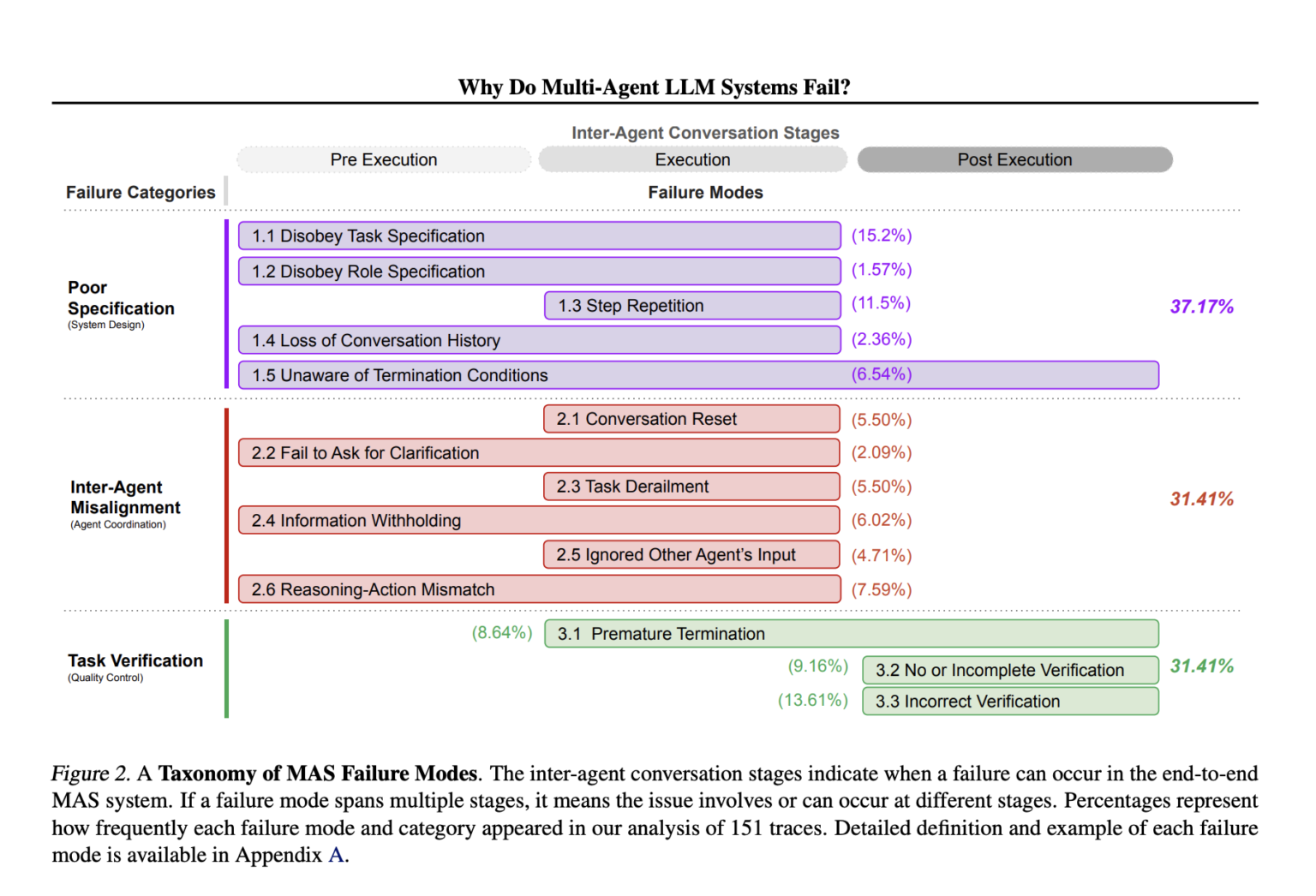
Now, equipped with this structured understanding of what can go wrong and why, let's tackle each failure pattern with specific diagnostic and architectural solutions.
2. Failure Pattern 1: Looping
An agent is looping when it repeats the same actions (e.g., calling the same tool with the same arguments) without making progress toward its goal. This wastes resources, frustrates users, and signals a critical flaw in the agent's reasoning or state management.
Diagnosis
- Symptom: The agent seems "stuck," re-issuing commands or asking the same questions.
- Root Cause (from paper LINK): The most common cause is a structural issue, such as a missing explicit stop condition in the prompt or logic. The agent simply doesn't know when it's "done."
- Tooling: The best way to diagnose a loop is by using a tracing tool (e.g., Langfuse, LangSmith). Visualizing the sequence of LLM calls, tool calls, and responses makes the repetitive cycle immediately obvious.
Solutions
The key to preventing loops is to move away from implicit, open-ended goals and toward explicit, bounded tasks. This is an architectural solution, not just a prompting trick.
Production-Grade AI Agents: Architecture Patterns That Actually Work
The article 'Production-Grade AI Agents: Architecture Patterns That Actually Work' provides a clear architectural solution for the looping problem.
Please read 'Pattern 1: Goal-Oriented Agents with Explicit Completion'. Pay attention to how a special token like [TASK_COMPLETE] provides a deterministic signal for the system's orchestrator to know the agent's job is finished. This moves the responsibility of 'knowing when to stop' from the probabilistic LLM to the deterministic control logic of your system.
Beyond explicit completion signals, you can implement other standard software engineering controls:
- State Machines: For complex, multi-step tasks, model the workflow as a finite state machine. The agent's capabilities and context are determined by its current state. This prevents it from regressing to previous steps. The "Effective Context Engineering" video we'll review later touches on this (at 22:19).
- Retry Counters: Implement a hard limit on the number of times an agent can attempt a specific action or tool call. This is a crucial backstop to prevent infinite loops and runaway costs.
3. Failure Pattern 2: Tool Misuse
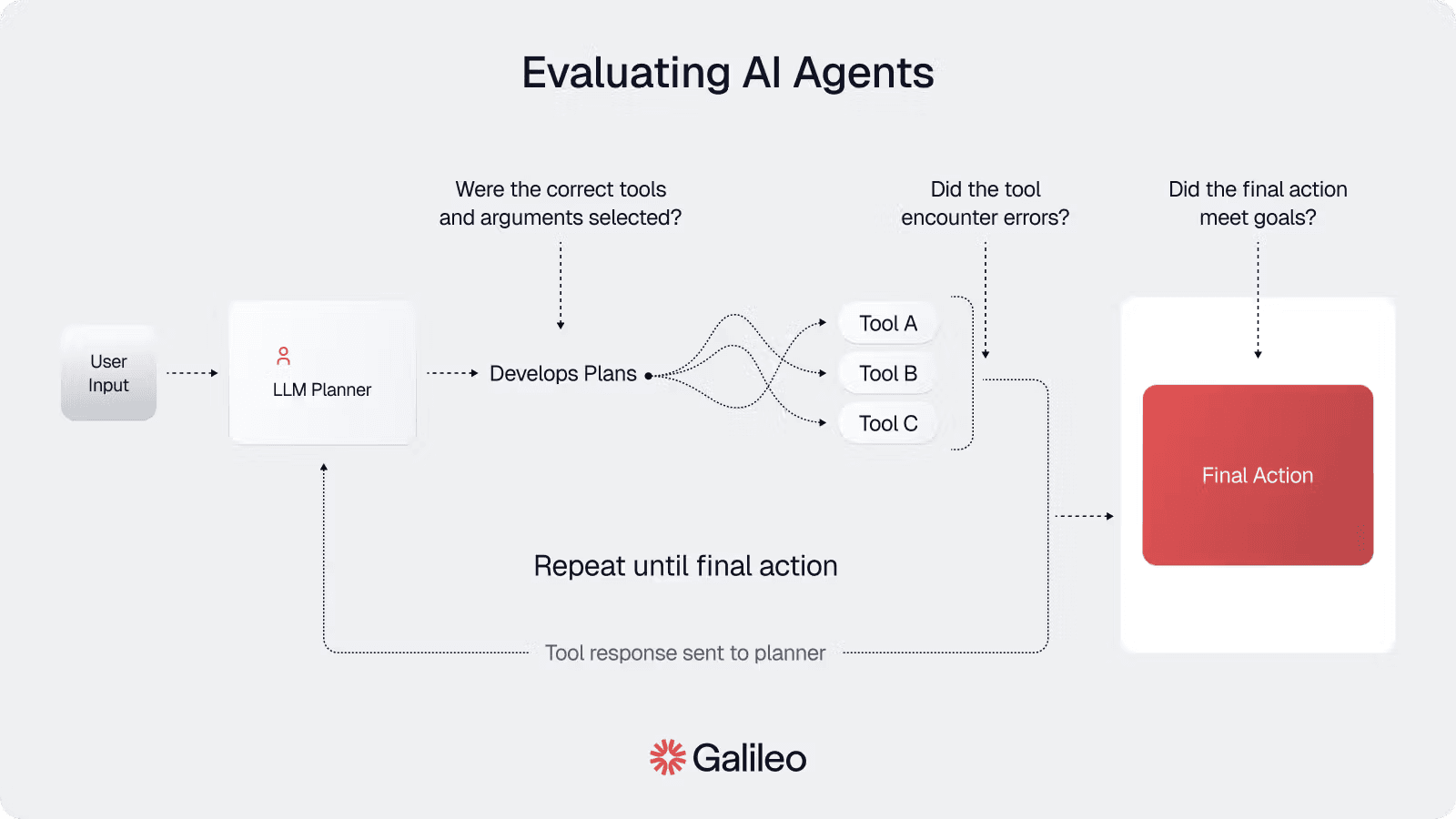
Tool misuse occurs when an agent calls the wrong tool, provides incorrect parameters, or misinterprets a tool's output. This is one of the most common and damaging failure modes, as it can lead to anything from simple errors to catastrophic actions in a production environment.
Diagnosis
- Symptoms: The system throws errors related to API calls, the agent reports that a tool failed, or the agent proceeds with nonsensical information it claims to have gotten from a tool.
- Root Causes (from paper LINK): Ambiguous tool descriptions, poorly structured prompts, or a lack of validation on the tool-calling logic.
- Tooling: Tracing is again essential. You need to inspect the exact tool call the LLM generated (the tool name and its arguments) and the response it received.
Solutions
Fixing tool misuse requires creating a robust, controlled interface between the agent and its tools.
-
Clear Tool Descriptions (Prompt Engineering): Ensure that each tool's description in the prompt is unambiguous. It should clearly state what the tool does, what parameters it requires (including their types and formats), and what it returns.
-
Architectural Validation (Tool Orchestration): Do not let the agent call tools directly. Implement a tool orchestration layer that acts as a gatekeeper.
Production-Grade AI Agents: Architecture Patterns That Actually Work
Let's return to the 'Production-Grade AI Agents' article for a powerful architectural pattern to manage tool calls safely.
Read 'Pattern 6: Tool Call Orchestration and Validation'. Focus on the 'MCP (Model Context Protocol)' pattern. Analyze the responsibilities of the ToolOrchestrator class: pre-execution validation, execution with retry logic, and post-execution validation. This pattern creates a safety boundary around your tools.
- Programmatic Guardrails & Human-in-the-Loop: For particularly high-stakes tools, you can add further layers of safety.
LangGraph: Build Human-in-the-Loop Agents That Never Break
The LangGraph video discusses two additional mechanisms for controlling tool use: programmatic guardrails and human-in-the-loop (HITL) checkpoints.
Watch the segment from 06:00 to 10:18. Understand the distinction between: Human-in-the-Loop: Interrupting the agent's execution to require human approval before a specific tool call proceeds. Guardrails: Hard-coded rules (e.g., a regex to block DROP TABLE in a SQL tool) that programmatically prevent dangerous actions. Permissions: A classic security principle, running the agent with a role that has least-privilege access to resources like a database.
By combining clear descriptions, a validation-enforcing orchestration layer, and targeted guardrails, you can significantly reduce the risk of tool misuse.
4. Failure Pattern 3: Context Loss
Context loss, or context "drift," happens when an agent forgets earlier parts of a conversation or gets confused by irrelevant information. As the interaction history grows, the limited context window of the LLM becomes a significant bottleneck, leading to a degradation in performance.
Diagnosis
- Symptoms: The agent asks for information it has already been given, ignores previous constraints or instructions, or mixes up information from different tasks.
- Root Causes (from paper LINK): The primary cause is the finite context window. Important information gets "pushed out" by newer messages, or the model gets confused by too much "noise" (the "needle in a haystack" problem).
- Tooling: Again, inspecting the full prompt sent to the LLM via a tracing tool is the only way to see what the model "sees." If you notice a very long conversation history, context loss is a likely culprit.
Solutions
Solving context loss requires disciplined "context engineering"—the art and science of curating the information sent to the LLM.
Effective Context Engineering for AI Agents (why agents still fail in practice)
This video, 'Effective Context Engineering for AI Agents,' provides an excellent conceptual overview of why context is so challenging and introduces several high-level strategies for managing it.
Please watch these three segments: 00:00 - 06:36: Understand the core problem of context engineering and why simply increasing context window size is not a complete solution (the 'diminishing marginal returns'). 19:01 - 21:43: Focus on the specific strategies for managing different context types: RAG for documents, focused descriptions for tools, and pruning/summarization for message history. 22:19 - 24:29: Pay close attention to the architectural idea of using a state machine. This is a powerful way to dynamically assemble context based on where the user is in a workflow, rather than relying on a linear chat history.
The "Production-Grade AI Agents" article operationalizes these concepts into specific architectural patterns.
Production-Grade AI Agents: Architecture Patterns That Actually Work
Now, let's look at concrete architectural patterns for implementing the context engineering strategies we just learned about.
Read the following three patterns from the article: Pattern 2: Context Isolation by Task: This implements the core idea of providing only relevant information, preventing context from one task from polluting another. Pattern 5: Off-Topic Detection with Context Preservation: A sophisticated technique to handle user-initiated topic changes gracefully without losing the context of the original task. Pattern 7: Conversation History Management: This details the implementation of 'smart windowing' and summarization to manage long conversations within token limits.
Ultimately, effective context management is about treating the context window not as an infinite scratchpad, but as a finite, high-value resource to be carefully managed through deliberate system design.
Conclusion
Today, we've transitioned from being agent builders to agent diagnosticians. We've seen that common failures like looping, tool misuse, and context loss are not random acts of an unreliable model, but predictable outcomes of specific design flaws.
Key Takeaways:
- Failures are Pattern-Based: Common agent failures can be categorized, traced to their root causes (often related to prompting, state, or context), and systematically addressed.
- Looping is a State Problem: Agents loop when they lack a clear goal or an explicit "stop" signal. The fix is architectural: design agents with defined completion states and use control structures like state machines.
- Tool Misuse is a Boundary Problem: Agents misuse tools when the boundary between the agent and the tool is too permissive. The fix is to create a secure boundary with validation, orchestration, guardrails, and, where necessary, human oversight.
- Context Loss is a Resource Problem: Agents lose context when the finite resource of the context window is mismanaged. The fix is disciplined context engineering: isolating context by task, summarizing history, and managing state explicitly.
- Avoid Anti-Patterns: The most reliable path is to avoid common anti-patterns like building fully autonomous agents with no structure, sharing context across all tasks, and trusting tool calls blindly.
You now have a robust framework for building and debugging a single reliable agent. In our next lesson, we will begin our exploration of Multi-Agent Architecture and Orchestration. We will start by asking a fundamental design question: When should you use a single, versatile agent versus a team of specialized agents for a given workflow? The diagnostic skills you've honed today will be invaluable as we analyze the new failure modes that emerge when multiple agents need to collaborate.