Recommended resources
The freely available resources this lesson will direct you to.
- The ultimate guide on how to write a bug reportwww.youtube.com
- Documentation and Managing Tickets - Learn Help Desk Serieswww.youtube.com
- AI-Human Collaboration in Support: Handoffs That Workwww.intercom.com
- Collect effective bug reports from customers | Jira Service Management Data Center 11.2 | Atlassian Documentationconfluence.atlassian.com
Hello again. In the previous lesson, you selected evidence that could answer a troubleshooting question without exposing credentials or unnecessary customer data. Now the challenge is to make that evidence usable by someone who was not present for the investigation.
Today you’ll turn the Weekly usage export case into a handoff note. By the end, another engineer should be able to understand what happened, repeat the test if authorized, see what you have already ruled out, and take a specific next step. Allow about 40 minutes, including the resources.
Write for the person who picks up the case
Imagine opening a ticket that says, “Export broken. Tried another account. Please investigate.” You would have to ask which export, what “broken” looked like, which account worked, and what conditions stayed the same. The ticket records activity, but it does not preserve the investigation.
A useful note answers two different questions:
- How can I observe the reported behavior? This requires the starting conditions, actions, expected result, and actual result.
- Where should I continue? This requires the tests already performed, what their results do and do not establish, and the next unresolved question.
Atlassian’s bug-report guidance focuses on information developers need to reproduce a problem. Read its description of the support-to-development workflow and the fields that commonly block or enable investigation.
Read Atlassian’s guidance to see why a support investigation must remain useful after another team receives it.
Under “The bug reporting and resolution process,” start with the process overview. Then read the service-project-agent column of the comparison table, from the agent’s initial investigation through communicating progress to the customer. Under “Collect specific information from users with custom fields,” read the information list. Focus on which details let someone else repeat an issue; you do not need to configure Jira fields for this lesson.
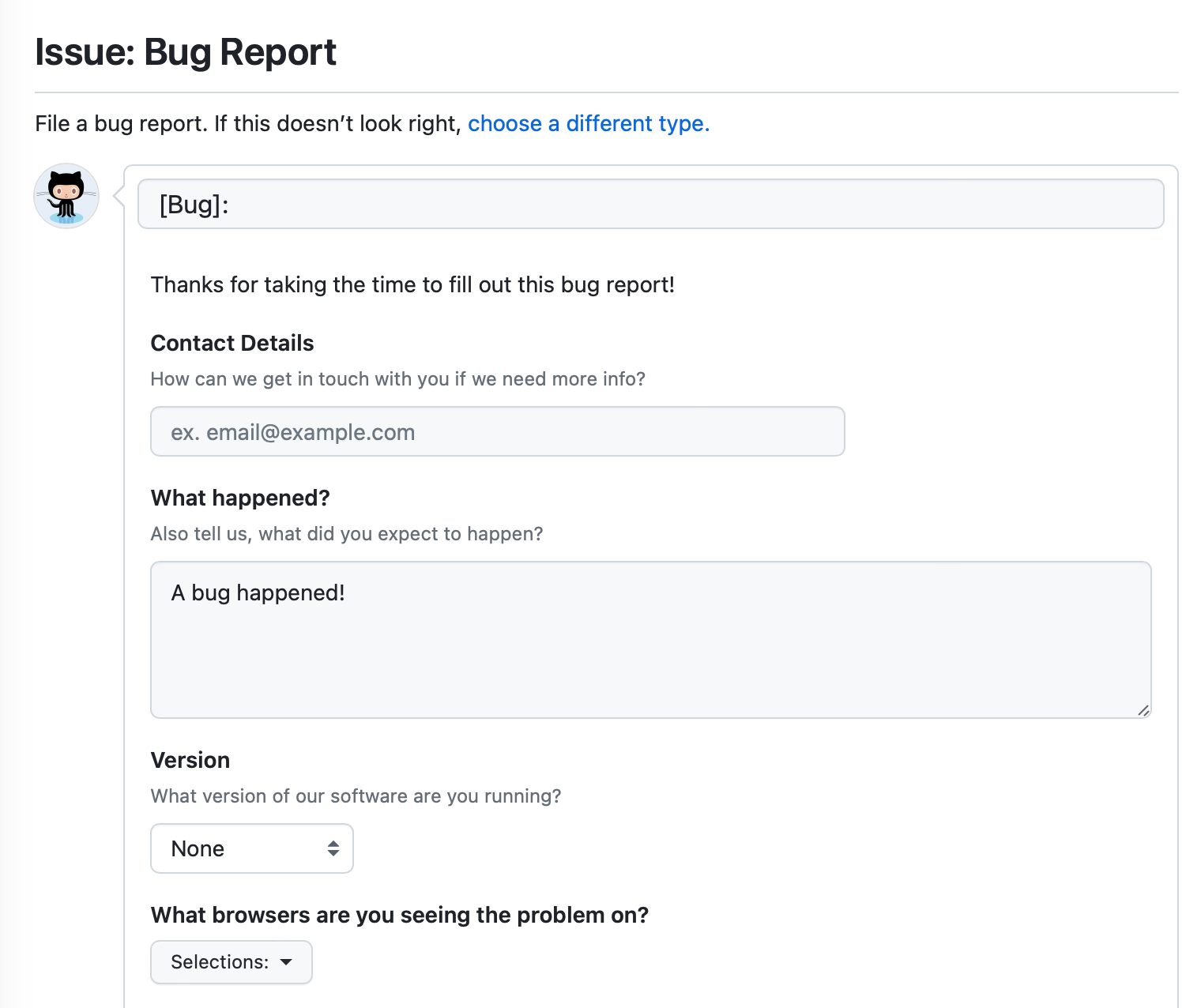
The form matters less than the content. A Jira ticket, Freshdesk internal note, or engineering issue might give you separate fields—or just one description box. This example GitHub form asks what happened, along with version and browser details. It does not visibly provide a dedicated field for every investigation result, so a reporter would need to organize those details in the available description.
Make the reproduction instructions executable
A problem statement says what is wrong. Reproduction steps tell another person what to do to see it. “Export the report” is too broad if the outcome depends on the account, report, date range, or environment. Conversely, the steps should not be padded with every click you made while exploring unrelated possibilities.
Watch these selected parts of Software Testing 101’s The ultimate guide on how to write a bug report. The reproduction section is especially relevant; the later clips show how to separate actual from expected behavior and specify the environment.
The ultimate guide on how to write a bug report
Watch selected excerpts from Software Testing 101’s bug-report walkthrough for a practical model of steps, results, and environment details.
In the steps-to-reproduce section, watch reproduction guidance for numbered, specific instructions and the reminder to check whether the written steps really match what you did. Skip ahead to actual versus expected; notice that expected behavior may need confirmation from product requirements rather than assumption. Finally, watch environment details for the role of OS, browser, and version in repeating a problem.
For the export case, the prerequisites include production, the Weekly usage report, Last 30 days, and an authorized session for each account. The action is selecting Export. The observable result is the UI message or a completed download—not a guess about why it occurred.
Keep expected and actual separate. The customer expects an export to download; account A instead displayed “Export failed.” If you have not confirmed whether account A is entitled to export that report, say so. An expectation reported by a customer is important context, but it is not automatically a verified product requirement.
Also separate instructions from history. Steps tell a colleague how to repeat a test. The investigation history says what happened when you ran it: account A failed at 10:04 UTC, authorized account B succeeded at 10:06 UTC, and A failed again at 10:08 UTC. Preserve all three outcomes. “B worked” alone would conceal the stronger A–B–A pattern; “A failed twice” alone would conceal the control.
A handoff note for the export case
The following is an illustrative note based on the observations carried forward from earlier lessons, not a claim about a live customer. It does not add an HTTP status, request ID, or root cause that nobody has verified.
Title: Weekly usage / Last 30 days export shows “Export failed”
       for account A in production

Customer-reported expectation:
The Weekly usage export should download. Whether account A meets all
export eligibility requirements has not yet been confirmed.

Observed impact and scope:
Export was blocked for account A during two observed attempts.
Of the two authorized accounts tested, B succeeded. Impact beyond
those accounts and any workaround are unknown.

Environment and conditions:
Production; Safari 17 on macOS 14. Same browser, report, date range,
and environment were used for the comparison. Account is the
deliberately changed variable.

Steps to repeat, with approved access:
1. In an authorized session for account A, open Weekly usage.
2. Set the report range to Last 30 days and select Export.
3. Record the time, time zone, and visible outcome.
4. Repeat with authorized account B under the same conditions.
5. Repeat with account A under the same conditions.

Expected: The export downloads for an account eligible to export it.
Actual in the recorded A attempts: The UI displayed “Export failed.”
Actual in the recorded B attempt: The export succeeded.

Completed test:
10:04 UTC — account A — failed; “Export failed”
10:06 UTC — account B — succeeded
10:08 UTC — account A — failed; “Export failed”

Interpretation:
These observations support an account-related pattern during this
test. They do not establish why A failed or whether the behavior
would recur for other accounts, browsers, or time periods.

Not yet checked:
Account A’s export eligibility; the relevant request outcome;
server-side events. No HTTP status or request ID has been verified.

Next action:
With approved access, confirm A’s export eligibility, then inspect
the specific export request from a fresh A attempt. Record its time,
status, and an approved request identifier if available. Compare
with an authorized B attempt under the same conditions. If access
is unavailable, hand this step to someone who has it.

Evidence handling:
Account aliases refer to authorized accounts through the approved
restricted case record. Do not place credentials, session values,
personal details, or report contents in this note.
Notice what this note does not say: “The account’s data is corrupt,” “the API returned 500,” or “all Safari users are affected.” Each would be a possible line of inquiry, not a result of the recorded test.
The steps are also conditional on approved access. A colleague must not obtain or share a customer password to reproduce the issue. If the test cannot be repeated safely, the previous observations still belong in the note; the access limitation belongs there too.
Leave the next engineer a decision, not just a task
“Investigate further” names no useful next move. A stronger next action identifies the unanswered question, the evidence to collect, and what the result might change. In this case, confirming eligibility matters before treating A’s failed export as a product defect. Inspecting the relevant export request could then show whether the visible error accompanies a failed web request, but its status must be observed, not inferred from the UI message.
Intercom’s handoff guidance concerns an AI support agent passing work to a human. Its setting differs from an engineer-to-engineer handoff, but its note structure is useful: preserve the original request, what was collected, what was found, why the work remains open, and the recommended next step.
AI-Human Collaboration in Support: Handoffs That Work
Read Intercom’s handoff-note example for its structure, then apply that structure to a human investigator passing a SaaS case to a colleague.
In “Building Effective Handoff Protocols,” find “Step 2: Design the handoff note.” Read the note format and example. Focus on the distinction between data collected, findings, the reason the handoff is needed, and the recommended next step. The refund example illustrates note quality; it is not a procedure for this export case.
Before handing over your own note, read it once from the receiving engineer’s position. Could they follow the steps without asking what report or range you meant? Could they tell a completed test from an untested hypothesis? Would they know where the safe evidence is stored and what to do if they lack access? If the answer to any of these is no, add the missing detail—not an unfiltered attachment.
A good investigation record is concise because it is selective, not because it omits uncertainty. “Unknown,” “not checked,” and “could not reproduce with available access” are valuable statements when accurate. They prevent repeated work and stop an assumption from becoming an apparent fact as the ticket moves between people.
Key takeaways
Document the starting conditions and repeatable actions, the expected and observed results, and the outcome of every meaningful test. State the scope the evidence supports without declaring a root cause prematurely. End with one concrete next action tied to an unanswered question, while keeping access and evidence handling safe.
This completes the evidence-driven troubleshooting module. Next, you’ll study how web requests travel through a SaaS application—the foundation for investigating the request outcome left open in this case.