Recommended resources
The freely available resources this lesson will direct you to.
Welcome back!
In our last lesson, we built a foundational FIFO task scheduler. We saw how a queue.Queue provides a simple, thread-safe way to process tasks in the order they arrive, perfectly illustrating the producer-consumer pattern. However, as you know from designing complex systems like Rudi, not all tasks are created equal.
Introduction
This lesson addresses a critical limitation of our simple scheduler: its inability to prioritize. Imagine a scenario: a long-running, low-priority task like generating a daily report is submitted. A moment later, a critical, high-priority task like a fraud alert arrives. In our FIFO system, the critical alert must wait, potentially for minutes, while the non-urgent report completes. This is not just inefficient; it can be unacceptable from a business perspective.
Today, we will evolve our scheduler to handle tasks based on their importance. To do this, we will replace the FIFO queue with a priority queue, implemented using a min-heap. This change will allow our scheduler to intelligently process the most urgent tasks first, regardless of their arrival time. Your experience with priority-based queuing at AWS will be a great asset here, as we map those concepts to a hands-on Python implementation.
By the end of this lesson, you will be able to evolve the scheduler to support priority levels by replacing the FIFO queue with a min-heap.
1. The Need for Priority
The "2:00 AM horror story" is a classic example of why FIFO scheduling can fail. Let's see this problem in action.
Don’t Let Your Urgent Jobs Wait: Building a Priority Queue with Python’s heapq
The article 'Don’t Let Your Urgent Jobs Wait' starts with a compelling scenario that perfectly illustrates the problem we're solving. It then builds a Python-based solution, which we will follow.
Read the first two sections, 'The 2:00 AM Horror Story' and 'The Flaw in “First-In, First-Out”'. Pay attention to the simple Python code that demonstrates how a critical fraud alert gets stuck behind a long-running report.
This leads us to the concept of a Priority Queue: an abstract data type where each element has an associated priority. Elements with higher priority are served before elements with lower priority.
But how do we build one efficiently?
| Implementation | Enqueue (Add Item) | Dequeue (Get Highest Prio) |
|---|---|---|
| Unsorted List | ||
| Sorted List | ||
| Binary Heap |
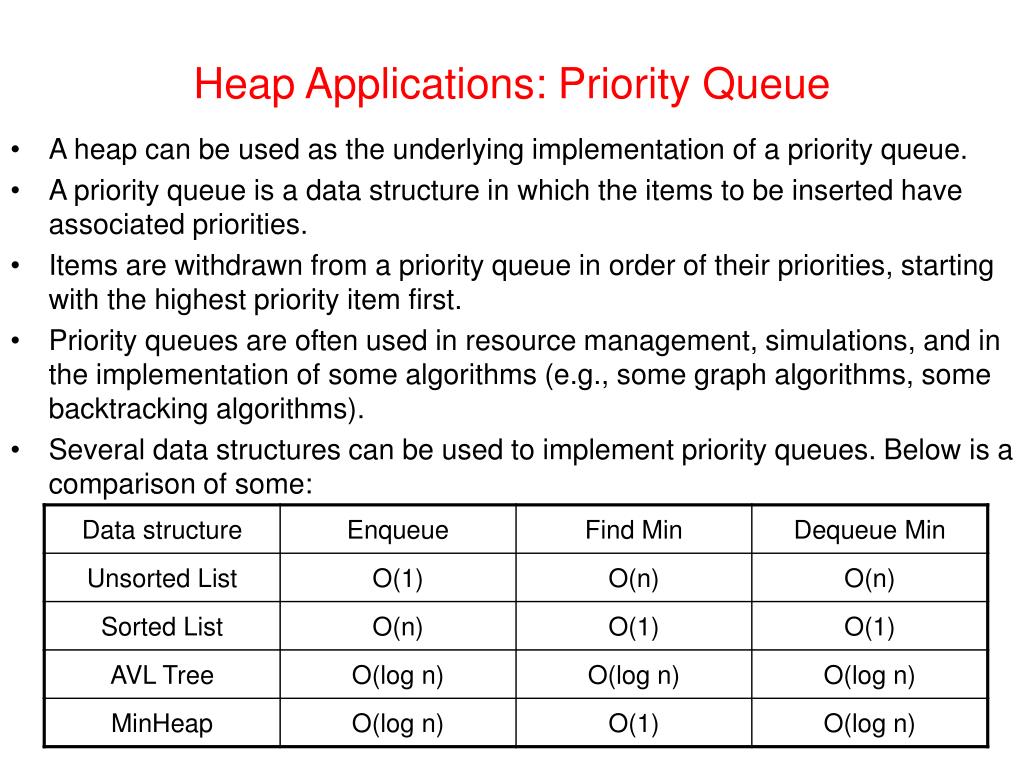
As the table shows, a heap provides the most efficient and balanced performance for the core operations of a priority queue.
2. Understanding Heaps and heapq
A heap is a specialized tree-based data structure that satisfies the "heap property." For a min-heap, the value of each node is less than or equal to the value of its children. This guarantees that the smallest element is always at the root of the tree, accessible in time.
Python's standard library provides the heapq module, which offers an efficient implementation of the heap queue algorithm. It cleverly uses a standard Python list to represent the heap.
Let's get a solid grasp of how heaps work and why they are the perfect foundation for a priority queue.
Heaps, heapsort, and priority queues - Inside code
The video 'Heaps, heapsort, and priority queues' by Inside code provides a clear, animated explanation of heap fundamentals and their application as priority queues.
Watch the following segments: 00:00 - 01:51: Introduces heaps and contrasts them with arrays. 01:51 - 03:07: Explains how a complete binary tree (like a heap) is efficiently stored in an array. 03:30 - 06:06: Covers the essential sift-up and sift-down operations that maintain the heap property. 06:06 - 08:00: Shows how insert and extract_min are built using these sifting operations. 17:05 - 18:41: This is the key part. It directly maps priority queue operations (enqueue, dequeue) to heap operations (insert, extract-min).
The core takeaway is that heapq.heappush and heapq.heappop operations on a list maintain the min-heap property with time complexity, making them ideal for our scheduler.
3. Building a Production-Ready Priority Scheduler
To adapt our scheduler, we'll swap queue.Queue with a simple list managed by heapq.
The Priority Tuple
heapq compares items directly. To make it work for our tasks, we'll store items as tuples. Since it's a min-heap, the item with the lowest first element is considered the highest priority.
# A tuple where the first element is the priority
# Priority 1 is higher than priority 10
(priority, task_object)
Handling Tie-Breaks and Thread Safety
There are two production-level details to address:
-
Sort Stability (Tie-breaking): What if two tasks have the same priority? Python will try to compare the second element of the tuple,
task_object. If ourTaskobjects are not comparable (and they generally shouldn't be), this will raise aTypeError. The standard solution is to add a unique, ever-increasing counter as a tie-breaker.(priority, sequence_counter, task_object) -
Thread Safety: The
queue.Queuewe used previously was thread-safe out of the box. A standard list managed byheapqis not. Multiple threads modifying the list can lead to corruption. We must protect our heap operations with athreading.Lock. -
Blocking Behavior:
queue.Queue.get()blocks when the queue is empty.heapq.heappop()on an empty list raises anIndexError. To replicate the efficient waiting behavior, we'll use athreading.Conditionvariable. The worker willwait()on the condition if the heap is empty, and theschedulemethod willnotify()the worker after adding a new task.
This approach is more manual but gives you a deeper understanding of the synchronization primitives that underpin thread-safe data structures.
heapq — Heap queue algorithm — Python 3.14.3 documentation
The official Python documentation for heapq includes an excellent section on implementing a robust priority queue that discusses these very issues.
Read the section titled 'Priority Queue Implementation Notes'. This section explains the challenges of sort stability and provides a complete recipe for a robust priority queue using an entry count for tie-breaking. This is the exact pattern we will implement.
4. Your Task: Implement the PriorityScheduler
Now, let's evolve the FIFOScheduler from our previous lesson into a PriorityScheduler. I have provided the class structure below. Your goal is to implement the schedule and _worker_loop methods using heapq, a Lock, and a Condition variable.
Notice the changes in __init__ and the new priority parameter in schedule. The logic for graceful shutdown with a sentinel has also been adapted for the priority queue.
import heapq
import threading
import time
from dataclasses import dataclass, field
from typing import Callable, Any

@dataclass(order=True)
class Task:
    """
    Represents a unit of work. `order=True` allows comparison if needed,
    but we will rely on a priority tuple to avoid issues.
    We add 'priority' and a unique 'task_id' for clarity.
    """
    priority: int
    task_id: int
    func: Callable = field(compare=False)
    args: tuple = field(compare=False, default_factory=tuple)
    kwargs: dict = field(compare=False, default_factory=dict)

class PriorityScheduler:
    """
    A task scheduler that executes tasks based on priority using a min-heap.
    """
    def __init__(self):
        self._tasks_heap = []  # A list to be used as a min-heap
        self._lock = threading.Lock()
        self._condition = threading.Condition(self._lock)
        self._counter = 0  # Monotonic counter for tie-breaking
        self._worker_thread = None
        self._stop_signal = object()

    def schedule(self, func: Callable, priority: int, *args: Any, **kwargs: Any):
        """
        Schedules a function to be executed by the worker based on priority.

        Args:
            func: The function to execute.
            priority: The priority of the task (lower number is higher priority).
            *args: Positional arguments for the function.
            **kwargs: Keyword arguments for the function.
        """
        with self._lock:


            # 1. Create a Task object.
            # 2. Create a priority tuple: (priority, counter, task_object).
            # 3. Use heapq.heappush to add the tuple to self._tasks_heap.
            # 4. Increment the counter.
            # 5. Notify the condition variable to wake up the worker if it's waiting.
            pass # Your implementation here

    def _worker_loop(self):
        """The main loop for the worker thread."""
        print("Worker thread started.")
        while True:
            with self._lock:


                # 1. Use a while loop to wait until self._tasks_heap is not empty.
                #    Inside this loop, call self._condition.wait().
                #    This releases the lock and waits to be notified.
                while not self._tasks_heap:
                    self._condition.wait()


                # 2. Once the heap is not empty, pop the highest priority item.
                #    The item is a tuple: (priority, counter, task).
                #    Use heapq.heappop().
                item = None # Your implementation here
                task = item[2] # Extract the task object from the tuple


            # 3. Check if the popped task is the stop signal. If so, break the loop.
            # 4. Execute the task outside the lock.
            #    Wrap the execution in a try...except block for robust error handling.
            if task is self._stop_signal:
                break

            try:


                # Execute the task
                pass # Your implementation here
            except Exception as e:
                print(f"Error executing task {task.task_id}: {e}")

        print("Worker thread stopped.")

    def start(self):
        """Starts the worker thread."""
        if self._worker_thread is not None:
            print("Worker is already running.")
            return
        self._worker_thread = threading.Thread(target=self._worker_loop)
        self._worker_thread.start()

    def stop(self):
        """Stops the worker thread gracefully."""
        if self._worker_thread is None:
            print("Worker is not running.")
            return

        with self._lock:


            # Push a high-priority stop signal to ensure it's processed next.
            # Using float('-inf') as the highest possible priority.
            heapq.heappush(self._tasks_heap, (float('-inf'), -1, self._stop_signal))
            self._condition.notify()

        self._worker_thread.join()
        self._worker_thread = None


# --- Example Usage ---
def sample_task(name: str, duration: int):
    """A simple task that prints a message and sleeps."""
    print(f"  STARTING task: '{name}' (will run for {duration}s)")
    time.sleep(duration)
    print(f"  FINISHED task: '{name}'")

if __name__ == '__main__':
    scheduler = PriorityScheduler()
    scheduler.start()

    print("Scheduling tasks with different priorities...")


    # Schedule a low-priority, long-running task first.
    scheduler.schedule(sample_task, priority=10, name="Daily Report", duration=3)
    time.sleep(0.1)


    # Schedule a high-priority, short task second.
    scheduler.schedule(sample_task, priority=1, name="CRITICAL Fraud Alert", duration=1)
    time.sleep(0.1)


    # Schedule a medium-priority task third.
    scheduler.schedule(sample_task, priority=5, name="User Data Backfill", duration=1)


    # Allow time for tasks to be processed.
    print("Main thread is free. Waiting for tasks to complete...")
    time.sleep(7)

    print("Stopping scheduler...")
    scheduler.stop()
    print("Scheduler stopped.")
When you run your completed implementation, you should see the "CRITICAL Fraud Alert" start before the "Daily Report," even though it was scheduled later.
Conclusion
Excellent work! You have successfully upgraded our simple scheduler into a priority-aware system. By replacing the FIFO queue with a min-heap, you've implemented a core feature of many real-world job processing systems.
Key Takeaways:
- Priority Queues are essential when tasks have different levels of importance, decoupling execution order from arrival time.
- A Binary Heap is the most efficient data structure for implementing a priority queue, offering for both insertions and deletions.
- Python's
heapqmodule provides the necessary algorithms to manage a list as a heap. - For production-quality priority queues, it's crucial to handle tie-breaks (using a sequence counter) and ensure thread safety (using
LockandConditionvariables).
Next Lesson Preview
Our scheduler is now quite capable, but it still has a major limitation: it doesn't understand dependencies. What if "Task A" must complete before "Task B" can start, regardless of their priorities? In the next lesson, we will extend the priority scheduler to model task dependencies using a Directed Acyclic Graph (DAG). This will introduce us to graph theory and algorithms like topological sort, which are fundamental to building complex workflows.