Recommended resources
The freely available resources this lesson will direct you to.
Welcome to our next lesson. In our previous session, we saw how sorting data can unlock highly efficient linear-time solutions, turning problems into much faster ones. This highlights a core principle: structure enables speed.
Today, we'll take that principle to its logical conclusion by exploring one of the most fundamental and powerful algorithms in computer science: binary search. When you have a sorted array, you don't need to scan every element. Binary search provides a way to find an element in logarithmic time, , which is dramatically faster than the linear scans we discussed. For an array with a million items, a linear scan might take a million steps, while binary search will take at-most 20.
Our goal is to implement an iterative binary search for an exact value, and crucially, to do so without the common boundary errors that can trap developers. Understanding the subtle details of the implementation will not only give you a robust tool for your arsenal but also build confidence in reasoning about algorithmic correctness.
The Core Idea: Divide and Conquer
At its heart, binary search is a "divide and conquer" strategy. You've used this intuition your whole life when looking for a word in a physical dictionary. You don't start at the first page; you open it somewhere in the middle. If the word you're looking for comes alphabetically before the words on that page, you know your word must be in the first half of the dictionary. You then repeat this process on that smaller half.
Binary search on a sorted array works exactly the same way.
- Start with the entire array as your search space.
- Find the middle element.
- Compare the middle element to your target value.
- If they match, you're done!
- If your target is smaller, you know it must be in the left half of the array. Discard the right half.
- If your target is larger, it must be in the right half. Discard the left half.
- Repeat this process on the new, smaller search space until you find the target or the search space is empty.
This image provides a clear visual of this process, showing how we zero in on the number 27.
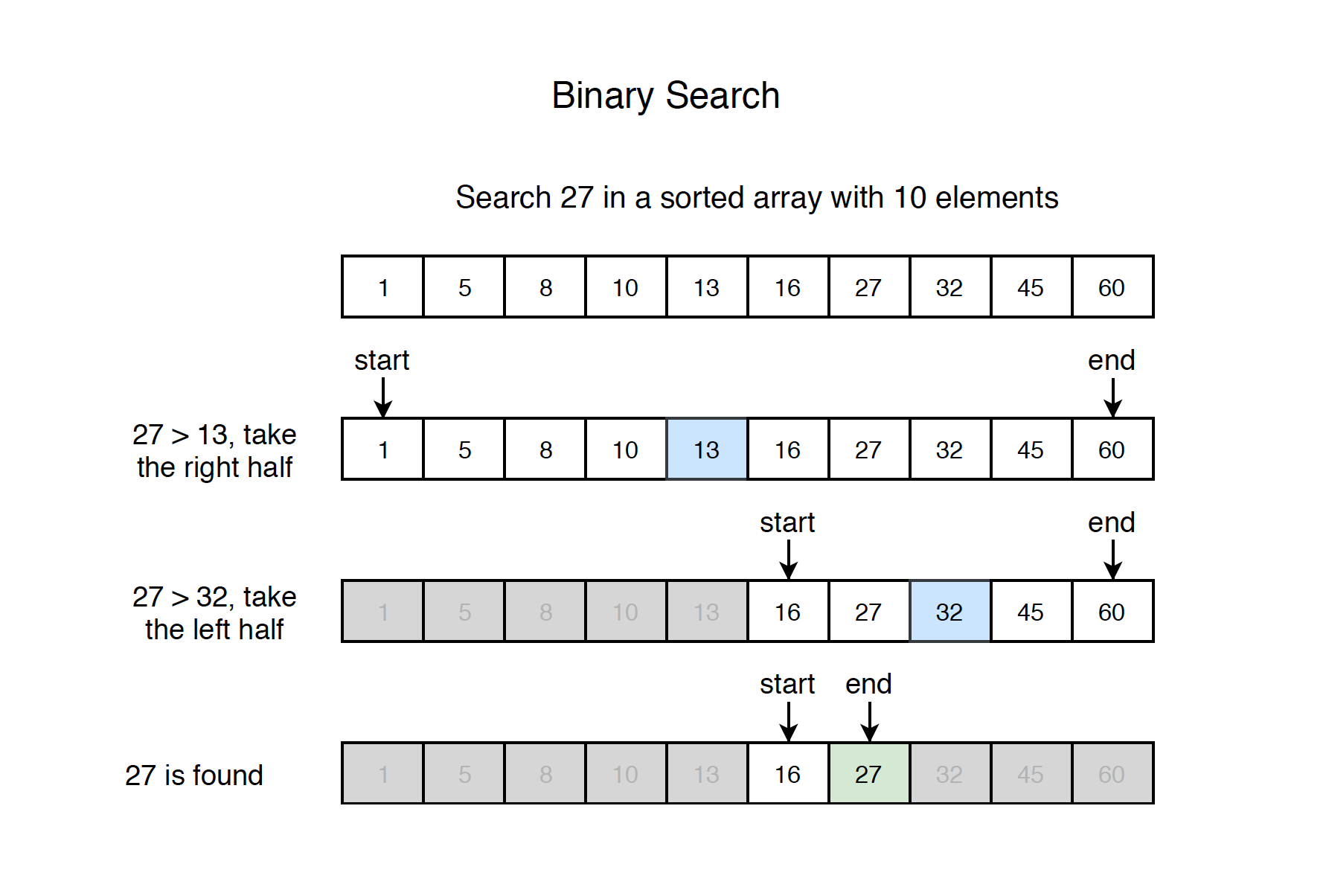
The power of this approach comes from how quickly the search space shrinks. Because we halve the number of candidates at every step, the number of comparisons required grows logarithmically with the size of the input.
A Robust Template for Iterative Binary Search
While the concept is straightforward, the implementation is famously prone to "off-by-one" errors. A small mistake in a loop condition or a boundary update can lead to an infinite loop or incorrect results. To avoid this, we'll establish a solid, reliable template.
The following resource from AlgoMonster provides a clean, well-commented implementation in several languages, including TypeScript. Let's focus on the TypeScript code as our reference template.
This resource provides a clear and concise implementation of iterative binary search. We will use this as our foundational template.
In the "Implementation" section, find the code snippets for different languages. Please focus your attention on the TypeScript version. Read through it and familiarize yourself with its structure: the initialization of left and right, the while loop, and the conditional logic inside.
The TypeScript code you just reviewed is a robust template. Let's break down the critical components to understand why it works and how it avoids common pitfalls.
function binarySearch(arr: number[], target: number): number {
    let left = 0;
    let right = arr.length - 1;

    while (left <= right) {
        // This mid calculation prevents overflow
        const mid = left + Math.floor((right - left) / 2);

        if (arr[mid] === target) {
            return mid; // Found it
        } else if (arr[mid] < target) {
            // Target is in the right half
            left = mid + 1;
        } else {
            // Target is in the left half
            right = mid - 1;
        }
    }

    return -1; // Not found
}
Every line in this function is deliberate. Let's dissect the three most critical details that guarantee correctness.
Anatomy of a Correct Binary Search
Your "algo phobia" is common, especially with algorithms like binary search where subtle errors have big consequences. The best way to counter this is to move from memorization to deep understanding. Let's analyze why each part of our template is essential.
1. The Loop Condition: while (left <= right)
Why left <= right and not left < right?
The condition left <= right defines the search space as a closed interval [left, right]. This interval is valid as long as the left boundary is not past the right boundary. This becomes critical when the search space shrinks to a single element.
If left and right both point to the same index (e.g., left = 5, right = 5), the search space contains one last element to check. The condition left <= right allows the loop to run one more time to check this element. If the condition were left < right, the loop would terminate prematurely, and you would fail to find a target that happens to be the last remaining element.
This is a classic off-by-one error. The mycodeschool video explains this logic clearly.
Binary Search - Iterative Implementation and common errors
This video provides a great walkthrough of the iterative implementation and common errors.
Watch the segment from this timestamp, where the presenter explains why the loop must continue as long as low <= high to handle the case of a single-element search space.
2. Boundary Updates: left = mid + 1 and right = mid - 1
Why the +1 and -1? Why not just left = mid?
This is the most critical detail for preventing infinite loops. Since we've already checked arr[mid] and it wasn't our target, we must exclude it from the next search space. If we don't, the search space might not shrink, leading to an infinite loop.
This problem is most apparent when left and right are adjacent. The resource "Hard to Memorize, Easy to Understand: Binary Search" has an excellent explanation of this exact failure case.
Hard to Memorize, Easy to Understand: Binary Search - Dev.to
This article masterfully explains the logic behind boundary shifts by showing what happens when you get it wrong.
Please read the section titled "The Key Edge Case". Pay close attention to the example that demonstrates how using left = mid instead of left = mid + 1 causes an infinite loop when the pointers become adjacent. This is the core insight for why the +1 and -1 are non-negotiable.
By always moving the boundary past the middle element (mid + 1 or mid - 1), we guarantee that the search space [left, right] shrinks with every single iteration, ensuring the loop will eventually terminate.
3. The mid Calculation: left + Math.floor((right - left) / 2)
Why this formula instead of the more obvious Math.floor((left + right) / 2)?
In JavaScript, for typical array sizes, (left + right) / 2 is perfectly fine. JavaScript numbers are 64-bit floating-point values, and left + right won't overflow until the array indices are astronomically large (well beyond Number.MAX_SAFE_INTEGER, which is about 9 quadrillion).
However, in many other languages (like C++, Java, C#) that use 32-bit integers, left + right can easily exceed the maximum integer value if left and right are both large. This "integer overflow" would result in a negative or wildly incorrect value for mid, breaking the algorithm.
The formula left + (right - left) / 2 is mathematically equivalent but avoids this overflow by first calculating the smaller difference (right - left). It's a standard practice in interviews to use this safer form, as it demonstrates an awareness of potential issues, even if they don't apply in your primary language.
The mycodeschool video also points this out as a common and important refinement.
Binary Search - Iterative Implementation and common errors
Let's revisit the mycodeschool video for its explanation on this topic.
Watch the section discussing common errors, specifically the part about calculating mid. The presenter explains why low + (high - low) / 2 is preferred to prevent integer overflow.
Video Walkthrough
We've dissected the theory and the critical details. Now, let's watch a complete, narrated walkthrough of this algorithm in JavaScript to solidify our understanding.
JavaScript Algorithms - 17 - Binary Search Solution
This video from Codevolution provides a step-by-step implementation and trace of binary search in JavaScript.
Watch the video from the beginning. It will cover: Setting up the function and pointers (0:06 - 2:11). Calculating the middle index and comparing (2:12 - 3:33). Adjusting the pointers to narrow the search space (3:34 - 5:10). Finding the target and handling the "not found" case (5:11 - 6:18). This will tie together all the concepts we've discussed into a single, coherent process.
Conclusion
In this lesson, we moved from the theory of binary search to a concrete, error-free iterative implementation. By focusing on the "why" behind each line of code, you've built a much more resilient understanding than simple memorization could provide.
Here are the key takeaways:
- The Template is Key: For searching an exact value in a sorted array, our template (
while (left <= right),mid = left + floor((right - left) / 2), andmid +/- 1updates) is your reliable starting point. - Closed Interval Logic: The
while (left <= right)condition is essential for correctly handling search spaces that shrink to a single element. - Guaranteed Progress: The
+1and-1in your boundary updates are non-negotiable. They ensure the search space shrinks in every iteration, preventing infinite loops. - Logarithmic Power: Binary search provides a massive performance gain over linear scanning, reducing complexity from to .
We've mastered searching for an exact value. However, binary search is even more versatile. In our next lesson, we will adapt this template to solve a different class of problems: finding the first element that satisfies a condition (a "lower bound" search). This will show you how to tweak the core binary search logic to handle a much broader range of interview questions.