Recommended resources
The freely available resources this lesson will direct you to.
Hello! Last time, you used cross-entropy to measure how much probability a model assigned to the actual next tokens. A loss value tells us how well the model did; training uses that value to change the model’s parameters.
In this lesson, you will train a small next-token predictor using PyTorch’s automatic differentiation and an optimizer. The model will be much simpler than Llama, but its training loop will have the same essential parts: predictions, loss, gradients, and parameter updates. Allow about 40 minutes for the video, reading, and runnable example.
From a loss to a gradient
A gradient tells us how a small change in a parameter would affect the loss. For a parameter , the quantity is the local rate of change of loss with respect to . PyTorch’s autograd calculates these gradients by recording the operations used to produce the loss, then applying the chain rule backward through them.
The diagram below illustrates why recording those operations matters. Its blue side computes a value from the inputs; its green side traces the derivatives back. Notice that contributes through both the multiplication and the sine operation. Its total gradient must include both paths, not just the most direct one.
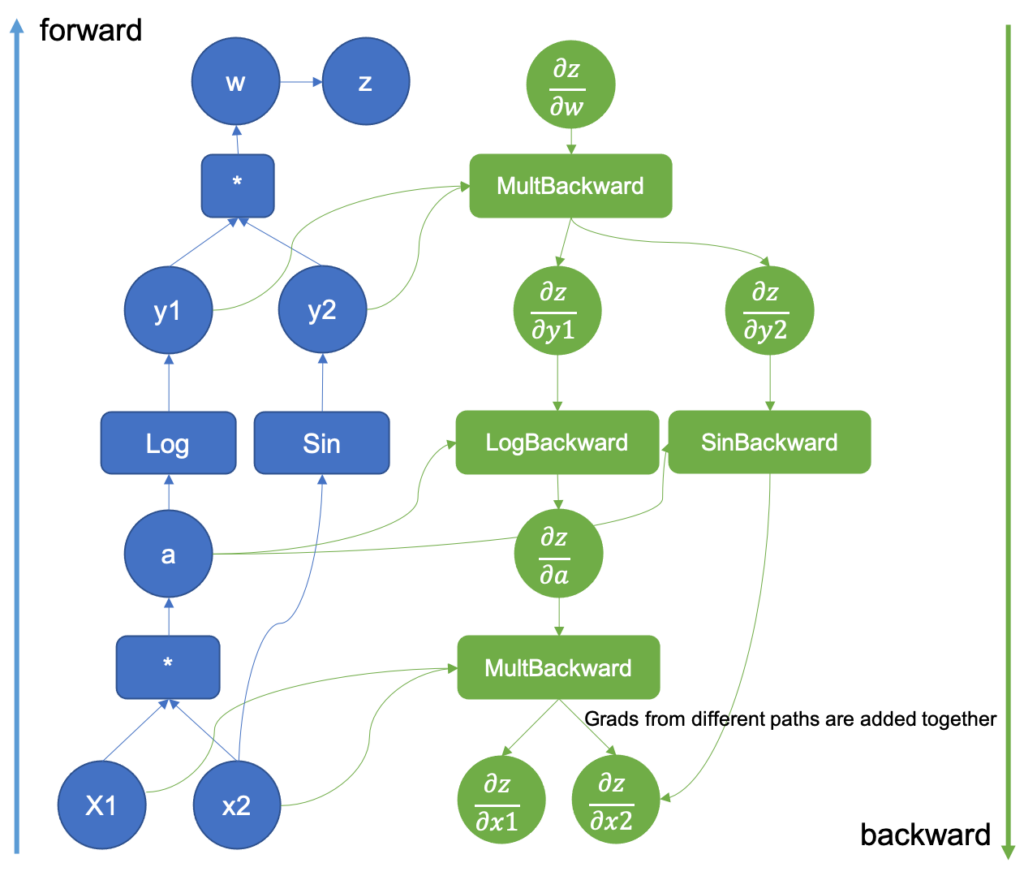
A language model’s graph contains far more operations, but the principle is unchanged. PyTorch builds the graph during the forward calculation. Calling loss.backward() traverses it and puts gradients in the .grad fields of the model’s trainable parameters. Backward computes gradients; it does not update weights.
Watch these portions of PyTorch’s The Fundamentals of Autograd. The small sine example makes the computation graph concrete; the training example distinguishes computing gradients from applying them.
PyTorch’s “The Fundamentals of Autograd” demonstrates gradient tracking, a model-weight update, and a way to evaluate without recording gradients.
Watch gradient tracking for requires_grad, grad_fn, and backward(). Continue with the training batch; observe that the weights do not change at backward(), but do change at optimizer.step(). Finally, watch gradient control for torch.no_grad(), which we will use when checking our trained model.
You normally do not set requires_grad=True on token IDs. They are integer inputs, not the quantities we are optimizing. Layers such as nn.Embedding and nn.Linear already own trainable, floating-point parameters for which PyTorch tracks gradients.
The optimizer’s part of the job
Once gradients exist, an optimizer uses them to adjust the parameters. For stochastic gradient descent (SGD), the basic update for a parameter is
where is the learning rate. The minus sign reflects our aim to reduce loss. A learning rate that is too large can make updates unstable; one that is too small can make progress slow.
Read the focused portion of PyTorch’s Optimizing Model Parameters tutorial before looking at our script.
PyTorch’s tutorial connects learning rate and batch size to the loss function and optimizer calls used in a training loop.
Start in “Hyperparameters” at the definitions. Continue through “Optimization Loop,” including its “Loss Function” and “Optimizer” subsections, ending with the three steps. Stop before “Full Implementation”; its example uses a different dataset. Focus on why gradients must be cleared between updates and why cross-entropy receives logits rather than probabilities.
We will clear gradients at the start of each update, then calculate predictions and loss, call backward(), and call step(). The tutorial also shows clearing gradients after a step. Either placement works when it is done consistently once per update: PyTorch adds newly computed gradients to any already in .grad.
Train a tiny next-token model
We will reuse the previous lesson’s five-token vocabulary and shifted targets. Our training sequence is I cast heal <eos>, giving three examples: I predicts cast, cast predicts heal, and heal predicts <eos>. fireball remains in the vocabulary, but is never a correct target in this tiny dataset.
The model first looks up a four-number embedding for each input token, then maps each embedding to five logits, one per vocabulary item. It sees only the current token—not the entire preceding context. That limitation keeps attention on the training mechanism rather than on language-model architecture.
Run this as a standalone CPU script:
import torch
from torch import nn
import torch.nn.functional as F

torch.manual_seed(7)

vocab = ["<eos>", "I", "cast", "heal", "fireball"]
inputs = torch.tensor([1, 2, 3], dtype=torch.long)
targets = torch.tensor([2, 3, 0], dtype=torch.long)


class TinyNextToken(nn.Module):
    def __init__(self, vocab_size, embedding_dim):
        super().__init__()
        self.embedding = nn.Embedding(vocab_size, embedding_dim)
        self.linear = nn.Linear(embedding_dim, vocab_size)

    def forward(self, token_ids):
        embeddings = self.embedding(token_ids)  # (3, 4)
        return self.linear(embeddings)            # (3, 5) logits


model = TinyNextToken(vocab_size=len(vocab), embedding_dim=4)
optimizer = torch.optim.SGD(model.parameters(), lr=0.2)


def measured_loss():
    model.eval()
    with torch.no_grad():
        logits = model(inputs)
        return F.cross_entropy(logits, targets).item()


initial_loss = measured_loss()
model.train()

for step in range(1, 101):
    optimizer.zero_grad()

    logits = model(inputs)                  # Forward pass
    loss = F.cross_entropy(logits, targets)
    loss.backward()                         # Calculate parameter gradients

    if step == 1:
        print("embedding gradient norm:",
              model.embedding.weight.grad.norm().item())
        print("linear gradient norm:",
              model.linear.weight.grad.norm().item())
        weight_before_step = model.linear.weight.detach().clone()

    optimizer.step()                        # Update parameters

    if step == 1:
        print("linear weights changed:",
              not torch.equal(weight_before_step,
                              model.linear.weight.detach()))

    if step in (1, 25, 50, 100):
        print(f"step {step:3d}, training loss {loss.item():.4f}")

final_loss = measured_loss()
print(f"initial loss: {initial_loss:.4f}")
print(f"final loss:   {final_loss:.4f}")

with torch.no_grad():
    predicted_ids = model(inputs).argmax(dim=-1).tolist()

for input_id, target_id, predicted_id in zip(
    inputs.tolist(), targets.tolist(), predicted_ids
):
    print(f"{vocab[input_id]:>5} | target: {vocab[target_id]:>5}"
          f" | predicted: {vocab[predicted_id]}")

assert final_loss < initial_loss
Trace one update carefully. model(inputs) returns shape (3, 5): one row of vocabulary logits for each of the three input tokens. F.cross_entropy compares those rows with the three integer targets and returns a scalar mean loss. Because the model produced those logits from its parameters, loss.backward() can calculate a gradient for each parameter involved. optimizer.step() then changes those parameters using the gradients.
The first update prints two nonzero gradient norms and confirms that the linear weights changed. Later loss values should be lower than the initial loss. The exact values depend on PyTorch’s computations, but setting the random seed makes the initialization repeatable in a given environment. The final predictions let you inspect what the model learned rather than relying on loss alone.
The snapshot uses .detach().clone() deliberately: it copies the pre-update weights without retaining their computation history. Without a clone, a reference to the weights would still point to the parameters that the optimizer is about to change.
What this result does—and does not—show
A falling training loss demonstrates that autograd and the optimizer are working together to fit these three examples. It does not demonstrate general language ability. This model has no mechanism to distinguish different histories ending in the same token, and we have not tested it on separate data. It could memorize these associations perfectly while failing on new sequences.
There are two useful boundaries to keep clear:
- Training needs a graph. Keep the forward pass and loss calculation outside
torch.no_grad()when you intend to callbackward(). Converting the loss to a Python number with.item()is fine for printing, but callbackward()on the original loss tensor. - Evaluation does not need gradients.
model.eval()selects evaluation behavior for layers that have distinct training and evaluation behavior;torch.no_grad()separately stops autograd from recording a graph. Our tiny model behaves the same in both modes, but the distinction will matter for larger models.
If the loss does not improve in a future experiment, inspect the update chain before changing the architecture: check that the loss is computed from the model’s logits, parameter .grad values are present after backward(), optimizer.step() runs, and old gradients are cleared. Then consider the learning rate and the data.
Takeaways
PyTorch records the operations that produce a loss, and loss.backward() computes gradients for trainable parameters. An optimizer such as SGD uses those gradients to update the parameters; clearing gradients prevents unintended accumulation between updates. The script connected the previous lesson’s next-token cross-entropy to a complete, if deliberately small, training loop.
This completes the PyTorch foundations module. Next, you will look inside the decoder architecture, beginning with causal attention: how a token can use earlier tokens as context without seeing future ones.