Recommended resources
The freely available resources this lesson will direct you to.
Introduction
In our previous lesson, we constructed a TenantStore with a full suite of CRUD operations, giving us the administrative capability to manage tenants in our system. With this foundation in place, we can now move beyond simply listing tenants and begin defining the unique capabilities and resources available to each one. This lesson marks our first step into tenant-specific resource management, a cornerstone of any flexible, multi-tiered SaaS product.
Our objective is to create a mapping that defines which AI agents are available to which tenants. This allows for scenarios where a "Pro" tenant might have access to a suite of advanced agents, while a "Free" tier tenant is limited to a basic set. You'll see this is a classic data modeling challenge: a many-to-many relationship. We'll explore how to model this relationship in our database and implement the logic to manage these associations, effectively building the control panel for tenant capabilities.
Modeling Tenant-to-Agent Relationships
A single tenant may have access to multiple agents, and a single agent (e.g., a "Data Analyst Agent") can be made available to many different tenants. This is the definition of a many-to-many relationship. In a relational database, the standard way to model this is by using an intermediary table, often called a join table or a junction table.
Our database schema will evolve to include:
- An
agentstable to store information about each unique agent in our system. - A
tenant_agentsjoin table, which connects thetenantsandagentstables. Each row in this table will represent a specific agent being granted to a specific tenant.
The following diagram, which you may recognize from a similar use case involving users and movies, illustrates this exact structure. Simply substitute "users" with "tenants," "movies" with "agents," and "users_movies" with our tenant_agents join table.
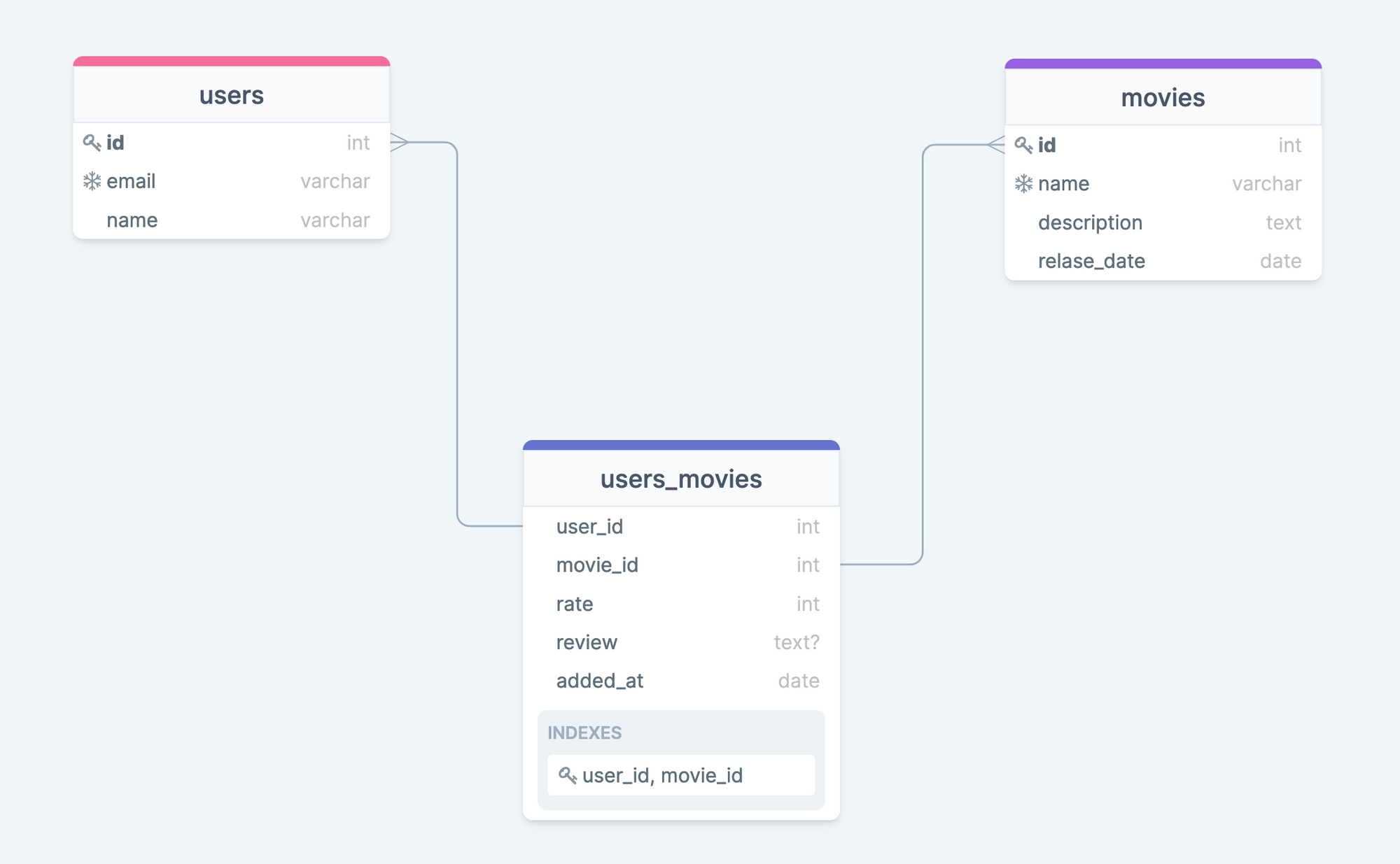
This join table is the key. It not only links tenants and agents but can also hold additional metadata about the relationship itself, such as role-based permissions or tenant-specific configurations for that agent.
Implementing Many-to-Many Relationships with Prisma
As our application's data model grows in complexity, managing raw SQL queries can become cumbersome. This is an ideal point to introduce an Object-Relational Mapper (ORM) like Prisma. Given your experience, you'll find Prisma's declarative schema and type-safe client to be a powerful and efficient way to interact with the database.
Let's look at how to define this many-to-many relationship in a Prisma schema. The article "Handle a Many-to-Many relationship with Prisma and Node.js" provides a clear, practical guide.
Handle a Many-to-Many relationship with Prisma and Node.js
This article provides an excellent walkthrough of implementing a many-to-many relationship, which we will adapt for our needs.
First, read the use case section to solidify your understanding of the modeling approach. Then, study the Prisma schema design. Pay close attention to how the MovieRating model acts as the explicit join table, connecting Movie and User with foreign keys and defining a composite primary key with @@id([movieId, userId]).
Adapting this pattern, our schema.prisma file would look something like this. We will define an Agent model and an explicit TenantAgent model to represent the join table.
// Existing Tenant model from previous lessons
model Tenant {
  id              String       @id @default(cuid())
  name            String
  planType        String       @map("plan_type")
  configurations  Json?
  createdAt       DateTime     @default(now()) @map("created_at")
  updatedAt       DateTime     @updatedAt @map("updated_at")
  agents          TenantAgent[] // Relation to the join table

  @@map("tenants")
}

// New Agent model
model Agent {
  id          String       @id @default(cuid())
  name        String       @unique
  description String?
  version     String       @default("1.0.0")
  tenants     TenantAgent[] // Relation to the join table

  @@map("agents")
}

// New join table model for the many-to-many relationship
model TenantAgent {
  tenant    Tenant @relation(fields: [tenantId], references: [id])
  tenantId  String @map("tenant_id")
  agent     Agent  @relation(fields: [agentId], references: [id])
  agentId   String @map("agent_id")

  // You could add additional metadata here, e.g.:
  // role      String @default("worker")
  // isEnabled Boolean @default(true)

  createdAt DateTime @default(now()) @map("created_at")

  @@id([tenantId, agentId]) // Composite primary key
  @@map("tenant_agents")
}
With this schema, creating a mapping is as simple as creating a new record in the TenantAgent table with the appropriate tenantId and agentId. Prisma's client will make this a straightforward operation.
From Data Model to Access Control
What we're building is a foundational piece of an access control system. The tenant-to-agent mapping dictates who (the tenant) can access what (the agent). As systems grow, these access rules can become much more complex.
The video "How To Handle Permissions Like A Senior Dev" provides an excellent overview of evolving from simple role checks to more sophisticated systems like Role-Based Access Control (RBAC) and Attribute-Based Access Control (ABAC).
How To Handle Permissions Like A Senior Dev
This video discusses advanced permission models that are highly relevant to multi-tenant systems.
Watch the section discussing database diagrams for permissions (database diagrams). The presenter's explanation of an organization table and how roles can be scoped to a specific organization is directly analogous to our Tenant model. This reinforces the importance of the join table we're building.
Our TenantAgent table is the first step towards this more robust model. By adding a role field to the join table, we could specify not just if a tenant has access to an agent, but how they can use it. This lays the groundwork for fine-grained permissioning that you'll need in a production environment.
Using Mappings to Scope Agent Availability
The ultimate goal of these mappings is to dynamically filter the agents available for any given API request. When a request comes in, our system will:
- Resolve the Tenant Context: Identify the
tenantIdfrom the request (e.g., via a JWT token, API key, or subdomain). - Query the Mappings: Use the
tenantIdto query thetenant_agentstable and retrieve the list of all associatedagentIds. - Load Available Agents: Use this list of
agentIds to load only the permitted agents and their corresponding tools and prompts for the current task.
This ensures that the agent orchestrator for a given tenant only ever considers the agents that tenant is authorized to use, enforcing strict isolation at the application layer.
The Pica Toolkit documentation provides a practical example of what this looks like in code. The identity and identityType parameters are used to initialize the toolkit for a specific user or organization, which in turn filters the available connections (our equivalent of agents/tools).
This documentation shows the practical application of identity-based resource filtering.
Review the configuration options for identity and identityType. Then, look at the code snippet in the Multi-Tenant Agent section. This demonstrates exactly how a resolved userId (our tenantId) is passed during initialization to scope the available resources. This is the pattern we are enabling with our database schema.
Conclusion
In this lesson, you have designed the crucial link between tenants and the agents they can access. By modeling and implementing a many-to-many relationship, you've moved from basic tenant management to building a sophisticated, configurable system for resource allocation.
Key Takeaways:
- Many-to-Many Modeling: You've learned to model the tenant-to-agent relationship using a dedicated join table in a relational database.
- Prisma for Relationships: You've seen how a modern ORM like Prisma simplifies the definition and management of complex database relationships.
- Access Control Foundation: You understand that these mappings are the first step towards a robust access control system, with clear parallels to production-grade RBAC and ABAC models.
- Tenant-Scoped Filtering: You can now see the end-to-end path from an incoming request to resolving a tenant's identity and using that identity to filter the set of available agents.
We have now defined which agents a tenant can use. The next logical question is, what can those agents do? In our next lesson, we will apply this same mapping pattern to tools and prompts, giving us granular, tenant-level control over the specific capabilities of each agent.