Recommended resources
The freely available resources this lesson will direct you to.
Welcome back. In the previous lesson, you created UTM-tagged URLs so PeakSip can identify which campaign, channel, and creative brought someone to its site. That tells you how a visit began. A measurement plan specifies what should be measured once that person arrives—and how those measurements will guide campaign decisions.
For this lesson, continue with PeakSip: a UK reusable-bottle brand running the FIRST10 offer to acquire first-time purchasers. You will turn that business aim into a practical measurement plan: a connected definition of funnel actions, GA4 events, primary conversions, supporting metrics, data sources, and launch checks.
A measurement plan is a decision system
A weak request sounds like: “Track everything.”
A useful measurement plan starts instead with: “What decision will this data help us make?”
For PeakSip, the central business question is not simply whether the campaign got traffic. It is whether paid activity acquired first-time UK customers at an acceptable cost. That question determines the rest of the plan:
- Business objective: acquire profitable first-time purchasers.
- Primary conversion: a successfully completed first purchase.
- Supporting actions: product views, add-to-cart actions, and checkout starts.
- Primary KPI: first-time purchase CPA.
- Diagnostic KPIs: purchase rate, funnel drop-off, ROAS, CTR, CPC, and landing-page engagement.
- Data requirements: campaign source labels, ecommerce events, transaction values, and a reliable way to identify a new customer.
The plan should state what counts as success before money is spent. Otherwise, a marketer may celebrate clicks when the business needed purchases, or optimize toward an easy action such as add-to-cart when it does not lead to orders.
How to Create a Marketing Measurement Plan (Template Included!)
Read “How to Create a Marketing Measurement Plan” from The Gray Company for the central idea that customer behaviors form measurable evidence of movement through a funnel.
In the “Definitions & Events” section, begin with the funnel principle. Then continue through the discussion of the primary desired action, micro-conversions, and engagement actions. Pay particular attention to the distinction between the final business outcome and smaller behaviors that signal progress. The “Technical Requirements” section that follows is useful context: note its emphasis on documenting domains, platforms, and traffic sources before assuming data can be joined correctly.
The chain you are designing
A campaign measurement plan connects four distinct ideas:
| Layer | Question it answers | PeakSip example |
|---|---|---|
| Funnel action | What did the person do? | Added a bottle to cart |
| Trackable event | What data record represents that action? | add_to_cart |
| Conversion classification | Is this action important enough to count as business success? | purchase is the primary conversion; add_to_cart is supporting |
| KPI | What decision metric uses that record? | Add-to-cart rate, purchase CPA, ROAS |
These layers are related but not interchangeable.
For example, a user pressing “Add to cart” is a funnel action. The site sends an add_to_cart event to analytics. The marketing team may treat it as a micro-conversion, because it signals intent, but it should not normally be the primary success metric for a campaign intended to generate sales. The KPI might be add-to-cart rate, which helps diagnose whether the product page and offer are working.
A purchase, by contrast, is usually a business outcome. It can be both an event (purchase) and a primary conversion. It then contributes to KPIs such as CPA and ROAS.
Events, key events, and conversions
In GA4, an event is a record of a specific interaction or occurrence. A page view, scroll, link click, product view, form start, and purchase can all be events.
A key event is GA4’s label for an event the business considers particularly important. In many performance-marketing conversations, people may still say “conversion” when they mean a key event. For planning purposes, keep the distinction clear:
- An event records an observed action.
- A key event identifies an event important to business success in GA4.
- A conversion action may be configured in an advertising platform, such as Google Ads, for reporting or campaign optimization.
- A KPI is the decision metric calculated from conversion and campaign data.
Read Google Analytics Help’s “About events” to establish the GA4 vocabulary you will use in your plan.
Start at the definition of an event in the opening section. Then, in “Understand key events,” read the key-event explanation. Focus on the sequence: collect an event first, then deliberately designate it as a key event when it represents meaningful business success.
Do not make every event a conversion
A common early-career mistake is to mark every positive interaction as a primary conversion: scrolls, product views, email sign-ups, add-to-carts, checkout starts, and purchases. This creates a misleading success total. It can also encourage automated bidding systems to optimize toward plentiful, low-value actions instead of scarce, valuable outcomes.
Use three practical categories:
| Category | Purpose | Typical PeakSip examples | Should it be a primary optimization goal? |
|---|---|---|---|
| Primary conversion | Measures the campaign’s central business outcome | First-time completed purchase | Yes, once tracking and volume are reliable |
| Micro-conversion | Indicates intent or progress before the primary outcome | add_to_cart, begin_checkout, email sign-up |
Usually no; use for diagnosis |
| Engagement event | Helps explain user behavior or test a hypothesis | Product-video view, size-guide view, FAQ expansion | No, unless the business objective specifically requires it |
A measurement plan is selective. Track an engagement action when you have a plausible reason to use it. If PeakSip believes its product video helps hesitant visitors understand insulation performance, a video_start or video_complete event may be useful. Tracking every navigation click merely because it is technically possible produces noise rather than insight.
Build the funnel before naming events
Start from the customer’s real journey, not from the analytics interface. For a purchase campaign, the core journey might look like this:
| Funnel stage | Customer action | Why it matters |
|---|---|---|
| Awareness | Sees an ad | Indicates available reach and delivery |
| Acquisition | Clicks a tagged ad and lands on the site | Connects paid traffic to site behavior |
| Consideration | Views a bottle product page | Shows product-level interest |
| Intent | Adds a product to cart | Shows a meaningful step toward buying |
| Checkout | Begins checkout | Identifies later-stage intent |
| Conversion | Completes a paid order | Produces the commercial result |
| Retention | Returns or makes a later purchase | Important, but outside this campaign’s immediate acquisition KPI |
Notice that “sees an ad” is not necessarily a website event. Impression, reach, clicks, spend, and platform-reported conversions often originate in Google Ads or Meta Ads. GA4’s role begins most clearly when the person reaches the site and interacts with it.
Your plan should name the source system for every important metric. This prevents an analyst from trying to calculate ad impressions from GA4 or treating a payment-platform order record as if it were generated by Google Ads.
PeakSip’s measurement-plan header
Before listing detailed events, write a short campaign-level statement. This gives everyone—marketing, analytics, developers, and stakeholders—the same definition of success.
| Field | PeakSip plan |
|---|---|
| Business objective | Acquire first-time UK purchasers during the FIRST10 promotion |
| Campaign objective | Generate first purchases from paid social, paid search, and email traffic |
| Primary conversion | A successfully completed order from a customer with no previous completed purchase |
| Primary KPI | First-time purchase CPA |
| Primary KPI formula | Paid-media spend divided by first-time completed purchases |
| Secondary KPI | First-order ROAS |
| Key diagnostic metrics | CTR, CPC, tagged sessions, product-view rate, add-to-cart rate, checkout completion rate, purchase rate |
| Core dimensions | Source, medium, campaign, content, landing page, device, country |
| Reporting cadence | Daily delivery check; weekly performance and optimization review |
| Main decision | Scale, retain, adjust, or pause campaign elements based on profitable acquisition performance |
Define “first-time purchaser” operationally
“New customer” sounds simple, but it must be defined in a way the business can implement.
For PeakSip, a defensible definition could be:
A first-time purchaser is a customer whose successfully paid order is their first completed order in PeakSip’s ecommerce or customer-record system.
This should not be inferred solely from GA4’s “new user” concept. A new GA4 user may be an existing customer using a new device, browser, or cookie state. Conversely, a returning site user may still become a first-time purchaser.
The ecommerce platform or customer database is usually best placed to determine whether an order is a first purchase. The measurement plan should request a new_customer parameter on the purchase event, or another reliable method of segmenting first orders in reporting.
Turn funnel actions into an event specification
An event name alone is not a specification. The plan needs to state when it fires, what information travels with it, and what it will be used for.
Here is a practical event plan for PeakSip.
| Funnel action | Event | Trigger or condition | Important parameters | Measurement role |
|---|---|---|---|---|
| Arrival from campaign | session_start, page_view |
Visitor lands on the site | UTM-derived source, medium, campaign, content; page location; landing page | Connects campaign traffic to onsite activity |
| Views a product | view_item |
Product-detail page loads with product data available | Item ID, item name, price, currency, item category | Measures product interest and product-page traffic |
| Adds product to cart | add_to_cart |
Visitor successfully adds an item | Item details, quantity, price, currency | Micro-conversion; diagnoses product and offer appeal |
| Starts checkout | begin_checkout |
Visitor enters checkout | Cart value, currency, items, coupon | Micro-conversion; identifies checkout intent |
| Applies offer code, if useful | select_promotion or a documented custom event |
Code is successfully applied, not merely typed | Coupon or promotion ID, cart value | Optional diagnostic for FIRST10 offer uptake |
| Completes order | purchase |
Payment succeeds and an order is confirmed | Transaction ID, value, currency, items, coupon, new_customer |
Primary conversion and revenue event |
The exact technical method depends on the site. An ecommerce platform may provide an integration; a developer may implement a data layer; or a team may use Google Tag Manager. Your role in performance marketing is to define the required business behavior and data fields clearly, then confirm that the implementation records them accurately.
Purchase events need stronger controls than page views
For lead generation, a unique confirmation page can sometimes provide a reasonable proxy for a form submission. For purchases, a simple page-view rule is riskier. A customer can refresh a thank-you page, revisit it from browser history, or reach it under an unusual order state.
For an ecommerce purchase event, the measurement plan should require:
- The event fires only after an order is successfully confirmed.
- Every order carries a unique
transaction_id. - The event includes actual order value and currency.
- Repeated views of a confirmation page do not create duplicate order records.
- Test transactions can be identified and excluded from business reporting where appropriate.
The transaction_id is particularly important. It provides a way to detect or prevent duplicate purchase reporting and to reconcile analytics data against ecommerce orders.
Parameters make an event useful
Think of the event name as the verb and parameters as the context.
The name purchase tells you that a purchase happened. It does not, on its own, tell you the order’s value, currency, product, coupon use, or whether the buyer was new.
For PeakSip, a simplified purchase record could include:
| Parameter | Why the plan requires it |
|---|---|
transaction_id |
Identifies the order and supports deduplication |
value |
Enables revenue and ROAS calculations |
currency |
Makes revenue interpretable across markets |
items |
Connects performance to individual products or categories |
coupon |
Shows whether FIRST10 was used |
new_customer |
Allows first-time purchase CPA and first-order ROAS to be calculated |
Do not place email addresses, names, phone numbers, or other personally identifiable information in GA4 event parameters or UTM values. The plan should use non-identifying IDs and approved business fields only.
Also document parameter conventions. For example:
new_customermust consistently betrueorfalse, not a mixture ofyes,new,1, and blank values.- Currency should use a single agreed format.
- Coupon values should match the actual promotional code used by the business.
- Item IDs should be stable, even if product names later change.
Inconsistent parameters create the same reporting problem that inconsistent UTM values create: one concept becomes several fragmented rows.
Design KPI definitions that support decisions
A KPI needs more than a name. It needs a formula, a scope, and a decision use.
For the FIRST10 campaign, the following KPI structure is sufficient for an initial launch.
| Measurement question | KPI | Definition | Main data source | How it informs action |
|---|---|---|---|---|
| Are ads getting attention efficiently? | CTR, CPC, CPM | Standard paid-media delivery metrics | Google Ads or Meta Ads | Diagnose creative, audience, bid, and reach issues |
| Are campaign visitors reaching the intended landing page? | Tagged sessions | Sessions segmented by source, medium, campaign, and content | GA4 | Validate UTM traffic and compare channel volume |
| Does the landing experience create intent? | Add-to-cart rate | Sessions with add_to_cart divided by sessions with view_item |
GA4 | Diagnose product-page relevance, price, offer, or usability |
| Are users abandoning checkout? | Checkout completion rate | Purchases divided by sessions with begin_checkout |
GA4 and ecommerce data | Investigate shipping, payment, trust, or checkout friction |
| Is the campaign acquiring new customers efficiently? | First-time purchase CPA | Paid-media spend divided by first-time completed purchases | Ad platform spend plus validated order or GA4 conversion data | Primary scale, retain, or pause decision |
| Is revenue supporting spend? | First-order ROAS | First-order revenue divided by paid-media spend | Ecommerce or GA4 revenue plus platform spend | Profitability guardrail and budget decision |
For the most important ratios, define the denominator carefully. For example, a useful landing-page purchase rate might be:
An ad-platform CPA can use the platform’s own attributed conversion total:
These may not match exactly, because GA4 and ad platforms can use different attribution rules, reporting dates, consent signals, and conversion windows. The important practice at this stage is to label the metric honestly. Do not place a GA4 purchase total over a Google Ads spend total and call it “Google Ads CPA” without stating the attribution and data-source assumptions.
Add targets and decision rules
A measurement plan becomes operational when it defines what the team will do with the result. PeakSip could document rules such as:
- If first-time purchase CPA exceeds the break-even CPA after sufficient meaningful data, then review search terms, audiences, creative, and landing-page funnel performance before increasing budget.
- If CTR and CPC are acceptable but add-to-cart rate is weak, then investigate the landing page, offer clarity, product price, and mobile experience.
- If add-to-cart rate is healthy but checkout completion is weak, then investigate shipping cost, payment options, checkout errors, or coupon behavior.
- If CPA is within the target and first-order ROAS meets the agreed guardrail, then consider gradual budget expansion.
The “sufficient meaningful data” threshold is business-specific. Avoid reacting to one purchase or a few clicks. Your campaign brief, budget, average CPC, conversion assumptions, and break-even economics should inform what volume is enough to make a decision.
Connect the previous UTM plan to the event plan
The previous lesson’s UTM convention is the acquisition layer of this measurement system. Use the same controlled values in the measurement plan:
| Tracking component | PeakSip example | Why it is needed |
|---|---|---|
| Source | facebook, google, newsletter |
Compare originating platforms or senders |
| Medium | paid_social, cpc, email |
Compare broad channel types |
| Campaign | peaksip-first10-uk-2025q1 |
Aggregate the promotion across channels |
| Content | video-commuter-a, rsa-commuter-v1 |
Compare creative or ad variation |
| Onsite event data | view_item, add_to_cart, begin_checkout, purchase |
Explain what those campaign visitors did |
| Order data | Value, transaction ID, first-purchase status | Evaluate commercial quality and profitability |
The UTM does not need to be manually copied into every event. Its job is to label the arriving traffic session. The event plan defines what the visitor does after arrival. In reporting, you combine acquisition dimensions such as campaign and source with conversion metrics such as purchases and revenue.
Specify systems, owners, and constraints
A plan can be logically perfect but still fail if no one owns the technical work. Include a compact implementation section.
| Requirement | Proposed system or owner | Acceptance condition |
|---|---|---|
| UTM naming and URL register | Performance marketer | Every external campaign link follows the documented convention |
| Ad impressions, clicks, and spend | Google Ads and Meta Ads | Campaign names and date ranges are documented |
| Onsite event collection | GA4, commonly deployed through a tag-management or ecommerce integration | Required events appear with correct parameters |
| Order value and first-time-customer logic | Ecommerce platform, developer, or data team | Purchase records match completed orders and identify first orders reliably |
| Dashboard or reporting view | GA4 reporting and later dashboard tooling | KPIs can be segmented by campaign, channel, landing page, and device |
| Privacy and consent requirements | Analytics, legal, and technical stakeholders | Tracking behavior reflects the organisation’s consent policy |
Also state constraints up front. Examples include consent-banner behavior, cross-domain checkout, payment-provider redirects, incomplete CRM history, offline orders, and limited developer access. A constraint is not an excuse to ignore measurement; it is a condition that should shape how confidently the team interprets the results.
Validate the plan before launch
Measurement is only useful when the expected event actually arrives with the expected data. Validation is a campaign-launch task, not an afterthought.
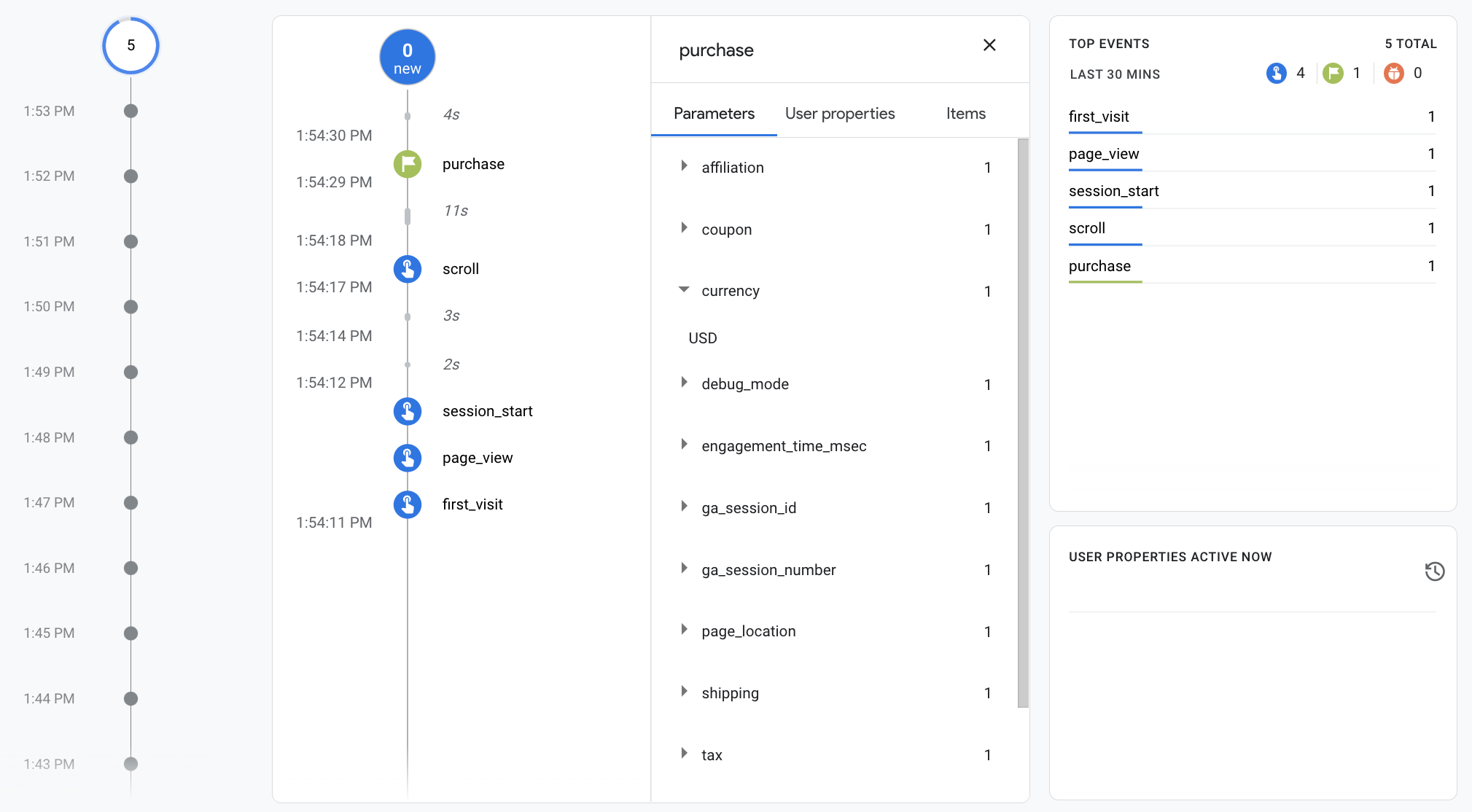
Use this practical quality-assurance sequence:
-
Review definitions. Confirm that stakeholders agree on what qualifies as a completed purchase, a first-time customer, and a valid campaign session.
-
Test each tagged URL. Click the Facebook, Google, and email test links. Confirm that each reaches the correct PeakSip landing page and that the UTM values remain intact.
-
Complete a realistic test journey. View a product, add it to cart, begin checkout, and complete a test order if the environment permits.
-
Inspect the event sequence. In GA4 DebugView or a realtime testing view, verify that the expected events appear in a sensible order.
-
Inspect parameters. For the purchase, check transaction ID, value, currency, item information, coupon, and first-customer status. An event can be present but still be unusable if its values are blank or incorrect.
-
Check duplicates. Refresh the confirmation page or revisit it as appropriate for the test. Confirm that one completed order does not produce multiple purchases.
-
Reconcile with the order system. Compare the test order in the ecommerce platform with the analytics record. For live reporting, periodically compare total completed orders and revenue against analytics rather than assuming they will always match perfectly.
Google Analytics 4 Events and Google Ads Conversion Tracking
Watch the selected portion of “Google Analytics 4 Events and Google Ads Conversion Tracking” from Surfside PPC to see the practical distinction between creating an event and marking it as a GA4 key event.
Watch event creation, where the presenter uses a confirmation-page condition to create a lead event. Then watch key event setup to see how that event is designated as important in GA4. Treat the confirmation-page approach as a simple lead-generation example; for ecommerce purchases, your plan should additionally require transaction IDs, values, and duplicate protection.
A successful test does not prove that the campaign will perform well. It proves something more basic and essential: that the data required to judge performance has a credible path from customer action to report.
A reusable measurement-plan template
For a future campaign, begin with this compact structure in a shared document or spreadsheet:
| Section | What to document |
|---|---|
| Objective | Business outcome, audience, market, offer, time period |
| Primary conversion | Exact action, operational definition, source of truth |
| Primary KPI | Formula, target or guardrail, reporting source |
| Funnel map | Stages, customer actions, micro-conversions, engagement signals |
| Event specification | Event name, trigger, required parameters, owner |
| Attribution and segmentation | UTM convention, core dimensions, channel definitions |
| Data sources | Ad platforms, GA4, ecommerce platform, CRM, dashboard |
| QA plan | Test journey, expected events, parameter checks, reconciliation process |
| Decision rules | Actions to take when results are above, below, or near targets |
| Constraints | Consent, technical dependencies, cross-domain paths, known gaps |
This template is valuable in interviews and real roles because it demonstrates more than familiarity with analytics tools. It shows that you can define measurement in relation to a business decision, communicate requirements across teams, and protect the quality of the conclusions that follow.
Key takeaways
A measurement plan connects the commercial goal to the actual data that will support campaign decisions.
- Begin with the business objective and define one primary conversion precisely.
- Map the customer journey into funnel actions, then identify the events that represent those actions.
- Treat purchases or qualified leads as primary conversions; use micro-conversions such as add-to-cart and checkout start to diagnose the funnel.
- Specify event triggers and parameters, especially transaction ID, value, currency, product details, and first-customer status for ecommerce.
- Define each KPI with its formula, scope, source system, and intended decision.
- Use UTMs to identify campaign acquisition, and onsite events to explain what campaign visitors do afterward.
- Test events and their parameters before launch, including checks for duplicate purchase records.
You have now completed the measurement-planning foundation of the course. Next, you will move into Excel and Google Sheets, beginning with the practical task of cleaning and standardizing a raw campaign-performance table—the data preparation needed before KPIs and performance conclusions can be trusted.