Recommended resources
The freely available resources this lesson will direct you to.
Welcome to the final lesson of our first module, "Python Toolkit for AI & Machine Learning." In our previous lesson, we dove into the fundamental concept of the derivative and learned how to compute its numerical approximation from scratch using Python and NumPy. You now have a powerful tool to calculate the rate of change for any function defined by a set of data points.
Today, we will complete the picture by combining our new computational skills with the visualization techniques you learned earlier. Our goal is to visualize a function and its derivative on the same plot. This is more than just a graphing exercise; it's about building a deep, visual intuition for the relationship between a function's behavior and its rate of change. This understanding is absolutely critical for the optimization algorithms that power machine learning.
From Computation to Visualization
In the last lesson, you built a function to compute the derivative using np.diff() and learned to handle the resulting array sizes. Now, we'll take those results—the original function data and its calculated derivative—and plot them together using Matplotlib.
The video we looked at previously demonstrates this step perfectly. It shows how to take the x_prime and y_prime arrays we generated and add them to our existing plot.
How to: Numerical Derivative in Python
Let's revisit the "How to: Numerical Derivative in Python" video from HagesLab.
Focus on the segment where the presenter plots both the function and its derivative. Watch from the point where the plot is made. Notice how plt.plot() is called twice, once for the original function and once for the derivative, all before plt.legend() is used to display the labels.
Interpreting the Relationship
Plotting a function and its derivative together reveals their intimate connection. The value of the derivative at any point tells you exactly what the original function is doing at that same point.
Let's examine a clear example.
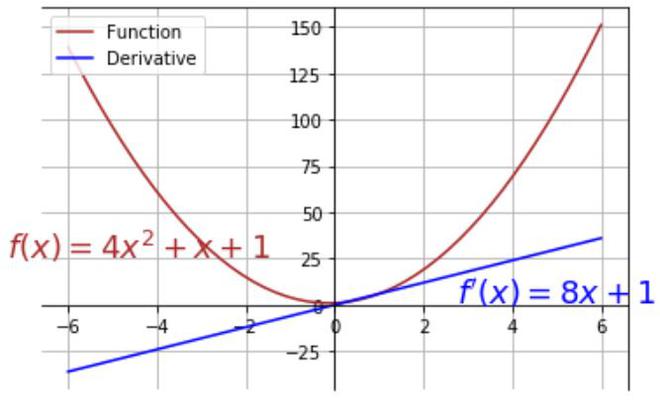
Observe the key interactions in the "A quadratic function and its derivative" plot:
- When the function is decreasing (the red curve goes down, for ), its derivative is negative (the blue line is below the x-axis).
- When the function reaches its minimum (the very bottom of the red curve), its derivative is zero (the blue line crosses the x-axis). This point is called a critical point and is fundamental to optimization.
- When the function is increasing (the red curve goes up, for ), its derivative is positive (the blue line is above the x-axis).
This is the core insight: the derivative's plot gives us a "story" about the original function's slope.
A Practical Example: Sine and Cosine
Let's apply this to another familiar pair of functions: sin(x) and its derivative, cos(x). We will generate the data for sin(x), compute its numerical derivative, and plot both.
import numpy as np
import matplotlib.pyplot as plt


# 1. Define the function and generate data
x = np.linspace(-2 * np.pi, 2 * np.pi, 200)
y = np.sin(x)


# 2. Compute the numerical derivative using the method from the last lesson
# The result should approximate cos(x)
y_prime = np.diff(y) / np.diff(x)
x_prime = x[:-1]  # Adjust the x-axis for the derivative plot


# 3. Plot both the function and its derivative
plt.figure(figsize=(12, 7))
plt.plot(x, y, label='f(x) = sin(x)', color='blue')
plt.plot(x_prime, y_prime, label="f'(x) ≈ cos(x)", color='orange', linestyle='--')


# Add a plot of the true derivative to see how good our approximation is
plt.plot(x, np.cos(x), label='Analytical f\'(x) = cos(x)', color='green', linestyle=':', linewidth=2)


# Add helpful lines and labels
plt.axhline(0, color='black', linewidth=0.5)
plt.title('Visualizing a Function and Its Numerical Derivative')
plt.xlabel('x')
plt.ylabel('y')
plt.legend()
plt.grid(True)
plt.show()
If you run this code, you will generate a plot very similar to this one:

Look at this plot and notice the same relationships:
- Where
sin(x)reaches its peaks (e.g., at ) or troughs (e.g., at ), its derivative,cos(x), is zero. - Where
sin(x)is increasing most steeply (e.g., at or ),cos(x)reaches its maximum value of 1. - Where
sin(x)is decreasing most steeply (e.g., at ),cos(x)reaches its minimum value of -1.
A From-Scratch Implementation
Now, let's work through a complete example from a resource that encapsulates this entire process in a clean, functional way.
Calculus Derivatives with python
This article from 4Geeks provides a straightforward Python implementation that defines a function, defines another function for its numerical derivative, and then plots them together.
Please read the section titled Derivative as Function. Study the Python code provided. It defines f(x), then defines df(x) using the forward difference method we learned, and finally uses plt.plot() twice to visualize them. This is a perfect template for your own explorations.
An Alternative: numpy.gradient()
Our "from scratch" method using np.diff() is excellent for understanding the mechanics of numerical differentiation. However, for practical applications, NumPy provides a more robust, single-function solution: np.gradient().
This function typically uses the more accurate central difference formula we briefly mentioned in the last lesson and automatically handles array boundaries, so you don't need to adjust the x-axis array manually.
You can use it like this:
# y and x are your NumPy arrays of data
y_prime = np.gradient(y, x)


# Now you can plot `x` and `y_prime` directly, as they have the same length
plt.plot(x, y_prime, label="Derivative (using np.gradient)")
While np.gradient() is convenient, understanding the np.diff() method ensures you know exactly what is happening under the hood, which is a key goal of this course.
Conclusion
This lesson concludes our foundational module on the Python toolkit for AI. You have successfully bridged the gap between an abstract mathematical concept—the derivative—and its concrete computation and visualization in code. Seeing a function and its derivative plotted together transforms the derivative from a dry formula into a dynamic story about the function's behavior.
Key Takeaways:
- Visualizing a function and its derivative on the same plot provides powerful intuition.
- The sign of the derivative indicates whether the function is increasing (positive), decreasing (negative), or at a critical point (zero).
- The magnitude of the derivative indicates the steepness of the function's slope.
- You can create these plots by combining the
np.diff()method from the previous lesson with Matplotlib'splt.plot(), or by using the convenientnp.gradient()function.
With this, you have completed the first major step in your journey. You have assembled the basic tools—NumPy for computation and Matplotlib for visualization—and applied them to the core calculus concept of differentiation.
In our next lesson, we will begin a new module, Foundations of Linear Algebra. We will shift our focus from the calculus of change to the structures that hold data: scalars, vectors, and matrices. These are the fundamental objects you will manipulate in virtually every AI and machine learning model.