Recommended resources
The freely available resources this lesson will direct you to.
Hello! Welcome to the ninth module of our course.
In our previous lessons, we designed a complete Static Application Security Testing (SAST) tool. We architected a pipeline that parses code into an Intermediate Representation and then uses rule-based and taint analysis engines to find vulnerabilities—all without ever running the code.
This marks our transition from the world of static analysis to Dynamic Application Security Testing (DAST). Instead of looking at source code, a DAST tool interacts with a live, running application, sending it requests and analyzing its responses to find security flaws.
This lesson focuses on the very first and most critical component of any DAST system: the crawler. Our learning outcome is to: Design a DAST crawling engine capable of link discovery, SPA handling, and authenticated attack surface mapping.
A DAST tool is only as good as its ability to discover the application's full attack surface. If a page or API endpoint isn't found by the crawler, it can't be tested. We will architect a crawler that goes far beyond a simple web scraper, designing it to handle the complexities of modern web applications.
Let's begin by building from first principles.
1. The Foundation: A Standard Web Crawler
At its core, a DAST crawler shares architectural DNA with a general-purpose web crawler like the one used by search engines. The fundamental goal is the same: start with a seed URL, discover all reachable links, and systematically visit them.
Design a Web Crawler: FAANG Interview Question
To understand these fundamentals, let's watch a segment from 'Design a Web Crawler' by ByteByteGo. This video concisely explains the core components and challenges of building a crawler at scale. While it focuses on crawling the entire web, the architectural patterns are directly applicable to our DAST context.
Please watch the following segments: 01:26 - 02:14: This explains the basic breadth-first search approach and its immediate limitations. 02:14 - 02:47: Focus on the concept of 'politeness'. For a DAST tool, this is crucial to avoid overwhelming the application under test with too many requests too quickly. 03:28 - 04:23: Pay attention to the components for avoiding redundant work ('URL seen') and the basic process of parsing, extracting links, and filtering.
From this, we can derive a foundational architecture for our DAST crawler:
- URL Frontier: A queue that holds the list of URLs to be crawled. It starts with the seed URL(s) of the target application.
- Worker Pool: A group of concurrent workers that pull URLs from the frontier, fetch the page content, and process it.
- HTML Parser & Link Extractor: A component that parses the fetched HTML to find all
hrefattributes in<a>tags. - URL Seen Filter: A data structure (like a hash set or Bloom filter) to keep track of URLs that have already been queued or visited, preventing infinite loops and redundant work.
- Scope Manager: A component that ensures the crawler only visits URLs within the defined target scope (e.g., stays on
example.comand doesn't follow links togoogle.com).
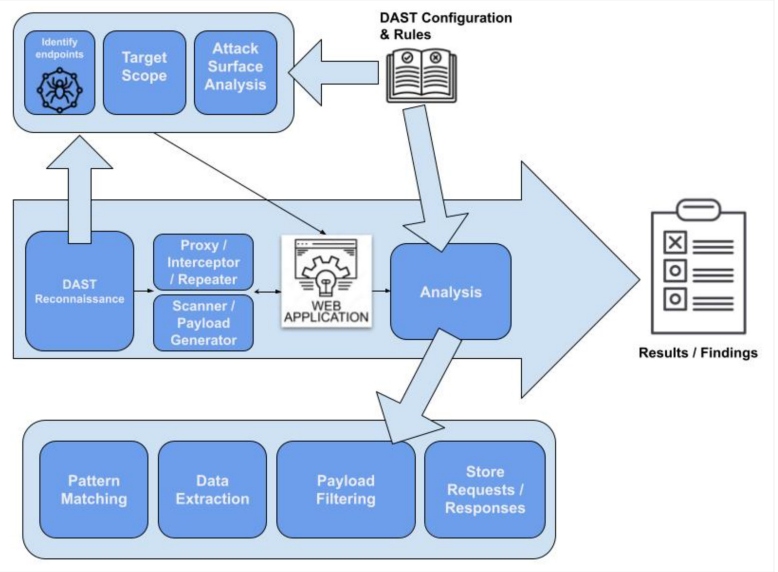
This simple architecture works well for traditional, static websites. However, it will fail dramatically on most modern applications.
2. Handling Modernity: JavaScript and Single-Page Applications (SPAs)
Modern web applications, particularly Single-Page Applications (SPAs) built with frameworks like React or Angular, don't load new pages for every interaction. Instead, they dynamically rewrite the current page's DOM using JavaScript in response to user actions. Links might be rendered by JavaScript, and entire sections of the application might only be accessible by clicking buttons or submitting forms, often without any change to the browser's URL.
A simple HTML parser that only looks for <a> tags will miss most of the attack surface. To solve this, our crawler must be able to think like a browser: it needs to render pages, execute JavaScript, and simulate user interactions. This is the job of a headless browser.
What Is a Headless Browser and How to Use It?
The video 'What Is a Headless Browser and How to Use It?' from Proxyway provides an excellent, non-technical introduction to this concept.
Please watch these segments: 00:18 - 01:00: This clearly defines what a headless browser is—a browser without a GUI, controllable by code. 01:00 - 02:25: This part is key. It explains why headless browsers are necessary for dynamic websites that use JavaScript for rendering, which is precisely our challenge. 02:33 - 03:57: This introduces the main automation libraries like Puppeteer, Playwright, and Selenium. As a system architect, you'd choose one of these libraries to build your crawler upon.
By integrating a headless browser library like Playwright or Puppeteer, we can upgrade our worker's logic significantly:
- A worker pulls a URL from the frontier.
- It uses the headless browser to navigate to that URL.
- It waits for the page to fully load, including the execution of initial JavaScript and any subsequent AJAX calls.
- The worker then executes a script in the browser's context to:
- Extract all traditional
<a>links. - Find all interactive elements:
<button>,<input>, elements withonclickhandlers, etc. - Extract URLs from JavaScript code itself (e.g., from strings in the code).
- Extract all traditional
- For each interactive element found, the crawler can generate new tasks, such as "click this button" or "fill and submit this form," and add them to the frontier. When a task is executed, the crawler observes the application for changes (DOM mutations, network requests) to discover new states and endpoints.
This context-aware crawling, as described in the "How Our DAST Engine Works" article from Siber Ninja, allows the engine to emulate real browser behavior and discover hidden endpoints that a static crawler would never see.
3. Taming Complexity: State-Aware Crawling with Finite State Machines
Our headless browser-based crawler can now interact with a SPA, but it quickly runs into a new problem: state explosion. An application can have a virtually infinite number of states. Imagine a search form—the crawler could try to submit millions of different search terms, treating each result page as a new discovery. This is inefficient and can lead to the scan never finishing.
The solution is to make the crawler state-aware. It needs to understand when an interaction has led to a genuinely new part of the application versus a variation of a state it has already seen. A powerful abstraction for this is to model the web application as a Finite State Machine (FSM).
Escape DAST's proprietary web application crawling algorithm
The article 'Escape DAST's proprietary web application crawling algorithm' provides a deep and fascinating look into this FSM-based approach. It's a prime example of applying first-principles thinking to solve a complex engineering problem in security.
Please read the following sections to understand this advanced architecture: How we came up with the idea of the first state-aware web application crawler: This introduces the FSM concept and its benefits over traditional URL-based crawling. The web application crawling algorithm: This explains what FSMs are in the context of a web app, defining 'states' and 'transition actions'. State Representation: This addresses the critical question: What is a state? It differentiates between 'External States' (reachable by URL) and 'Deep States' (reachable only through interaction). Methods for Identifying States: This section is a masterclass in system design trade-offs. It explores various techniques for creating a unique 'fingerprint' of a state (DOM structure, visible text, interactive elements, etc.) and discusses the pros and cons of each.
Let's synthesize this into an architectural design. Our crawler no longer just tracks URLs; it tracks states.
- State Definition: A state is a unique functional view of the application. The core design challenge is defining what "unique" means. As the article discusses, we can create a "state signature" or hash by combining multiple features:
- The structure of the DOM tree (ignoring dynamic content).
- The set of interactive elements present on the page.
- Key static text elements like headings.
- The current URL.
- Transition Actions: These are the edges of our FSM. They represent user interactions like clicking a button, submitting a form, or navigating to a link.
- Crawling Process:
- The crawler starts at the initial state (e.g., the home page).
- It calculates the state's signature and checks if it has been seen before. If not, it stores the signature.
- It identifies all possible transition actions from the current state (links to click, forms to submit).
- It adds these
(state, action)pairs to the frontier. - A worker picks a task, executes the action (e.g., clicks a button), and analyzes the resulting page to determine the new state.
- The process repeats.
This FSM approach elegantly solves the state explosion problem by ensuring the crawler explores each unique functional area of the application only once.
4. Mapping the Authenticated Attack Surface
Many, if not most, critical vulnerabilities reside in parts of an application that are only accessible after a user logs in. Our DAST crawler must therefore be able to perform authenticated scanning.
This requires a dedicated Session Manager component within our architecture.
The process is as follows:
- Configuration: The user provides the DAST engine with authentication details. This could be username/password credentials, a pre-captured session cookie, or a JWT token.
- Authentication: Before the crawl begins, a dedicated task uses the headless browser to perform the login sequence. It navigates to the login page, fills in the credentials, and submits the form.
- Session Capture: Upon successful login, the Session Manager captures the necessary session artifact. For web applications, this is typically a session cookie or a JWT stored in local/session storage. The headless browser's context automatically stores these, making them available for subsequent requests.
- Authenticated Crawl: The main crawl then proceeds as described in the previous sections. Every request made by the headless browser will now automatically include the captured session artifacts, allowing it to access authenticated pages.
- Session Health Checks: Web sessions can expire. The Session Manager must be able to detect this. For example, if a request is unexpectedly redirected to the login page or receives a
401 Unauthorizedstatus, the crawler knows it has been logged out. It should then trigger the re-authentication process and retry the failed action.
As noted in the Escape article, this capability is essential for discovering critical access control flaws and ensuring comprehensive test coverage. It allows the DAST scanner to map the application from the perspective of a real user.
Conclusion
In this lesson, we designed a sophisticated crawling engine for a modern DAST tool. We went from a basic link-following bot to a state-aware engine capable of mapping the full attack surface of complex, authenticated SPAs.
Key Takeaways:
- Modern DAST crawlers cannot simply parse HTML; they must use headless browsers to execute JavaScript and simulate user interactions to discover the full attack surface of SPAs.
- Modeling the application as a Finite State Machine (FSM) is a powerful architectural pattern to manage complexity. It allows the crawler to intelligently explore functional states rather than just URLs, avoiding the "state explosion" problem.
- State identification is a core design problem. The best solutions create a robust "fingerprint" of a page's state by combining features like the DOM structure and the set of interactive elements.
- Authenticated scanning is a critical requirement. This is architected using a Session Manager that handles the initial login, captures session artifacts (cookies/tokens), and re-authenticates when a session expires.
Preview of the Next Lesson:
Our crawler has now produced a detailed map of the application's attack surface: every discovered URL, form, input parameter, and API endpoint. The next logical step is to attack it. In our next lesson, we will address the outcome: "Design a DAST fuzzing engine, comparing mutation-based and generation-based approaches for test case generation." We will architect the component that takes this map and systematically sends malformed and malicious inputs to each entry point to uncover vulnerabilities.