Recommended resources
The freely available resources this lesson will direct you to.
Hello! Welcome to your next lesson on smart contract security.
In our last few lessons, we've focused on securing your smart contract code against vulnerabilities like reentrancy and front-running. But the most secure contract in the world is worthless if the keys that control it fall into the wrong hands. Today, we shift our focus from the code to the credentials—the private keys that grant ultimate authority over your deployments, upgrades, and treasuries.
Your goal for this lesson is to learn how to follow security best practices for private key management during development and deployment.
As a backend developer, you're already familiar with the importance of managing secrets like API keys, database passwords, and SSH keys. The core principles are the same in Web3, but the consequences of a leak are often more direct, irreversible, and publicly devastating.
1. The Cardinal Sin: Plaintext Private Keys
Let's start with a crucial rule that underpins all of Web3 security. It’s a point made with appropriate intensity in the development community.
The best place to store your private key is...
Watch this short, energetic video from Patrick Collins, a prominent educator in the space. He passionately explains why storing private keys in plaintext is a critical mistake and introduces the developer mantra: "What you practice in dev, you will do in prod."
Watch the first 1 minute and 23 seconds. Absorb the urgency. This is the single most important habit to build from day one.
The message is clear: never, ever store a private key in plaintext. A plaintext key is one that's visible to anyone who can read the file, like this:
PRIVATE_KEY=0xac0974bec39a17e36ba4a6b4d238ff944bacb478cbed5efcae784d7bf4f2ff80
This is the digital equivalent of taping your house key to your front door.
2. What Exactly Are We Protecting?
To understand the risks, let's quickly clarify what a private key is and how it relates to your wallet.

The private key is the single piece of data that proves ownership of an account and its assets. It's used to sign transactions, which authorizes the blockchain to move funds or execute function calls on your behalf.
Your 12 or 24-word Secret Recovery Phrase (or seed phrase) is a human-readable master key from which all of your individual private keys are derived. If someone gets your private key, they control that one account. If they get your secret recovery phrase, they control every account in your wallet.
MetaMask Security - 9 Attacks and How to Stop Them
This video segment explains the relationship between private keys, recovery phrases, and wallet ownership. It sets the stage for understanding the different ways they can be compromised.
Watch from 01:13 to 02:38. Focus on the core idea: your wallet doesn't 'hold' crypto; it holds the keys that prove ownership.
3. The Threat Model: How Keys Are Stolen
The reason plaintext keys are so dangerous is that there are numerous ways for them to be exposed, both accidentally and maliciously.
Real-World Consequences
Accidental exposure is a massive problem. Hackers run bots that constantly scan public code repositories like GitHub for anything that looks like a private key.
Secure Your Private Keys in Hardhat and Foundry with Encrypted Secrets
To understand the gravity of the situation, let's look at some real-world examples of costly private key compromises from this QuickNode guide.
Read the 'Overview' and 'Why Encrypted Secrets Matter' sections. Pay special attention to the 'Real-World Stories,' such as the Ronin Bridge hack and the developer who lost $40,000 from a brief exposure on GitHub.
These incidents happen due to a few common attack vectors:
- Accidental Git Commits: A developer accidentally commits a
.envfile or leaves a key in the code. - Phishing: A user is tricked into entering their private key or seed phrase on a malicious website that looks legitimate.
- Malware: A virus on your computer scans your files for keys or logs your keystrokes when you type your wallet password.
This next video segment details these common user-facing attacks, which are just as relevant for developers to understand and guard against.
MetaMask Security - 9 Attacks and How to Stop Them
Let's return to the MetaMask security video to see how these attacks work in practice.
Watch from 02:38 to 06:01. This covers both phishing attacks and the risks of storing your keys digitally on a potentially compromised computer.
4. Secure Development: Encrypting Secrets in Hardhat
So, if we can't store keys in plaintext, how do we use them to deploy contracts from our development environment? The answer is to use tools that manage encrypted secrets.
The basic principle is this:
- You provide your private key to a trusted tool.
- The tool encrypts the key using a password that you choose.
- The encrypted key (now just a jumble of characters) is stored safely.
- When you need to sign a transaction (e.g., during deployment), the tool asks for your password to temporarily decrypt the key in memory, use it, and then discard it.
As of version 3, Hardhat has a built-in secrets manager that does exactly this. Let's walk through how to use it.
Secure Your Private Keys in Hardhat and Foundry with Encrypted Secrets
The QuickNode guide we looked at earlier provides an excellent step-by-step tutorial for using Hardhat's encrypted keystore. We will follow this guide to secure our development keys.
Read the section titled 'How to Use Encrypted Secrets in Hardhat'. Follow the steps carefully in your own terminal within a test project directory. You don't need to actually deploy, but practice running the keystore set, list, and get commands. Pay close attention to how the hardhat.config.js is updated to reference the encrypted secrets using configVariable.
Test your understanding!
After setting your SEPOLIA_PRIVATE_KEY using npx hardhat keystore set, you commit your project to GitHub. You've correctly added .env to your .gitignore file. An attacker gains access to your public GitHub repository.
Can they steal the funds from the account associated with SEPOLIA_PRIVATE_KEY? Why or why not?
Show answer
No, they cannot. Hardhat's keystore saves the encrypted secrets in a local file (e.g., secrets.json) that is not part of your repository unless you explicitly add it. Even if you did accidentally commit that file, the secret is encrypted. Without the master password you created, the encrypted value is useless to the attacker. This provides multiple layers of defense against accidental commits.
5. Secure Deployment: Production-Grade Key Management
Using Hardhat's keystore is great for development and testnet deployments. But when you're managing contracts on mainnet that control real, high-value assets or have powerful admin privileges, you need to upgrade your security.
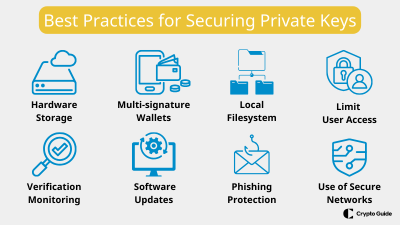
The two industry standards for production key management are Hardware Wallets and Multi-Signature Wallets.
A. Hardware Wallets
A hardware wallet is a physical device that stores your private keys offline. Its key feature is that the private key never leaves the device. When you need to sign a transaction, the transaction data is sent to the device, you verify it on the device's screen, and you physically press a button to approve it. The device signs the transaction internally and sends only the signature back to the computer.
This protects you even if your computer is riddled with malware.
MetaMask Security - 9 Attacks and How to Stop Them
This segment explains the mechanics of how a hardware wallet keeps your keys safe, separating them from your internet-connected computer.
Watch from 07:43 to 09:14. Focus on understanding the core security benefit: the key is generated offline and never exposed to the computer.
B. Multi-Signature Wallets
For a project with real funds or significant responsibilities (like being the owner of your token contract), relying on a single person with a single hardware wallet is still a risk. What if they lose the wallet? What if they go rogue?
A multi-signature wallet (or "multisig") is a smart contract that requires multiple signers to approve a transaction before it can be executed. For example, you could set up a 2-of-3 multisig, where any transaction requires approval from at least two out of three designated owners.
This is the standard for team-based treasury management and for securely holding the owner role of important contracts.
Best Practices for Deploying a Smart Contract on EVM Mainnets
This excerpt from an Alchemy guide reinforces the need for higher security on mainnet and explicitly recommends multisigs for admin accounts.
Read the 'Key Management' section. Note the recommendation to use a multisig like Gnosis Safe for administrator accounts.
We will dive deeper into setting up and using a Gnosis Safe multisig in a later module on Governance. For now, the key takeaway is that critical contract roles should be owned by a multisig, not a regular developer account.
6. Essential OpSec Hygiene
Finally, securing your keys involves building good habits—what's often called Operational Security (OpSec).
This resource provides a fantastic checklist of developer habits.
Secure Your Private Keys in Hardhat and Foundry with Encrypted Secrets
Let's look at a final checklist of best practices to incorporate into your daily workflow.
Read the section 'Best Practices for Managing Secrets'. These are non-negotiable rules for any Web3 developer.
Here is a summary of the most critical habits:
- Use
.gitignore: Always add.env, keystore files (secrets.json), and other sensitive files to your.gitignorebefore you even create them. - Use Separate Keys: Use different accounts for testing, deployment, and personal funds. Your deployment account should have only enough funds for gas.
- Beware of Your Shell History: Don't pass secrets as command-line arguments. If you accidentally paste a key into your terminal, clear your history immediately (
history -c). - Secure Your Machine: Keep your OS and software updated. Use antivirus software. Be cautious about the npm packages and browser extensions you install.
- Trust, but Verify: When buying a hardware wallet, buy it directly from the manufacturer to avoid supply-chain attacks where a device is tampered with before it gets to you.
Conclusion
You now have a framework for thinking about key security at every stage of your project's lifecycle. Protecting your keys is not a one-time task but a continuous practice of vigilance and good habits.
Key Takeaways:
- Never store private keys in plaintext. Not in code, not in
.envfiles that get committed, not anywhere. - For development, use your framework's built-in tools, like Hardhat's encrypted keystore, to manage testnet keys securely.
- For deployment and production, use the right tools for the job: hardware wallets for individual high-value accounts and multi-signature wallets for team funds and contract ownership.
- Adhere to strict OpSec hygiene: use
.gitignore, separate your accounts, and be mindful of phishing and malware.
Preview of the Next Lesson:
This lesson was about securing the keys you control. Our next, and final, lesson in the security module will focus on safely interacting with contracts you don't control. We will learn how to use OpenZeppelin's SafeERC20 library to interact safely with other tokens, protecting your contract from non-standard or even malicious token implementations.