Recommended resources
The freely available resources this lesson will direct you to.
- Exploring the Latency/Throughput & Cost Space for LLM Inference // Timothée Lacroix // CTO Mistralwww.youtube.com
- AI Perf benchmarking - Dynamo and other LLM endpointswww.youtube.com
- LLM Inference Performance Engineering: Best Practiceswww.databricks.com
- How to Benchmark An LLM with vLLM in 10 Minutesvast.ai
In our last session, you learned to move from observing GPU memory to calculating the VRAM required for the KV cache. This gave you a powerful tool for capacity planning before deployment. Today, we'll bridge the gap between theoretical calculation and real-world performance by empirically measuring the effects of your decisions.
This lesson focuses on one of the most fundamental trade-offs in LLM serving: throughput versus latency. Your goal is to analyze the impact of request batching on these two key metrics using a benchmark script. As an LLM Ops engineer, understanding how to generate and interpret this data is critical for tuning your service to meet specific performance goals and SLOs, whether for a real-time chatbot or a high-volume offline processing pipeline.
1. The Core Trade-off: Throughput vs. Latency
In any serving system, from a simple web server to a complex LLM inference engine, you want to serve as many users as possible (high throughput) as quickly as possible (low latency). With LLMs, batching requests is the primary lever for increasing throughput. By processing multiple user requests together in a single forward pass, you can better utilize the GPU's parallel processing capabilities.
However, this comes at a cost.
LLM Inference Performance Engineering: Best Practices
This article from Databricks provides an excellent overview of the key performance metrics and the trade-offs involved in LLM serving.
Please read the following sections to ground your understanding: "Important Metrics for LLM Serving": This section defines the four essential metrics: Time To First Token (TTFT), Time Per Output Token (TPOT), Latency, and Throughput. "Throughput": Focus on the first paragraph, which explains that grouping queries increases throughput but also increases the completion time for each individual query. "Latency Trade-Off": Study this section and the accompanying "Figure 7: MPT-7B throughput vs. latency." This graph is the classic visualization of the trade-off you'll be measuring yourself. It shows how throughput increases with batch size, but so does latency.
As the reading makes clear, batching introduces a fundamental tension:
- Higher Throughput: By combining requests, the GPU processes more tokens per second overall, leading to better hardware utilization and cost-efficiency.
- Higher Latency: A request that arrives in a batch has to wait for the entire batch to be processed. This means the time to get a response (both TTFT and total latency) for any single user will increase as the batch size grows.
Your job as an Ops engineer is not to eliminate this trade-off, but to find the right balance for your specific application's requirements.
2. Batching Strategies at a Glance
Before we start benchmarking, it's helpful to know that "batching" isn't a single technique. The Databricks article you just read mentioned three common strategies.
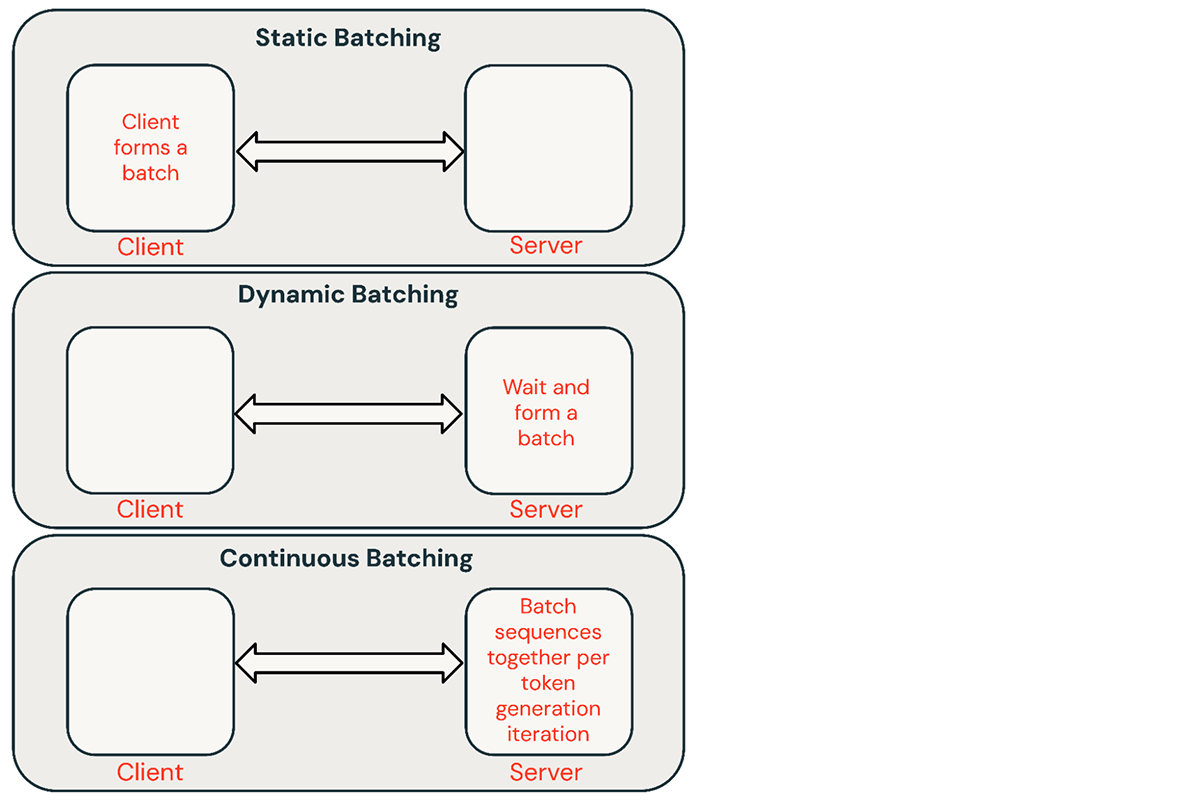
For today's hands-on exercise, we will be using a form of static batching, where we send a fixed number of concurrent requests to the server. This is the simplest way to isolate and measure the direct impact of batch size on performance.
3. Hands-on: Benchmarking with vLLM
Now, let's get practical. We will use the benchmarking script provided with vLLM, a high-performance LLM serving library. This script allows us to simulate a specific load and measure the resulting performance.
The following steps guide you through setting up a vLLM server and running the benchmark_serving.py script to test different concurrency levels.
How to Benchmark An LLM with vLLM in 10 Minutes
This guide provides a clear, step-by-step walkthrough for using vLLM's benchmarking tool. We will follow its structure for our experiment.
Read through the steps in the article to familiarize yourself with the process. Focus on these three main parts: "Install required Python packages" and "Log in to Hugging Face": The initial setup. "Start the vLLM server": The vllm serve command. "Run the benchmark script": Pay close attention to the benchmark_serving.py command and its parameters, especially --max-concurrency.
Your Experiment: Measuring the Impact of Concurrency
Now, you will perform a series of benchmark runs, changing only the concurrency level each time. This simulates changing the batch size.
1. Setup your Environment
In your terminal, assuming you have a Python environment with GPU support (e.g., in a cloud VM or a local machine with an NVIDIA GPU and CUDA):
# Install the necessary libraries
pip install vllm pandas huggingface_hub


# Log in to Hugging Face to access models like Llama 3
huggingface-cli login


# Paste your HF token when prompted
2. Start the vLLM Server
Let's serve the meta-llama/Llama-3-8B-Instruct model. Open a new terminal for the server.
# This command starts the server. It will download the model on the first run.
python -m vllm.entrypoints.openai.api_server \
    --model meta-llama/Llama-3-8B-Instruct
Keep this terminal open. The server is now running and waiting for requests on http://localhost:8000.
3. Run the Benchmark and Analyze
In your first terminal, you'll run the benchmark script. We'll use vLLM's built-in script. First, you need to clone the repository to access it.
git clone https://github.com/vllm-project/vllm.git
Now, run the benchmark multiple times, varying the --max-concurrency parameter. This parameter controls how many requests are sent in parallel.
Run 1: Concurrency = 1
python vllm/benchmarks/benchmark_serving.py \
    --backend vllm \
    --model meta-llama/Llama-3-8B-Instruct \
    --tokenizer meta-llama/Llama-3-8B-Instruct \
    --dataset-name random \
    --random-input-len 1024 \
    --random-output-len 1024 \
    --num-prompts 200 \
    --max-concurrency 1
After the run completes, note the key results:
- Throughput (requests/s)
- Throughput (output tokens/s)
- Mean TTFT (s)
- Mean TPOT (s)
Run 2, 3, 4...: Increase Concurrency
Now, repeat the command with increasing concurrency. Use values like 4, 8, 16, 32, and 64.
# Example for concurrency = 8
python vllm/benchmarks/benchmark_serving.py \
    --backend vllm \
    --model meta-llama/Llama-3-8B-Instruct \
    --tokenizer meta-llama/Llama-3-8B-Instruct \
    --dataset-name random \
    --random-input-len 1024 \
    --random-output-len 1024 \
    --num-prompts 200 \
    --max-concurrency 8
Create a simple table with your results:
| Concurrency | Throughput (output tokens/s) | Mean TTFT (s) | Mean TPOT (s) |
|---|---|---|---|
| 1 | ... | ... | ... |
| 4 | ... | ... | ... |
| 8 | ... | ... | ... |
| 16 | ... | ... | ... |
| ... | ... | ... | ... |
Analysis:
As you increase concurrency, you should observe:
- Throughput (output tokens/s) increases. The GPU is processing more work in parallel, so the total number of tokens generated per second across all requests goes up.
- Mean TTFT and TPOT increase. Each individual request takes longer to start generating (TTFT) and longer to produce each subsequent token (TPOT) because it's sharing GPU resources with other requests in the batch.
You have just empirically generated your own throughput vs. latency curve!
4. Finding the "Sweet Spot"
Your benchmark data is not just an academic exercise. It's the primary tool for making informed decisions about configuring your service. The goal is to find the "sweet spot" that balances cost (GPU utilization) and user experience (latency).
AI Perf benchmarking - Dynamo and other LLM endpoints
This video from NVIDIA Developer demonstrates a professional-grade benchmarking tool called AI Perf. While the tool is different, the methodology and purpose are identical to what you just did.
Watch the section from finding the sweet spot. The speaker explains how to run benchmarks at different concurrency levels to create a "Pareto chart" that visualizes the trade-off between GPU efficiency (throughput per GPU) and user-perceived speed (tokens per second per user).
The key insight is that the "best" configuration depends entirely on your use case:
- Interactive Chatbot: User experience is paramount. You need a low TTFT so the bot feels responsive. You would likely choose a lower concurrency setting to prioritize low latency, even if it means lower overall throughput and less GPU utilization.
- Offline Document Summarization: Here, total throughput is the main goal. You want to process a large batch of documents as quickly and cheaply as possible. You would choose a high concurrency level to maximize GPU utilization, accepting that the latency for any single document is higher.
Your familiarity with SRE principles is directly relevant here. This process is analogous to load testing a traditional microservice to determine the optimal number of concurrent connections or worker threads to maximize requests per second without violating latency SLOs.
Conclusion
In this lesson, you put theory into practice by moving from calculation to measurement. You've seen firsthand how request batching is a double-edged sword, improving system throughput while increasing per-request latency.
Here are the key takeaways:
- Batching is the primary method to increase LLM inference throughput and improve GPU utilization.
- This creates a direct trade-off between throughput and latency (TTFT and TPOT).
- Benchmarking scripts (like vLLM's
benchmark_serving.py) are essential tools for an LLM Ops engineer to quantify this trade-off for a specific model, hardware, and workload. - The ideal batch size or concurrency level is not a fixed number; it's a strategic choice based on the application's specific SLOs for latency and throughput.
In the previous lesson, you calculated the memory impact of batching. Today, you measured its performance impact. In the next lesson, we will refine this understanding by exploring more advanced batching strategies. You'll measure the performance difference between the static batching approach we used today and continuous batching, the state-of-the-art technique used by systems like vLLM to further optimize throughput in real-world, dynamic traffic patterns.