Recommended resources
The freely available resources this lesson will direct you to.
Hello! Welcome back to our course.
In our last lesson, we mastered several prompt engineering techniques to guide Large Language Models. We learned that while methods like Chain-of-Thought and system prompts can elicit better reasoning and more structured outputs, they are fundamentally limited by the knowledge baked into the model during its training. This leads to a critical question: how can we make an LLM answer questions about information it has never seen, such as recent events or your company's private documents?
Today's lesson introduces the primary solution to this challenge: Retrieval-Augmented Generation (RAG). Our goal is to explain the RAG architecture and its core components. We will explore why RAG is necessary and break down the entire process, from preparing your data to generating a grounded, factual response.
1. Why RAG? The Problem with Standalone LLMs
As powerful as LLMs are, they have inherent limitations that prevent them from being reliable sources of truth for many real-world applications.
To start, let's watch a short video that clearly outlines these problems and introduces RAG as the solution.
Introduction To Undertsanding RAG(Retrieval-Augmented Generation)
In this video, Krish Naik discusses the key disadvantages of using LLMs on their own and how RAG helps overcome them.
Watch from 02:47 to 08:15. Pay close attention to the two main problems discussed: hallucination due to knowledge cutoffs, and the impracticality of fine-tuning for new or private data.
As the video explains, the main issues are:
- Knowledge Cutoff & Hallucination: LLMs are static models trained on a dataset from a specific point in time. They have no knowledge of events that occurred after their training date and can "hallucinate" (invent) plausible-sounding but incorrect information when asked about topics they don't know.
- Lack of Access to Private Data: A public LLM like GPT-4 has no knowledge of your company's internal HR policies, your project's technical documentation, or your personal notes.
- Impracticality of Fine-Tuning: While you could fine-tune a model on new data, this is computationally expensive, time-consuming, and not feasible for information that changes frequently.
RAG offers a more efficient and scalable alternative. Instead of trying to stuff all possible knowledge into the model's parameters, we give the model a tool to look up relevant information just in time to answer a question.
2. The RAG Architecture: A High-Level Overview
At its core, the name "Retrieval-Augmented Generation" perfectly describes what it does:
- Retrieval: Before answering, the system retrieves relevant information from an external knowledge base.
- Augmentation: The retrieved information (context) is added to the user's original prompt.
- Generation: The LLM generates an answer based on the augmented prompt, which now includes the necessary context.
This process is typically divided into two main phases: an offline Data Ingestion phase and an online Query phase.
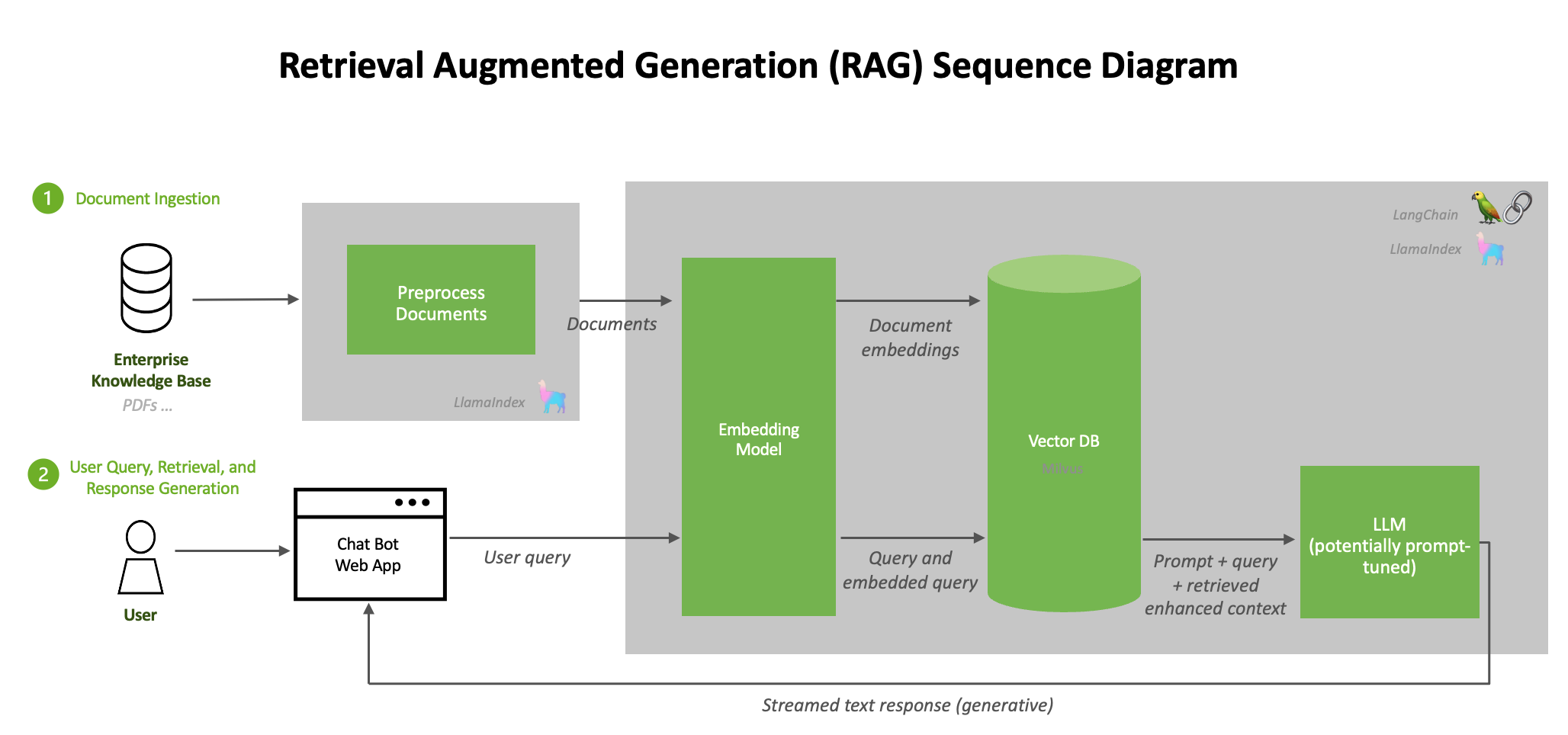
Let's break down these two phases and their components.
3. Phase 1: Data Ingestion (Offline)
The goal of this phase is to take your raw data—from PDFs, websites, documents, etc.—and transform it into a structured, searchable knowledge base. This is a one-time setup process (though it can be updated as your data changes).
Retrieval-Augmented Generation (RAG)
This article from Pinecone provides a clear, step-by-step explanation of the RAG components. We'll start with the first step: Ingestion.
Read the subsection titled "Ingestion". This will introduce you to the key steps of chunking, embedding, and loading data into a vector database.
The ingestion pipeline consists of the following key steps:
a) Chunking
We can't feed a 50-page document directly to an LLM due to context window limitations. More importantly, feeding it a huge document when only one paragraph is relevant is inefficient and can confuse the model. Therefore, we break large documents into smaller, more manageable pieces, or chunks.
Choosing a chunking strategy involves a trade-off:
- Small chunks: More precise, but may lack surrounding context.
- Large chunks: More context, but may contain irrelevant noise.
RAG Crash Course for Beginners
This video from KodeKloud explains the importance of chunking and the trade-offs involved.
Watch from 38:16 to 41:26. Focus on understanding the 'precision problem' and the balance between chunk size and context.
b) Embedding
Once we have our text chunks, we need a way to search them based on meaning, not just keywords. This is achieved using embeddings. An embedding model (which is a type of neural network) converts each text chunk into a high-dimensional vector—a list of numbers—that represents its semantic meaning. Chunks with similar meanings will have vectors that are "close" to each other in vector space.
c) Indexing in a Vector Database
These vectors are then stored and indexed in a specialized database called a vector database. Unlike a traditional database that searches for exact matches, a vector database is optimized for extremely fast similarity search. Given a query vector, it can rapidly find the stored vectors that are closest to it.
RAG Crash Course for Beginners
To understand why we need a specialized database and how it works, let's continue with the KodeKloud video.
Watch from 29:43 to 33:41. This section explains the inefficiency of a naive search and introduces the concept of vector databases and indexing algorithms like HNSW.
At the end of the ingestion phase, you have a vector database populated with embeddings of your knowledge, ready to be queried.
4. Phase 2: Retrieval & Generation (Online)
This phase occurs every time a user submits a query. It's the "live" part of the RAG system.
Retrieval-Augmented Generation (RAG)
Let's return to the Pinecone article to walk through the retrieval, augmentation, and generation steps.
Read the subsections on "Retrieval", "Augmentation", and "Generation". This will complete the picture of the online query process.
Here's the step-by-step flow:
a) Embed the Query
When a user asks a question (e.g., "What is our company's policy on remote work?"), the system uses the same embedding model from the ingestion phase to convert this query into a vector.
b) Retrieve Relevant Chunks
The system takes the query vector and uses it to search the vector database. It performs a similarity search (e.g., using an algorithm like cosine similarity) to find the text chunks whose vectors are most similar to the query vector. These are the chunks most likely to contain the answer. This is the Retriever component's job.
c) Augment the Prompt
This is where RAG directly connects to our previous lesson on prompt engineering. The system constructs a new prompt that includes both the original user query and the retrieved text chunks.
A typical prompt template looks like this:
Use the following documents to answer the question. If the documents don't contain enough information to answer, say "I cannot answer this based on the provided documents."

Context:
[Chunk 1 from retrieval]
[Chunk 2 from retrieval]
...

Question: What is our company's policy on remote work?

Answer:
This process of inserting the retrieved information is the Augmentation step.
d) Generate the Response
Finally, this augmented prompt is sent to the LLM. The LLM, which is the Generator component, now has the necessary context to formulate an accurate answer grounded in the provided documents, rather than relying solely on its internal knowledge.
This structured article provides a comprehensive and detailed look at the retriever and generator components.
RAG Architecture: Components, Timing & Design Patterns
For a deeper dive into the mechanics of the retriever and generator, let's look at this excellent article from mbrenndoerfer.com.
Please read the following two sections: "The Retriever Component": This section details the sub-systems of the retriever, including encoding, indexing, and the retrieval process at query time. "The Generator Component": This section explains how the LLM integrates the retrieved context and how prompt engineering is crucial for this step.
Conclusion
You now understand the complete architecture of a Retrieval-Augmented Generation system. By separating knowledge storage from the LLM's reasoning capabilities, RAG provides a powerful and flexible way to create AI applications that are accurate, up-to-date, and can operate on private data.
Key Takeaways:
- RAG solves key LLM limitations: It mitigates hallucination, overcomes knowledge cutoffs, and allows the use of private data without expensive fine-tuning.
- Two-Phase Architecture: RAG consists of an offline Ingestion phase (chunking, embedding, indexing) and an online Query phase (retrieval, augmentation, generation).
- Core Components:
- Retriever: Searches a vector database to find relevant document chunks based on semantic similarity to the user's query.
- Generator (LLM): Synthesizes a final answer based on an augmented prompt containing both the original query and the retrieved context.
- The Power of Augmentation: RAG is fundamentally an advanced form of prompt engineering, where the context is dynamically retrieved from a knowledge base instead of being manually written.
Preview of the Next Lesson
We have covered the what and why of RAG. In the next lesson, we will move to the how. You will learn to build a simple RAG pipeline using a framework like LangChain with a vector store and an LLM, putting today's theory into practice.