Recommended resources
The freely available resources this lesson will direct you to.
- Linked List - Data Structures & Algorithms Tutorials in Python #4www.youtube.com
- 2 Simple Ways To Code Linked Lists In Pythonwww.youtube.com
- Implementing Your Own Linked List (Video) – Real Pythonrealpython.com
- Linked Lists — Problem Solving with Algorithms and Data Structures 3rd editionrunestone.academy
Hello! In the previous lesson, you used sets to keep track of distinct values. Now you’ll work with a different kind of structure: objects connected to other objects. This is a foundation for linked lists, trees, and graphs.
Today’s goal is deliberately small: define a Node class, create several nodes, and connect them using references. You do not need to build a full linked list yet. Allow about 30–35 minutes, including time to run and modify the code.
Give each node two jobs
A node stores a piece of data and a reference to another node. Watch 2 Simple Ways To Code Linked Lists In Python by Anthony Sistilli for a short demonstration before writing your own version.
2 Simple Ways To Code Linked Lists In Python
Watch how separate node objects become connected through an attribute that holds a reference to the next node.
Start with the node idea, then watch the Python example through the manual connections. The video calls its link attribute next_node; our code will call the same kind of attribute next.
The picture shows a fragment of a linked chain. Each box is one node: its item field holds data, while its next field refers to a different node.
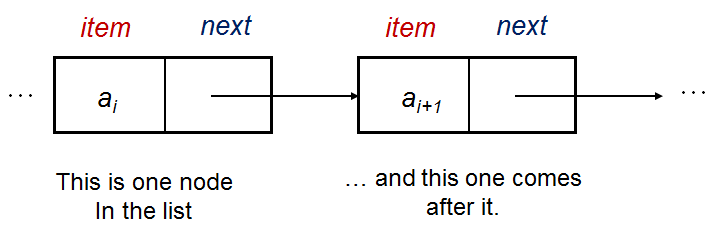
You can define that structure with an ordinary Python class:
class Node:
    def __init__(self, data):
        self.data = data
        self.next = None
Calling Node(3) creates a new object. Its data is 3, and its next is initially None, meaning no next node has been connected:
first = Node(3)

print(first.data)          # 3
print(first.next is None)  # True
None is not another node. It is how we mark an absent connection. We set it explicitly so every newly created node has a next attribute, even before it is linked to anything.
Connect objects, not just their values
Create three separate nodes, then assign node objects to their next attributes:
first = Node(3)
second = Node(7)
third = Node(10)

first.next = second
second.next = third
head = first
After first.next = second, the next attribute of first refers to the same object as the variable second. It does not store the integer 7. Likewise, second.next refers to third. The variable head gives us a convenient starting reference to the first node; it does not create another node.
You can inspect these connections directly:
print(head.data)                 # 3
print(head.next.data)            # 7
print(head.next.next.data)       # 10
print(head.next.next.next is None)  # True
Read head.next.data one part at a time: start with the object referenced by head, access its next node, then access that node’s data. This is not list indexing. A Python list can retrieve an element by position; connected nodes are reached by following their references.
Notice the difference between these two assignments:
first.next = second       # Connect first to the second Node object
# first.next = second.data  # Stores 7 instead; not a node connection
In the commented-out version, first.next.data would fail because an integer has no data attribute. For this node design, next should hold either a Node object or None.
Understand what a reference changes
A variable can refer to an object without containing a separate copy of it. Because head and first refer to the same node, changing that node through either name is visible through the other:
head = first
first.data = 30

print(head.data)  # 30
The same principle applies to links. In our three-node chain, head.next and second refer to the same node:
print(head.next is second)  # True

second.data = 70
print(head.next.data)       # 70
Here, is tests whether two expressions refer to the same object. Nodes can also hold equal data without being the same node:
another = Node(70)

print(another.data == second.data)  # True
print(another is second)            # False
This distinction matters in DSA: a node’s value tells you what it stores, while its identity tells you which object a reference connects to. When checking for an absent link, use node.next is None.
Key takeaways
A Node class can start with just data and next. Each call to Node(...) creates a separate object; assigning one node to another’s next attribute connects them by reference. None marks a missing next node, and is helps distinguish object identity from equal stored values.
Next, you’ll trace recursive functions and identify their base cases and recursive steps—another important foundation before you build larger data structures.