Recommended resources
The freely available resources this lesson will direct you to.
- Branch Coverage - Georgia Tech - Software Development Processwww.youtube.com
- what is coverage? (intermediate) anthony explains #480www.youtube.com
- Coverage summary: coverage report — Coverage.py 7.16.2 documentationcoverage.readthedocs.io
- Branch coverage measurement — Coverage.py 7.13.5 documentationcoverage.readthedocs.io
Hello! In the previous lesson, you tested expected failures by checking both exception types and the details callers need. Those assertions tell you whether a chosen case behaves correctly. This lesson asks a different question: which decisions in the code have your tests not exercised at all?
You’ll measure branch coverage in your incident project, read a missing-branch report, and use it to identify behavior worth testing. The aim is not to collect a perfect percentage for its own sake. It is to find important cases—especially alternatives and boundaries—that an otherwise green test suite may have overlooked.
What branch coverage adds
A line-coverage report tells you which executable lines ran. That is useful, but a conditional can run without being tried both ways. Branch coverage records which possible destinations from a decision point were taken. For an if, that commonly means checking whether tests exercised both the condition being true and the condition being false.
Watch the selected portions of what is coverage? (intermediate) anthony explains #480 by anthonywritescode. The demonstration uses a small Python function rather than incident code; focus on how changing the measurement changes what the report reveals.
what is coverage? (intermediate) anthony explains #480
Watch the demonstration of running pytest under coverage.py, enabling branch measurement, and inspecting an HTML report.
In running coverage, notice that running tests and displaying the report are separate commands. In branch reporting, watch the extra report columns appear after the tests are rerun with branch measurement enabled. Finally, HTML inspection shows how the visual report helps locate a partial branch. You can skip the discussion of coverage thresholds that follows; interpreting the missing behavior comes first.
The coverage.py documentation gives the precise distinction. Read its explanation of possible destinations and the short “How to measure branch coverage” section.
Branch coverage measurement — Coverage.py 7.13.5 documentation
Coverage.py explains what it measures when one line has multiple possible next lines. Read this before interpreting a percentage.
In “Branch coverage measurement,” begin with the definition. Continue through the “How to measure branch coverage” subsection, ending with the report explanation. Focus on the difference between executing a conditional line and visiting every destination from it.
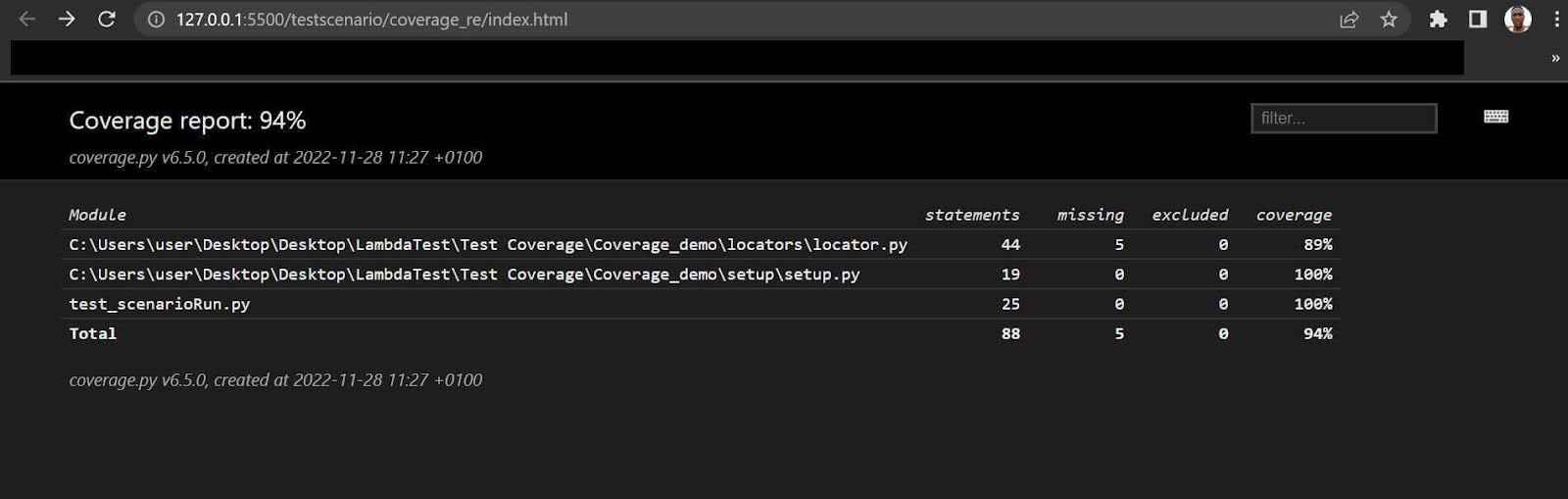
The earlier-looking coverage summary below reports statements, missing statements, and an overall percentage—but no branch columns. Its 94% figure does not tell you which conditional alternatives were tested.
Measure a decision in your incident project
Consider a small display rule for an incident heading. A saved incident has an ID; a draft may not yet have one. Add src/incident_app/incident_heading.py:
def format_incident_heading(title: str, incident_id: int | None) -> str:
    if incident_id is not None:
        title = f"#{incident_id} {title}"
    return title
Start with a test for a saved incident in tests/test_incident_heading.py:
from incident_app.incident_heading import format_incident_heading


def test_heading_includes_saved_incident_id() -> None:
    assert format_incident_heading("Database unavailable", 42) == (
        "#42 Database unavailable"
    )
Run coverage from the project root, using your existing isolated environment. Add coverage to the project’s development dependencies and update its lock file using the dependency workflow established earlier in the course. The --source option keeps the measurement focused on your application package rather than pytest and installed libraries.
python -m coverage run --branch --source=incident_app -m pytest -q
python -m coverage report -m src/incident_app/incident_heading.py
The first command runs the tests while recording branches. The second reads that recorded data and displays a report; -m includes missing line and branch locations. Running only the second command after an older, line-only measurement will not add branch information—you must rerun the tests with --branch.
For this function, the test executes every statement in the file. Yet it always supplies an ID. The if is never evaluated as false, so the path directly to return title remains untried. You can therefore see complete statement coverage alongside a partial branch.
Read the report documentation to decode what you see:
Coverage summary: coverage report — Coverage.py 7.16.2 documentation
The coverage.py report guide explains the branch-related columns and the missing-branch notation shown by -m.
In “Coverage summary: coverage report,” read from the column explanation. Focus on “Branch,” “BrPart,” and “Missing.” In particular, a notation such as 2->4 describes an unobserved jump between source lines, not a missing range of lines.
In this example, a missing jump from the if line to the return line means no test has yet passed None as the ID. A missing-line entry would instead mean that a statement never ran. The overall percentage in a branch-enabled report includes both statement and branch opportunities; do not read it as a standalone measure of test quality.
Turn a gap into a behavioral test
The report suggests an input, but it cannot tell you the correct output. You must supply that from the rule: a draft heading has no ID prefix. Add a test with an assertion that expresses that contract:
def test_draft_heading_has_no_id_prefix() -> None:
    assert format_incident_heading("Database unavailable", None) == (
        "Database unavailable"
    )
Rerun the measurement and report:
python -m coverage run --branch --source=incident_app -m pytest -q
python -m coverage report -m src/incident_app/incident_heading.py
The if now takes both destinations. You can also inspect the source visually:
python -m coverage html
Open htmlcov/index.html and select incident_heading.py. When branches are missing, the HTML view highlights partially covered lines and annotates the unvisited destinations. This is particularly useful when a full-project text report points to a decision inside a larger function.
The same reasoning applies to code you already wrote. The previous lesson’s tests passed negative and zero IDs to require_positive_incident_id(). Both inputs take its rejection branch. If those are its only tests, they do not establish what happens for a valid ID. A focused success test would be:
from incident_app.incident_ids import require_positive_incident_id


def test_accepts_positive_incident_id() -> None:
    assert require_positive_incident_id(42) == 42
Notice the distinction between two inputs and two branches: negative and zero are different boundary cases, but both make incident_id <= 0 true. Conversely, even tests that cover both outcomes of that condition might miss zero specifically. Branch coverage guides your search; understanding the rule guides your choice of cases.
Treat coverage as a search tool, not a verdict
A report records execution, not whether assertions are useful. This test would exercise the draft path without checking its result:
def test_draft_heading_is_called() -> None:
    format_incident_heading("Database unavailable", None)
It can improve the coverage number while giving you little protection against a wrong heading. Prefer assertions on observable behavior, including returned values, relevant exception details, or collaborator calls when those are part of the contract.
When reviewing a missing branch, use this sequence:
- Locate the decision in the source and work out which input would take the missing path.
- State the expected behavior independently of the implementation. What should a caller observe on that path?
- Write a focused test with a meaningful assertion, then rerun coverage to confirm that it exercised the path you intended.
Prioritize branches with consequential behavior: rejection versus acceptance, missing versus present data, and success versus failure. A high percentage cannot prove that assertions are correct, that every boundary value was chosen, or that the implementation matches its requirements. Equally, a low percentage is a prompt to investigate—not permission to add tests that merely execute lines.
Takeaways
Run pytest under coverage.py with --branch, then use coverage report -m or the HTML view to find decisions whose alternative destinations were not exercised. Translate each relevant gap into a test that checks the expected behavior, not just a call that raises the score. Remember that multiple inputs can take the same branch, and complete branch coverage can still miss important boundaries.
Next, you’ll use the testing techniques from this module to protect a refactor of incident status-transition logic into a pure function.